

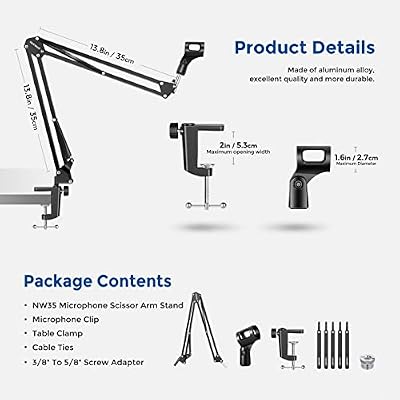
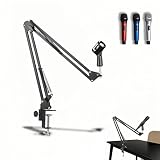
The NEEWER Boom Scissor Mic Arm with Screws is one of the longest-running boom arms in the streaming and podcasting market — a classic two-section scissor design with included thread adapters and a desk clamp that has shipped in essentially the same form for a decade. At around $25 it remains one of the most widely purchased entry-level arms, and for good reason: it is cheap, it works, and it fits the lightweight USB mics that most beginning streamers buy first. This NEEWER Boom Scissor review covers the specifications, build, reach, mic compatibility and value.

NEEWER Microphone Arm Stand, Suspension Boom Scissor Mic Arm Stand | 3/8" to 5/8" Screw, Cable Ties, Compatible with Blue Yeti, Snowball, Yeti X, Quadcast and Other Mics, Max Load 1.5kg



As an Amazon Associate we earn from qualifying purchases. Product prices and availability are accurate as of the date/time indicated.
🛒 Best Price Today on Amazon
Prime members get fast, free shipping on everything above, plus member-only deals. New members get a 30-day free trial — cancel anytime.
As an Amazon Associate we earn from qualifying purchases.






NEEWER Boom Scissor Mic Arm at a Glance
| Specification | Detail |
|---|---|
| Arm type | Scissor-style spring boom (twin-section) |
| Load capacity | Light-to-medium mics up to roughly 1.5 lb |
| Mic compatibility | Universal via included 5/8-inch and 3/8-inch threaded screws |
| Mount type | C-clamp; desk lip up to about 2 inches |
| Reach | Horizontal extension around 30 inches; vertical reach around 30 inches |
| Cable management | External hook-and-loop or zip-tie wraps |
| Construction | Steel scissor arms with plastic pivots |
| Included accessories | Desk clamp, 5/8-inch and 3/8-inch screws, basic cable wraps |
| Approx price | Around $25 |
Build Quality & Materials
This is the original-style NEEWER scissor arm and its build reflects a decade of refinement around a fixed price point. The two scissor sections are sprung steel — the structural load-bearing parts that carry the microphone weight — while the joints, end caps and clamp body are plastic with some metal hardware. For a sub-$30 arm that mix is appropriate: steel where load matters, plastic where it does not. The finish is matte black, the joints rotate without noticeable play out of the box, and the springs offer enough tension to hold a typical USB microphone in place.
Fit and finish are honest for the price. The springs are exposed in the classic scissor-arm fashion, not concealed within a tube, so the arm looks like what it is — a sub-$30 streaming accessory rather than a $150 broadcast tool. That is part of the appeal: it gets the job done, it has been doing it for years, and the design is well understood. Buyers should not expect the polish of a premium arm at this price, but should expect a working, durable arm well-suited to a light mic.
Reach & Adjustability
Reach is generous for the price. The twin scissor sections fold and extend to position the mic anywhere within roughly a 30-inch radius of the clamp, with similar vertical adjustment. That covers the typical seated working distance from desk-edge clamp to mouth position, and lets the arm fold neatly back when not in use. For most streaming and podcasting desks the reach envelope is more than sufficient.
Adjustability is via the sprung scissor mechanism — push the arm where you want it, the springs hold it. The mechanism is fast, intuitive and reliable, and has been used in broadcast studios in a similar form for decades. It does have the characteristic scissor-arm trade-off: the sprung sections produce a small creak or twang when moved quickly, which a sensitive microphone will pick up. Adjust the arm between takes or during silent breaks rather than mid-recording, and the design works well.
Cable Management
Cable management is external. The mic cable runs along the outside of the scissor arms, secured with hook-and-loop wraps or zip ties. This is the standard arrangement for budget scissor arms and has the virtue of being simple, serviceable and easy to re-cable if the mic is replaced. It is not as visually clean as a fully channelled arm, but for a streaming desk it is tidy enough.
When routing the cable, leave small loops of slack at each pivot point so the springs can fully extend and fold without pulling on the cable. Run the cable down behind the desk in a single tidy bundle, and the result is a clean enough look for camera framing in a streaming setup. For a fully concealed look, a tube-style spring arm further down this list is the upgrade path, but the simpler external routing here works fine for most users.
Mic Compatibility — Blue Yeti / HyperX / Shure
The included 5/8-inch and 3/8-inch threaded screws mean this arm fits essentially any USB or XLR microphone on the market. The catch is weight: like all budget scissor arms, it is rated for lighter microphones, and it is most at home with the HyperX QuadCast and SoloCast, the Shure MV7 family, the Rode NT-USB Mini and the broad range of lightweight USB condensers. For these mics the spring tension is appropriate and the arm holds position confidently for as long as you need.
For the Blue Yeti specifically the arm is at the upper edge of its load envelope. The Blue Yeti plus shock mount approaches 3.4 lb assembled, and a budget scissor arm with this spring rating will sag at full extension. It can be used, but you will need to keep the arm positioned closer to the clamp, where the spring leverage is more favourable. For a Blue Yeti owner, one of the heavier-duty arms in this list is the more comfortable recommendation. See our best streaming microphones guide for compatible mics, and the best USB microphones category for lighter options that pair naturally with this arm.
Installation & Setup
Installation is essentially as simple as boom arms get. The desk clamp arrives assembled; slide the jaw under the back edge of the desk, position the clamp where you want the arm to pivot, and tighten the screw clamp by hand until firm. Drop the arm into the clamp socket, choose the right thread adapter for your mic (5/8-inch is the broadcast standard, 3/8-inch is used by some consumer mounts), and screw the mic on. The whole process takes ten minutes.
The clamp is designed for desks with a flat underside and a lip of about 2 inches or less, which is the standard for gaming and office desks. Thicker desks, curved-edge desks or desks with a reinforcing rail at the back are problematic — measure first. If the clamp slips once the arm is loaded, a thin rubber pad between the clamp and the desk surface adds grip. Re-check the clamp tightness after the first few days of use, as scissor arms transmit small forces every time the mic is adjusted.
Verdict
The NEEWER Boom Scissor Mic Arm with Screws is the budget reference. It has been on the market for years, it works, and at around $25 it is one of the most sensible first-arm purchases for a new streamer or podcaster with a lightweight mic. The included thread adapters cover essentially every mic on the market, the reach is generous, and installation is straightforward.
It is the wrong buy for a Blue Yeti owner who wants the arm to hold position effortlessly at full extension, for users who adjust the mic mid-stream (the scissor creak will be picked up by sensitive mics) and for buyers who want the quietest possible damping. For those users, look at the spring-and-damping arms further down this list. For a lightweight USB mic on a typical streaming desk, however, the original NEEWER scissor remains a sensible default. Pair it with a webcam from our best streaming webcams guide for a complete streaming corner.
Frequently Asked Questions
What microphones fit this NEEWER scissor arm?
Virtually any USB or XLR microphone fits via the supplied 5/8-inch and 3/8-inch threaded screws. It is best matched to lighter microphones such as the HyperX QuadCast, Shure MV7 and most USB condensers.
Does it work with the Blue Yeti?
The Blue Yeti plus shock mount approaches 3.4 lb assembled, which is at the upper edge of this arm’s load envelope. It can be used but the spring will sag at full extension. For a Blue Yeti specifically, a heavier-duty arm in this list is the safer recommendation.
How thick a desk does the clamp fit?
The clamp fits desks with a flat underside and a lip up to about 2 inches thick. This covers most gaming and office desks. Thicker or curved-edge desks are problematic — measure first.
Is this arm quiet when adjusted?
Like all scissor arms, it has a characteristic faint creak when moved quickly. Adjust the arm between takes or during silent breaks rather than mid-recording, and the noise will not be captured.
More Boom Arm Reviews
- NEEWER Low Profile Mic Arm with Damping 360° Review
- InnoGear Boom Arm for Blue Yeti and HyperX QuadCast Review
- RØDE PSA1+ Professional Studio Arm Review (Black)
- RØDE PSA1+ Professional Studio Arm Review (White)
- RØDE PSA1 Professional Studio Arm Review (Original)
- InnoGear Heavy Duty Mic Stand for Blue Yeti with Pop Filter Review
- TONOR Microphone Arm Stand with Pop Filter Review
- InnoGear Mic Boom Arm for Yeti, HyperX, SoloCast Review
Affiliate Disclosure: As an Amazon Associate, we earn from qualifying purchases. If you click a link and make a purchase, we may earn a small commission at no extra cost to you. Prices and availability are accurate as of publication and may change.










