

- Top Pick: InnoGear Boom Arm Microphone Mic Stand for Blue Yeti Fifine HyperX, Black
- Best Value: InnoGear Mic Arm Microphone Boom Arm Cable Management for Blue Yeti, Black
- Premium Choice: InnoGear Microphone Stand Mic Boom Arm for Blue Yeti HyperX QuadCast S SoloCast Snowball Fifine K669B and other Mic, with Shock Mount Windscreen Pop Filter Mic Clip Holder Cable Ties, Medium
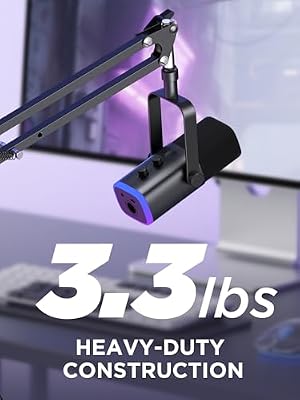
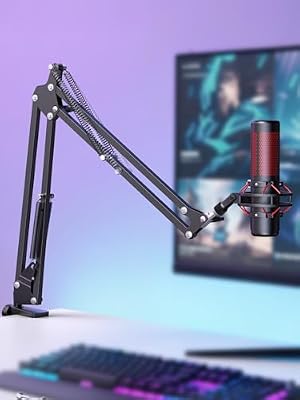
The InnoGear Boom Arm for Blue Yeti and HyperX QuadCast is one of the most widely recommended arms for heavier USB mics. It is a spring boom designed specifically to support the Blue Yeti — at roughly 3.4 lb assembled, one of the most demanding USB mics on the market — alongside lighter alternatives like the HyperX QuadCast. With pricing around $30 it is a notable value: a heavy-duty rating at a budget price. This InnoGear Boom Arm review covers the specifications, build, reach, mic compatibility and value.

InnoGear Boom Arm Microphone Mic Stand for Blue Yeti Fifine HyperX, Black | Desk Mount, Desktop Stands, Adjustable Reach, Rotate Fully, Folds Away Compactly, for Gaming, Streaming or Recording




As an Amazon Associate we earn from qualifying purchases. Product prices and availability are accurate as of the date/time indicated.
🛒 Best Price Today on Amazon
Prime members get fast, free shipping on everything above, plus member-only deals. New members get a 30-day free trial — cancel anytime.
As an Amazon Associate we earn from qualifying purchases.




InnoGear Boom Arm for Blue Yeti at a Glance
| Specification | Detail |
|---|---|
| Arm type | Spring boom (two-section) rated for heavier USB mics |
| Load capacity | Up to about 3.3 lb, rated for the Blue Yeti class |
| Mic compatibility | Blue Yeti, HyperX QuadCast/SoloCast, Shure MV7, and most XLR mics via thread adapters |
| Mount type | C-clamp; desk lip up to about 2 inches |
| Reach | Horizontal extension around 32 inches; vertical reach around 32 inches |
| Cable management | Internal channels along the arm tubes |
| Construction | Metal arm tubes and pivot joints |
| Included accessories | Desk clamp, 5/8-inch to 3/8-inch screws and adapters |
| Approx price | Around $30 |
Build Quality & Materials
The InnoGear arm is built specifically for heavier mics, and the materials show it. The two arm sections are metal tubes with the springs enclosed inside, the pivot joints are metal-on-metal with adequate friction to hold position, and the clamp is the heaviest in the budget tier — closer in feel to the mid-tier arms than to the cheap scissor designs. Out of the box the finish is matte black, the joints rotate smoothly, and the assembly holds a Blue Yeti without sagging at full extension.
What sets this arm apart at the price is the spring rating. Most sub-$50 arms are tensioned for the lighter USB condenser class, and they sag under the heavier Blue Yeti load. The InnoGear springs are tensioned higher specifically to carry that weight, which is the design difference that earns the arm its Blue Yeti recommendation. It is not as polished as a RØDE PSA1+, but for $30 it gets the structural priorities right and delivers a heavy-mic-rated arm at a budget price.
Reach & Adjustability
Reach is slightly more generous than the budget scissor arms — roughly 32 inches horizontal and vertical — which is useful when carrying a heavier mic, since the longer reach gives more leverage options. The mic can be positioned anywhere within that envelope and held confidently. The two-section design folds back close to the clamp when the mic is not in use and extends to bring the mic in front of the face during recording, which is the standard streaming-desk workflow.
Adjustability is via the sprung two-section mechanism, with enough damping at the pivots to keep motion smooth and reduce the creak associated with scissor arms. It is not perfectly silent — at $30 it is not the precision-damped feel of a flagship arm — but it is quieter than the budget scissor designs and confidently holds position once set. For a Blue Yeti owner moving up from a tabletop tripod or an inadequate scissor arm, the difference is immediate and obvious.
Cable Management
Cable management is internal, which is a strong feature at this price. The mic cable enters the tube at the mic end, runs the length of both arm sections, and exits at the clamp end behind the desk. The cable is fully enclosed and invisible from any normal viewing angle, which makes the streaming-desk corner look meaningfully more professional than an arm with external cable wraps.
Threading the cable during install adds a few minutes but is straightforward — feed the cable through the upper section, attach it to the mic, then thread the lower section before fitting the arm to the clamp. Leave a small amount of slack at each pivot so the arm can articulate without stressing the cable, and route the exit at the clamp end neatly down behind the desk. Done well the cable is invisible, which is one of the reasons this arm is so popular for streaming setups. Pair it with a webcam from our best streaming webcams guide for a clean camera framing.
Mic Compatibility — Blue Yeti / HyperX / Shure
This is the arm to buy if you own a Blue Yeti. The spring tension is specifically rated for the Blue Yeti’s roughly 3.4 lb assembled weight, and the arm holds the mic confidently at full extension without the sag that lighter arms exhibit. The HyperX QuadCast and SoloCast are well within the load envelope, as are the Shure MV7 family, the Rode NT-USB Mini and Procaster, and most XLR dynamics like the Shure SM7B (though for the SM7B specifically, check the arm’s published max load against the SM7B’s spec).
With the supplied 5/8-inch and 3/8-inch threaded screws and adapters, mic mounting is universal. The arm fits virtually any popular streaming microphone — see our best streaming microphones guide for the matching mic recommendations. For users running an XLR setup, this arm pairs naturally with the lighter-to-medium XLR mics covered in our best XLR microphones guide and feeds neatly into one of the best audio interfaces options on the desk.
Installation & Setup
Installation is straightforward. The C-clamp slides under the back edge of the desk and tightens with a screw clamp until firm. The clamp jaw is sized for the typical desk lip up to about 2 inches, which covers most gaming and office desks. The arm pole drops into the clamp socket, the mic mount threads onto the upper end, and the mic attaches via the supplied 5/8-inch or 3/8-inch screw. Setup takes about fifteen minutes including cable routing.
The clamp is heavier than the budget scissor versions, which helps with the Blue Yeti load — a heavier clamp with more contact area resists the slight twisting force a 3.4 lb mic applies at full extension better than a light clamp. Re-check the clamp tightness after the first week, particularly if you frequently adjust the arm position. For thicker desks or curved-edge desks, measure carefully — the clamp is not designed for desks above the standard 2-inch lip.
Verdict
The InnoGear Boom Arm for Blue Yeti and HyperX QuadCast is one of the standout values in the entire boom-arm market. At around $30 it is one of the few budget-tier arms that genuinely holds a Blue Yeti without sagging, includes internal cable routing for a clean appearance, and delivers a build quality that punches well above its price. For a Blue Yeti owner who has been using a tabletop tripod or struggling with an under-rated scissor arm, this is the obvious upgrade.
It is not perfectly damped — flagship arms like the RØDE PSA1+ deliver smoother motion and quieter adjustment — and the clamp will not fit very thick desks. For most users with a Blue Yeti, HyperX QuadCast or comparable mic, however, the InnoGear hits the sensible balance of build, rating and price. Combine it with a desk from our best gaming desks guide and a chair from our best gaming chairs guide for a complete streaming setup.
Frequently Asked Questions
Will this arm hold a Blue Yeti?
Yes. This is one of the arms specifically rated for the Blue Yeti’s roughly 3.4 lb assembled weight. The springs are tensioned to hold the mic confidently at full extension without the sag that lighter arms exhibit.
Does this arm have internal cable routing?
Yes. The mic cable runs internally through the arm tubes from the mic end to the clamp end, giving a clean cable appearance with no visible external cable wraps.
What microphones fit this arm?
Virtually any popular streaming microphone via the supplied 5/8-inch and 3/8-inch threaded screws. It carries the Blue Yeti, HyperX QuadCast, SoloCast, Shure MV7 and most XLR dynamics within their rated weights.
How thick a desk does the clamp fit?
The C-clamp fits a desk lip up to about 2 inches thick, which covers the typical gaming and office desk. Thicker or curved-edge desks may not work — measure first.
More Boom Arm Reviews
- RØDE PSA1+ Professional Studio Arm Review (Black)
- RØDE PSA1+ Professional Studio Arm Review (White)
- RØDE PSA1 Professional Studio Arm Review (Original)
- InnoGear Heavy Duty Mic Stand for Blue Yeti with Pop Filter Review
- TONOR Microphone Arm Stand with Pop Filter Review
- InnoGear Mic Boom Arm for Yeti, HyperX, SoloCast Review
- Aokeo AK-49 Adjustable Compact Boom Scissor Arm Review
- InnoGear Mic Stand for Blue Snowball with Pop Filter Review
Affiliate Disclosure: As an Amazon Associate, we earn from qualifying purchases. If you click a link and make a purchase, we may earn a small commission at no extra cost to you. Prices and availability are accurate as of publication and may change.










