

- Top Pick: NEEWER Low Profile Mic Arm Desk Mount, 360° Swivel Boom Arm with Pneumatic Damping Adjustable, Cable Management, Compatible with Shure MV7 SM7B Blue Yeti Gaming Streaming Podcast Microphone, MS002
- Best Value: NEEWER Low Profile Mic Boom Arm Desk Mount, Microphone Boom Arm with 360° Ball Head & Cable Management Channels, 1/4" 3/8" 5/8" Threads for Podcast Streaming Gaming Recording, Max Load 3.3 lb, MS007
- Premium Choice: NEEWER Microphone Stand, Low Profile Damped Mic Holder Boom Arm Desk Mount with Ball Head & 3/8" 5/8" Adapters Compatible with Blue Yeti Snowball HyperX QuadCast SoloCast Shure, Max Load 3.3 lb, MS007
The NEEWER Low Profile Mic Arm with Damping 360° is a step up from the classic scissor design — a low-profile spring arm with integrated damping that pivots through a full 360 degrees. Built to look more like the modern streaming arms popularised by RØDE’s PSA1, it covers the area around the desk without the creaking noise of a sprung scissor arm. At around $50 it sits between the budget scissor arms and the premium broadcast options. This NEEWER Low Profile Mic Arm review covers the specifications, build, reach, mic compatibility and value.
🛒 Best Price Today on Amazon
Prime members get fast, free shipping on everything above, plus member-only deals. New members get a 30-day free trial — cancel anytime.
As an Amazon Associate we earn from qualifying purchases.


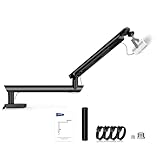


NEEWER Low Profile Mic Arm at a Glance
| Specification | Detail |
|---|---|
| Arm type | Low-profile spring boom with damping |
| Load capacity | Suitable for medium mics up to roughly 2.5 lb |
| Mic compatibility | Most USB and XLR mics via 5/8-inch and 3/8-inch threaded screws |
| Mount type | C-clamp; desk lip up to about 2 inches |
| Reach | Horizontal extension around 30 inches; vertical reach around 30 inches |
| Cable management | Internal channels along the arm tubes |
| Construction | Metal arm tubes with damped pivot joints |
| Included accessories | Desk clamp, thread adapters, cable management clips |
| Approx price | Around $50 |
Build Quality & Materials
The Low Profile Mic Arm is a clear step up from the classic scissor design. The two arm sections are metal tubes with the springs enclosed inside, rather than the exposed sprung sections of a scissor arm. The pivot joints incorporate damping — a small amount of friction that smooths motion and dramatically reduces the creak and twang that scissor arms produce when moved quickly. The clamp is more substantial than the budget arms and the build feels closer to a $90 broadcast tool than to a $25 scissor.
Materials are appropriate to the price. The tubes are metal, the joints are damped with synthetic bushings rather than relying purely on spring tension, and the cable enters the tube at one end and exits at the other for a fully internal cable run. The finish is matte black throughout, which suits the typical streaming desk aesthetic, and the low-profile silhouette is genuinely more attractive on camera than an exposed scissor. For around $50 it is one of the better-built mid-tier arms.
Reach & Adjustability
Reach is essentially equivalent to the scissor arms — roughly 30 inches horizontal and vertical — with the added benefit that the arm holds position far more confidently. The damped joints smooth out the motion so you can position the mic with a fingertip and it stays exactly where you set it. The 360-degree pivot at the clamp means the arm can fold completely away when not in use, with no orientation lockout that limits the resting position.
Adjustability is faster and quieter than a scissor arm. Where a scissor arm fights you slightly with spring tension, the damped low-profile design lets you nudge the mic an inch or two without the arm springing back. That is the single biggest day-to-day improvement over a scissor arm and is the reason most users who buy this arm do not go back to a scissor. The arm is quiet during adjustment, which means mid-stream micro-adjustments to mic position are usable without picking up creaking noise.
Cable Management
Cable management is internal, which is the biggest visual upgrade over scissor arms. The mic cable enters the tube at the mic-end pivot, runs through the inside of the arm sections, and exits near the clamp at the back of the desk. This gives a clean, near-invisible cable run — the kind of look that makes a streaming desk look more professional on camera. Routing the cable through the tubes is a minor extra step during install but pays back every day in the cleaner desk appearance.
Plan the cable threading carefully during installation: feed the cable through the arm sections before connecting the mic, leave a small amount of slack at each pivot so the cable is not stressed when the arm articulates, and route the exit at the clamp end down behind the desk. Done well the cable disappears almost entirely, leaving only the mic and arm visible — exactly the streaming-corner look users buy this tier of arm for. Pair with a high-end best gaming desks for a fully polished look.
Mic Compatibility — Blue Yeti / HyperX / Shure
The Low Profile Mic Arm is rated for medium mics up to roughly 2.5 lb, which covers most of the popular streaming microphones. The HyperX QuadCast, Shure MV7 and MV7X, Rode NT-USB family and the broad lightweight USB condenser category are all well within its envelope. For the Blue Yeti plus shock mount, the rating is at or near the edge — a Blue Yeti assembly weighs around 3.4 lb, which sits above the comfortable 2.5 lb rating, so the springs will be at the upper end of their tension. It can work, but for a Blue Yeti specifically, look at the higher-load arms in this list.
With the supplied 5/8-inch and 3/8-inch threaded screws, mic mounting is universal. For a lighter mic this is one of the most pleasant arms to use at the price, with the damped action making mic positioning genuinely effortless. See our best USB microphones guide for the mics that pair best with this arm, and the best streaming microphones category for the broader streaming-mic recommendations. For XLR users, the best XLR microphones guide covers the heavier broadcast options that need a higher-load arm.
Installation & Setup
Installation is similar to other clamp-mount arms. Slide the C-clamp under the back edge of the desk, tighten the screw clamp by hand until firm, and drop the arm pole into the clamp socket. The clamp fits the standard desk lip up to about 2 inches, which covers most gaming and office desks. The internal cable routing requires threading the mic cable through the arm tubes before attaching the mic, which adds five to ten minutes to the install — plan this step in advance.
Total install time is fifteen to twenty minutes including cable routing, which is slightly longer than the budget scissor arms but reasonable for the better-finished result. After installation the damped joints may benefit from a small tension adjustment to match your specific mic weight — the joints have small tension screws that increase or decrease the resistance, and most users find a fingertip-adjustable damped position quickly. Re-check the clamp after a week of use; even damped arms transmit some force during adjustment.
Verdict
The NEEWER Low Profile Mic Arm with Damping 360° is the right buy for the streamer or podcaster who has used a budget scissor arm and is ready to upgrade. At around $50 it delivers the three things that matter most over the budget tier: quieter damped motion that does not creak when adjusted, internal cable management for a cleaner camera look, and a more substantial build that holds position with a fingertip. The 360-degree pivot at the clamp is a useful detail that the cheaper arms often skip.
It is not quite a flagship — the spring damping is good but not the precision-engineered silence of a RØDE PSA1+, and the load rating tops out before a fully shock-mounted Blue Yeti. For most users with a lighter to medium-weight mic, however, the low-profile arm sits in a sensible value spot in the boom-arm market. Combine it with one of the best streaming microphones recommendations and a best streaming webcams for a tidy streaming corner.
Frequently Asked Questions
Is the NEEWER Low Profile arm quieter than a scissor arm?
Yes. The damped pivot joints largely eliminate the creak and twang that scissor arms produce when moved quickly. It is quiet enough for mid-stream micro-adjustments without picking up arm noise.
Does this arm have internal cable routing?
Yes. The mic cable runs through the inside of the arm tubes from the mic end to the clamp, giving a clean cable appearance. Thread the cable during installation before connecting the mic.
Will this arm hold a Blue Yeti?
A Blue Yeti plus shock mount weighs around 3.4 lb, which is at the upper edge of this arm’s roughly 2.5 lb rating. It can work but the spring will be at its tension limit. For a Blue Yeti specifically, one of the higher-load arms in this list is the safer choice.
How wide a desk lip does the clamp fit?
The clamp fits the standard desk lip up to about 2 inches, which covers the typical gaming and office desks. Measure the desk before purchase to confirm.
More Boom Arm Reviews
- InnoGear Boom Arm for Blue Yeti and HyperX QuadCast Review
- RØDE PSA1+ Professional Studio Arm Review (Black)
- RØDE PSA1+ Professional Studio Arm Review (White)
- RØDE PSA1 Professional Studio Arm Review (Original)
- InnoGear Heavy Duty Mic Stand for Blue Yeti with Pop Filter Review
- TONOR Microphone Arm Stand with Pop Filter Review
- InnoGear Mic Boom Arm for Yeti, HyperX, SoloCast Review
- Aokeo AK-49 Adjustable Compact Boom Scissor Arm Review
Affiliate Disclosure: As an Amazon Associate, we earn from qualifying purchases. If you click a link and make a purchase, we may earn a small commission at no extra cost to you. Prices and availability are accurate as of publication and may change.
Ready to decide? Our #1 pick for 2026 is the Arm type.
Live price & availability on Amazon.


