- Top Pick: Lian Li V100-ATX Mid-Tower PC Case-Black-V100RX
- Best Value: CORSAIR 4000D RS ARGB Frame Modular Mid-Tower ATX PC Case, High Airflow, 3X Pre-Installed RS Fans, InfiniRail™ Mounting System, ASUS BTF, MSI Zero, Gigabyte Stealth, Black
- Premium Choice: MUSETEX ATX PC Case 7 PWM ARGB Fans Pre-Installed, Type-C Mid Tower Computer Case with Full-View Dual Tempered Glass, Gaming PC Case, Black(K2)
The case is where every other part of your build lives, and choosing the right ATX chassis shapes your airflow, your clearance for big GPUs and coolers, and how the finished machine looks on your desk. A good ATX case balances three things: enough room to fit a standard ATX motherboard and the components you want, an airflow design that keeps temperatures in check, and a layout that makes building and cable management painless. This guide rounds up the best ATX PC cases in 2026 across the styles people actually shop for, from airflow-first mid-towers to showpiece panoramic-glass designs and affordable workhorses.
Our picks were chosen on what genuinely matters in a case: motherboard fit and internal clearance, airflow and cooling potential, build and material quality, and value. We have included a deliberate spread, from a budget high-airflow mid-tower to a premium tempered-glass showcase. A quick note on fit: every pick here is a full ATX-compatible mid-tower, so you will not buy the wrong size. Whether you want maximum airflow, a dual-chamber layout, or a glass-wrapped centrepiece, there is an option here. Below you will find an at-a-glance comparison, then a closer look at each case and a buyer’s guide covering motherboard fit, airflow and clearance.
As an Amazon Associate we earn from qualifying purchases at no extra cost to you.


Updated November 2026 – We re-checked the lineup against current manufacturer specifications and recurring buyer feedback. Prices change often, so cases are grouped by price tier rather than listed at a fixed price.
Quick answer: the best ATX PC cases right now are the NZXT H6 Flow for clean dual-chamber airflow, the Lian Li V100 for long-GPU clearance at a value price, and the Fractal Design North for a wood-and-glass look with strong airflow. Every case in this guide fits a full-size ATX motherboard.
How We Chose the Best ATX PC Cases
We did not build in or benchmark these cases ourselves. Each pick was ranked by comparing manufacturer specifications, published reviews and recurring buyer feedback on four points: motherboard and GPU clearance, airflow design and included fans, build quality and ease of building, and value for the price tier. Cases that were not true full-size ATX designs were left out.
🛒 Best Price Today on Amazon
Prime members get fast, free shipping on everything above, plus member-only deals. New members get a 30-day free trial — cancel anytime.
Best ATX PC Cases at a Glance
| Case | Best For | Standout Spec | Price Tier |
|---|---|---|---|
| NZXT H6 Flow | Airflow + clean dual-chamber | Dual-chamber, panoramic mesh airflow | Mid-range |
| Hyte Y70 | Panoramic-glass showcase | Wraparound glass, high-airflow design | Premium |
| Fractal Design Focus G (USB 3.0) | Value high-airflow ATX | Mid-tower ATX, 2 included fans | Value |
| Corsair Crystal 680X RGB | Premium dual-chamber RGB | Tempered glass, high-airflow smart case | Premium |
1. NZXT H6 Flow Compact Dual-Chamber Mid-Tower Airflow Case

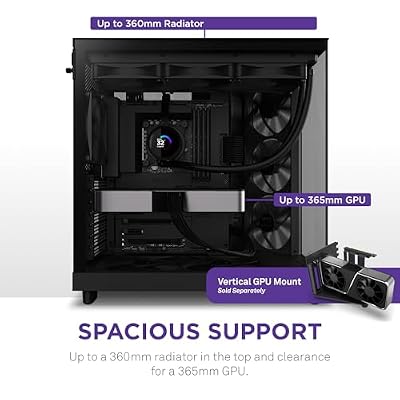
NZXT H6 Flow - Compact Dual-Chamber ATX PC Case - Black | Compact dual-chamber ATX case with panoramic glass and 3 included 120mm fans. Airflow-optimized for clean, cool builds.




As an Amazon Associate we earn from qualifying purchases. Product prices and availability are accurate as of the date/time indicated.
The NZXT H6 Flow is the standout ATX pick for builders who want airflow and clean looks in equal measure, and it leads this list. It is a compact dual-chamber mid-tower with a panoramic perforated front and side, designed to feed cool air straight to the components while hiding cables and the power supply in a separate chamber. It pairs a modern layout with strong cooling potential at a mid-range price.
This is the case to choose if you want a tidy, airflow-first build that still shows off your hardware through the angled glass corner. The dual-chamber design routes cables and the PSU out of sight for an exceptionally clean front compartment, the mesh panels keep fresh air moving over the GPU and CPU, and the compact mid-tower footprint fits a standard ATX board without dominating the desk. NZXT supports easy triple-fan mounting for a strong intake setup. For a contemporary ATX case that balances cooling, cable management and a showcase look, the H6 Flow is the obvious starting point.
Pros: Dual-chamber cable hiding, strong panoramic mesh airflow, clean ATX layout, fair price.
Cons: Compact dimensions limit very long radiators; angled glass shows dust on the corner.
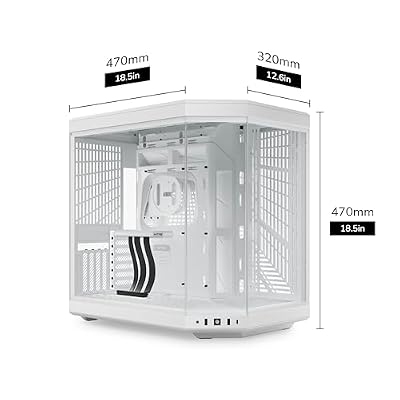
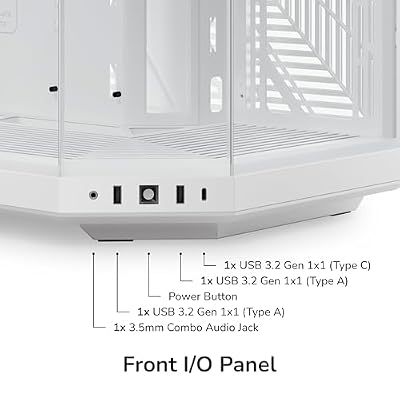
2. Hyte Y70 Modern Aesthetic Gaming PC Case – Panoramic Glass, High-Airflow Design

Hyte Y70 Modern Aesthetic Gaming PC Case - Panoramic Glass | High-Airflow Design | Cable Management | Dual Chamber ATX Mid-Tower Chassis | 10 Fan Capacity | Luxury PCIe 4.0 Riser Cable - Snow White


As an Amazon Associate we earn from qualifying purchases. Product prices and availability are accurate as of the date/time indicated.
The Hyte Y70 is the panoramic-glass showcase pick. It is a striking mid-tower built around a wraparound tempered-glass front and side that turns the build into a display piece, paired with a high-airflow internal layout and generous room for components. It is a premium-tier choice for builders who treat the finished PC as a centrepiece.
This is the case for someone who wants their hardware on full display and is willing to invest in the presentation. The seamless panoramic glass gives an unobstructed three-sided view of the components, the spacious interior comfortably fits an ATX motherboard alongside large GPUs and cooling, and the high-airflow design keeps temperatures sensible despite the glass. It is a natural home for vertical GPU mounting and custom cable work. For a show-stopping ATX case where aesthetics lead but airflow is not forgotten, the Y70 is a standout — just be ready to keep the glass clean.
Pros: Wraparound panoramic glass, spacious ATX interior, high-airflow layout, premium showcase looks.
Cons: Glass attracts fingerprints and dust; large footprint and premium pricing.
3. Fractal Design Focus G – Mid Tower Computer Case – ATX – High Airflow – USB 3.0
The Fractal Design Focus G (USB 3.0 edition) is the value high-airflow ATX pick. It is a full mid-tower ATX case with a mesh-and-vent front built for cooling, front USB 3.0 connectivity, and two included Fractal fans out of the box. It pairs Fractal’s well-regarded build quality with a practical, airflow-first design.
This is the case for the builder who wants dependable airflow and a clean, understated Scandinavian aesthetic without paying showcase prices. The front intake design and bundled fans give a solid out-of-the-box cooling baseline, the mid-tower interior comfortably houses a standard ATX motherboard and most GPUs, and Fractal’s fit and finish are a step above typical budget chassis. Front USB 3.0 keeps connectivity current. For a no-nonsense, well-built high-airflow ATX mid-tower that just works, the Focus G is a long-standing favorite and an easy recommendation.
Pros: Full ATX mid-tower, high-airflow front, two included fans, trusted Fractal build quality.
Cons: Pricing on this listing varies; styling is functional rather than flashy.
4. Corsair Crystal Series 680X RGB High Airflow Tempered Glass ATX Smart Case

CORSAIR iCUE Link 3500X RGB Mid-Tower ATX PC Case – Panoramic Tempered Glass – Reverse Connection Motherboard Compatible – 3X CORSAIR iCUE Link RX120 RGB Fans Included – Black


As an Amazon Associate we earn from qualifying purchases. Product prices and availability are accurate as of the date/time indicated.
The Corsair Crystal 680X RGB is the premium dual-chamber RGB pick. It is a high-airflow ATX ‘smart case’ wrapped in tempered glass, using a dual-chamber layout to separate the main components from the power supply and drives, and it ships ready for extensive RGB and liquid cooling. It is the most premium case in the core ranking, aimed at high-end showpiece builds.
This is the case for the enthusiast building a flagship system where cooling, expandability and presentation all matter. The dual-chamber design keeps the main compartment immaculate while hiding cables, drives and the PSU, the generous interior swallows large ATX boards, multiple radiators and long GPUs, and the tempered-glass front and side panels show it all off. Corsair builds it around its RGB and iCUE ecosystem for coordinated lighting. For a spacious, airflow-rich ATX case designed for ambitious, RGB-heavy and liquid-cooled builds, the 680X is the premium standout.
Pros: Dual-chamber high airflow, tempered glass, huge cooling and radiator support, RGB-ready.
Cons: Highest price here; large and heavy, and overkill for modest builds.
More Best ATX PC Cases by Use Case
The numbered picks above are the core list. The cases below match the other options in the comparison block at the top of this page and add three new alternatives, each described by the specifications in its listing.
Lian Li V100 ATX Mid-Tower – Best Value for Long GPUs
The Lian Li V100 is an ATX mid-tower whose listing highlights support for 420mm graphics cards and a 360mm radiator, a side-mounted USB-C port and dust filters. It suits first-time builders who want room for a large GPU without paying premium prices. Skip it if you want a showcase glass design; it is a practical case first.
Corsair 4000D RS ARGB Frame – Best Modular Airflow Case
The Corsair 4000D RS ARGB Frame is a modular ATX mid-tower with three pre-installed RS fans, InfiniRail fan mounts and compatibility with back-connector motherboards from ASUS, MSI and Gigabyte. It is a good fit for builders who plan to upgrade fans or add RGB later. Skip it if you want a dual-chamber layout.
NZXT H5 Flow – Best Compact ATX Mid-Tower
The NZXT H5 Flow is a compact ATX mid-tower with two included 120mm fans and room for a 360mm front radiator. It is a smaller, simpler alternative to the H6 Flow for desks with limited space. Skip it if you need very long GPUs or lots of drive bays.
Fractal Design North – Best Wood-Front Case
The Fractal Design North pairs a genuine walnut front with a glass side panel, two 140mm Aspect PWM fans and a front USB-C port in an ATX airflow mid-tower. It is the case to choose if the PC sits on your desk and you want it to look like furniture. Skip it if you want maximum radiator space or the lowest price.
Montech XR Panoramic – Best Budget Panoramic Glass
The Montech XR is a panoramic-glass ATX case with three ARGB PWM fans included. It is aimed at buyers who want a showcase look while keeping the case cost low. Skip it if you prefer a plain, mesh-first design.
Corsair 3500X RS ARGB – Best Panoramic Mid-Tower from a Big Brand
The Corsair 3500X RS ARGB is a panoramic mid-tower from Corsair with ARGB fans and straightforward building. It suits builders who want the front-and-side glass look backed by a well-known brand and parts availability. Skip it if airflow is your top priority over looks.
MUSETEX K2 and MUSETEX Y6 – Best Low-Cost Glass Cases with Many Fans
The MUSETEX K2 ships with seven PWM ARGB fans and dual tempered glass panels, while the MUSETEX Y6 has four non-LED fans and a 270-degree tempered glass view. Both are ATX mid-towers with USB Type-C. They suit budget builds where included fans matter. Be cautious with long GPUs and tall coolers, and check the listing dimensions first, since less-known brands vary in clearance and finish.
NZXT H9 Flow – Best Large Dual-Chamber Case

The NZXT H9 Flow is a larger dual-chamber ATX case than the H6 Flow, built for high-end builds with plenty of room for coolers and cables.
- Dual-chamber ATX design
- Four fans included
- Support for 420mm radiators at the top and front
- Perforated top panel for airflow
Pros: excellent radiator support, tidy cable routing, plenty of GPU room. Cons: bigger and heavier than compact cases, higher price tier.
Skip it if you have a small desk or a mainstream GPU; the H6 Flow is easier to place.
Lian Li LANCOOL 216 – Best Airflow Mid-Tower
The Lian Li LANCOOL 216 is built around airflow, with a mesh front and large front fans.
- ATX mid-tower with mesh airflow design
- Dual front 160mm PWM fans
- Three PWM fans included
- Mesh front for direct intake airflow
Pros: strong airflow out of the box, roomy interior, good value. Cons: less compact than the NZXT H5 Flow, simple styling.
Skip it if you want a wood or panoramic-glass look.
Antec C5 ARGB – Best Fan-Heavy Glass Case

The Antec C5 ARGB is a mid-tower ATX case with seven ARGB PWM fans pre-installed and a seamless 270-degree tempered-glass view.
- ATX mid-tower
- Seven ARGB PWM fans included
- 270-degree seamless tempered glass
- Strong out-of-the-box lighting
Pros: lots of included fans, a modern showcase look at a modest price tier. Cons: glass shows dust and fingerprints, and RGB fans add noise at full speed.
Skip it if you want the quietest possible build.
How to Choose an ATX PC Case
The first thing to confirm with any ‘ATX’ case is the motherboard fit it actually supports, because the label can mislead. A true ATX case accepts a standard full-size ATX motherboard (and usually smaller Micro-ATX and Mini-ITX boards too). Every pick here is a full ATX-compatible mid-tower, including the NZXT H6 Flow, Hyte Y70, Fractal Focus G and Corsair 680X, but check the supported motherboard sizes on the specific listing before you buy. Always match the case’s supported form factors to the motherboard you are buying before anything else.
Airflow is the next priority, because it governs your temperatures and noise. Look for a case with a mesh or heavily vented front, like the Fractal Focus G and the NZXT H6 Flow, since a perforated intake feeds cool air directly to the GPU and CPU. Glass-fronted showcase cases such as the Hyte Y70 and Corsair 680X can still cool well, but they rely on side and bottom intakes and good fan placement to compensate. Count the included fans and the mounting points for more, and favour a layout that creates a clear front-to-back or bottom-to-top airflow path.
Clearance determines whether your components physically fit, so check three numbers against your parts list: maximum GPU length, maximum CPU cooler height, and radiator support if you plan to water-cool. Spacious cases like the Corsair 680X and Hyte Y70 swallow long GPUs and big radiators with ease, while compact designs like the H6 Flow are more constrained — perfectly fine for mainstream parts but worth verifying for flagship hardware. A few minutes confirming clearance saves a frustrating return.
Finally, weigh layout, looks and budget together. A dual-chamber design like the H6 Flow or 680X hides cables and the PSU for a dramatically cleaner build and easier cable management, which is worth a lot if presentation matters. Decide whether you want an airflow-first workhorse, a glass showcase, or a value mid-tower, and set your budget — there is a capable ATX case here from the value tier to the premium tier. Confirm the board fit, prioritise real airflow, verify clearance for your GPU and cooler, and pick the case on this list that matches how you build.
Best ATX PC Cases by Need
| Need | Pick | Spec line |
|---|---|---|
| Best airflow | Lian Li LANCOOL 216 | Mesh front · dual 160mm front fans · 3 PWM fans |
| Best for long GPUs | Lian Li V100 | 420mm GPU support · 360mm radiator · side USB-C |
| Best dual-chamber | NZXT H6 Flow | Panoramic mesh · dual-chamber · ATX |
| Best showcase | Hyte Y70 | Wraparound glass · high airflow · ATX |
| Best for big radiators | NZXT H9 Flow | 4 fans included · 420mm top and front radiators |
| Best for looks | Fractal Design North | Walnut front · glass side · 2 x 140mm fans |
What Size of Case Do You Need for an ATX Motherboard?
An ATX motherboard needs a case that lists ATX support, usually a mid-tower or larger. Mid-towers are the best balance for most builds. Full towers add radiator space and drive bays but need more desk room.
How Many Case Fans Do You Need?
Aim for at least two intake fans at the front and one exhaust fan at the rear or top. Cases that ship with three or more fans, such as the NZXT H6 Flow or LANCOOL 216, give a good baseline. Add more fans only if your GPU or CPU runs hot under load.
GPU and Cooler Clearance Checks
Look up three numbers before you buy: the case’s maximum GPU length, maximum CPU cooler height and radiator support. Compare them with your parts. As a rule, leave at least 10mm of free space beyond the length of your GPU for cables and airflow.
Back-Connect Motherboards and Cable Management
If you plan to use a back-connector motherboard from ASUS, MSI or Gigabyte, choose a case that explicitly lists support, like the Corsair 4000D RS ARGB Frame. A dual-chamber design is the easiest way to hide the power supply and cable bulk.
More ATX Case Questions
What is the best ATX case for airflow?
The best ATX case for airflow is a mesh-front mid-tower with large front fans, such as the Lian Li LANCOOL 216 or NZXT H6 Flow. Glass-front cases can cool well, but they rely on side or bottom intakes.
Can a Micro-ATX motherboard fit in an ATX case?
Yes. ATX cases accept ATX, Micro-ATX and Mini-ITX motherboards, so you can start with a smaller board and keep the case. The reverse does not work: a Micro-ATX case will not fit a full ATX board.
Do I need a dual-chamber case?
No, but it helps with cable management and appearance. A traditional single-chamber case like the Lian Li V100 or Corsair 4000D is easier to build in and often cheaper.
Is a glass side panel worth it?
If you want to show off your parts, yes. Glass panels are heavier and show dust, and some mesh-first designs cool slightly better than full-glass fronts.
How much GPU clearance do I need for an RTX or Radeon card?
Check your card’s length in its specifications and compare it with the case. Many high-end GPUs are over 300mm long, so choose a case that lists clearance above that, such as the Lian Li V100 at 420mm.
Frequently Asked Questions
What is the difference between an ATX and a Micro-ATX case?
An ATX case is sized to fit a standard full-size ATX motherboard and is typically a mid-tower with room for large GPUs, coolers and multiple drives. A Micro-ATX (mATX) case is smaller and built for compact Micro-ATX or Mini-ITX boards — it will not accept a full ATX motherboard. Always match the case’s supported form factors to the board you plan to install.
Do I need a high-airflow case for gaming?
It strongly helps. A high-airflow case with a mesh or vented front, like the Fractal Focus G or NZXT H6 Flow, feeds cool air directly to your GPU and CPU, keeping temperatures and fan noise down under gaming load. Glass-fronted showcase cases such as the Hyte Y70 and Corsair 680X can still cool well, but they depend more on side and bottom intakes and careful fan placement to move enough air.
How do I make sure my graphics card and cooler will fit?
Check the case’s maximum GPU length and maximum CPU cooler height against the dimensions of your specific parts, and look at radiator support if you plan to water-cool. Spacious cases like the Corsair 680X and Hyte Y70 fit long GPUs and big coolers easily, while compact cases such as the H6 Flow are tighter. A quick clearance check before buying avoids returns.
What are the benefits of a dual-chamber case?
A dual-chamber case, such as the NZXT H6 Flow or Corsair Crystal 680X, separates the main component compartment from the power supply, drives and cable bulk. The result is a much cleaner-looking main chamber on display, simpler cable management, and often improved airflow because the front compartment is uncluttered. It is a popular layout for showcase builds where presentation matters.
Related Guides
Affiliate Disclosure: As an Amazon Associate, we earn from qualifying purchases. If you click a link and make a purchase, we may earn a small commission at no extra cost to you. Prices and availability are accurate as of publication and may change.