

Overclocking is about headroom: a PC that can be pushed beyond its stock clocks needs the right ingredients in place first. That means an unlocked CPU and an enthusiast chipset (an Intel Z-series or AMD X-series board) that allow tuning, a robust cooling solution — ideally liquid — to handle the extra heat, and a power supply with enough headroom to feed components running harder than stock. A graphics card that the user can also push helps. This guide rounds up the best gaming PCs for overclocking in 2026: prebuilt desktops whose unlocked processors, capable boards, strong cooling and generous power give you the foundation to tune, rather than machines locked down at the factory.
- Best Gaming PCs for Overclocking at a Glance
- 1. Corsair Vengeance i5200 Gaming PC – Liquid Cooled Intel Core Ultra 9 285K
- 2. ZOTAC MEK Gaming PC, NVIDIA GeForce RTX 5090 32GB, AMD Ryzen 7 9700
- 3. ZOTAC MEK Gaming PC, NVIDIA GeForce RTX 5080 16GB, AMD Ryzen 7 9800
- 4. iBUYPOWER Element Gaming PC, AMD Ryzen 9 7900X, NVIDIA GeForce GPU
- 5. Skytech Gaming O11 Vision Gaming PC, AMD Ryzen 7 7700X, NVIDIA RTX 5070
- 6. Skytech Gaming Archangel 5 Gaming PC, AMD Ryzen 7 7700X, NVIDIA RTX 5070
- How to Choose a Gaming PC for Overclocking
- Frequently Asked Questions
- Related Guides
- Related Articles
Our picks were chosen on what overclockers actually need: an unlocked or tuning-friendly CPU, a chipset that supports adjustment, cooling that can cope with raised clocks and voltages, and power and thermal headroom to keep things stable. We have included a wide price spread — from around $1,899 to around $6,399 — because tuning headroom exists at several tiers. We lead with the enthusiast liquid-cooled, unlocked builds that give the most room to push and are honest about which models are more constrained. Below you will find an at-a-glance comparison of all six, then a closer look at each and a buyer’s guide written specifically around unlocked chips, cooling and PSU headroom.
As an Amazon Associate we earn from qualifying purchases at no extra cost to you.




🛒 Best Price Today on Amazon
Prime members get fast, free shipping on everything above, plus member-only deals. New members get a 30-day free trial — cancel anytime.
Best Gaming PCs for Overclocking at a Glance
| PC | Best For | Standout Spec | Approx Price |
|---|---|---|---|
| Corsair Vengeance i5200 (Ultra 9 285K) | Flagship liquid-cooled tuning | Unlocked Ultra 9 285K, liquid cooled | around $6,399 |
| ZOTAC MEK (Ryzen 7 9700, RTX 5090) | GPU-led enthusiast push | RTX 5090 32GB, X-series platform | around $4,999 |
| ZOTAC MEK (Ryzen 7 9800, RTX 5080) | High-end CPU + GPU headroom | Ryzen 7 9800, RTX 5080 | around $3,148 |
| iBUYPOWER Element (Ryzen 9 7900X) | Unlocked 12-core value | Unlocked Ryzen 9 7900X | around $2,299 |
| Skytech O11 Vision (Ryzen 7 7700X) | Airflow tuning starter | Unlocked 7700X, airflow O11 case | around $1,999 |
| Skytech Archangel 5 (Ryzen 7 7700X) | Entry overclock-ready build | Unlocked 7700X, RTX 5070 | around $1,899 |
1. Corsair Vengeance i5200 Gaming PC – Liquid Cooled Intel Core Ultra 9 285K

Corsair Vengeance i7500 Gaming PC – Black | Liquid Cooled Intel Core i9-14900KF CPU, NVIDIA GeForce RTX 5080 GPU, 32GB VENGEANCE RGB DDR5 Memory, 2TB M.2 SSD




As an Amazon Associate we earn from qualifying purchases. Product prices and availability are accurate as of the date/time indicated.
The Corsair Vengeance i5200 is the flagship overclocking pick, and it is purpose-built for the job. It pairs an unlocked Intel Core Ultra 9 285K — a top-tier ‘K’ processor designed to be tuned — with liquid cooling that gives the thermal headroom serious overclocking demands. Corsair builds these on enthusiast-grade components with the power delivery and cooling to push components beyond stock, which is exactly what a tuner wants. At around $6,399 it is the premium option here.
This is the machine for the enthusiast who wants to tune from a strong foundation rather than fight a locked-down system. The unlocked Ultra 9 285K is the headline: it is meant to be pushed, and the liquid cooling is there to absorb the extra heat that tuning generates while keeping the system stable. With Corsair’s iCUE ecosystem for monitoring and control and a build clearly aimed at performance headroom, the i5200 gives overclockers the room and the tools they are looking for. If you want a no-compromise platform to tune, this is the standout.
Pros: Unlocked Ultra 9 285K built to tune, liquid cooling for thermal headroom, enthusiast power delivery.
Cons: Highest price here by a wide margin; overkill for anyone not tuning.
2. ZOTAC MEK Gaming PC, NVIDIA GeForce RTX 5090 32GB, AMD Ryzen 7 9700

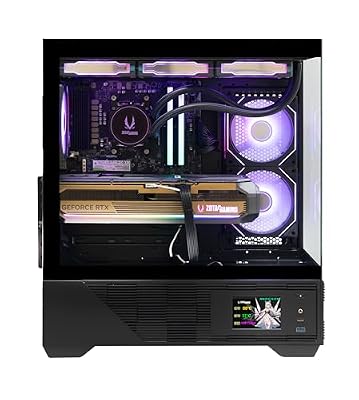
ZOTAC MEK Gaming PC Desktop, Ryzen 7 9800X3D, NVIDIA GeForce RTX 5080 16GB | 32GB DDR5, 2TB NVMe SSD, 850W 80+ Gold PSU, WiFi 6E, Windows 11 Pro, GDDR7, up to 5.2GHz






As an Amazon Associate we earn from qualifying purchases. Product prices and availability are accurate as of the date/time indicated.
The ZOTAC MEK with the RTX 5090 is the pick for enthusiasts who want to push the graphics side as well as the CPU. It pairs a flagship RTX 5090 with 32GB of GDDR7 — a card with real headroom for GPU tuning and the most demanding settings — with a Ryzen 7 9700 on AMD’s tuning-friendly X-series platform. At around $4,999 it is a high-end build aimed at users who treat both the CPU and the GPU as components to optimise.
This is the machine for the overclocker whose interest leans toward graphics performance and the absolute top of the stack. The RTX 5090 gives enormous headroom to tune power and clocks for more frames, the AMD platform supports CPU adjustment, and the large 32GB frame buffer suits the heaviest workloads. Pairing serious GPU tuning potential with a capable, adjustable CPU platform, the RTX 5090 MEK is the pick when graphics headroom is as important to you as processor tuning.
Pros: Flagship RTX 5090 with major GPU tuning headroom, AMD X-series platform, top-tier components.
Cons: GPU-led rather than a dedicated unlocked-CPU tuning rig; very expensive.
3. ZOTAC MEK Gaming PC, NVIDIA GeForce RTX 5080 16GB, AMD Ryzen 7 9800
ZOTAC MEK Gaming PC Desktop, Ryzen 7 9800X3D, NVIDIA GeForce RTX 5080 16GB | 32GB DDR5, 2TB NVMe SSD, 850W 80+ Gold PSU, WiFi 6E, Windows 11 Pro, GDDR7, up to 5.2GHz
As an Amazon Associate we earn from qualifying purchases. Product prices and availability are accurate as of the date/time indicated.
The ZOTAC MEK with the RTX 5080 is the high-end pick that balances CPU and GPU headroom at a more attainable price. It pairs an RTX 5080 with 16GB of GDDR7 and a Ryzen 7 9800 on AMD’s adjustable X-series platform, giving enthusiasts strong tuning potential on both fronts. At around $3,148 it sits below the RTX 5090 model while keeping the enthusiast ingredients intact.
This is the machine for the tuner who wants flagship-adjacent performance and real headroom without the very top price. The RTX 5080 has plenty of room for GPU tuning, the Ryzen 7 9800 on an X-series board supports CPU adjustment, and the overall build is geared toward enthusiast use. It gives you most of the tuning potential of the dearer MEK at a meaningfully lower cost, making it the value-conscious high-end pick for someone who wants to push both the processor and the graphics card.
Pros: RTX 5080 plus adjustable Ryzen 7 9800, AMD X-series platform, strong dual-tuning headroom.
Cons: Less raw GPU headroom than the 5090 model; still a premium price.
4. iBUYPOWER Element Gaming PC, AMD Ryzen 9 7900X, NVIDIA GeForce GPU

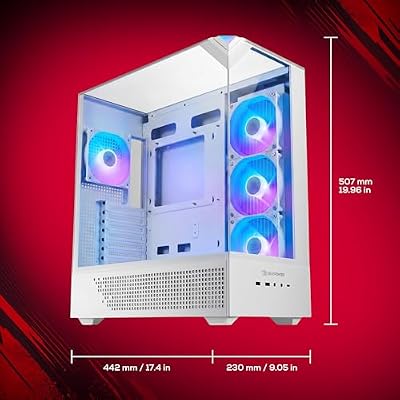
iBUYPOWER Element Gaming PC Desktop Computer AMD Ryzen 9 7900X CPU, NVIDIA GeForce RTX 5070 12GB GPU, 32GB DDR5 RAM, 1TB NVMe SSD, Windows 11 Home, Gamer Keyboard and Mouse - EWA9N5702






As an Amazon Associate we earn from qualifying purchases. Product prices and availability are accurate as of the date/time indicated.
The iBUYPOWER Element with the Ryzen 9 7900X is the unlocked twelve-core value pick. The 7900X is an unlocked, twelve-core enthusiast processor that AMD’s X-series platform lets you tune, delivering both a high core count and real overclocking potential. At around $2,299 it brings a genuinely tuning-capable high-core CPU into a more affordable build than the flagships above.
This is the machine for the enthusiast who wants a lot of unlocked cores to play with at a sensible price. The twelve-core 7900X gives you both threads for demanding games and tasks and the unlocked multiplier overclockers value, and on a compatible X-series board there is room to tune. To push it hard you will want to confirm the cooler and power supply can keep up, but as a foundation, an unlocked twelve-core chip at this price is a strong starting point. For high-core, tuning-friendly value, the Element is a smart pick.
Pros: Unlocked 12-core Ryzen 9 7900X, X-series tuning platform, high core count at a fair price.
Cons: Confirm cooling and PSU headroom before pushing it hard; not factory-tuned.
5. Skytech Gaming O11 Vision Gaming PC, AMD Ryzen 7 7700X, NVIDIA RTX 5070
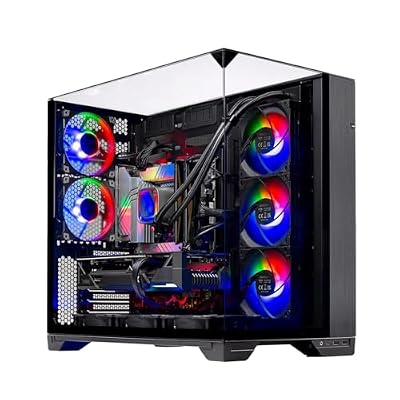
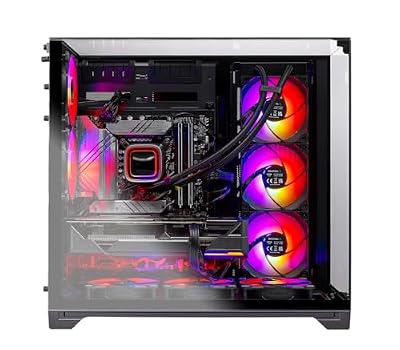
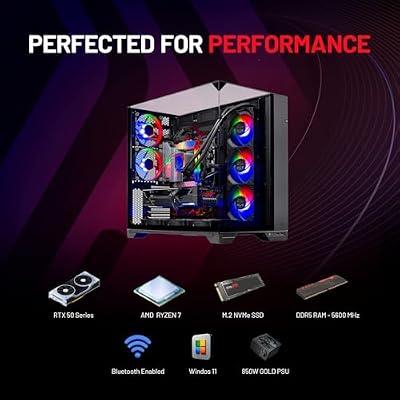
Skytech Gaming O11 Vision Gaming PC, AMD Ryzen 7 7700X 4.5GHz, NVIDIA RTX 5070 12GB, X670 Board, 1TB Gen4 NVMe SSD, 32GB DDR5 RAM 5600, 850W Gold ATX 3 PSU, 360 ARGB AIO, Wi-Fi, Win 11, Desktop







As an Amazon Associate we earn from qualifying purchases. Product prices and availability are accurate as of the date/time indicated.
The Skytech O11 Vision with the Ryzen 7 7700X is the airflow-focused tuning starter. The 7700X is an unlocked eight-core processor, and it sits in a popular O11-style case built around airflow — useful when tuning raises temperatures. Paired with an RTX 5070, at around $1,999 it is an accessible entry into a system with genuine overclock-friendly bones.
This is the pick for someone getting into tuning who wants an unlocked chip and a chassis with good thermal potential without spending big. The unlocked 7700X can be adjusted on a compatible board, the airflow-oriented case helps dissipate the extra heat that overclocking creates, and the RTX 5070 gives the GPU some room too. As with any mainstream prebuilt, check the specific motherboard’s tuning support and the power supply’s headroom before pushing hard — but the unlocked CPU and breathable case make this a sensible, lower-cost place to start overclocking.
Pros: Unlocked 8-core 7700X, airflow case for tuning heat, capable RTX 5070, accessible price.
Cons: Verify board tuning support and PSU headroom; mainstream rather than enthusiast-grade.
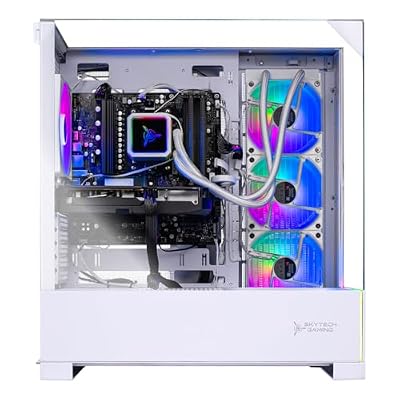
6. Skytech Gaming Archangel 5 Gaming PC, AMD Ryzen 7 7700X, NVIDIA RTX 5070

Skytech Gaming Archangel 5 Gaming PC, AMD Ryzen 7 7700X 4.5GHz, NVIDIA RTX 5070 12GB, 1TB Gen4 NVMe SSD, 32GB DDR5 RAM 6000, 750W Gold PSU, 360 ARGB AIO, Wi-Fi, Win 11, Desktop


As an Amazon Associate we earn from qualifying purchases. Product prices and availability are accurate as of the date/time indicated.
Rounding out the list is the Skytech Archangel 5 with the Ryzen 7 7700X, the entry overclock-ready build. It brings the same unlocked eight-core 7700X and an RTX 5070 to a more affordable chassis, giving you a tuning-capable CPU at the lowest price here. At around $1,899 it is the budget gateway into a system you can adjust.
This is the machine for the newcomer who wants to experiment with overclocking without a big outlay. The unlocked 7700X provides the adjustable foundation, and the RTX 5070 offers solid gaming performance with some tuning potential of its own. Because it uses a standard chassis rather than an enthusiast airflow case, keeping temperatures in check while tuning means paying close attention to cooling and fan curves, and you should confirm the board and power supply support your plans. As an affordable, unlocked starting point for learning to overclock, the Archangel 5 fits the bill.
Pros: Unlocked 8-core 7700X at the lowest price here, RTX 5070, accessible overclock-ready base.
Cons: Standard case limits thermal headroom; check cooling, board and PSU before tuning.
How to Choose a Gaming PC for Overclocking
The starting point for overclocking is an unlocked CPU on a chipset that allows tuning. Intel’s unlocked chips carry a ‘K’ suffix — like the Core Ultra 9 285K in the Corsair Vengeance i5200 — and pair with Z-series boards, while AMD’s Ryzen processors are broadly tuning-friendly on X-series chipsets, as in the 7900X and 7700X builds here. A locked chip on a basic board leaves little room to push, so confirm both the processor and the motherboard support adjustment before you buy a machine to tune.
Cooling is the next priority, because overclocking generates extra heat that must go somewhere. Liquid cooling with a sizeable radiator, as on the Corsair Vengeance i5200, gives the most thermal headroom for sustained tuned clocks, while a well-ventilated airflow case like the Skytech O11 Vision helps a good air cooler cope. If a build uses a standard chassis, plan to watch temperatures closely and tune fan curves — the more thermal headroom you have, the further and more stably you can push.
Power-supply headroom is the detail that keeps a tuned system stable. Components running above stock draw more power, so a PSU with comfortable headroom above the system’s stock draw gives the stability overclocking needs and room for future upgrades. Enthusiast builds like the Corsair tend to ship with this in mind; with mainstream prebuilts such as the Skytech models, it is worth confirming the supply has enough margin before you push clocks and voltages.
Finally, match your ambition to the platform and your budget, and decide whether you want to tune the CPU, the GPU or both. A flagship like the Corsair Vengeance i5200 is built to be pushed out of the box; the RTX 5090 MEK leans toward GPU headroom; the unlocked Ryzen builds offer adjustable cores at lower prices but ask you to verify cooling and power yourself. Choose an unlocked chip on a capable board, ensure cooling and PSU headroom match your goals, and pick the PC on this list that gives you the room to tune you are after.
Frequently Asked Questions
What makes a gaming PC good for overclocking?
Three things working together: an unlocked CPU on a tuning-capable chipset (an Intel Z-series board with a ‘K’ chip like the Ultra 9 285K, or an AMD X-series board with a Ryzen processor), cooling strong enough to handle the extra heat — ideally liquid — and a power supply with headroom above the stock draw. A locked chip on a basic board with marginal cooling leaves little room to push safely.
Do I need liquid cooling to overclock?
It is not strictly required, but it helps a great deal. Overclocking raises temperatures, and liquid cooling with a large radiator — like the loop in the Corsair Vengeance i5200 — provides the most thermal headroom for sustained tuned clocks. A strong air cooler in an airflow-focused case like the Skytech O11 Vision can manage moderate tuning, but the more cooling headroom you have, the further and more stably you can go.
Why does power supply headroom matter for overclocking?
Because components running above their stock settings draw more power. A power supply with comfortable headroom over the system’s normal draw keeps a tuned machine stable under load and leaves room for upgrades. Enthusiast builds like the Corsair model are specified with this in mind; on mainstream prebuilts such as the Skytech machines, confirm the PSU has enough margin before pushing clocks and voltages.
Can I overclock the graphics card too, or just the CPU?
Both, on the right hardware. GPUs can be tuned for higher clocks and power within their limits, and a card with real headroom like the RTX 5090 in the ZOTAC MEK is well suited to it. CPU tuning depends on an unlocked chip and a capable board, as on the unlocked Ryzen and ‘K’ Intel builds here. Some enthusiasts push both; decide which matters more to you and choose a platform with the headroom to match.
Related Guides
- Best Gaming PCs
- Best CPU Coolers for Overclocking
- Best Power Supplies
- Best Gaming Monitors
- Best RAM for Your Build
- Best Gaming Headsets
Affiliate Disclosure: As an Amazon Associate, we earn from qualifying purchases. If you click a link and make a purchase, we may earn a small commission at no extra cost to you. Prices and availability are accurate as of publication and may change.










