

Data analysis is fundamentally an in-memory activity. Whether you are loading a wide CSV into a pandas or R dataframe, running a SQL query against an in-memory table, or holding several joined datasets at once, the work happens in RAM — and the moment your data exceeds the memory available, the system spills to disk and your queries slow to a crawl. For an analytics machine, the most reliable way to keep work fast is simply to fit your data, with comfortable headroom for the OS, your IDE, and a browser. This guide rounds up the best RAM for data analysis in 2026, focused on high-capacity DDR4 kits — including a laptop option — that keep large dataframes and in-memory tables resident.
- Best RAM for Data Analysis at a Glance
- 1. Crucial 32GB DDR4 RAM Kit (2x16GB) 3200MHz Laptop Memory, SODIMM
- 2. CORSAIR Vengeance LPX DDR4 32GB (2x16GB) up to 3200MHz CL16
- 3. Corsair Vengeance RGB Pro 32GB (2x16GB) DDR4 3200MHz C16
- 4. CORSAIR Vengeance LPX DDR4 16GB (2x8GB) 3600MHz CL18
- 5. CORSAIR VENGEANCE LPX DDR4 16GB (2x8GB) 3000MHz CL15
- 6. CORSAIR Vengeance LPX DDR4 16GB (2x8GB) 3200MHz CL16
- How to Choose RAM for Data Analysis
- Frequently Asked Questions
- Related Guides
- Related Articles
Let us be honest about what these kits are: standard, high-quality DDR4 memory selected for capacity and a sensible speed-and-timing balance, not specialised analytics hardware. There is no such thing as a dedicated data-analysis chip on a memory module; what makes RAM good for analysis is having enough of it, running in dual channel, at a respectable frequency. Our picks lead with a high-capacity laptop kit — because so much analysis happens on notebooks — then cover desktop kits across capacities and budgets, with prices from around $119 up to around $245. We describe each by capacity and fit. Below is an at-a-glance comparison of all six, then a closer look at each and a buyer’s guide built around capacity, configuration, and speed.
As an Amazon Associate we earn from qualifying purchases at no extra cost to you.





🛒 Best Price Today on Amazon
Prime members get fast, free shipping on everything above, plus member-only deals. New members get a 30-day free trial — cancel anytime.
Best RAM for Data Analysis at a Glance
| Memory Kit | Best For | Standout Spec | Approx Price |
|---|---|---|---|
| Crucial 32GB DDR4 Laptop Kit 3200 CL22 | Analytics on a laptop | 2x16GB SODIMM, 3200MHz | around $245 |
| Corsair Vengeance LPX 32GB 3200 CL16 | Desktop dataframe headroom | 2x16GB, CL16, low profile | around $243 |
| Corsair Vengeance RGB Pro 32GB 3200 CL16 | 32GB capacity with RGB | 2x16GB, 3200MHz, RGB | competitive |
| Corsair Vengeance LPX 16GB 3600 CL18 | Faster mid-capacity desktop | 2x8GB, 3600MHz, low profile | around $130 |
| Corsair Vengeance LPX 16GB 3000 CL15 | Tight-timing 16GB value | 2x8GB, 3000MHz, CL15 | competitive |
| Corsair Vengeance LPX 16GB 3200 CL16 | Budget analytics starter | 2x8GB, CL16, low profile | around $119 |
1. Crucial 32GB DDR4 RAM Kit (2x16GB) 3200MHz Laptop Memory, SODIMM

As an Amazon Associate we earn from qualifying purchases. Product prices and availability are accurate as of the date/time indicated.
The Crucial 32GB DDR4 laptop kit is our top pick for data analysis, and it leads the list deliberately: a great deal of analytics happens on laptops, and this 2x16GB SODIMM kit brings full desktop-class 32GB capacity to a notebook. Running at 3200MHz, it lets a laptop hold large dataframes and in-memory tables that a typical 8GB or 16GB machine simply cannot, transforming how much data you can work with on the move. At around $245 it is a high-value upgrade for a mobile analytics setup.
For data analysis specifically, capacity on a laptop is often the single biggest constraint, and this kit removes it. With 32GB you can load a wide CSV into pandas, keep several joined datasets alive, and run an in-memory query without the disk-swapping that grinds laptop analytics to a halt. The two 16GB SODIMMs fill a notebook’s slots for dual-channel bandwidth, and Crucial’s broad compatibility makes it a dependable drop-in. If your analytics live on a laptop and you keep running out of memory, this is the upgrade to make first.
Pros: Full 32GB capacity for a laptop, dual SODIMMs for dual-channel, removes memory bottlenecks.
Cons: Laptop SODIMM only, not for desktops; 3200MHz CL22 is a relaxed timing.
2. CORSAIR Vengeance LPX DDR4 32GB (2x16GB) up to 3200MHz CL16

CORSAIR Vengeance LPX DDR4 RAM 32GB (2x16GB) Up to 3200MHz CL16-20-20-38 1.35V Intel XMP AMD EXPO Computer Memory – Black (CMK32GX4M2E3200C16)


As an Amazon Associate we earn from qualifying purchases. Product prices and availability are accurate as of the date/time indicated.
The Corsair Vengeance LPX 32GB kit is the desktop dataframe-headroom pick. It delivers a full 32GB across two 16GB modules at up to 3200MHz with a tight CL16 timing, in Corsair’s slim, reliable LPX heat spreaders. At around $243 it is a proven, no-nonsense desktop kit for an analytics workstation where capacity is the priority and lighting is not.
For data analysis, this kit’s 32GB capacity is the headline: it gives a desktop room to hold large dataframes, join multiple tables in memory, and run analytical queries without spilling to disk. The CL16 timing at 3200MHz is responsive for the repeated in-memory operations that analysis involves, and the low-profile design keeps clearance easy under any cooler. Compared with the laptop kit at the top, this is the desktop equivalent — same capacity goal, tighter CL16 timing — and a long-standing favorite for a dependable analytics build.
Pros: 32GB desktop capacity at tight CL16 3200MHz, low-profile and reliable.
Cons: No RGB; SODIMM laptops need the Crucial kit instead.
3. Corsair Vengeance RGB Pro 32GB (2x16GB) DDR4 3200MHz C16

CORSAIR Vengeance RGB DDR5 RAM 32GB (2x16GB) Up to 6000MHz CL30-36-36-76 1.40V AMD EXPO Intel XMP Desktop Computer Memory - Gray (CMH32GX5M2B6000Z30K)
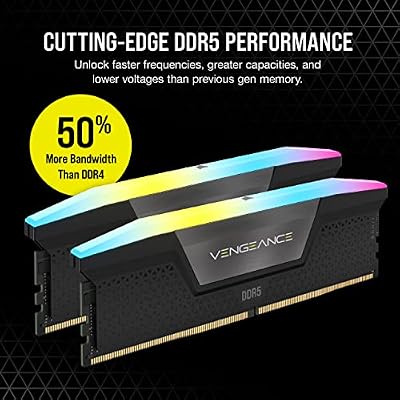


As an Amazon Associate we earn from qualifying purchases. Product prices and availability are accurate as of the date/time indicated.
The Corsair Vengeance RGB Pro 32GB kit is the pick for 32GB capacity with lighting. It offers the same analytics-friendly 32GB at 3200MHz with a CL16 timing across two 16GB modules as the LPX, but adds Corsair’s well-regarded RGB for builders who want their workstation to look the part. It frequently sits at a competitive price for a 32GB RGB kit.
For data analysis, the practical benefit is identical to the LPX: 32GB of capacity to keep large dataframes and in-memory tables resident, with a responsive CL16 3200MHz timing for the constant copying and transforming that analysis work involves. The dual-channel layout supplies good bandwidth, and iCUE-controlled RGB ties it into a coordinated build if appearance matters to you. For an analyst who wants the headroom of 32GB and a bit of style, this RGB Pro kit is a sensible, well-priced choice.
Pros: 32GB capacity at CL16 3200MHz with attractive RGB, good bandwidth for analytics.
Cons: RGB adds height; pure-capacity builders may prefer the plain LPX.
4. CORSAIR Vengeance LPX DDR4 16GB (2x8GB) 3600MHz CL18

CORSAIR VENGEANCE LPX DDR4 RAM 16GB (2x8GB) 3600MHz CL18-22-22-42 1.35V Intel AMD Desktop Computer Memory - Black (CMK16GX4M2D3600C18)
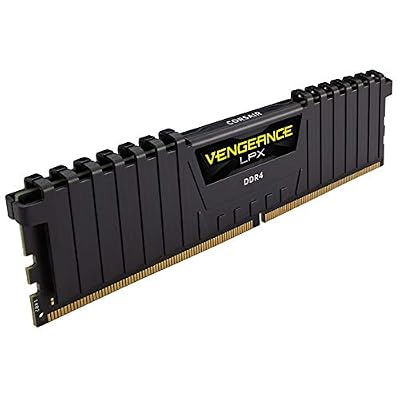

As an Amazon Associate we earn from qualifying purchases. Product prices and availability are accurate as of the date/time indicated.
The Corsair Vengeance LPX 16GB 3600MHz kit is the faster mid-capacity desktop pick. It is a 2x8GB dual-channel kit running at a quick 3600MHz with a CL18 timing in the slim LPX heat spreader. At around $130 it suits an analyst whose datasets fit within 16GB but who wants the snappier in-memory performance a higher frequency brings.
For data analysis, this kit makes sense when your typical datasets are moderate rather than huge, and you would rather have speed than spare capacity you will not use. The 3600MHz frequency accelerates the repeated array and table operations of in-memory analysis, and the dual-channel layout supplies the bandwidth those operations want. Be honest about your data, though: if you regularly work with dataframes that approach or exceed 16GB, capacity matters more than this speed, and a 32GB kit is the better call. For consistently moderate workloads, this fast 16GB kit is a responsive, well-priced option.
Pros: Fast 3600MHz mid-capacity kit, low-profile, snappy for moderate dataframe work.
Cons: 16GB suits moderate datasets only; large data needs more capacity.
5. CORSAIR VENGEANCE LPX DDR4 16GB (2x8GB) 3000MHz CL15

CORSAIR Vengeance RGB DDR5 RAM 32GB (2x16GB) 6400MHz CL36-48-48-104 1.35V AMD EXPO Intel XMP 3.0 Desktop Computer Memory – Gray (CMH32GX5M2B6400Z36)


As an Amazon Associate we earn from qualifying purchases. Product prices and availability are accurate as of the date/time indicated.
The Corsair Vengeance LPX 16GB 3000MHz CL15 kit is the tight-timing value pick. It is a 2x8GB dual-channel kit at 3000MHz with a notably tight CL15 latency in the reliable low-profile LPX design. It often sits at a competitive price, offering an analyst a responsive 16GB foundation with one of the tightest CAS timings in the lineup.
For data analysis, this kit appeals when you want quick, responsive memory at 16GB and value a tight latency over raw frequency. The CL15 timing is snappier per cycle than the looser CL18 of the 3600MHz kit, even if the headline speed is a touch lower, which keeps in-memory operations feeling responsive. As ever for analysis, weigh capacity first: 16GB handles moderate datasets but fills up with large dataframes or many joined tables. For consistently smaller analytical workloads where responsiveness matters, this tight-timing LPX kit is a smart, well-priced choice.
Pros: Tight CL15 latency at 16GB, low-profile and reliable, responsive for moderate data.
Cons: 16GB capacity; 3000MHz base speed trails the 3200/3600MHz kits.
6. CORSAIR Vengeance LPX DDR4 16GB (2x8GB) 3200MHz CL16

CORSAIR Vengeance DDR5 32GB (2 x 16GB) Up to 6000MHz AMD Intel RAM | Desktop Gaming Memory, AMD EXPO & Intel XMP 3.0 Compatible, CL30, Grey, CMK32GX5M2B6000Z30


As an Amazon Associate we earn from qualifying purchases. Product prices and availability are accurate as of the date/time indicated.
Rounding out the list is the Corsair Vengeance LPX 16GB 3200MHz CL16 kit, the budget analytics starter. It is a 2x8GB dual-channel kit at 3200MHz with a tight CL16 timing in the slim, dependable LPX heat spreader. At around $119 it is the cheapest kit here and a sensible entry point for someone starting out in data analysis, or a building block toward more capacity.
For data analysis, this kit is the affordable foundation. The 3200MHz CL16 combination is the DDR4 sweet spot of speed and tight timing, keeping in-memory work responsive, and the low-profile LPX design fits any build. As with the other 16GB kits, be realistic about capacity — 16GB handles smaller datasets and learning projects well but fills quickly with large dataframes — so treat this as a starting point you may expand later. For an affordable, reliable 16GB kit to begin an analytics setup or to grow toward 32GB, it is a practical, no-fuss choice.
Pros: Affordable 16GB at the CL16 3200MHz sweet spot, low-profile, a solid starter.
Cons: 16GB fills quickly with large dataframes; best as a foundation to expand.
How to Choose RAM for Data Analysis
For data analysis, capacity is the decisive factor — even more than for general computing. Analytical work loads datasets into memory as dataframes or in-memory tables, holds multiple joined datasets at once, and keeps an IDE and browser alive alongside. The instant your data exceeds available RAM, the system spills to disk and queries crawl. For that reason 32GB, as on the three larger kits here — including the Crucial laptop kit — is the comfortable working capacity for serious analysis; 16GB suits smaller datasets and learning but fills fast. Size your memory to your largest realistic dataset plus headroom.
Match the form factor to your machine, because this is a real fork in the road for analysts. A great deal of data work happens on laptops, and laptops need SODIMM memory like the Crucial 32GB kit — desktop DIMMs will not fit. Desktop analytics workstations take standard DIMM kits like the Corsair Vengeance LPX and RGB Pro models. Confirm whether you are upgrading a laptop or a desktop before anything else, then choose a kit in the right form factor; capacity and speed are irrelevant if the module does not physically fit your system.
Always buy a matched dual-channel kit, and treat speed as a secondary refinement after capacity. Two modules in dual channel deliver markedly more bandwidth than a single stick of the same size, and analysis’s heavy in-memory operations benefit from that bandwidth — every kit here is a matched pair. On speed, a higher frequency (3600MHz) or a tighter CAS latency (CL15 or CL16) makes repeated in-memory operations a little snappier, but the leap from 16GB to 32GB of capacity transforms an analytics workflow far more than any speed difference. Get the capacity first.
Finally, set honest expectations and confirm compatibility. These are standard, high-quality DDR4 kits chosen for capacity and a sensible speed-and-timing balance — there is no specialised analytics hardware on a memory module, and more RAM cannot speed up compute the way a faster CPU can. What ample RAM does is keep your data resident so you are not bottlenecked by disk. Match the memory standard to your platform (DDR4 here), check your motherboard or laptop’s supported speeds and maximum capacity, and remember to enable the XMP profile on desktop kits so they run at their rated frequency. Set your capacity target, pick the right form factor, and choose the kit on this list that fits.
Frequently Asked Questions
How much RAM do I need for data analysis?
For serious analysis, 32GB is the comfortable working capacity, which is why the three larger kits here are 32GB. It lets you load a wide dataset into a dataframe, hold several joined tables in memory, and run in-memory queries without spilling to disk, with headroom for your IDE and browser. 16GB handles smaller datasets and learning projects but fills quickly. Size your RAM to your largest realistic dataset plus comfortable overhead.
Is laptop RAM different from desktop RAM for analytics?
Yes — physically. Laptops use compact SODIMM modules like the Crucial 32GB kit, while desktops use full-size DIMMs like the Corsair Vengeance LPX and RGB Pro kits, and the two are not interchangeable. Since a lot of data work happens on laptops, confirm your machine’s form factor first. Functionally the goal is the same in both: maximise capacity, run dual-channel, at a sensible speed.
Does RAM speed matter for data analysis?
Capacity matters most — running out forces slow disk swapping. Speed is a secondary refinement: a higher frequency like 3600MHz or a tight CAS latency like CL15/CL16 makes repeated in-memory operations a little snappier. But the jump from 16GB to 32GB transforms an analytics workflow far more than the difference between speeds. Secure enough capacity first, then prefer a tight timing at a sensible frequency.
Will more RAM make my data analysis run faster?
It helps most by preventing slowdowns: with enough RAM your data stays resident in memory instead of spilling to disk, which keeps queries and dataframe operations fast. What extra RAM cannot do is speed up raw computation the way a faster CPU would — these are standard DDR4 kits, not analytics accelerators. The biggest gains come from having sufficient capacity to fit your data comfortably, after which a faster CPU drives further speed.
Related Guides
- Best RAM for Gaming
- Best DDR4 RAM Kits
- Best Laptop RAM Upgrades
- Best NVMe SSDs
- Best Workstation PCs
- Best Gaming PCs
Affiliate Disclosure: As an Amazon Associate, we earn from qualifying purchases. If you click a link and make a purchase, we may earn a small commission at no extra cost to you. Prices and availability are accurate as of publication and may change.










