

A productivity mouse is judged by a different yardstick than a gaming one. Here the wins come from comfort over an eight-hour day, programmable buttons that turn repetitive actions into single clicks, smooth or silent scrolling through long documents, and the ability to glide between a laptop, a desktop and a tablet without re-pairing. Raw DPI barely registers; what matters is how much friction the mouse removes from your workflow. This guide rounds up the best mice for productivity in 2026, ranked by how much they help you work comfortably and efficiently.
- Best Mice for Productivity at a Glance
- 1. Logitech G502 Hero High Performance Mouse, 11 Programmable Buttons
- 2. Anker 2.4G Wireless Vertical Ergonomic Optical Mouse, Multi-Device
- 3. Logitech M330 Silent Wireless Mouse, 2.4GHz, Optical Tracking
- 4. Logitech M510 Wireless Mouse, 2.4 GHz with USB Unifying Receiver
- 5. Logitech M185 Wireless Mouse, 2.4GHz USB Receiver, 12-Month Battery
- 6. Logitech G305 Lightspeed Wireless Gaming Mouse, HERO Sensor, 12,000 DPI
- How to Choose a Mouse for Productivity
- Frequently Asked Questions
- Related Guides
- Related Articles
We chose these picks on the things that genuinely speed up work: programmable and convenient buttons, ergonomic comfort for long sessions, multi-device and wireless flexibility, and quiet, efficient scrolling. The list leads with the most workflow-enhancing options and runs through comfortable, dependable everyday performers, with prices from around $14 to around $32. Below is an at-a-glance comparison of all six, a closer look at each through a productivity lens, and a buyer’s guide built around buttons, ergonomics, connectivity and scrolling — the things that actually matter at a desk.
As an Amazon Associate we earn from qualifying purchases at no extra cost to you.


🛒 Best Price Today on Amazon
Prime members get fast, free shipping on everything above, plus member-only deals. New members get a 30-day free trial — cancel anytime.
Best Mice for Productivity at a Glance
| Mouse | Best For | Standout Spec | Approx Price |
|---|---|---|---|
| Logitech G502 Hero | Power users who want macros | 11 programmable buttons, scroll modes | around $32 |
| Anker 2.4G Vertical Mouse | All-day ergonomic comfort | Vertical shape, multi-device | around $22 |
| Logitech M330 Silent Wireless | Quiet open-plan offices | Silent clicks, long battery | around $18 |
| Logitech M510 Wireless Mouse | Comfortable everyday work | Side buttons, full-size comfort | around $28 |
| Logitech M185 Wireless Mouse | Simple reliable daily driver | 12-month battery, plug-and-play | around $14 |
| Logitech G305 Lightspeed Wireless | Light, responsive workhorse | LIGHTSPEED, programmable buttons | around $37 |
1. Logitech G502 Hero High Performance Mouse, 11 Programmable Buttons

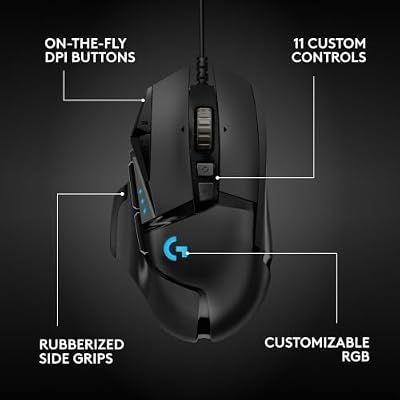
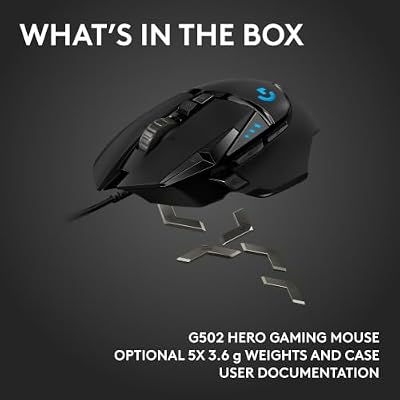
Logitech G502 Hero Wired Gaming Mouse - Black | High performance, 25,600 DPI, RGB, adjustable weights, 11 programmable buttons, on-board memory, PC/Mac





As an Amazon Associate we earn from qualifying purchases. Product prices and availability are accurate as of the date/time indicated.
The Logitech G502 Hero tops this productivity list for one reason: it has eleven programmable buttons. Although it is marketed as a gaming mouse, that vast button array and Logitech’s G HUB software make it a remarkable productivity tool, letting you map shortcuts, macros and application commands to dedicated buttons. It also features a scroll wheel that switches between ratcheted and free-spinning modes for racing through long documents. At around $32 it is a power user’s dream.
For productivity, the value is in eliminating repetitive actions. You can assign copy, paste, undo, switch-application or custom macros to physical buttons and trigger them with a thumb instead of a keyboard reach, while the free-spin scroll wheel flies through long spreadsheets and web pages, then ratchets for precise line-by-line control. G HUB stores per-application profiles so the buttons change with whatever you are using. If your work is full of repeated commands, the G502’s programmability is genuinely transformative.
Pros: Eleven programmable buttons, dual-mode scroll wheel, per-app profiles via G HUB.
Cons: Heavier and wired; gaming styling rather than office-discreet.
2. Anker 2.4G Wireless Vertical Ergonomic Optical Mouse, Multi-Device

Anker 2.4G Wireless Ergonomic Mouse, Right Hand Vertical Mouse USB Receiver | Multi-Device Connectivity, 800/1200/1600 DPI, Wireless Mouse for Laptop, Desktop, PC, 5 Buttons, Black (Batteries Required)


As an Amazon Associate we earn from qualifying purchases. Product prices and availability are accurate as of the date/time indicated.
The Anker vertical mouse is the all-day comfort pick, and comfort is a productivity feature in its own right. Its vertical, handshake-position design keeps your wrist and forearm in a natural posture, which can reduce the strain that builds up over long workdays, and it adds multi-device connectivity so it can serve more than one machine. At around $22 it is an affordable route to a more comfortable desk.
For productivity, the ergonomic shape pays off in stamina: a relaxed wrist means less fatigue and discomfort across a full day of mousing, which keeps you working comfortably for longer. The optical sensor tracks accurately for everyday tasks, and multi-device support lets you switch between a work laptop and a personal desktop without swapping hardware. If long hours at the desk leave your wrist aching, the Anker’s upright posture is a simple, effective upgrade to your daily comfort.
Pros: Vertical ergonomic comfort for long days, multi-device pairing, accurate optical sensor.
Cons: Vertical shape takes adjustment; no programmable macro buttons.
3. Logitech M330 Silent Wireless Mouse, 2.4GHz, Optical Tracking

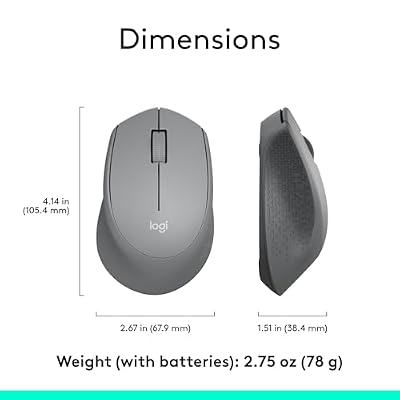
Logitech M330 Silent Plus Full Size 2.4 GHz Wireless Mouse - Grey | Silent, lightweight, 2.4 GHz USB-A Nano Receiver, 1000 dpi optical tracking, 2-year battery life, PC, Mac, laptop compatible



As an Amazon Associate we earn from qualifying purchases. Product prices and availability are accurate as of the date/time indicated.
The Logitech M330 Silent is the quiet-office pick. Its headline feature is silent clicking — Logitech rates the buttons as dramatically quieter than a standard mouse — paired with smooth optical tracking, long battery life and a comfortable shape. At around $18 it is an affordable way to mouse without the constant clicking that can disturb an open-plan office, a shared room or a video call.
For productivity, the silence is the differentiator. The near-silent buttons let you work without distracting colleagues, family or meeting participants, which makes it ideal for shared spaces, libraries and calls, while the smooth scroll and reliable optical sensor handle everyday navigation comfortably. Long battery life means it stays ready for months. It will not replace a macro-laden power mouse, but for quiet, comfortable, distraction-free work, the M330 fills a niche the others do not.
Pros: Genuinely quiet silent clicks, comfortable shape, long battery, smooth optical tracking.
Cons: No programmable macros; a comfort-and-quiet pick rather than a power tool.
4. Logitech M510 Wireless Mouse, 2.4 GHz with USB Unifying Receiver

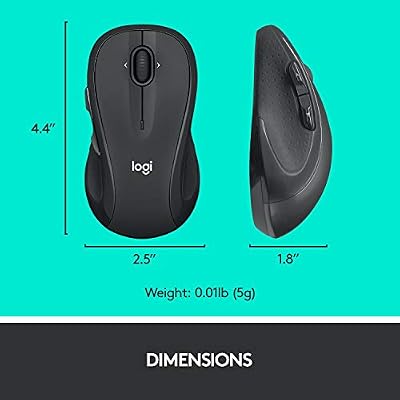
Logitech M510 Full Size Ambidextrous 2.4 GHz Wireless Mouse | 2.4 GHz USB-A Nano Receiver, tilt-to-scroll function, 2-year battery life, Windows Mac Linux compatible, certified for Chrome





As an Amazon Associate we earn from qualifying purchases. Product prices and availability are accurate as of the date/time indicated.
The Logitech M510 is the comfortable everyday-work pick. It is a full-size wireless mouse with a contoured shape, side buttons for browser and document navigation, and Logitech’s Unifying receiver, which can pair multiple compatible devices to a single USB dongle. At around $28 it is a dependable, comfortable mouse for getting through a normal workday.
For productivity, the M510 balances comfort and useful inputs. The larger body supports your whole hand for relaxed all-day use, the side buttons let you navigate back and forward through pages and folders without reaching for the keyboard, and the smooth scroll wheel handles long documents. The Unifying receiver tidies your USB ports if you use several Logitech peripherals. It is not a programmable powerhouse, but as a comfortable, well-equipped everyday office mouse, the M510 is a reliable workhorse.
Pros: Comfortable full-size shape, handy side buttons, Unifying receiver, smooth scroll.
Cons: Limited programmability; everyday comfort rather than heavy macro use.
5. Logitech M185 Wireless Mouse, 2.4GHz USB Receiver, 12-Month Battery

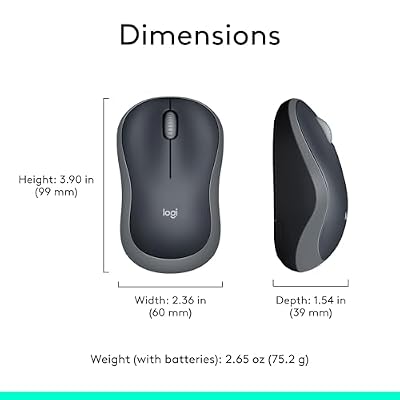
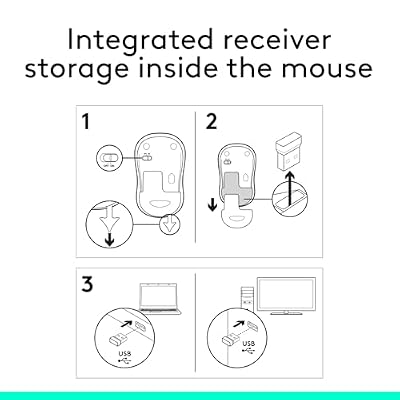
Logitech M185 Compact Ambidextrous 2.4 GHz Wireless Mouse - Swift Grey | Ambidextrous mouse with 2.4 GHz USB-A Nano Receiver, Optical Tracking, 12-Months Battery Life, PC, Mac, Laptop compatible




As an Amazon Associate we earn from qualifying purchases. Product prices and availability are accurate as of the date/time indicated.
The Logitech M185 is the simple, reliable daily-driver pick. It is a compact wireless mouse with dependable optical tracking, a plug-and-play 2.4GHz receiver and battery life rated up to twelve months. At around $14 it is the most affordable option here and a no-fuss choice for anyone who just wants a mouse that works every day without thinking about it.
For productivity, the M185’s strength is dependability. It tracks reliably for everyday navigation, the receiver works the moment you plug it in, and the long battery life means you can forget about it for the better part of a year. It has no programmable buttons or ergonomic tricks, so it is best as a straightforward, comfortable pointer for browsing, email and general office tasks — or as an inexpensive spare for a second machine. As a reliable, low-cost daily driver, it is hard to fault.
Pros: Reliable optical tracking, year-long battery, plug-and-play, very affordable.
Cons: No side buttons or macros; a basic everyday pointer, not a power tool.
6. Logitech G305 Lightspeed Wireless Gaming Mouse, HERO Sensor, 12,000 DPI

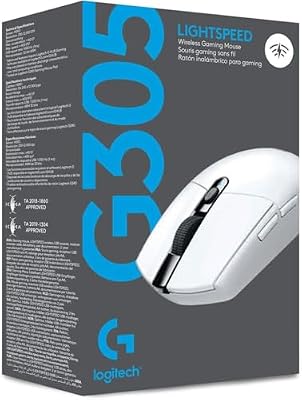
Logitech G305 Lightspeed Wireless Gaming Mouse - White | 12,000 DPI, Lightweight, 6 Programmable Buttons, 250h Battery, On-Board Memory, Compatible with PC and Mac





As an Amazon Associate we earn from qualifying purchases. Product prices and availability are accurate as of the date/time indicated.
Rounding out the list is the Logitech G305 Lightspeed, the light, responsive workhorse pick. It is a lightweight wireless mouse built on Logitech’s LIGHTSPEED technology with an accurate HERO sensor and programmable buttons, and although it is a gaming mouse, its responsiveness and light weight make it an efficient productivity tool too. At around $37 it brings gaming-grade snappiness to the desk.
For productivity, the appeal is speed and low effort. The LIGHTSPEED wireless is highly responsive so the cursor never feels laggy during fast work, the light shell makes long sessions of moving and clicking less tiring, and the programmable buttons can be mapped to handy shortcuts. Long battery life keeps it ready, and the clean shape suits a tidy desk. If you want a snappy, lightweight wireless mouse that doubles for the occasional game, the G305 is a versatile way to finish the list.
Pros: Responsive LIGHTSPEED wireless, light shell for long use, programmable buttons.
Cons: Fewer buttons than the G502; gaming product rather than office-styled.
How to Choose a Mouse for Productivity
For productivity, programmable buttons are often the biggest single upgrade, so weigh them first. Mapping copy, paste, undo, application-switching or custom macros to physical buttons turns multi-step keyboard actions into a single thumb click, which adds up across a workday. A button-rich mouse like the Logitech G502 Hero, with eleven buttons and per-application profiles, is a genuine workflow tool, while simpler mice with a couple of side buttons like the M510 still help with browser and document navigation.
Ergonomics matter more for productivity than for almost anything else, because you hold the mouse for hours. A comfortable shape reduces fatigue and the strain that builds over long sessions, and a vertical ergonomic design like the Anker’s keeps your wrist in a neutral handshake position that many people find far kinder over a full day. Match the shape and size to your hand, and if wrist discomfort is a recurring problem, take the ergonomic option seriously — comfort directly affects how long and how well you can work.
Connectivity and flexibility keep your desk tidy and your workflow smooth. Wireless removes cable clutter, multi-device pairing like the Anker’s lets one mouse serve a laptop and a desktop, and Logitech’s Unifying receiver — as on the M510 — links several peripherals to a single dongle. Long battery life, rated up to a year on mice like the M185, means less maintenance. Decide how many devices you switch between and how much you value a clean, low-fuss setup, then choose accordingly.
Finally, think about scrolling and your environment, two details that quietly shape a workday. A free-spinning or smooth scroll wheel, like the G502’s dual-mode wheel, flies through long documents and spreadsheets, while silent clicking, as on the M330, lets you work without disturbing an open-plan office, a shared room or a video call. Decide whether macros, comfort, multi-device flexibility, quiet operation or fast scrolling matters most to your work, and pick the mouse on this list that removes the most friction from your day.
Frequently Asked Questions
Are gaming mice good for productivity?
They can be excellent, especially button-rich models. A gaming mouse like the Logitech G502 Hero offers eleven programmable buttons and per-application profiles, letting you map shortcuts and macros that speed up repetitive work, and its dual-mode scroll wheel races through long documents. The main trade-offs are gaming styling and extra weight, but for power users the programmability is a real productivity advantage.
Do silent mice really make a difference in an office?
Yes, in shared or quiet spaces they noticeably reduce distraction. A mouse like the Logitech M330 Silent uses buttons rated far quieter than a standard mouse, so your clicking does not disturb colleagues, family or people on a video call. If you work in an open-plan office, a library or take frequent calls, the near-silent clicks are a small but genuinely welcome quality-of-life improvement.
Is a vertical mouse better for working all day?
For many people, yes. A vertical mouse like the Anker model holds your wrist and forearm in a neutral handshake position rather than flat, which can reduce the strain and fatigue that build over long workdays. There is a short adjustment period, but if hours of mousing leave your wrist aching, the ergonomic posture is a simple and effective way to work more comfortably for longer.
What features matter most in a productivity mouse?
Comfort for long sessions, programmable or convenient buttons, smooth or silent scrolling, and flexible connectivity such as multi-device pairing. Raw DPI barely matters for work. Prioritise an ergonomic shape that suits your hand, buttons that map to the actions you repeat, and wireless or multi-device support that keeps your desk tidy — the mice here each lead on a different one of those strengths.
Related Guides
- Best Ergonomic Mice
- Best Wireless Gaming Mouse
- Best Gaming Mouse
- Best Mechanical Keyboards
- Best Monitors for Work and Play
- Best Office Chairs for Working From Home
Affiliate Disclosure: As an Amazon Associate, we earn from qualifying purchases. If you click a link and make a purchase, we may earn a small commission at no extra cost to you. Prices and availability are accurate as of publication and may change.










