

- Top Pick: Logitech S150 USB Speakers with Digital Sound
- Best Value: Computer Speakers for Desktop PC Monitor, USB Plug-in, Wired, Computer Soundbar for PC, Laptop Speakers with Adaptive-Channel-Switching, Loud Sound, Deep Bass, USB C Adapter, Easy to Clip on Monitor
- Premium Choice: Black Logitech S150 USB Speakers with Digital Sound, New,
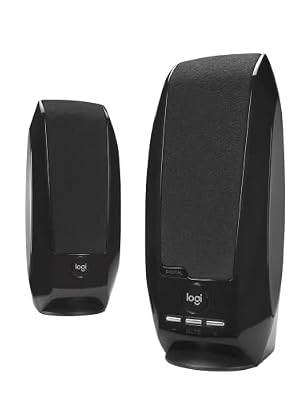
The Logitech S150 is one of the longest-serving USB-powered 2.0 PC speaker designs in the Logitech catalogue — a slim, USB-bus-powered stereo pair that connects to the PC through a single USB cable and uses the computer’s USB sound system rather than the analogue 3.5mm path. The advantages are practical: a single cable for both audio and power, and a digital audio path that bypasses noisy analogue circuitry in budget PCs. The Logitech S150 sits around $30 and competes with the Amazon Basics USB and original Creative Pebble pairs in this guide. This Logitech S150 review covers the sound quality, connectivity, build, setup, who they suit and a verdict.



As an Amazon Associate we earn from qualifying purchases. Product prices and availability are accurate as of the date/time indicated.
🛒 Best Price Today on Amazon
Prime members get fast, free shipping on everything above, plus member-only deals. New members get a 30-day free trial — cancel anytime.
As an Amazon Associate we earn from qualifying purchases.

![[Upgraded] Computer Speakers for Desktop PC, USB Plug-n-Play, External Speakers for Laptop, Mini PC Sound Bar with Stereo Loud Sound, Enhanced Bass, Compatible with Windows, macOS, ChromeOS, Linux](https://m.media-amazon.com/images/I/416h3bKRiuL._SL160_.jpg)



Logitech S150 at a Glance
| Feature | Specification |
|---|---|
| Configuration | 2.0 stereo (two satellites, no subwoofer) |
| Total power output (RMS / Peak) | Approx. 1.2W RMS / 2.4W Peak (low-power USB-bus design) |
| Driver size | Approx. 2-inch full-range per satellite |
| Frequency response | Not documented by manufacturer; typical compact USB 2.0 range |
| Connectivity | USB digital audio (single cable for audio + power) |
| Controls | On-cabinet volume / mute / power buttons |
| Headphone output | No |
| Subwoofer | No (2.0 stereo design) |
| Approx. price | Around $30 |
Sound Quality & Bass Response
Before getting into the specifics of this speaker system it is worth a brief refresher on the technical choices that shape any PC speaker review: channel configuration (2.0 versus 2.1), power delivery (USB-bus power versus mains power) and connection type (3.5mm analogue, USB digital or Bluetooth). A 2.0 system consists of two stereo satellite speakers with the bass and treble drivers contained within each cabinet — simple, tidy and the right answer for the majority of desk setups where the speakers sit either side of a monitor. A 2.1 system adds a dedicated subwoofer, which usually lives on the floor and reproduces the lowest frequencies. The advantage is genuine low-end extension for games, films and electronic music; the trade-off is desk and floor footprint plus extra cabling. Most office and casual-gaming users are well served by a competent 2.0 set; gamers and film viewers who want chest-thumping bass benefit from 2.1.
Power matters too. USB-bus-powered speakers — the Amazon Basics Stereo, Logitech S150 and original Creative Pebble belong here — draw their power from the computer’s USB port and produce modest, near-field volume that suits a single user at a desk. Mains-powered speakers (such as the Edifier R1280T, Logitech Z313 and Klipsch ProMedia 2.1) draw from a wall outlet and can drive much louder, fuller sound, with room to fill a small or medium room. As a rule, USB-powered 2.0 sets sit in the budget tier and prioritise convenience; mains-powered 2.0 and 2.1 sets occupy the mid and upper tiers and prioritise sound quality and headroom. The Creative Pebble V2 sits in between — USB-C bus-powered but with a higher 8W RMS rating than the original Pebble.
Finally, connectivity. The traditional PC speaker input is a single 3.5mm analogue jack, which works with any computer, console, phone or tablet with a headphone output. USB speakers add a digital audio path, bypassing the PC sound card and often acting as a USB sound card themselves. Bluetooth, where present, allows wireless playback from a phone or tablet, which is useful when the same speakers are used for music as well as PC audio — the Edifier R1280T is a good example of a desk speaker that adds RCA inputs but keeps to wired connections. A headphone output on the speaker unit is a quietly important convenience: a forward-facing 3.5mm jack lets you plug headphones into the speakers themselves rather than reaching behind the PC each time you want a private listening session.
The S150 is built around a USB digital audio path rather than the 3.5mm analogue input that most budget 2.0 PC speakers use, and the practical effect is twofold. First, there is no audible hum or interference from a noisy budget PC sound card — the USB audio bypasses analogue circuitry entirely and the speakers receive a clean digital signal. Second, the speakers register on the operating system as their own audio device, which is genuinely useful for users who want to keep certain applications routed to a dedicated audio output. The sound character itself is the familiar Logitech budget tuning: clean, forward and adequate for desk-distance listening, with reasonable treble and serviceable mid-range. Bass is modest — the USB-bus power budget caps how hard the small full-range drivers can be driven, and there is no dedicated woofer. Within the brief of a tidy USB-audio desktop 2.0 set, the S150 performs sensibly. Compare with more powerful budget options in our best budget PC speakers guide.
Connectivity & Controls
Connectivity is the S150’s distinctive feature: a single USB cable handles both audio and power, plugging into a free PC or laptop USB port. There is no 3.5mm input, no Bluetooth and no RCA. The trade-off is portability and tidiness against compatibility — the S150 will not connect to a phone, tablet or console without USB-host support and works best as a dedicated PC or laptop accessory. Controls live on the cabinet itself rather than on a control pod: volume up, volume down, mute and power buttons sit on the front of the right satellite, easy to reach without looking. There is no headphone passthrough or microphone input. The on-cabinet button cluster takes a moment to learn, after which it becomes natural.
Build & Aesthetics
The S150 cabinets are slim, rectangular black plastic boxes — markedly less stocky than the Z130 or S120 in the same family. The styling is contemporary in a quiet way: minimalist Logitech branding, an unobtrusive button cluster on the front of the right cabinet and a slim form factor that disappears at the edges of a monitor base. There is no RGB, no aggressive styling and no software. The look is well judged for office and home-office desks where the speakers should be visually unobtrusive. Build is functional for the price — the plastic is light but the cabinets are stable on the desk, the USB cable lengths are sensible and the buttons have a positive click.
Setup & Placement
Setup is the simplest possible: plug the USB cable into a free PC or laptop port, wait for the operating system to recognise the speakers as a USB audio device, select the S150 in the system sound settings and play. There is no separate audio cable, no power adapter and no driver to install on modern Windows, macOS or Linux. Placement-wise, the slim cabinets sit comfortably either side of even a small monitor; keep them symmetrical, close to ear height when seated and with a small gap behind each cabinet to reduce muddy reflections. The compact form factor and single-cable design suit small or shared desks particularly well. Wider category coverage is in our best USB-powered speakers guide.
Who It’s For
The S150 is for the buyer who wants a tidy, single-cable USB 2.0 desktop speaker pair and values the digital audio path over the wider compatibility of a 3.5mm input. If you have a PC or laptop with spare USB ports, want to minimise desk cabling and prefer to avoid any analogue hum from a budget PC sound card, the S150 is well judged. It is not for buyers who want to share the same speakers with phones, tablets or consoles — for that, a 3.5mm-input speaker such as the Logitech Z130 or any Creative Pebble in this guide is more flexible — and it is not for buyers who want genuine low-end weight (any 2.1 set in this guide is a better choice for that). For the tidy single-cable desk, it is a sensible default. The wider category is covered in our best PC speakers guide.
Pros and Cons
Pros: Single USB cable handles both audio and power; digital audio path avoids analogue hum from budget PC sound cards; slim, tidy cabinets; minimalist styling; effectively zero-configuration on modern operating systems.
Cons: Only ~1.2W RMS per channel — modest volume and no real bass; no 3.5mm input limits use with phones, tablets or consoles; no headphone passthrough; no Bluetooth or RGB.
Verdict
At around $30 the Logitech S150 is a sensible specialist purchase — exactly the right answer for the buyer who wants a single-cable USB audio path and minimal desk cabling, and exactly the wrong answer for the buyer who wants flexibility across multiple sources or genuine low end. Buyers in the latter group should look at the Creative Pebble or the Logitech Z313 in this guide. Buyers in the former group will find the S150 quietly capable. As ever in the budget 2.0 category, the choice between products comes down to which trade-offs suit your specific desk; the S150’s are clear and well judged for the USB-only buyer. Compare with bigger systems in our best gaming speakers guide.
Frequently Asked Questions
How are the Logitech S150 speakers powered?
They are USB-bus powered — the single USB cable supplies both digital audio and power from the PC or laptop, so there is no separate mains adapter or 3.5mm cable required.
Do the Logitech S150 work with phones or tablets?
Not without USB-host support. The S150 is a USB-only speaker designed for PCs and laptops; phones, tablets and consoles generally need a 3.5mm-input speaker.
Do the Logitech S150 have a headphone jack?
No. There is no headphone passthrough on the cabinets. For a budget set with a front headphone jack, see the Logitech S120 or Z130 in this guide.
Are the Logitech S150 loud?
No. With around 1.2W RMS total power they are sized for near-field desk listening rather than filling a room.
More PC Speaker Reviews
- Redragon GS520 RGB Desktop Speakers 2.0 Review
- Klipsch ProMedia 2.1 THX Computer Speaker System Review
- Creative Pebble V2 USB-C Computer Speakers Review
- Logitech Z623 400W 2.1 THX Speaker System Review
- Amazon Basics Stereo 2.0 PC Speakers Review (USB-Powered)
- Creative Pebble 2.0 Channel Stereo Speakers Review
- Logitech S120 2.0 Stereo Speakers Review
- Edifier R1280T Powered Bookshelf Speakers Review (2.0)
Affiliate Disclosure: As an Amazon Associate, we earn from qualifying purchases. If you click a link and make a purchase, we may earn a small commission at no extra cost to you. Prices and availability are accurate as of publication and may change.
Related Articles
Looking for more on this topic? Browse the hand-picked guides below — each one applies the same scoring rubric used in this review.










