

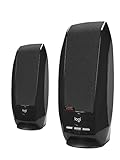
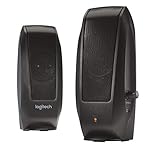
The Logitech S120 is one of the longest-running budget stereo PC speaker designs available — a small, mains-powered 2.0 set with a 3.5mm audio input and a front-mounted volume control and headphone jack, priced around $25. It dispenses with everything modern: no Bluetooth, no USB audio, no app and no RGB. What you get instead is a tidy pair of stereo speakers that plug into the wall, take a 3.5mm cable from the PC and produce reliable near-field audio without surprises. This Logitech S120 review covers the sound quality and bass response, connectivity and controls, build, setup, who they are for and a verdict on whether they still earn a place on a 2026 desk.

Anker soundcore Upgraded Bluetooth Speaker, IPX5 Waterproof, Stereo Sound | 24H Playtime, Portable Wireless Speaker for iPhone, Samsung and More



As an Amazon Associate we earn from qualifying purchases. Product prices and availability are accurate as of the date/time indicated.
🛒 Best Price Today on Amazon
Prime members get fast, free shipping on everything above, plus member-only deals. New members get a 30-day free trial — cancel anytime.
As an Amazon Associate we earn from qualifying purchases.
Check Price on Amazon →





Logitech S120 at a Glance
| Feature | Specification |
|---|---|
| Configuration | 2.0 stereo (two satellites, no subwoofer) |
| Total power output (RMS / Peak) | 1.2W RMS / 2.3W Peak total |
| Driver size | Approx. 2-inch full-range per satellite |
| Frequency response | Not documented by manufacturer; typical compact 2.0 range |
| Connectivity | 3.5mm analogue input; mains power |
| Controls | Front-mounted volume / power knob |
| Headphone output | Yes (front 3.5mm) |
| Subwoofer | No (2.0 stereo design) |
| Approx. price | Around $25 |
Sound Quality & Bass Response
Before getting into the specifics of this speaker system it is worth a brief refresher on the technical choices that shape any PC speaker review: channel configuration (2.0 versus 2.1), power delivery (USB-bus power versus mains power) and connection type (3.5mm analogue, USB digital or Bluetooth). A 2.0 system consists of two stereo satellite speakers with the bass and treble drivers contained within each cabinet — simple, tidy and the right answer for the majority of desk setups where the speakers sit either side of a monitor. A 2.1 system adds a dedicated subwoofer, which usually lives on the floor and reproduces the lowest frequencies. The advantage is genuine low-end extension for games, films and electronic music; the trade-off is desk and floor footprint plus extra cabling. Most office and casual-gaming users are well served by a competent 2.0 set; gamers and film viewers who want chest-thumping bass benefit from 2.1.
Power matters too. USB-bus-powered speakers — the Amazon Basics Stereo, Logitech S150 and original Creative Pebble belong here — draw their power from the computer’s USB port and produce modest, near-field volume that suits a single user at a desk. Mains-powered speakers (such as the Edifier R1280T, Logitech Z313 and Klipsch ProMedia 2.1) draw from a wall outlet and can drive much louder, fuller sound, with room to fill a small or medium room. As a rule, USB-powered 2.0 sets sit in the budget tier and prioritise convenience; mains-powered 2.0 and 2.1 sets occupy the mid and upper tiers and prioritise sound quality and headroom. The Creative Pebble V2 sits in between — USB-C bus-powered but with a higher 8W RMS rating than the original Pebble.
Finally, connectivity. The traditional PC speaker input is a single 3.5mm analogue jack, which works with any computer, console, phone or tablet with a headphone output. USB speakers add a digital audio path, bypassing the PC sound card and often acting as a USB sound card themselves. Bluetooth, where present, allows wireless playback from a phone or tablet, which is useful when the same speakers are used for music as well as PC audio — the Edifier R1280T is a good example of a desk speaker that adds RCA inputs but keeps to wired connections. A headphone output on the speaker unit is a quietly important convenience: a forward-facing 3.5mm jack lets you plug headphones into the speakers themselves rather than reaching behind the PC each time you want a private listening session.
The S120 is built around a modest 1.2W RMS total output, and the sound character reflects that — clean, controlled and adequate for desk-distance listening rather than impressive or loud. Voice content and dialogue come through clearly with the slightly forward, no-nonsense character that Logitech tunes into its budget speakers. Music is pleasant at quiet to moderate volume; push the knob toward the top and the small drivers and limited amplification start to lose composure, which is expected at this power tier. Bass response is modest — there is no dedicated woofer and the small full-range drivers do not produce real low end. Compared with the USB-powered Amazon Basics or Creative Pebble pairs in this guide, the S120 is in the same broad performance class: a competent budget 2.0 set rather than a film or gaming powerhouse. For genuine low end, see our best 2.1 PC speakers guide.
Connectivity & Controls
Connectivity is deliberately minimal: a 3.5mm analogue jack from the PC, laptop, tablet or phone, plus a mains power lead. There is no USB audio path, no Bluetooth and no RCA — which keeps compatibility broad (anything with a headphone output) and operation predictable. The front of the right cabinet carries a single rotary knob combining on/off and volume, easy to reach without looking. The standout convenience compared with USB-bus-powered budget rivals is the front-mounted 3.5mm headphone output: plug headphones into the speaker rather than reaching behind the PC tower, and the speaker output mutes automatically. That single feature alone makes the S120 more useful on a shared family desk than several USB rivals at the price.
Build & Aesthetics
The S120’s cabinet design is older than most current PC speakers, and that shows — small, rectangular, matte-black plastic boxes with a simple front grille and an unobtrusive Logitech logo. There is no RGB, no aggressive styling and no software story. The look is functional rather than fashionable, which is genuinely useful for the buyer who wants something tidy on an office desk or in a household where speakers should disappear. Build quality is acceptable for the price — the plastic is not premium but the units are solid enough on the desk, the cable lengths are sensible and the front knob has a positive feel. Don’t expect to be impressed; do expect them to keep working for years, as the long sales history suggests.
Setup & Placement
Setup is as simple as any speaker in this guide. Plug the mains lead into a wall socket, run the 3.5mm cable from the right cabinet to the PC headphone output, turn the front knob on and audio appears — no driver to install, no software, no pairing. Placement-wise, the S120 rewards the same basic care any 2.0 set asks for: keep the two satellites symmetrical either side of the monitor, leave a small gap between each cabinet and the back wall to avoid muddy reflections, and try to get the drivers close to ear height. The cabinets are small enough to sit on either side of even a compact monitor base without crowding the desk. Wider category coverage is in our best PC speakers guide.
Who It’s For
The Logitech S120 is for the buyer who wants a no-nonsense, mains-powered 2.0 set with a useful headphone passthrough at the lowest practical price, and does not need wireless connectivity or deep bass. If you are setting up a family computer, a quiet office machine, a kid’s homework station or a kitchen PC and you want predictable, undemonstrative audio with a front headphone jack so the family can use the same desk without rewiring, the S120 is well judged. It is not for gamers chasing film-grade bass (the Z313 or ProMedia in this guide are better choices) and not for buyers who want Bluetooth (consider an Edifier alternative). For the tidy, shared desk, it is a sensible default. The budget tier is covered in our best budget PC speakers guide.
Pros and Cons
Pros: Useful front-mounted 3.5mm headphone output (rare at the price); mains powered for a more stable signal than USB-bus designs; tidy, neutral styling; long-proven reliability; very low price.
Cons: Only 1.2W RMS total — modest volume and bass; no Bluetooth, USB audio or RGB; older, unfashionable cabinet design; no microphone input.
Verdict
At around $25 the Logitech S120 is a sensible, no-frills budget desktop 2.0 set, and the front-mounted headphone passthrough is the feature that earns it a place on a shared family or office desk where USB-bus rivals fall short. Buyers chasing genuine low-end or modern features such as Bluetooth or RGB should look elsewhere — the Edifier R1280T, Logitech Z313 and Klipsch ProMedia in this guide all address those needs better. For the buyer who simply wants reliable, tidy audio plus the convenience of a front headphone jack at the lowest practical price, the S120 still earns a quiet recommendation. Compare with other simple options in our best USB-powered speakers guide.
Frequently Asked Questions
Do the Logitech S120 speakers need mains power?
Yes. Unlike the USB-bus-powered budget options in this guide, the S120 has a mains power lead and plugs into a wall socket.
Do the Logitech S120 have a headphone jack?
Yes. There is a front-mounted 3.5mm headphone output on the right cabinet, and inserting a headphone plug automatically mutes the speaker output.
Are the Logitech S120 speakers loud?
No. With 1.2W RMS total power, they are sized for desk-distance listening rather than filling a room. For louder volume, look at the Edifier R1280T or any 2.1 set in this guide.
Do the Logitech S120 speakers support Bluetooth?
No. They use a wired 3.5mm analogue input only. For wireless connectivity, the Edifier R1280T is a better starting point.
More PC Speaker Reviews
- Edifier R1280T Powered Bookshelf Speakers Review (2.0)
- Amazon Basics USB-Powered Computer Speakers Review
- Logitech Z313 2.1 Multimedia Speaker System Review
- Logitech Z130 PC Speakers Stereo 2.0 Review
- Logitech S150 USB Speakers Review (Digital Sound)
- Redragon GS520 RGB Desktop Speakers 2.0 Review
- Klipsch ProMedia 2.1 THX Computer Speaker System Review
- Creative Pebble V2 USB-C Computer Speakers Review
Affiliate Disclosure: As an Amazon Associate, we earn from qualifying purchases. If you click a link and make a purchase, we may earn a small commission at no extra cost to you. Prices and availability are accurate as of publication and may change.
Related Articles
Looking for more on this topic? Browse the hand-picked guides below — each one applies the same scoring rubric used in this review.










