

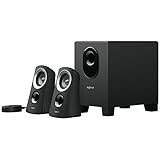
The Logitech Z313 is the cheapest properly built 2.1 speaker system on most buyers’ shortlists — two compact satellite speakers and a down-firing subwoofer, with a wired desktop control pod and a single 3.5mm input, priced around $50. It exists for the buyer who has decided that 2.0 desktop pairs do not provide enough low-end for gaming or films and is unwilling to step up to the Logitech Z623 or Klipsch ProMedia tier. This Logitech Z313 review covers the sound quality and bass response, connectivity and controls, build, setup, who they suit and a verdict on whether they remain a sensible 2026 purchase.
🛒 Best Price Today on Amazon
Prime members get fast, free shipping on everything above, plus member-only deals. New members get a 30-day free trial — cancel anytime.
As an Amazon Associate we earn from qualifying purchases.



Check Price on Amazon →

Logitech Z313 at a Glance
| Feature | Specification |
|---|---|
| Configuration | 2.1 (two satellites + dedicated subwoofer) |
| Total power output (RMS / Peak) | 25W RMS / 50W Peak |
| Driver size | Approx. 2-inch full-range satellites + ~5.25-inch down-firing sub driver |
| Frequency response | Not fully documented; subwoofer extends well below satellite-only response |
| Connectivity | 3.5mm analogue input; mains power |
| Controls | Wired desktop control pod with volume / power / headphone jack |
| Headphone output | Yes (on control pod) |
| Subwoofer | Yes — compact down-firing |
| Approx. price | Around $50 |
Sound Quality & Bass Response
Before getting into the specifics of this speaker system it is worth a brief refresher on the technical choices that shape any PC speaker review: channel configuration (2.0 versus 2.1), power delivery (USB-bus power versus mains power) and connection type (3.5mm analogue, USB digital or Bluetooth). A 2.0 system consists of two stereo satellite speakers with the bass and treble drivers contained within each cabinet — simple, tidy and the right answer for the majority of desk setups where the speakers sit either side of a monitor. A 2.1 system adds a dedicated subwoofer, which usually lives on the floor and reproduces the lowest frequencies. The advantage is genuine low-end extension for games, films and electronic music; the trade-off is desk and floor footprint plus extra cabling. Most office and casual-gaming users are well served by a competent 2.0 set; gamers and film viewers who want chest-thumping bass benefit from 2.1.
Power matters too. USB-bus-powered speakers — the Amazon Basics Stereo, Logitech S150 and original Creative Pebble belong here — draw their power from the computer’s USB port and produce modest, near-field volume that suits a single user at a desk. Mains-powered speakers (such as the Edifier R1280T, Logitech Z313 and Klipsch ProMedia 2.1) draw from a wall outlet and can drive much louder, fuller sound, with room to fill a small or medium room. As a rule, USB-powered 2.0 sets sit in the budget tier and prioritise convenience; mains-powered 2.0 and 2.1 sets occupy the mid and upper tiers and prioritise sound quality and headroom. The Creative Pebble V2 sits in between — USB-C bus-powered but with a higher 8W RMS rating than the original Pebble.
Finally, connectivity. The traditional PC speaker input is a single 3.5mm analogue jack, which works with any computer, console, phone or tablet with a headphone output. USB speakers add a digital audio path, bypassing the PC sound card and often acting as a USB sound card themselves. Bluetooth, where present, allows wireless playback from a phone or tablet, which is useful when the same speakers are used for music as well as PC audio — the Edifier R1280T is a good example of a desk speaker that adds RCA inputs but keeps to wired connections. A headphone output on the speaker unit is a quietly important convenience: a forward-facing 3.5mm jack lets you plug headphones into the speakers themselves rather than reaching behind the PC each time you want a private listening session.
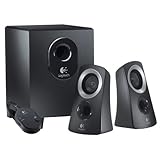
The Z313 is the first speaker in this guide to deliver genuine low end, and that single difference is the whole reason to choose it over a 2.0 desktop pair. The compact down-firing subwoofer adds the body and rumble that small satellite drivers cannot produce — explosions in games and films have weight, electronic music has a kick drum that you feel as well as hear, and music with prominent bass lines is rendered with body that the Creative Pebble or Amazon Basics pairs cannot match. The two small satellites handle the mid-range and treble well enough for the price tier; they will not match the precision of the Edifier R1280T bookshelf pair, but they are no worse than other 2.1 satellites at this budget. The 25W RMS total is modest by 2.1 standards — for genuinely loud, room-filling 2.1 audio, the Logitech Z623 (400W peak) or Klipsch ProMedia 2.1 are the obvious step ups. But for the desk-bound user who wants real bass for the lowest practical price, the Z313 is well judged. The wider 2.1 category is covered in our best 2.1 PC speakers guide.
Connectivity & Controls
Connectivity is minimal: a single 3.5mm analogue input feeds audio in from the PC, laptop, phone, tablet or console. There is no USB audio path, no Bluetooth and no RCA. That breadth of compatibility is fine for the price tier, but buyers who want wireless playback should look at the Z623 (which adds RCA) or any Bluetooth-equipped Edifier. The standout convenience is the wired desktop control pod: a small cradle that sits on the desk and carries a power button, a volume dial and a 3.5mm headphone jack. The control pod is the right answer for a system with a subwoofer on the floor — you do not have to reach down to adjust volume, and the headphone jack means you can plug headphones into the speaker system rather than swapping cables on the back of the PC.
Build & Aesthetics
Build is functional rather than premium. The two satellite cabinets are small black plastic boxes; the subwoofer is a compact black wood-effect cube with a down-firing driver and integrated amplification. The wired desktop control pod is genuinely useful but undeniably budget-styled. There is no RGB, no aggressive styling and no software. The overall impression on the desk is tidy without being remarkable — the satellites take up roughly the same space as a Creative Pebble pair, the subwoofer hides under the desk and the control pod sits unobtrusively next to a mousepad. The Z313 has been on sale for many years; the design has not been refreshed but the long sales history is itself evidence that buyers find it does the job.
Setup & Placement
Setup is straightforward for a 2.1 system. Connect the two satellite cables to the subwoofer (the sub contains the amplification for the system), connect the control pod to the subwoofer, run the 3.5mm cable from the control pod to the PC headphone output, plug the subwoofer into mains and switch on. Placement should follow standard 2.1 practice: place the two satellites symmetrically either side of the monitor, ideally close to ear height when seated, and put the subwoofer on the floor either between or to one side of your seated position. Down-firing subwoofers need a small amount of breathing space below the driver — they should sit on a firm floor surface, not on a thick carpet that chokes the driver. Compare with mid-tier 2.1 options in our best gaming speakers guide.
Who It’s For
The Z313 is for the buyer who wants a real subwoofer in the audio chain at the lowest practical price and does not need flagship 2.1 volume or extra inputs. If you spend serious time gaming or watching films on a desk, find that 2.0 desktop speakers feel thin in the low end, and value the convenience of a wired control pod with a headphone jack, the Z313 is squarely your system. It is not for buyers who want chest-thumping concert volume — the Z623 and ProMedia 2.1 in this guide go significantly louder — and not for buyers who want Bluetooth or RCA, both of which are absent. For the budget 2.1 desk, the Z313 is the defining choice. Bigger 2.1 systems are covered in our best 2.1 PC speakers guide.
Pros and Cons
Pros: Real subwoofer at a low price; useful wired desktop control pod with headphone jack; tidy desk satellites that do not crowd a typical monitor; long-proven reliability; significantly more low-end than any budget 2.0 set in this guide.
Cons: Only 25W RMS — modest by 2.1 standards; no Bluetooth or RCA inputs; satellites are not premium-grade; subwoofer is small and will not satisfy buyers who want film-grade rumble.
Verdict
At around $50 the Logitech Z313 is a sensible, defining choice for the desk-bound user who wants real low-end audio without spending serious money. It is unambitious in volume and inputs, but the subwoofer is the entire point — for any buyer stepping up from a 2.0 desktop pair, the difference in low-end weight is significant and obvious. Bass-hungry gamers should consider stretching to the Z623 (which goes very significantly louder); buyers who want Bluetooth or hi-fi character should look at the Edifier R1280T family. For everyone else at this price who simply wants a subwoofer in the chain, the Z313 is the obvious answer. Compare with premium 2.1 in our best THX-certified speakers guide.
Frequently Asked Questions
How loud is the Logitech Z313?
It is rated at 25W RMS total (50W peak), which is moderate by 2.1 standards — fine for desk listening, but the Z623 (400W peak) or Klipsch ProMedia in this guide are significantly louder.
Does the Logitech Z313 have Bluetooth?
No. It uses a single 3.5mm analogue input and there is no wireless connectivity in this model.
Where does the Logitech Z313 subwoofer go?
The subwoofer is a compact down-firing design intended to sit on the floor under or next to the desk, on a firm surface rather than a thick carpet.
Can you plug headphones into the Logitech Z313?
Yes. The wired desktop control pod includes a 3.5mm headphone jack, so you can plug headphones into the speaker system without rewiring at the back of the PC.
More PC Speaker Reviews
- Logitech Z130 PC Speakers Stereo 2.0 Review
- Logitech S150 USB Speakers Review (Digital Sound)
- Redragon GS520 RGB Desktop Speakers 2.0 Review
- Klipsch ProMedia 2.1 THX Computer Speaker System Review
- Creative Pebble V2 USB-C Computer Speakers Review
- Logitech Z623 400W 2.1 THX Speaker System Review
- Amazon Basics Stereo 2.0 PC Speakers Review (USB-Powered)
- Creative Pebble 2.0 Channel Stereo Speakers Review
Affiliate Disclosure: As an Amazon Associate, we earn from qualifying purchases. If you click a link and make a purchase, we may earn a small commission at no extra cost to you. Prices and availability are accurate as of publication and may change.
Related Articles
Looking for more on this topic? Browse the hand-picked guides below — each one applies the same scoring rubric used in this review.










