

- Top Pick: Patriot Viper Venom DDR5 RAM 16GB (2X8GB) 6000MT/s CL36 Desktop Memory
- Best Value: Crucial Pro 32GB DDR5 RAM Kit (2x16GB),CL36 6000MHz, Overclocking Desktop Gaming Memory, Intel XMP 3.0 & AMD Expo Compatible, Black – CP2K16G60C36U5B
- Premium Choice: CORSAIR Vengeance RGB DDR5 RAM 32GB (2x16GB) Up to 6000MHz CL36-44-44-96 1.35V Intel XMP 3.0 Desktop Computer Memory – White (CMH32GX5M2E6000C36W)
Overclocking memory is about squeezing more out of the kit you buy: pushing the frequency higher, tightening the timings, or simply hitting the rated speed reliably through an XMP profile. The kits that overclock best start from a strong foundation — a high rated frequency, tight CAS latency, quality ICs and a robust XMP profile that gives the memory controller room to stretch. For enthusiasts who like to tune their system in the BIOS, the right kit turns a good build into a fast one. This guide rounds up the best RAM for overclocking in 2026, focused on high-speed, tight-timing DDR4 kits with proven headroom.
- Best RAM for Overclocking at a Glance
- 1. CORSAIR Vengeance RGB PRO SL DDR4 32GB (2x16GB) 3600MHz CL18
- 2. G.SKILL RipjawsV Series DDR4 (XMP) 32GB (2x16GB) 3200MT/s CL16
- 3. CORSAIR Vengeance RGB PRO DDR4 32GB (2x16GB) 3200MHz CL16
- 4. CORSAIR Vengeance LPX DDR4 32GB (2x16GB) up to 3200MHz CL16
- 5. Corsair Vengeance LPX DDR4 16GB (2x8GB) 3200MHz CL16-18-18-36
- 6. CORSAIR Vengeance RGB PRO DDR4 16GB (2x8GB) 3200MHz CL16-18-18-36
- How to Choose RAM for Overclocking
- Frequently Asked Questions
- Related Guides
- Related Articles
Our picks were chosen on what genuinely drives an overclock: rated speed and the XMP profile behind it, CAS latency relative to that speed, capacity, and value. We have ordered the list to lead with the kits that give the most tuning headroom and finish with solid, easy-XMP foundations. We avoid quoting invented overclock results — every chip is different, so we describe where each kit starts and what it is built for, with prices from around $119 up to around $274. The list spans value 16GB kits and 32GB performance kits across 3200 and 3600MHz speed grades. Below is an at-a-glance comparison of all six, then a closer look at each and a buyer’s guide built around XMP, timings and headroom.
As an Amazon Associate we earn from qualifying purchases at no extra cost to you.


🛒 Best Price Today on Amazon
Prime members get fast, free shipping on everything above, plus member-only deals. New members get a 30-day free trial — cancel anytime.
Best RAM for Overclocking at a Glance
| Memory Kit | Best For | Standout Spec | Approx Price |
|---|---|---|---|
| Corsair Vengeance RGB PRO SL 32GB 3600 CL18 | Highest-speed XMP headroom | 3600MHz, slim SL profile, RGB | around $259 |
| G.SKILL Ripjaws V 32GB 3200 CL16 (XMP) | Tight-timing tuning base | CL16 XMP, proven OC ICs | around $240 |
| Corsair Vengeance RGB PRO 32GB 3200 CL16 | 32GB RGB tuning kit | 32GB, CL16, iCUE RGB | around $274 |
| Corsair Vengeance LPX 32GB 3200 CL16 | Cooler-clearance OC kit | Low-profile LPX, CL16 | around $220 |
| Corsair Vengeance LPX 16GB 3200 CL16 | Budget OC starter | 2x8GB CL16, low profile | around $119 |
| Corsair Vengeance RGB PRO 16GB 3200 CL16 | Entry RGB tuning kit | 2x8GB CL16, iCUE RGB | — |
1. CORSAIR Vengeance RGB PRO SL DDR4 32GB (2x16GB) 3600MHz CL18

CORSAIR Vengeance DDR5 64GB (2x32GB) DDR5 6000MHz CL30 AMD EXPO Intel XMP iCUE Compatible Computer Memory – Gray (CMK64GX5M2B6000Z30)


As an Amazon Associate we earn from qualifying purchases. Product prices and availability are accurate as of the date/time indicated.
The Corsair Vengeance RGB PRO SL leads the overclocking list because it starts from the highest rated speed here — 3600MHz — across two 16GB modules with a CL18 timing, all in a slimmer ‘SL’ heat spreader designed to clear tall air coolers. That higher baseline frequency is exactly what an overclocker wants: more starting headroom to push further or to tighten timings. At around $259 it is the premium pick and the natural choice for tuning enthusiasts.
This is the kit for the builder who wants to chase frequency and brings a capable board to the table. Starting at 3600MHz gives the memory controller a running start, the CL18 timing leaves room to tighten as you tune, and the slim SL profile keeps the modules out of the way of large coolers during your experiments. With iCUE-controlled RGB and a generous 32GB capacity, it is the showpiece overclocking kit on the list and our lead recommendation for headroom.
Pros: Highest 3600MHz starting speed, room to tighten CL18, slim cooler-friendly SL profile.
Cons: Highest price here; results depend on your CPU and motherboard.
2. G.SKILL RipjawsV Series DDR4 (XMP) 32GB (2x16GB) 3200MT/s CL16

G.SKILL RipjawsV Series DDR4 RAM (XMP) 32GB (2x16GB) Up to 3200MT/s* CL16-18-18-38 1.35V Intel AMD Desktop Computer Memory U-DIMM - Black (F4-3200C16D-32GVK)


As an Amazon Associate we earn from qualifying purchases. Product prices and availability are accurate as of the date/time indicated.
The G.SKILL Ripjaws V is the tight-timing tuning base of this list, and a long-time favorite among overclockers for the quality of its ICs. It delivers 32GB across two 16GB modules at 3200MT/s with a tight CL16 timing and a well-behaved XMP profile that snaps to rated speed with one click. At around $240 it is the kit to buy when you want a dependable, proven foundation to tune from.
This is the kit for the enthusiast who values tight timings and a reputation for tuning well over the highest headline frequency. The CL16 base at 3200MT/s is already snappy, the Ripjaws V line is renowned for responding to manual timing and voltage tweaks, and XMP makes hitting the rated profile effortless before you start experimenting. For a 32GB kit that gives you a strong, predictable starting point for overclocking, the Ripjaws V is hard to beat and earns its place near the top.
Pros: Tight CL16 base, well-regarded overclocking ICs, clean XMP profile, large 32GB capacity.
Cons: Plain styling; manual tuning takes time and BIOS know-how.
3. CORSAIR Vengeance RGB PRO DDR4 32GB (2x16GB) 3200MHz CL16

CORSAIR VENGEANCE LPX DDR4 RAM 16GB (2x8GB) 3600MHz CL18-22-22-42 1.35V Intel AMD Desktop Computer Memory - Black (CMK16GX4M2D3600C18)
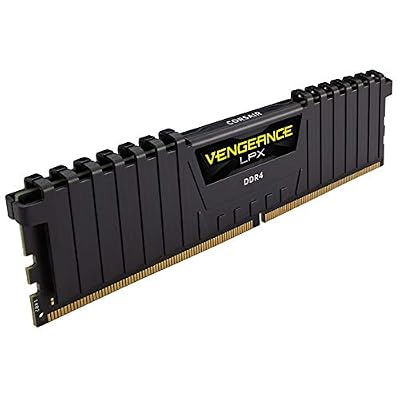

As an Amazon Associate we earn from qualifying purchases. Product prices and availability are accurate as of the date/time indicated.
The Corsair Vengeance RGB PRO 32GB kit is the RGB tuning option for builders who want lighting alongside headroom. It offers 32GB across two 16GB modules at 3200MHz with a tight CL16 timing and Corsair’s well-regarded RGB lighting, tied into the iCUE ecosystem. At around $274 it is priced at the top of this group, reflecting the capacity-plus-RGB combination.
This is the kit for the enthusiast who tunes in the BIOS but also wants their memory to look the part in a windowed build. The CL16 base at 3200MHz is a solid, responsive starting point for tightening timings or nudging frequency, the 32GB capacity gives headroom for heavy multitasking, and the iCUE RGB lets you coordinate lighting with the rest of your system. For an overclocking-friendly 32GB kit that does not sacrifice show for tuning potential, the Vengeance RGB PRO fits well.
Pros: Tight CL16 32GB base, attractive iCUE RGB, solid tuning foundation for showcase builds.
Cons: Priciest in this group; lighting adds cost over plain kits.
4. CORSAIR Vengeance LPX DDR4 32GB (2x16GB) up to 3200MHz CL16

CORSAIR Vengeance LPX DDR4 RAM 32GB (2x16GB) Up to 3200MHz CL16-20-20-38 1.35V Intel XMP AMD EXPO Computer Memory – Black (CMK32GX4M2E3200C16)


As an Amazon Associate we earn from qualifying purchases. Product prices and availability are accurate as of the date/time indicated.
The Corsair Vengeance LPX 32GB kit is the cooler-clearance overclocking pick. It delivers 32GB across two 16GB modules at up to 3200MHz with a tight CL16 timing in Corsair’s famously low-profile LPX heat spreaders, which clear tall CPU air coolers and tight cases. At around $220 it is a proven, no-nonsense kit that tuners reach for when clearance matters.
This is the kit for the overclocker who runs a big air cooler and wants tight timings without RGB getting in the way. The CL16 base at 3200MHz gives a responsive starting point to tune from, the low-profile LPX design ensures the modules never collide with a large heatsink during installation or experimentation, and the LPX line has a long track record of reliability. For a dependable, clearance-friendly 32GB foundation to overclock, the Vengeance LPX is an easy recommendation.
Pros: Tight CL16 32GB base, low-profile LPX for cooler clearance, proven reliability.
Cons: No RGB; tuning beyond XMP still requires BIOS effort.
5. Corsair Vengeance LPX DDR4 16GB (2x8GB) 3200MHz CL16-18-18-36

CORSAIR Vengeance DDR5 32GB (2 x 16GB) Up to 6000MHz AMD Intel RAM | Desktop Gaming Memory, AMD EXPO & Intel XMP 3.0 Compatible, CL30, Grey, CMK32GX5M2B6000Z30


As an Amazon Associate we earn from qualifying purchases. Product prices and availability are accurate as of the date/time indicated.
The Corsair Vengeance LPX 16GB kit is the budget overclocking starter. It is a 2x8GB dual-channel kit running 3200MHz with a tight CL16-18-18-36 timing set and Corsair’s low-profile LPX heat spreaders, available for around $119 — the cheapest entry on this list. For a tuner on a tight budget, it is a sensible place to begin.
This is the kit for the enthusiast learning to overclock or building a value-focused gaming PC who still wants to tune. The CL16 base at 3200MHz is a responsive starting point, the 16GB capacity suits 1080p gaming, and the low-profile design keeps clearance simple under any cooler. You will not have the 32GB headroom of the larger kits, but for cutting your teeth on XMP and manual timing tweaks without spending much, this affordable LPX kit is a practical choice.
Pros: Affordable tight-timing CL16 base, low-profile design, fine starter for tuning.
Cons: Only 16GB; less suited to heavy multitasking workloads.
6. CORSAIR Vengeance RGB PRO DDR4 16GB (2x8GB) 3200MHz CL16-18-18-36

CORSAIR Vengeance RGB DDR5 RAM 32GB (2x16GB) 6400MHz CL36-48-48-104 1.35V AMD EXPO Intel XMP 3.0 Desktop Computer Memory – Gray (CMH32GX5M2B6400Z36)


As an Amazon Associate we earn from qualifying purchases. Product prices and availability are accurate as of the date/time indicated.
Rounding out the list is the Corsair Vengeance RGB PRO 16GB kit, the entry RGB tuning pick. It pairs a 3200MHz speed with a tight CL16-18-18-36 timing across two 8GB modules and adds Corsair’s iCUE RGB lighting, giving budget-conscious tuners a base to overclock from that also looks the part. It is a popular, widely available kit at an accessible price point.
This is the kit for someone who wants to dip into overclocking on a value 16GB build but still cares about a coordinated, lit system. The CL16 base at 3200MHz responds well to XMP and modest tuning, the 16GB capacity covers mainstream gaming, and the iCUE RGB ties the modules into the rest of your lighting. For an affordable, good-looking starting point to learn memory overclocking, the Vengeance RGB PRO 16GB rounds out the list neatly.
Pros: Tight CL16 base with RGB, iCUE integration, accessible entry tuning kit.
Cons: 16GB capacity; meaningful gains still need manual BIOS work.
How to Choose RAM for Overclocking
Overclocking RAM starts with picking a kit that gives you somewhere to go. The rated speed is your launch pad: a kit that already ships at 3600MHz, like the Vengeance RGB PRO SL here, gives the memory controller more starting headroom than one rated at 3200MHz. That said, the lower-rated CL16 kits often respond beautifully to manual tightening because of the quality of their ICs, so headroom can mean either pushing frequency higher or squeezing the timings tighter — decide which kind of tuning interests you.
Timings are the other half of the equation, and lower CAS latency at a given speed is the goal. The CL16 kits on this list — the Ripjaws V, both LPX kits and the Vengeance RGB PRO models — start tighter than the CL18 RGB PRO SL, which trades a looser timing for higher frequency. When you overclock, you are balancing speed against stability at a given timing: push the frequency and you may need to loosen timings, or hold the frequency and tighten them. The best overclocking kits give you room to play with both.
XMP is what makes the rated speed accessible in the first place, and it matters for every kit here. Out of the box, DDR4 typically runs at a slow default until you enable the XMP profile in the BIOS, which applies the rated frequency, timings and voltage with one click — your guaranteed, validated overclock. From there, manual tuning is where enthusiasts find extra performance, but it takes BIOS knowledge, patience and stability testing. A clean, robust XMP profile, like those on the G.SKILL and Corsair kits, is the dependable foundation every manual overclock should build on.
Finally, remember that overclocking results are never guaranteed, because they depend on your specific CPU’s memory controller, your motherboard and even the individual modules — the famed ‘silicon lottery.’ Confirm your board supports the speeds you are targeting, keep cooling and clearance in mind (the low-profile LPX kits help here), and treat the rated XMP speed as the result you can count on, with anything beyond it a bonus. Pick a kit with a strong rated speed and tight timings, learn your BIOS, test for stability, and choose the kit on this list that matches your tuning ambitions.
Frequently Asked Questions
What makes a RAM kit good for overclocking?
A strong starting point: a high rated frequency, tight CAS latency, quality memory ICs, and a robust XMP profile. Kits like the 3600MHz Vengeance RGB PRO SL give frequency headroom, while tight CL16 kits such as the G.SKILL Ripjaws V respond well to manual timing tweaks. The better the foundation, the more room you have to push speed higher or tighten timings during tuning.
Is enabling XMP the same as overclocking?
Essentially, yes — it is a one-click, manufacturer-validated overclock. DDR4 usually boots at a slow default speed until you enable the XMP profile in the BIOS, which applies the kit’s rated frequency, timings and voltage. That is the guaranteed performance you paid for. Manual overclocking goes beyond XMP to push further, but XMP is the dependable baseline every kit here is built around.
Will overclocking RAM damage my system?
Sticking to a kit’s rated XMP profile is safe and supported. Manual overclocking carries some risk if you apply excessive voltage or run unstable settings, which can cause crashes or, in extremes, hardware stress — so raise frequency and voltage gradually and test for stability. For most users, enabling XMP and perhaps modestly tightening timings delivers the gains without meaningful risk.
Do my CPU and motherboard limit how far I can overclock RAM?
Absolutely. Your CPU’s integrated memory controller, your motherboard’s design and the individual modules all set the ceiling — the ‘silicon lottery’ means two identical kits can overclock differently. Always check your motherboard’s supported memory speeds, and treat the rated XMP speed as guaranteed with anything beyond it dependent on your specific hardware.
Related Guides
- Best RAM for Gaming
- Best DDR4 RAM Kits
- Best RGB RAM
- Best CPU Coolers for Overclocking
- Best Motherboards for Overclocking
- Best Gaming PCs
Affiliate Disclosure: As an Amazon Associate, we earn from qualifying purchases. If you click a link and make a purchase, we may earn a small commission at no extra cost to you. Prices and availability are accurate as of publication and may change.










