

A home-office keyboard has a very different job from a gaming board: it needs to be quiet enough for video calls, comfortable enough for full working days, and tidy enough to keep a desk clear of cables. Where a gaming keyboard chases speed and RGB, the best work keyboards lean into low-profile comfort, reliable wireless, a full number pad for spreadsheets, and long battery life you can forget about. This guide rounds up the best keyboards for the home office in 2026 across the styles people actually shop for: simple full-size wireless boards, complete keyboard-and-mouse combos, and slim metal-framed designs that look the part on a clean desk.
- Best Keyboards for the Home Office at a Glance
- 1. Logitech K270 Wireless Keyboard for Windows, 2.4 GHz Wireless, Full-Size, Number Pad
- 2. Logitech MK345 Wireless Keyboard and Mouse Combo with Palm Rest, 2.4 GHz USB Receiver
- 3. Arteck 2.4G Wireless Keyboard Stainless Steel Ultra Slim Full Size Keyboard
- 4. Logitech K350 Wireless Wave Keyboard with Unifying Wireless Technology, Black
- 5. Redragon S101M-KS Gaming Keyboard and Mouse Wireless with Tri-Mode, RGB Keyboard
- 6. Logitech MK120 Wired Keyboard and Mouse Combo for Windows, Optical Wired Mouse
- How to Choose a Home-Office Keyboard
- Frequently Asked Questions
- Related Guides
- Related Articles
Our picks were chosen on what genuinely matters for working from home: quiet, comfortable typing, a stable wireless connection, a full-size layout with a number pad, and value. We have included a deliberate price spread — from around $17 up to around $55 — because the best office keyboard is the one that fits your desk, your typing style and your budget rather than the most expensive one. Whether you want a no-fuss wireless board, a matching combo with a palm rest, or a tri-mode keyboard that pairs with a laptop and a desktop at once, there is an option here. Below you will find an at-a-glance comparison, then a closer look at each keyboard and a buyer’s guide covering what really matters for a productive, comfortable home-office setup.
As an Amazon Associate we earn from qualifying purchases at no extra cost to you.



🛒 Best Price Today on Amazon
Prime members get fast, free shipping on everything above, plus member-only deals. New members get a 30-day free trial — cancel anytime.
Best Keyboards for the Home Office at a Glance
| Keyboard | Best For | Standout Spec | Approx Price |
|---|---|---|---|
| Logitech K270 Wireless | Simple quiet typing | Full-size, 2.4GHz wireless | around $25 |
| Logitech MK345 Combo with Palm Rest | All-day comfort | Keyboard + mouse, palm rest | around $38 |
| Arteck 2.4G Stainless Steel Slim | Premium slim look | Stainless steel, ultra-slim | around $30 |
| Logitech K350 Wave Ergonomic | Curved ergonomic typing | Wave key layout, Unifying | around $40 |
| Redragon S101M-KS Tri-Mode Combo | Multi-device flexibility | Tri-mode wireless, combo | around $55 |
| Logitech MK120 Wired Combo | Reliable budget basics | Wired keyboard + mouse | around $18 |
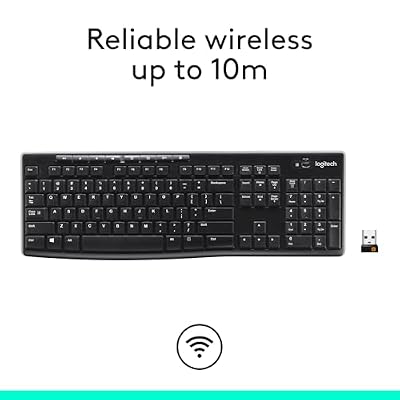
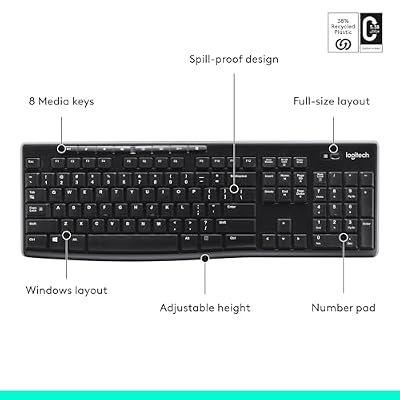
1. Logitech K270 Wireless Keyboard for Windows, 2.4 GHz Wireless, Full-Size, Number Pad






As an Amazon Associate we earn from qualifying purchases. Product prices and availability are accurate as of the date/time indicated.
The Logitech K270 is the pick for anyone who wants a simple, quiet, reliable keyboard for everyday work and nothing they have to think about. It is a full-size 2.4GHz wireless board with a number pad, a familiar layout, and a tiny USB receiver, and it runs on long-life batteries Logitech rates in years rather than weeks. At around $25 it is the value default for a tidy home-office desk.
For a home office this is exactly the intent it serves: the low-profile keys are quiet enough not to intrude on calls, the full layout with a number pad keeps spreadsheet and data entry comfortable, and the wireless receiver clears one more cable off the desk. There is no software to learn and no lighting to manage — you plug in the receiver and start typing. If your priority is a dependable, quiet, full-size keyboard for work without any fuss, the K270 is the obvious starting point.
Pros: Quiet full-size typing, simple 2.4GHz wireless, very long battery life, great value.
Cons: No Bluetooth or multi-device pairing; plain styling and no backlight.
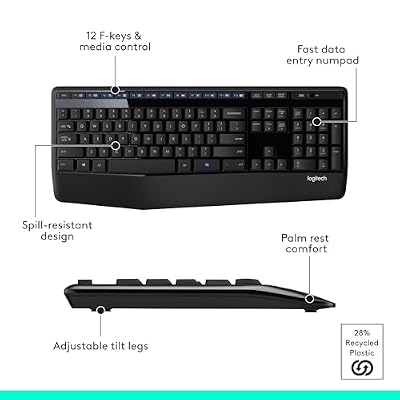
2. Logitech MK345 Wireless Keyboard and Mouse Combo with Palm Rest, 2.4 GHz USB Receiver




As an Amazon Associate we earn from qualifying purchases. Product prices and availability are accurate as of the date/time indicated.
The Logitech MK345 is the all-day-comfort pick, and it arrives as a complete set. It pairs a full-size wireless keyboard featuring an integrated palm rest with a comfortable contoured wireless mouse, both running off a single USB receiver. At around $38 it is a tidy, well-priced way to kit out a desk with matching, comfortable peripherals in one purchase.
This is the combo to choose if you spend long hours at the keyboard and want support for your wrists built in. The integrated palm rest encourages a more relaxed typing posture through a full working day, the quiet keys suit a shared room or a call-heavy schedule, and the bundled mouse means there is nothing else to buy. With a single receiver powering both devices and long battery life on each, the MK345 is a comfortable, complete home-office solution that keeps the desk clean.
Pros: Built-in palm rest for comfort, matching wireless mouse, single receiver, quiet keys.
Cons: Palm rest is fixed and non-adjustable; 2.4GHz only, no Bluetooth.
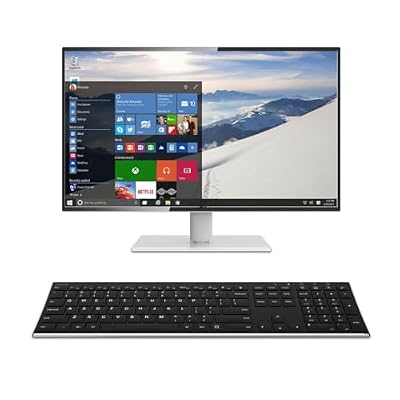
3. Arteck 2.4G Wireless Keyboard Stainless Steel Ultra Slim Full Size Keyboard

Arteck 2.4G USB Wireless Keyboard Full Size Keyboard for Computer/PC/Laptop


As an Amazon Associate we earn from qualifying purchases. Product prices and availability are accurate as of the date/time indicated.
The Arteck 2.4G stainless steel keyboard is the premium-look pick for a minimalist desk. It wraps a full-size, ultra-slim layout in a stainless steel frame, giving it a solid, low-profile feel closer to a laptop chiclet board than a chunky desktop keyboard, and it charges via a built-in rechargeable battery rather than relying on disposables. At around $30 it brings a premium aesthetic to a sensible price.
This is the keyboard for the home worker who cares how the desk looks as well as how it types. The slim chiclet keys are quiet and have a short, laptop-like travel that many people find fast and comfortable for documents and email, the metal frame keeps it rigid and flat, and the full-size layout retains the number pad for figures. The rechargeable battery means no swapping cells. If you want a tidy, good-looking, quiet keyboard that suits a clean modern workspace, the Arteck is a stylish, well-judged choice.
Pros: Premium stainless steel build, ultra-slim quiet keys, rechargeable battery, full-size layout.
Cons: Low-travel chiclet keys are not for everyone; 2.4GHz only.
4. Logitech K350 Wireless Wave Keyboard with Unifying Wireless Technology, Black
As an Amazon Associate we earn from qualifying purchases. Product prices and availability are accurate as of the date/time indicated.
The Logitech K350 Wave is the ergonomic pick of this list. Its signature feature is the constant curve ‘Wave’ key layout, which contours the keys to the natural arc of your fingers, paired with a cushioned palm rest to encourage a more relaxed hand position. It uses Logitech’s Unifying receiver, so a single dongle can also drive a compatible Unifying mouse, and it sits around the $40 mark.
This is the keyboard to choose if long days of typing leave your hands or wrists tired and you want a gentler posture without committing to a fully split ergonomic board. The Wave layout and palm rest ease your hands into a more natural angle, the full-size design keeps the number pad for spreadsheets, and the quiet keys suit a working environment. Unifying support lets you consolidate keyboard and mouse onto one receiver to keep the desk tidy. For comfortable, ergonomic everyday typing at a fair price, the K350 is a long-standing favorite.
Pros: Ergonomic Wave key layout, cushioned palm rest, Unifying receiver, quiet full-size typing.
Cons: Curved layout takes adjustment; not a true split ergonomic board.
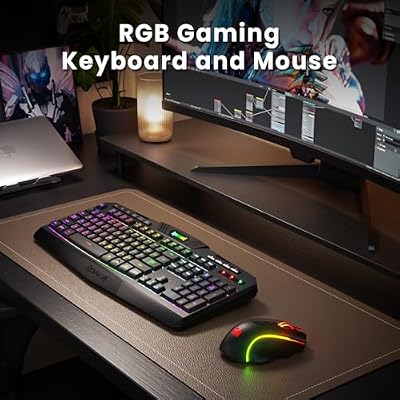
5. Redragon S101M-KS Gaming Keyboard and Mouse Wireless with Tri-Mode, RGB Keyboard

Redragon S101M-KS Gaming Keyboard and Mouse Wireless with Tri-Mode, RGB Keyboard and 4800 DPI Gaming Mouse, 10 Independent Multimedia Keys for Wins, PC, Computer, Wireless S101 Ideal for Gamer



As an Amazon Associate we earn from qualifying purchases. Product prices and availability are accurate as of the date/time indicated.
The Redragon S101M-KS is the multi-device pick, and it is the most flexible connection of the group. It is a wireless keyboard-and-mouse combo with tri-mode connectivity — wired USB, 2.4GHz dongle and Bluetooth — so it can pair with a work laptop, a desktop and a tablet and switch between them. It carries gaming styling with RGB lighting, and at around $55 it is the priciest set here, justified by that connection flexibility.
This is the combo to choose if your home office juggles more than one machine and you want one keyboard to rule them all. Tri-mode connectivity lets you switch between a wired desktop, a Bluetooth tablet and a 2.4GHz laptop without swapping gear, the full-size layout keeps the number pad, and the bundled mouse rounds out the set. Be honest with yourself about the look: this is a gaming-styled board with RGB rather than an understated office piece, and the lighting can be dimmed or switched off for a calmer desk. If multi-device flexibility outranks subtle styling, the S101M-KS delivers.
Pros: Tri-mode connectivity (wired/2.4GHz/Bluetooth), full combo with mouse, switches between devices.
Cons: Gaming-styled RGB rather than subtle office look; highest price here.
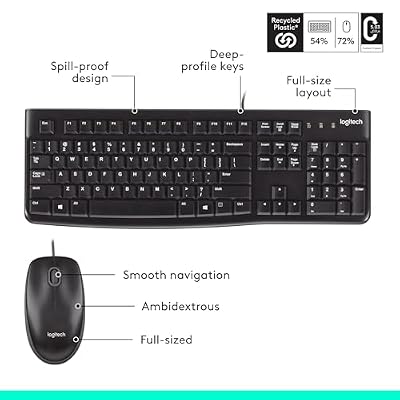
6. Logitech MK120 Wired Keyboard and Mouse Combo for Windows, Optical Wired Mouse




As an Amazon Associate we earn from qualifying purchases. Product prices and availability are accurate as of the date/time indicated.
Rounding out the list is the Logitech MK120, the reliable budget basics pick. It is a no-nonsense wired keyboard-and-mouse combo: a full-size, low-profile keyboard with a number pad and a simple optical mouse, both plug-and-play over USB. At around $18 it is the cheapest set here and the dependable choice for a desk that just needs to work.
This is the combo for the home worker who wants zero maintenance and zero fuss — no batteries to charge, no receiver to lose, no software to install. The wired connection is rock solid and never drops, the spill-resistant keyboard and quiet, low-profile keys suit everyday document and email work, and the full layout keeps the number pad. It will not impress on looks or features, but as an affordable, ultra-reliable wired keyboard and mouse for getting work done, the MK120 is a sensible default that simply works.
Pros: Rock-solid wired connection, full-size quiet layout, mouse included, lowest price here.
Cons: Wired only means a cable on the desk; basic styling and no extras.
How to Choose a Home-Office Keyboard
Choosing a home-office keyboard starts with how it sounds and feels, because you will live with it for hours a day. For work, quiet matters: low-profile, membrane-style keys like those on the K270, MK345 and Arteck here are far less intrusive on video calls and in shared rooms than loud, clicky mechanical switches. Comfort is the partner to quiet — a cushioned palm rest, as on the MK345 and K350 Wave, or a gentle ergonomic curve can make a real difference to your wrists over a long day, so prioritise the typing experience above flashy features.
Connection is the next decision, and it shapes how tidy and flexible your desk is. A simple 2.4GHz wireless receiver, as used by most boards here, clears the cable clutter with a reliable, plug-and-play link and is ideal if you stay at one machine. If you switch between a laptop, a desktop and a tablet, look for multi-device or tri-mode connectivity like the Redragon S101M-KS, which adds Bluetooth so you can pair several devices. And if you never want to think about batteries or dropped signals, a wired combo like the MK120 is the most dependable option of all.
Layout and battery are the practical details that decide day-to-day convenience. A full-size board with a dedicated number pad — which all six here provide — is the right call if you work with spreadsheets, accounting or data entry, where the numeric keys save real time. On power, decide between long-life replaceable batteries (the K270 and MK345 are rated for years) and a built-in rechargeable cell (as on the slim Arteck); both are fine, so pick the approach you find less hassle. Make sure the layout matches your work and the battery suits your habits.
Finally, match the keyboard to your desk and your priorities. If looks matter on a clean modern desk, the metal-framed Arteck stands out; if comfort is everything, the K350 Wave or the palm-rested MK345 lead; if you want one keyboard across several devices, the tri-mode Redragon fits; and if you just want reliable basics for the least money, the wired MK120 delivers. Set a budget, decide whether you value comfort, looks, flexibility or simplicity most, and pick the home-office keyboard on this list that hits your priority. The best work keyboard is quiet, comfortable, and the one you stop noticing the moment you start typing.
Frequently Asked Questions
What makes a good keyboard for working from home?
For home-office work the priorities are quiet typing, all-day comfort, a reliable connection and a tidy desk — not gaming speed or RGB. Low-profile keys that do not intrude on calls, a full-size layout with a number pad for spreadsheets, and either dependable wireless or a simple wired link cover what most people actually need. A palm rest or gentle ergonomic curve, as on the MK345 or K350 Wave, adds welcome comfort over long days.
Should I get a wireless or wired keyboard for my home office?
Wireless boards like the K270 or MK345 keep the desk clear of cables and are ideal if you stay at one machine, while their long battery life means little maintenance. If you switch between several devices, a tri-mode option such as the Redragon S101M-KS adds Bluetooth pairing. If you never want to charge or re-pair anything, a wired combo like the MK120 is the most reliable choice — it just works, at the cost of one cable on the desk.
Do I need a full-size keyboard with a number pad for office work?
If you work with spreadsheets, accounting, invoicing or any kind of data entry, a dedicated number pad genuinely speeds you up, which is why every keyboard in this guide is full-size. If you rarely touch numbers and value desk space or a more centred mouse position, a compact tenkeyless board can work too — but for general home-office productivity, full-size with a number pad is the safer, more flexible default.
Are these keyboards quiet enough for video calls?
Yes. The membrane and low-profile boards here — the K270, MK345, Arteck and K350 — use soft, quiet keys that are well suited to a call-heavy day and shared rooms, unlike loud clicky mechanical switches. Even the gaming-styled Redragon combo can be used quietly. If silence is critical, favour a low-profile membrane board and avoid heavily clicky mechanical switches for your work setup.
Related Guides
- Best Mechanical Keyboards
- Best Wireless Gaming Mouse
- Best Monitors for Your Desk
- Best Office Chairs for Working From Home
- Best Desks for Home and Gaming
- Best Budget Desk Setup
Affiliate Disclosure: As an Amazon Associate, we earn from qualifying purchases. If you click a link and make a purchase, we may earn a small commission at no extra cost to you. Prices and availability are accurate as of publication and may change.
Ready to decide? Our #1 pick for 2026 is the Logitech K270 Wireless.
Live price & availability on Amazon.


