

- Top Pick: TP-Link AX1800 WiFi 6 Router (Archer AX21 V5)
- Best Value: NETGEAR Nighthawk Dual-Band WiFi 7 Router (RS90) – Router Only, BE3600 Wireless Speed (up to 3.6 Gbps) – Covers up to 2,000 sq. ft., 50 Devices – 2.5 Gig Internet Port – Free Expert Help
- Premium Choice: TP-Link BE6500 Dual-Band WiFi 7 Router (BE400)
A wireless router is the heart of your home network, and the best one for most people is the one that blankets the whole house in reliable, easy-to-manage Wi-Fi. That means coverage that reaches every room, a modern Wi-Fi standard so all your devices connect smoothly, and setup simple enough that you are online in minutes rather than wrestling with menus. This guide rounds up the best wireless routers in 2026 with that focus — whole-home coverage, broad device support, and painless setup — spanning easy mesh systems and capable standalone routers for homes of every size.
- Best Wireless Routers at a Glance
- 1. TP-Link Deco S4 Mesh AC1900 Wi-Fi System (Up to 5,500 Sq.ft.)
- 2. Amazon eero 6 Mesh Wi-Fi Router (Plans up to 900 Mbps)
- 3. TP-Link Deco X55 AX3000 Wi-Fi 6 Mesh System (Up to 2,500 Sq.ft.)
- 4. TP-Link Archer AX21 V5 AX1800 Wi-Fi 6 Router (Dual-Band Gigabit)
- 5. TP-Link Archer A6 AC1200 Gigabit Wi-Fi Router (Dual-Band MU-MIMO)
- 6. Tenda AC1200 Smart Wi-Fi Router (Dual-Band Wireless)
- How to Choose a Wireless Router
- Frequently Asked Questions
- Related Guides
- Related Articles
Our picks were chosen on what matters for everyday wireless: coverage area, the Wi-Fi standard and band support, how easy each is to set up and manage (usually via a phone app), and value. We have prioritised models that make strong, stable Wi-Fi effortless rather than chasing raw peak numbers, with prices from around $28 up to around $96. The list spans mesh systems that spread coverage across multiple units and single routers that cover a room or an apartment from one box. Below is an at-a-glance comparison of all six, then a closer look at each and a buyer’s guide built around coverage, standards, and ease of use — the things that decide your day-to-day Wi-Fi experience.
As an Amazon Associate we earn from qualifying purchases at no extra cost to you.



🛒 Best Price Today on Amazon
Prime members get fast, free shipping on everything above, plus member-only deals. New members get a 30-day free trial — cancel anytime.
Best Wireless Routers at a Glance
| Router | Best For | Standout Spec | Approx Price |
|---|---|---|---|
| TP-Link Deco S4 AC1900 Mesh | Easy whole-home coverage | Mesh, up to 5,500 sq.ft. | around $96 |
| Amazon eero 6 Mesh Wi-Fi Router | Simplest mesh setup | Wi-Fi 6 mesh, app-driven | around $90 |
| TP-Link Deco X55 AX3000 Mesh | Wi-Fi 6 mesh value | Wi-Fi 6 mesh, up to 2,500 sq.ft. | around $70 |
| TP-Link Archer AX21 AX1800 Wi-Fi 6 | Single-room Wi-Fi 6 upgrade | Wi-Fi 6 dual-band router | around $52 |
| TP-Link Archer A6 AC1200 Gigabit | Budget reliable Wi-Fi | Dual-band MU-MIMO, gigabit | around $40 |
| Tenda AC1200 Smart Wi-Fi Router | Cheapest dual-band pick | AC1200 dual-band, simple app | around $28 |
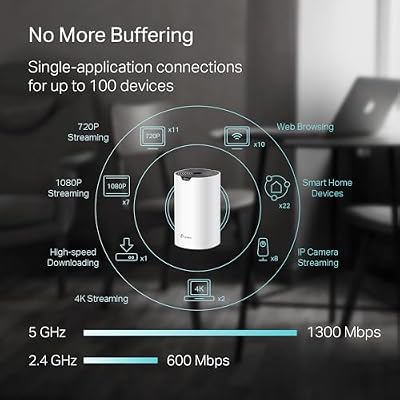
1. TP-Link Deco S4 Mesh AC1900 Wi-Fi System (Up to 5,500 Sq.ft.)

TP-Link Deco S4 Mesh AC1900 WiFi System, Deco S4(3-Pack) | Up to 5,500 Sq.ft. Coverage, Replaces WiFi Router and Extender, Gigabit Ports, Works with Alexa



As an Amazon Associate we earn from qualifying purchases. Product prices and availability are accurate as of the date/time indicated.
The TP-Link Deco S4 leads this guide because it solves the single biggest wireless frustration: dead zones. It is a mesh system that uses multiple units working together to blanket up to 5,500 square feet in seamless Wi-Fi, all managed through the friendly Deco app. At around $96 it is an affordable way to cover a whole house and replace both a router and any range extenders.
This is the pick for anyone in a larger or multi-storey home who is tired of Wi-Fi that fades in back bedrooms. Because mesh nodes hand your devices off automatically as you move, you stay on one network with no manual switching, and the Deco app makes setup and management genuinely simple — guest networks, parental controls, and device priority are a few taps away. For effortless, consistent coverage across a big space with the easiest possible administration, the Deco S4 is the standout wireless choice.
Pros: Whole-home mesh up to 5,500 sq.ft., seamless roaming, very easy Deco app setup.
Cons: AC (Wi-Fi 5) rather than Wi-Fi 6; multi-unit footprint to place.
2. Amazon eero 6 Mesh Wi-Fi Router (Plans up to 900 Mbps)

Amazon eero 6 mesh wifi router - Supports internet plans up to 900 Mbps, Coverage up to 1,500 sq. ft., Connect 75+ devices, 1-pack


As an Amazon Associate we earn from qualifying purchases. Product prices and availability are accurate as of the date/time indicated.
The Amazon eero 6 is the pick for the simplest possible setup and the most hands-off ongoing experience. It is a Wi-Fi 6 mesh router that supports internet plans up to 900 Mbps, expands easily by adding more eeros, and is configured entirely through the polished eero app — which also auto-updates and can act as a smart-home hub. At around $90 it is a beginner-friendly entry into modern mesh Wi-Fi.
This is the router for anyone who wants strong, reliable wireless without thinking about networking at all. Setup is famously quick — scan, name, and you are online — the app keeps the firmware current automatically, and the mesh design lets you add coverage room by room as needed. Wi-Fi 6 support means newer phones, laptops, and smart devices connect efficiently even when many are online at once. For effortless, future-friendly home Wi-Fi with minimal fuss, the eero 6 is an easy recommendation.
Pros: Wi-Fi 6 mesh, exceptionally simple app setup, auto-updates, easy to expand.
Cons: Some advanced features sit behind an optional subscription; ecosystem-tied.
3. TP-Link Deco X55 AX3000 Wi-Fi 6 Mesh System (Up to 2,500 Sq.ft.)

TP-Link Deco X55 AX3000 WiFi 6 Mesh System, Deco X55(1-Pack) | Covers up to 2500 Sq.Ft., Replaces Wireless Router and Extender, 3 Gigabit Ports, Supports Ethernet Backhaul




As an Amazon Associate we earn from qualifying purchases. Product prices and availability are accurate as of the date/time indicated.
The TP-Link Deco X55 is the Wi-Fi 6 mesh value pick, pairing modern wireless with whole-home coverage at a sensible price. It is an AX3000 Wi-Fi 6 mesh system covering up to 2,500 square feet, again managed through the easy Deco app and able to replace a router and extenders. At around $70 it brings Wi-Fi 6 mesh within reach of mainstream budgets.
This is the pick for a medium-sized home that wants the efficiency of Wi-Fi 6 across the whole space without paying flagship prices. Wi-Fi 6 handles many connected devices more gracefully than older standards, the mesh design delivers seamless roaming from room to room, and the Deco app keeps setup and management painless. It covers a smaller area than the AC1900 Deco S4 but adds the newer standard, making it the smarter long-term buy for a typical home. For affordable, modern, easy mesh Wi-Fi, the Deco X55 hits the mark.
Pros: Wi-Fi 6 mesh up to 2,500 sq.ft., seamless roaming, easy Deco app, strong value.
Cons: Covers less area than larger mesh kits; may need an extra node for big homes.
4. TP-Link Archer AX21 V5 AX1800 Wi-Fi 6 Router (Dual-Band Gigabit)
The TP-Link Archer AX21 is the pick for upgrading a single home or apartment to Wi-Fi 6 from one tidy box. It is a dual-band AX1800 Wi-Fi 6 router with gigabit ports, support for the TP-Link app and voice assistants, and a price that makes the modern standard accessible. At around $52 it is an outstanding-value way to step up from an older single router.
This is the router to choose when one well-placed unit covers your space and you want the device-handling efficiency of Wi-Fi 6 without going mesh. The AX1800 dual-band design connects a busy household of phones, laptops, and smart devices smoothly, the gigabit ports support fast wired connections, and the app makes setup straightforward. It is ideal for apartments and small-to-medium homes where coverage from a central spot is sufficient. For an affordable, modern single-router Wi-Fi 6 upgrade, the Archer AX21 is a deservedly popular pick.
Pros: Affordable Wi-Fi 6 single router, dual-band AX1800, gigabit ports, easy app setup.
Cons: One unit covers less than mesh; large homes may still see dead zones.
5. TP-Link Archer A6 AC1200 Gigabit Wi-Fi Router (Dual-Band MU-MIMO)

TP-Link AC1200 Gigabit Dual Band WiFi Router (Archer A6) | MU-MIMO Wireless Internet Router, 4 x Antennas, OneMesh and AP Mode, Long Range Coverage


As an Amazon Associate we earn from qualifying purchases. Product prices and availability are accurate as of the date/time indicated.
The TP-Link Archer A6 is the budget reliable pick, delivering dependable dual-band Wi-Fi for a modest price. It is an AC1200 router with MU-MIMO for serving multiple devices, gigabit ports, and TP-Link’s straightforward setup, designed to be a steady workhorse for everyday browsing and streaming. At around $40 it is a sensible, no-drama wireless choice.
This is the router for a smaller home or apartment that wants solid, stable Wi-Fi without paying for the newest standard. The AC1200 dual-band design comfortably handles streaming, video calls, and general use, MU-MIMO helps it serve several devices at once, and the gigabit ports keep wired connections fast. It is a classic value router that simply does the job. For dependable everyday wireless on a budget, the Archer A6 is an easy and trustworthy recommendation.
Pros: Reliable AC1200 dual-band, MU-MIMO, gigabit ports, easy setup, low price.
Cons: Wi-Fi 5 rather than Wi-Fi 6; single unit limits coverage area.
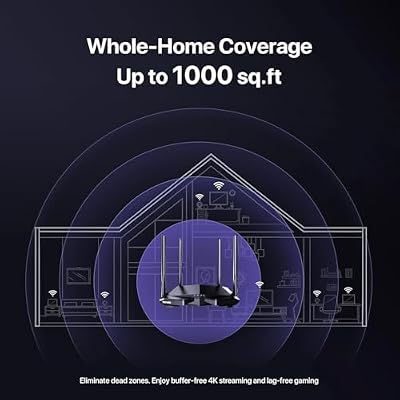
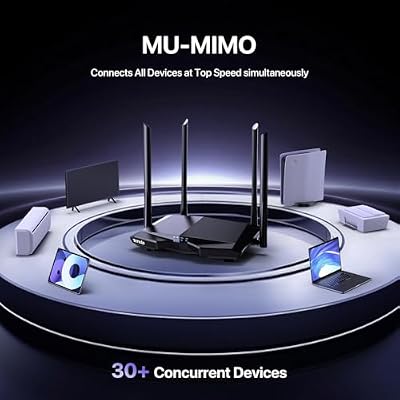
6. Tenda AC1200 Smart Wi-Fi Router (Dual-Band Wireless)

Tenda AC1200 Smart WiFi Router, High Speed Dual Band Wireless Internet Router with Smart APP, 4 x 100 Mbps Fast Ethernet Ports, Supports Guest WiFi, Access Point Mode, IPv6 and Parental Controls(AC6)



As an Amazon Associate we earn from qualifying purchases. Product prices and availability are accurate as of the date/time indicated.
Rounding out the list is the Tenda AC1200, the cheapest dual-band pick here. It is a smart dual-band wireless router with high-gain antennas and a simple companion app, aimed at delivering stable everyday Wi-Fi at a rock-bottom price. At around $28 it is the most affordable way on this list to put modern dual-band wireless in a home.
This is the router for the tightest budgets, a first apartment, or a backup unit. The AC1200 dual-band design covers everyday browsing, streaming, and social media, the high-gain antennas help push the signal across a small home, and the app keeps setup and basic management approachable. It is an entry-level router rather than a powerhouse, but for cheap, reliable wireless that gets you online without fuss, the Tenda AC1200 punches above its very low price.
Pros: Lowest price here, dual-band AC1200, high-gain antennas, simple app setup.
Cons: Entry-level performance; Wi-Fi 5 and limited range for larger spaces.
How to Choose a Wireless Router
Start with coverage, because the most common Wi-Fi complaint is dead zones, not raw speed. Match the router to the size and layout of your home: a single router like the Archer AX21, Archer A6, or Tenda AC1200 covers an apartment or small home from a central spot, while a mesh system like the Deco S4, Deco X55, or eero 6 spreads coverage across multiple units to blanket larger or multi-storey homes. If you have rooms where Wi-Fi currently fades, mesh is almost always the answer.
Next, weigh the Wi-Fi standard. Wi-Fi 6 (the AX models like the eero 6, Deco X55, and Archer AX21) handles many simultaneous devices more efficiently than Wi-Fi 5 (the AC models like the Deco S4, Archer A6, and Tenda), which matters in homes packed with phones, laptops, TVs, and smart gadgets. Wi-Fi 5 routers remain perfectly capable and great value for lighter device loads, but if you are buying for the next several years, Wi-Fi 6 is the more future-friendly choice.
Ease of setup and management is the quality-of-life factor that decides how pleasant the router is to live with. App-driven systems — the Deco app for TP-Link and the eero app for Amazon — make installation a guided, few-minute job and put guest networks, parental controls, and device priority a few taps away. If you would rather never log into a clunky admin page, prioritise a router with a polished app; the eero 6 and Deco models are especially beginner-friendly here.
Finally, set a budget and match it to your needs. For effortless whole-home coverage, the Deco S4 or eero 6 lead; for Wi-Fi 6 mesh value, the Deco X55; for a single-room Wi-Fi 6 upgrade, the Archer AX21; for dependable budget wireless, the Archer A6; and for the cheapest dual-band option, the Tenda AC1200. The best wireless router is the one that reaches every room, supports all your devices smoothly, and is easy to set up and forget. Match coverage, standard, and simplicity to your home, and pick the router on this list that fits.
Frequently Asked Questions
Should I get a mesh system or a single wireless router?
It comes down to the size of your home. A single router like the Archer AX21 or Archer A6 covers an apartment or small home well from a central location. If you have a larger or multi-storey home with rooms where Wi-Fi fades, a mesh system like the Deco S4, Deco X55, or eero 6 uses multiple units to deliver seamless coverage everywhere, which is the better fix for dead zones.
How much Wi-Fi coverage area do I actually need?
Match the rated coverage to your home’s square footage and layout, and allow headroom for walls and floors that weaken signal. The Deco S4 is rated up to 5,500 sq.ft. for large homes, the Deco X55 up to 2,500 sq.ft. for medium ones, while single routers like the Archer AX21 suit apartments and smaller spaces. If in doubt, choose a mesh kit and add nodes as needed.
Is Wi-Fi 6 worth it, or is Wi-Fi 5 enough for a wireless router?
Wi-Fi 6 models like the eero 6, Deco X55, and Archer AX21 handle many connected devices more efficiently, which helps in busy households and makes them more future-friendly. Wi-Fi 5 (AC) routers like the Deco S4, Archer A6, and Tenda AC1200 remain reliable and excellent value for lighter device loads. If you are buying for the long term or have lots of devices, lean Wi-Fi 6.
How easy are these wireless routers to set up?
Very easy, especially the app-driven ones. The Amazon eero 6 and TP-Link Deco models walk you through setup in a few minutes via their phone apps and put guest networks and parental controls within reach. The single TP-Link Archer routers and the Tenda also use companion apps for straightforward installation, so you do not need networking expertise to get a strong, stable connection.
Related Guides
- Best High Speed Routers
- Best Mesh Wi-Fi Systems
- Best Wi-Fi Range Extenders
- Best Gaming Routers
- Best Network Switches
- Best Budget Gaming Setup
Affiliate Disclosure: As an Amazon Associate, we earn from qualifying purchases. If you click a link and make a purchase, we may earn a small commission at no extra cost to you. Prices and availability are accurate as of publication and may change.










