

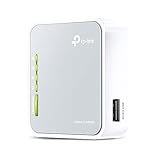
The TP-Link TL-WR802N is one of the longest-serving budget travel routers on the market — a tiny N300 nano router with five modes, fast Ethernet ports and an asking price around $25. It is the router travellers and hobbyists buy when they want the basics for as little money as possible. This TP-Link TL-WR802N review covers the wireless standard, VPN capabilities, modes, portability and overall value.

TP-Link N300 Wireless Portable Nano Travel Router, TL-WR802N | WiFi Bridge/Range Extender/Access Point/Client Modes, Mobile in Pocket
As an Amazon Associate we earn from qualifying purchases. Product prices and availability are accurate as of the date/time indicated.
🛒 Best Price Today on Amazon
Prime members get fast, free shipping on everything above, plus member-only deals. New members get a 30-day free trial — cancel anytime.
As an Amazon Associate we earn from qualifying purchases.



TP-Link TL-WR802N at a Glance
| Component | Specification |
|---|---|
| Form factor | Pocket — nano cube chassis |
| WiFi standard | WiFi 4 (802.11n), 2.4 GHz only |
| Max speed | 300 Mbps wireless |
| Cellular | None |
| VPN support | None in stock firmware |
| Ethernet ports | 1x WAN/LAN, 100 Mbps |
| Battery | None — USB-powered via micro-USB |
| Modes | Router / Access Point / Range Extender / Client / Hotspot |
| Approx price | Around $25 |
Performance & Range
The TL-WR802N is built around a single-band 2.4 GHz WiFi 4 (802.11n) radio rated at 300 Mbps and a single 100 Mbps fast-Ethernet port that switches between WAN and LAN duty depending on mode. That is exactly the same wireless spec as the GL.iNet Mango, and the same real-world story applies: the Ethernet port is the bottleneck rather than the radio, so the router is best understood as a 100 Mbps gateway for a single connected laptop, phone or tablet on a typical hotel WiFi link.
Range from the small internal antenna is single-room — a hotel room, a desk in a coffee shop, a corner of a tradeshow booth. The TL-WR802N is not built to cover an apartment, let alone a house; it is built to sit close to the device it serves and to disappear in a pocket the rest of the time. For wider home coverage, our best mesh WiFi systems guide is a better starting point.
VPN Capabilities — OpenVPN / WireGuard / Tailscale
The TL-WR802N’s stock firmware does not include any VPN client. That is the single largest functional difference between it and the GL.iNet Mango at a similar price — the Mango runs OpenWrt with OpenVPN, WireGuard and Tailscale support out of the box, while the TL-WR802N runs a stripped-down TP-Link firmware that handles routing, basic Wi-Fi and the mode switch but not VPN tunnelling for connected clients.
That makes the TL-WR802N the wrong router for travellers whose primary requirement is hotel-WiFi VPN security — for that use the Mango or the Roam 6 above is a better pick. Where the TL-WR802N still shines is the pure routing use case: a small reliable network behind a single uplink, with no VPN involved. For buyers who specifically want OpenVPN, WireGuard or Tailscale on a travel router, the GL.iNet alternatives in this guide are the right choice.
Modes — Hotel WiFi / Repeater / Bridge
TP-Link gives the TL-WR802N five operating modes covered by a switch on the device and the web interface: router mode for a wired uplink, access point mode for adding wireless to a wired uplink, range extender mode to extend an existing WiFi network, client mode to give a wired device a wireless connection, and hotspot mode for sharing a tethered uplink. That covers the common scenarios for travel and small-network use, and the mode switch is straightforward enough for first-time users.
The TL-WR802N does not market a dedicated hotel-WiFi mode in the modern sense — it handles captive portals when one of the connected devices logs in, but the more polished hotel-mode flow on the GL.iNet routers and the TP-Link Roam 6 is missing. For a single-device hotel connection it is fine; for sharing one hotel login across several devices the dedicated hotel-mode routers further up are easier. For home mesh, see our best mesh WiFi systems guide.
Battery & Portability
The TL-WR802N has no internal battery — it is powered by micro-USB from any 5V/1A source, which means a phone charger, a laptop USB port or any USB power bank will run it. That is the same model as the Mango, and the same advice applies: pair it with even a small power bank if you want pocket use without an outlet. The body is a tiny plastic cube small enough to disappear in a coat pocket, which is the whole point of the design.
For travellers who already carry a USB power bank for their phone the lack of a built-in battery is not a real downside — the router runs from the same brick. For travellers who want one less cable and one less thing to plug in, the Roam 6 with its internal battery is the better pick, at three times the price.
Use Cases — Travel / Coffee Shop / Tradeshow
The TL-WR802N is built for budget travel and lab use. For travel, it gives a small reliable router for a single laptop or phone behind a hotel or rental uplink, at the lowest realistic price for a brand-name device. For coffee-shop and co-working use, it acts as a private access point you can plug into a wired port to keep your devices off the venue’s open WiFi. For tradeshow booths and pop-up offices it is a cheap, dependable way to add wireless to a single Ethernet port.
It is also the router that hobbyists and home-lab users reach for when they need a small WiFi access point for a project — Raspberry Pi setups, network testing, isolated subnets — because at $25 it is cheap enough to keep several on hand. Its lack of VPN and modest 100 Mbps Ethernet port rule it out for buyers who want a privacy-focused travel router, but for the basic mode-switching role at the lowest price it is hard to beat. For deeper network setup, see our low-latency gaming network guide.
Verdict
At around $25 the TP-Link TL-WR802N is the cheapest realistic name-brand travel router on this list, and within its modest scope it does its job well. It is not the right pick for travellers who want VPN protection, WiFi 6 speed or Gigabit Ethernet — for those buyers the GL.iNet Mango, the TP-Link Roam 6 or the GL.iNet Beryl AX are far better fits. For buyers who want a small, reliable, cheap pocket router for a single device behind a typical hotel or rental uplink, the TL-WR802N is a sensible budget choice.
It is also a useful hobbyist tool — small enough to keep in a backpack pocket or a lab drawer, cheap enough not to worry about, and capable enough to handle the basic five-mode role. For occasional, light travel use with no privacy requirements, it earns a budget recommendation. Buyers who can stretch the budget should compare the GL.iNet Mango (about $30) for VPN support, or browse our best budget routers guide.
Frequently Asked Questions
Does the TP-Link TL-WR802N support VPN?
Not in stock firmware. It does not include OpenVPN, WireGuard or Tailscale clients for connected devices. For VPN support at a similar price, look at the GL.iNet Mango.
How fast is the TP-Link TL-WR802N?
It is rated 300 Mbps on 2.4 GHz WiFi 4 with a single 100 Mbps fast-Ethernet port — fine for typical hotel WiFi but well below modern home broadband speeds.
Does the TP-Link TL-WR802N have a battery?
No. It runs from micro-USB at 5V/1A, so any phone charger, USB power bank or laptop USB port will power it.
What modes does the TP-Link TL-WR802N support?
Five: router, access point, range extender, client and hotspot — covering the common scenarios for travel, small-network and home-lab use.
More Travel Router Reviews
- TP-Link AC750 Portable Nano Travel Router Review (TL-WR902AC)
- TP-Link N150 3G/4G Portable Travel Router Review (TL-MR3020)
- GL.iNet GL-SFT1200 Opal Review: Dual-Band Travel Router
- NETGEAR Nighthawk M7 5G Mobile Hotspot Review (WiFi 7)
- GL.iNet GL-MT3000 Beryl AX Review: WiFi 6 Travel Router (2.5GbE)
- GL.iNet GL-AXT1800 Slate AX Review: WiFi 6 Travel Router
- GL.iNet GL-MT6000 Flint 2 Review: WiFi 6 OpenWrt Router
- TP-Link N300 TL-WR841N Wireless Extender Review
Affiliate Disclosure: As an Amazon Associate, we earn from qualifying purchases. If you click a link and make a purchase, we may earn a small commission at no extra cost to you. Prices and availability are accurate as of publication and may change.










