

The TP-Link TL-WR841N is one of TP-Link’s longest-serving budget routers — a desktop N300 dual-antenna wireless router and range extender at an asking price around $25. It is not strictly a travel router, but its low price, small footprint, range-extender mode and access-point mode make it a common pick for budget secondary-network and simple range-extending duties around the home or in temporary setups. This TP-Link TL-WR841N review covers the wireless standard, VPN capabilities, modes, portability and overall value.

TP-Link N300 Wireless Extender, Wi-Fi Router (TL-WR841N) - 2 x 5dBi High Power Antennas, Supports Access Point, WISP, Up to 300Mbps


As an Amazon Associate we earn from qualifying purchases. Product prices and availability are accurate as of the date/time indicated.
🛒 Best Price Today on Amazon
Prime members get fast, free shipping on everything above, plus member-only deals. New members get a 30-day free trial — cancel anytime.
As an Amazon Associate we earn from qualifying purchases.





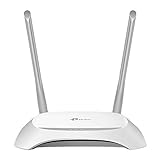


TP-Link TL-WR841N at a Glance
| Component | Specification |
|---|---|
| Form factor | Desktop — small plastic chassis with two antennas |
| WiFi standard | WiFi 4 (802.11n), 2.4 GHz only |
| Max speed | 300 Mbps wireless |
| Cellular | None |
| VPN support | None in stock firmware |
| Ethernet ports | 1x WAN + 4x LAN, 100 Mbps |
| Battery | None — mains-powered AC adapter |
| Modes | Router / Access Point / Range Extender / WISP |
| Approx price | Around $25 |
Performance & Range
The TL-WR841N is built around a single-band 2.4 GHz WiFi 4 (802.11n) radio rated at 300 Mbps, with one Fast-Ethernet WAN port and four Fast-Ethernet LAN ports. By 2026 standards it is well behind even the dual-band TL-WR902AC — let alone WiFi 6 hardware — but at $25 it remains the cheapest realistic name-brand desktop router on this guide. Two external antennas help with directional signal in a small home or apartment, and the desktop form factor lets the router be placed centrally for the best coverage from a single radio.
Real-world throughput is limited by the 100 Mbps Ethernet ports rather than the wireless radio, so the TL-WR841N is firmly a sub-Gigabit router. For typical sub-100 Mbps home broadband or a basic secondary network behind a faster main router, the wired side is enough. For modern home broadband above 100 Mbps, a Gigabit router is a meaningful upgrade. Buyers should also note that the TL-WR841N has been on sale for many years across multiple hardware revisions, and the wireless behaviour can vary slightly between revisions — checking the hardware version on the underside of the unit is worth doing if you are buying second-hand. See our best gaming routers guide for context and the latest best WiFi 6E routers guide for the modern alternatives.
VPN Capabilities — OpenVPN / WireGuard / Tailscale
The TL-WR841N’s stock TP-Link firmware does not include any VPN client for connected devices — no OpenVPN, no WireGuard, no Tailscale. That makes it the wrong router for travellers or home users whose main requirement is VPN-protected networking. For VPN support at a similar price point, the GL.iNet Mango (about $30, with full OpenWrt VPN support) is the right pick.
The TL-WR841N’s strength is its low-price-with-a-known-brand position rather than its software flexibility. For buyers who do not need a VPN client on the router itself — perhaps because they run per-device VPN clients on each phone, tablet and laptop separately — the TL-WR841N covers the basic routing needs. For VPN-focused buyers, the GL.iNet alternatives in this guide are the better fit. Some older hardware revisions of the TL-WR841N can be flashed with third-party OpenWrt builds for VPN support, but the small flash and RAM budget limit which OpenWrt features will run reliably, and the route is not officially supported by TP-Link.
Modes — Hotel WiFi / Repeater / Bridge
The TL-WR841N supports four operating modes — router mode for a wired uplink, access point mode to add wireless behind an existing router, range extender mode to extend an existing WiFi network, and WISP mode for a wireless ISP uplink. The range-extender role is one of the most common use cases for this specific model — buyers often deploy it as a cheap secondary access point or wireless repeater in a part of the home where the main router’s signal is weak.
It does not market a dedicated hotel-WiFi mode in the modern sense — captive portals are handled by the device that logs in rather than by a polished hotel-mode flow. For travellers whose main need is hotel WiFi sharing, the TP-Link Roam 6 or any GL.iNet router in this guide is a far better fit. For home mesh setups, see our best mesh WiFi systems guide.
Battery & Portability
The TL-WR841N has no internal battery and is mains-powered through an AC adapter rather than the USB power that the small nano travel routers use. That makes it less flexible for genuine pocket-portable travel use than the Mango, Opal, TL-WR802N or TL-WR902AC, which can all run from a USB power bank. The desktop form factor with two external antennas is suited to staying in one place on a desk or shelf, not to daily carry in a bag.
For occasional temporary setups where AC power is available — a holiday rental, a vacation home, a short-term office, a workshop — the TL-WR841N is cheap and dependable. For genuine travel use where USB power and pocket portability matter, any of the smaller nano travel routers in this guide is the right pick.
Use Cases — Travel / Coffee Shop / Tradeshow
The TL-WR841N is the wrong pick for true travel — it is desktop-class and mains-powered, not pocket-portable. Its strongest use cases are budget home networking (cheap secondary access point, range extender for the back of the house, basic wired switch with WiFi attached) and budget temporary setups where AC power is available and the router can stay in one place: a holiday rental, a vacation home, a workshop, a basement office.
For the dedicated travel router category covered by the rest of this guide, every other product is a better fit — the TL-WR841N is included here mainly as a reference budget device that buyers often compare against when shopping for travel routers. For occasional secondary-network duty around the home at $25, it remains hard to beat on price. For more capable budget routers, see our best budget routers guide.
Verdict
At around $25 the TP-Link TL-WR841N is the cheapest realistic name-brand router on this guide, and within its modest scope it does its job well. It is not a travel router — it is mains-powered, desktop-form, single-band WiFi 4, with no VPN support — but for cheap budget home secondary-network duty or for temporary setups where AC power is available, it remains a sensible budget pick that has been around long enough to be very well-vetted.
Buyers shopping for a genuine pocket travel router should choose any of the other products in this guide instead. Buyers shopping for the cheapest possible secondary access point or basic range extender for the home, the TL-WR841N earns a budget recommendation. For modern wireless standards see our best WiFi 6E routers guide.
Frequently Asked Questions
Is the TP-Link TL-WR841N a travel router?
Not really. It is a desktop mains-powered router rather than a pocket USB-powered travel router. For travel, choose any of the smaller nano or palm-size routers in this guide instead.
Does the TP-Link TL-WR841N support VPN?
Not in stock firmware. For VPN support at a similar price, look at the GL.iNet Mango (about $30) with its full OpenWrt-based OpenVPN, WireGuard and Tailscale support.
What modes does the TP-Link TL-WR841N support?
Four: router, access point, range extender and WISP — covering the common scenarios for basic home networking and small temporary setups.
Is the TP-Link TL-WR841N good for home use?
It is suited to basic budget home use — a cheap secondary access point, a simple range extender or a basic router for sub-100 Mbps broadband. For modern home broadband, a Gigabit WiFi 6 router is a far better fit.
More Travel Router Reviews
- TP-Link AC1900 Smart WiFi Router Review (Archer A8)
- GL.iNet GL-MT300N-V2 Mango Review: Pocket VPN Travel Router
- TP-Link Roam 6 AX1500 Review: Portable WiFi 6 Travel Router
- TP-Link N300 Nano Travel Router Review (TL-WR802N)
- TP-Link AC750 Portable Nano Travel Router Review (TL-WR902AC)
- TP-Link N150 3G/4G Portable Travel Router Review (TL-MR3020)
- GL.iNet GL-SFT1200 Opal Review: Dual-Band Travel Router
- NETGEAR Nighthawk M7 5G Mobile Hotspot Review (WiFi 7)
Affiliate Disclosure: As an Amazon Associate, we earn from qualifying purchases. If you click a link and make a purchase, we may earn a small commission at no extra cost to you. Prices and availability are accurate as of publication and may change.










