

The Anker 13-in-1 USB-C Docking Station is a full desktop dock built around the workstation use case — triple display output (one HDMI plus two DisplayPort), 100W PD to the host, 10Gbps USB-C and USB-A data, gigabit Ethernet, SD and microSD, and 3.5mm audio. It connects to the host over a single USB-C cable and uses DisplayLink technology to drive three displays from a host that natively supports only one or two. At around $250 it is the right desktop dock for a multi-monitor MacBook Air or PC laptop user; this Anker 13-in-1 docking station review covers the trade-offs against a true TB4 dock.
- Anker 13-in-1 USB-C Docking Station at a Glance
- Performance and Data Speeds
- Power Delivery and Charging
- Display Output and Multi-Monitor
- Build and Connector Quality
- Compatibility — Mac, PC and Steam Deck
- Verdict
- Frequently Asked Questions
- More Thunderbolt 4 Reviews
- Related Articles
- Related Articles
- Related Guides
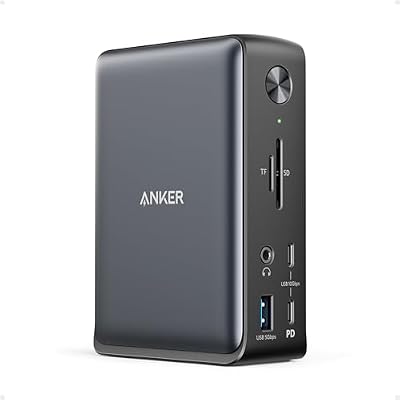
Anker Laptop Docking Station, 13-in-1 USB C Docking Station, Triple Display




As an Amazon Associate we earn from qualifying purchases. Product prices and availability are accurate as of the date/time indicated.
🛒 Best Price Today on Amazon
Prime members get fast, free shipping on everything above, plus member-only deals. New members get a 30-day free trial — cancel anytime.
As an Amazon Associate we earn from qualifying purchases.




Anker 13-in-1 USB-C Docking Station at a Glance
| Component | Specification |
|---|---|
| Type | USB-C docking station (USB-C + DisplayLink, not full TB4) |
| Data speed | 10 Gbps (USB 3.2 Gen 2 on data ports) |
| Cable length | USB-C host cable around 1 m |
| Power Delivery | Up to 100W PD to the host laptop |
| Display output | Triple display — 4K@60Hz HDMI + 2x 4K@60Hz DisplayPort (DisplayLink) |
| Compatibility | USB-C laptops, Thunderbolt 4 / 3, USB4, MacBook (M-series via DisplayLink driver) |
| Port count | 13 (3 displays, 4 USB-A, 2 USB-C data, Ethernet, SD, microSD, audio, PD) |
| Certification | Anker-branded, DisplayLink-enabled, not Intel TB4 certified |
| Approx price | Around $250 |
Performance and Data Speeds
The 13-in-1 is a USB-C dock with a DisplayLink graphics adapter built in — not a true TB4 dock. Its data ports run at 10Gbps over USB 3.2 Gen 2, which is the right speed for external SSDs, fast USB-A peripherals and gigabit Ethernet workloads. What the dock does that a normal USB-C dock cannot is drive three displays through DisplayLink, which is a software-driven graphics over USB protocol. On a typical M-series MacBook Air (which natively drives one external display) or a single-display PC ultrabook, the dock unlocks triple-display productivity. The trade-off is that DisplayLink is not native — it runs through the host’s CPU and a driver, which adds a small CPU overhead and a slight latency. For everyday office, code and content work the experience is identical to a native multi-monitor setup; for gaming and 60+ fps full-screen video, the native HDMI / DP output (not the DisplayLink ones) is the right choice. For host laptops, see our best RTX 5070 gaming laptops guide.
Power Delivery and Charging
The 100W PD covers a 14-inch MacBook Pro at full speed and a 16-inch MacBook Pro at almost-full speed (the 16-inch’s 140W charger pulls more under sustained load, but 100W from a dock is invisible in normal use). It also covers every current PC ultrabook and most gaming-class ultrabooks. The single-cable design means the dock’s wall power supply feeds both the dock itself and the host laptop, replacing the laptop’s own charger on the desk. For the buyer who comes home and plugs one USB-C cable into the laptop to get power and a full desktop setup, this is the model. For 240W-class laptops that need every watt, the Anker is not the right fit.
Display Output and Multi-Monitor
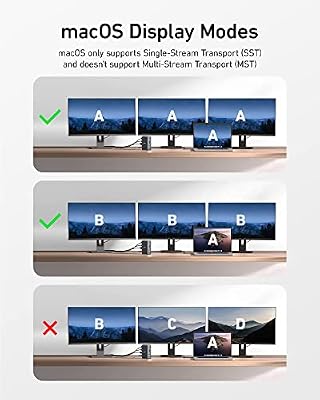
The triple-display setup is the headline. One HDMI port runs at 4K@60Hz (native through the host’s DisplayPort alt-mode on TB4 and USB4 hosts), and two DisplayPort ports each run up to 4K@60Hz through the dock’s built-in DisplayLink adapter. The configuration is most powerful on a MacBook Air or a single-display PC laptop, where the dock turns a one-display host into a three-monitor desktop. On a multi-display host like the M-series MacBook Pro, the dock adds DisplayLink displays on top of the host’s native two — useful for buyers running four or more screens. The 4K@60Hz spec across all three is the right pick for productivity. For buyers also running an OLED panel as the primary, see our best OLED gaming laptops roundup.
Build and Connector Quality
The 13-in-1 is a substantial desktop dock — anodised aluminium chassis, a heavy enough base to stay put on the desk under the load of plugged cables, and a clear front-back layout (frequently-used ports on the front, semi-permanent ports on the back). The included USB-C host cable is about 1m long, which is right for a desk-side run with the dock at the back. The 100W PSU is a separate brick — large, as 100W PSUs always are, but it sits behind the desk. For desk integration, see our best gaming desks guide.
Compatibility — Mac, PC and Steam Deck
The dock works on any USB-C host with DisplayPort alt-mode — every current MacBook, every PC ultrabook, every TB4 / USB4 laptop. M-series Macs require the free DisplayLink driver from Synaptics for the two DisplayPort outputs to work (Apple Silicon does not natively support multiple displays on the Air, and DisplayLink is the workaround Anker uses). On a TB4 PC laptop the dock works as a USB-C dock without driver installation for the native HDMI port and with DisplayLink for the two DP ports. The Steam Deck supports the dock’s USB-C connection at 10Gbps and the native HDMI 4K output; DisplayLink on the Deck is supported via SteamOS’s Linux-style DisplayLink driver. For Core Ultra system context, see our Intel Core Ultra laptop guide guide.
Verdict
At around $250 the Anker 13-in-1 USB-C Docking Station is the right dock for a triple-display desk setup over a single USB-C cable — particularly for MacBook Air and single-display PC laptop users. The DisplayLink workaround unlocks multi-monitor productivity on hosts that cannot do it natively, the 100W PD covers most laptops at full speed, and the 13-port spread covers every realistic peripheral. It is not a TB4 dock — DisplayLink is software-driven and not the right choice for full-screen high-refresh gaming — but for desk productivity it earns a recommendation. Buyers who need a true TB4 dock for eGPU or dual-4K native should look at TB4-certified docks instead. See our best USB hubs roundup for adjacent options.
The DisplayLink trade-off bears one more comment: in everyday productivity work — multiple browser windows, spreadsheets, code, IDE plus terminal plus chat — DisplayLink is completely invisible. The CPU overhead is in the low single-digit percent on a modern M-series or Core Ultra chip, the latency is in single-digit milliseconds, and the refresh rate caps at 60Hz which is also the cap of the underlying monitors. Where DisplayLink shows itself is in full-screen high-refresh gaming, full-screen 4K video at high bitrates, and any scenario where the host’s native GPU output is the right tool — for those, plug the monitor into the native HDMI output of the dock and reserve the DisplayLink outputs for productivity displays. Used this way, the 13-in-1 is the right hybrid dock for a multi-monitor MacBook Air or single-display PC ultrabook.
Frequently Asked Questions
Does the Anker 13-in-1 Docking Station support a MacBook Air with three monitors?
Yes — via DisplayLink. The MacBook Air natively supports only one external display, but the dock’s built-in DisplayLink adapter provides the additional two displays through a free driver from Synaptics.
Is the Anker 13-in-1 dock a Thunderbolt 4 dock?
No. It is a USB-C dock with a DisplayLink adapter for the additional displays, not a TB4 dock. There is no eGPU support, and DisplayLink runs through the host CPU rather than as native graphics.
Can the Anker 13-in-1 run 4K monitors?
Yes — all three displays support 4K@60Hz. The HDMI port runs natively at 4K@60Hz through DisplayPort alt-mode, and the two DisplayPort outputs each run 4K@60Hz through DisplayLink.
Will the Anker 13-in-1 work with my Windows PC laptop?
Yes. The dock works with any USB-C laptop supporting DisplayPort alt-mode — that covers every current Windows ultrabook, every TB4 / USB4 PC laptop, and most older USB-C PC laptops.
More Thunderbolt 4 Reviews
- Anker 11-in-1 USB-C Docking Dual Monitor 10Gbps Review
- MOKiN USB-C Hub 10Gbps 4K@60Hz 100W PD Review
- UGREEN Revodok Pro USB-C Hub 6-in-1 10Gbps 4K Review
- Anker 8-in-1 USB-C Dock Dual Monitor 2 HDMI 4K Review
- Maxonar 2-Pack Thunderbolt 4 Cable 40Gbps 240W 8K Review
- Cable Matters Intel-Certified TB4 Cable 3.3ft 40Gbps Review
- Cable Matters Intel-Certified TB4 Cable 1ft 40Gbps Review
- Silkland USB-C to USB-C 240W 40Gbps USB4 Cable Review
Affiliate Disclosure: As an Amazon Associate, we earn from qualifying purchases. If you click a link and make a purchase, we may earn a small commission at no extra cost to you. Prices and availability are accurate as of publication and may change.
Related Articles
Looking for more on this topic? Browse the hand-picked guides below — each one applies the same scoring rubric used in this review.


