

The Silkland USB-C to USB-C 240W 40Gbps USB4 Cable is a USB-IF-certified USB4 cable that ships with the full 40Gbps / 240W / 8K envelope — the maximum spec for a passive USB4 cable. USB-IF certification is the USB equivalent of Intel’s TB4 compliance programme, and a USB-IF 40Gbps Gen3x2 cable will run at full speed on any USB4 host. At around $25 the cable competes directly with Intel-certified TB4 cables on price while adding the higher 240W charging ceiling. This Silkland USB4 cable review covers the spec table, real-world performance, charging behaviour and the cross-certification case.

Silkland USB 4 for Thunderbolt 4, 40Gbps 240W 8K, USB-IF Certified, 3.3FT | Single 8K/6K Dual 4K, Braided Thunderbolt Cable Compatible for MacBook, SSD, Mac mini, iPhone 17, Monitor


As an Amazon Associate we earn from qualifying purchases. Product prices and availability are accurate as of the date/time indicated.
🛒 Best Price Today on Amazon
Prime members get fast, free shipping on everything above, plus member-only deals. New members get a 30-day free trial — cancel anytime.
As an Amazon Associate we earn from qualifying purchases.

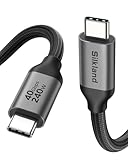
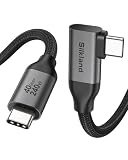
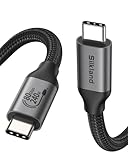


Silkland USB4 40Gbps Cable at a Glance
| Component | Specification |
|---|---|
| Type | USB-C to USB-C cable (USB-IF-certified USB4) |
| Data speed | 40 Gbps (USB4 Gen 3×2) |
| Cable length | 0.8 m (2.6 ft) |
| Power Delivery | Up to 240W (PD 3.1, EPR) |
| Display output | Single 8K@60Hz or dual 4K@60Hz |
| Compatibility | USB4, Thunderbolt 4 / 3, USB-C |
| Connector | USB-C, both ends, passive cable |
| Certification | USB-IF certified (40Gbps Gen 3×2, 240W EPR) |
| Approx price | Around $25 |
Performance and Data Speeds
The Silkland is a USB-IF-certified USB4 40Gbps cable, which means it has passed the same kind of compliance testing that certifies a Thunderbolt 4 cable — only against the USB4 specification rather than the TB4 specification. In practice these are almost the same envelope: 40Gbps of total bandwidth carrying PCIe and DisplayPort tunneling. The cable’s 0.8m length is fully passive and well within the maximum 2m passive run, so signal integrity is excellent. On a USB4 host (a recent AMD Ryzen 7040 / 8040 / AI HX laptop, an Intel Core Ultra notebook) the cable runs at the host’s full USB4 speed; on a Thunderbolt 4 host the cable runs as a TB4 cable because USB4 and TB4 share the underlying signalling. For laptop pairings that exploit the cable, see our best RTX 5070 gaming laptops and Intel Core Ultra laptop guide guides.
Power Delivery and Charging
The headline against Intel-certified TB4 cables is the 240W power envelope. USB Power Delivery 3.1 with EPR carries up to 240W over a USB-C cable, and the Silkland is rated for the full ceiling — enough to charge a 140W MacBook Pro 16-inch at full speed, any current PC laptop and a TB4 dock that pushes high current back to the host. The certification means the e-marker chip inside the cable correctly reports the 240W rating to the host and the charger, so PD negotiation runs at the maximum power both ends support. This is the area where USB-IF 240W cables out-spec Intel-certified TB4 cables, which (in their current versions) typically carry 100W. For high-power notebooks the difference is meaningful.
Display Output and Multi-Monitor
The Silkland supports DisplayPort 2.1 tunneling within the USB4 40Gbps envelope, which translates to a single 8K@60Hz display or two 4K@60Hz displays — identical to a TB4 cable’s envelope. Behaviour on a USB4 host is straightforward: the cable carries the DisplayPort signal through the USB4 link, and the host’s GPU drives the monitor as if it were directly connected. On a TB4 host the same DisplayPort tunneling runs through Thunderbolt 4, with the same 8K / dual-4K result. For productivity setups that combine the cable with a high-refresh OLED or 4K@144Hz panel, see our best OLED gaming laptops and best 240Hz gaming laptops guides.
Build and Connector Quality
Silkland uses a braided nylon jacket with aluminium-shell USB-C plugs. The build is comparable with the Cable Matters and Maxonar TB4 cables — properly stiff to carry the heavier shielding needed for 40Gbps, with positive-clicking USB-C plugs. The 0.8m length is correct for a desk-side run between a laptop on a riser and a dock or SSD on the same desk; for monitor runs across the desk, the longer Silkland 5m option (reviewed separately) is the better fit. A USB-IF logo on the plug confirms the certification, which is the visual reassurance equivalent of the Intel TB4 logo on a Cable Matters cable.
Compatibility — Mac, PC and Steam Deck
The Silkland’s USB-IF USB4 certification covers every USB4 host. On a USB4 PC laptop (AMD Ryzen 7040 / 8040 / AI HX, Intel Core Ultra) the cable runs at the full 40Gbps USB4 envelope with up to 240W PD. On a Thunderbolt 4 MacBook Pro or PC laptop the cable runs as a TB4 cable — Thunderbolt 4 is built on USB4 signalling, so a certified USB4 40Gbps cable carries TB4 data correctly. On a TB3 host the cable runs at TB3’s 40Gbps, dual 4K, 100W envelope. On the Steam Deck the cable acts as a high-quality USB-C cable at 10Gbps with the Deck’s 45W charging limit. The compatibility profile is essentially identical to an Intel-certified TB4 cable, with the bonus of the 240W charging envelope. Buyers also building around a desk should see our best gaming desks roundup.
Verdict
At around $25 the Silkland USB-IF-certified USB4 cable is a strong-value alternative to an Intel-certified TB4 cable. The 240W charging ceiling out-specs current TB4 cables, the 40Gbps data and 8K display envelope match TB4 exactly, and the USB-IF certification gives the same kind of compliance assurance that Intel certification gives a TB4 cable. The main reason to choose an Intel-certified TB4 cable instead is buyer preference for the TB4 brand and the Intel logo; on technical performance the Silkland holds its own. For long runs the Silkland 5m option is the natural step up; for buyers prioritising the highest 240W charging on a desk-side cable, this is the right pick. See also our best USB hubs roundup for dock pairings.
Compared head-to-head with the Cable Matters Intel-Certified 3.3ft TB4 cable, the Silkland trades the recognised Intel logo for a higher 240W charging envelope at a lower price — the right trade for buyers driving a 16-inch MacBook Pro or a high-power Windows gaming laptop where the Cable Matters 100W rating leaves charging headroom on the table. Compared with the short Maxonar 2-pack, the Silkland adds proper USB-IF compliance testing in exchange for half the cable count, which is the right trade when one well-certified cable is more useful than a pair of unverified ones. For users who own multiple high-power USB-C laptops the Silkland’s 240W rating future-proofs through several charger upgrades, which is the longer-horizon argument for the cable beyond the certification headline.
Frequently Asked Questions
Is the Silkland USB4 cable the same as a Thunderbolt 4 cable?
Almost — both carry 40Gbps of data, 8K display and PCIe tunneling. USB4 is the underlying open spec, and Thunderbolt 4 is built on it. A USB-IF-certified 40Gbps USB4 cable will run a TB4 device at the full TB4 envelope on a TB4 host.
Does the Silkland USB4 cable charge a 16-inch MacBook Pro at full speed?
Yes. The 240W power-delivery rating covers the 140W charger of a 16-inch MacBook Pro with significant headroom — the cable will negotiate full-speed PD on any current laptop charger.
What is USB-IF certification?
USB-IF is the USB Implementers Forum, the body that runs the USB specifications and the official USB certification programme. A USB-IF-certified cable has passed compliance testing against the USB4 specification — the USB-spec equivalent of an Intel-certified TB4 cable.
Can the Silkland USB4 cable carry an 8K display?
Yes. The 40Gbps USB4 envelope supports a single 8K@60Hz display or two 4K@60Hz displays via DisplayPort 2.1 tunneling, identical to a Thunderbolt 4 cable.
More Thunderbolt 4 Reviews
- Silkland USB 4 Cable 16.5ft / 5m 20Gbps Long Cable Review
- Silkland USB-C Monitor Display Cable 4K@144Hz 8K Review
- Anker 7-in-2 MacBook Dock TB-Compatible HDMI 4K Review
- Anker 13-in-1 USB-C Docking Station Triple Display Review
- Anker 11-in-1 USB-C Docking Dual Monitor 10Gbps Review
- MOKiN USB-C Hub 10Gbps 4K@60Hz 100W PD Review
- UGREEN Revodok Pro USB-C Hub 6-in-1 10Gbps 4K Review
- Anker 8-in-1 USB-C Dock Dual Monitor 2 HDMI 4K Review
Affiliate Disclosure: As an Amazon Associate, we earn from qualifying purchases. If you click a link and make a purchase, we may earn a small commission at no extra cost to you. Prices and availability are accurate as of publication and may change.
Related Articles
Looking for more on this topic? Browse the hand-picked guides below — each one applies the same scoring rubric used in this review.










