

The Anker 7-in-2 MacBook Pro Hub is a sleek dual-USB-C dock that plugs directly into the two USB-C ports on the left side of a MacBook Pro or MacBook Air and turns them into seven ports — HDMI 4K, USB-C data, USB-C PD passthrough, two USB-A 3.0, and SD plus microSD slots. The hub is Thunderbolt-compatible (it uses the host’s TB4 / TB3 ports as USB-C, not as a full TB4 dock), and the dual-USB-C design means it sits flush against the side of the MacBook without a dangling cable. At around $90 it is the right hub for buyers who want a tidy on-laptop dock; this Anker 7-in-2 MacBook hub review covers the trade-offs against a desktop TB4 dock.

Anker USB-C Hub for MacBook, 7-in-2 Mac Dock with 4K@60Hz HDMI | Thunderbolt 4 Compatible, USB-C and 2 USB-A 5Gbps Data Ports, for MacBook Pro, MacBook Air M4/M5 and More (Not Work with Neo)



As an Amazon Associate we earn from qualifying purchases. Product prices and availability are accurate as of the date/time indicated.
🛒 Best Price Today on Amazon
Prime members get fast, free shipping on everything above, plus member-only deals. New members get a 30-day free trial — cancel anytime.
As an Amazon Associate we earn from qualifying purchases.



Anker 7-in-2 MacBook Dock at a Glance
| Component | Specification |
|---|---|
| Type | USB-C hub (TB-compatible dual-USB-C plug, not full TB4) |
| Data speed | 10 Gbps (USB 3.2 Gen 2 on data USB-C) |
| Cable length | None — plugs directly into the MacBook |
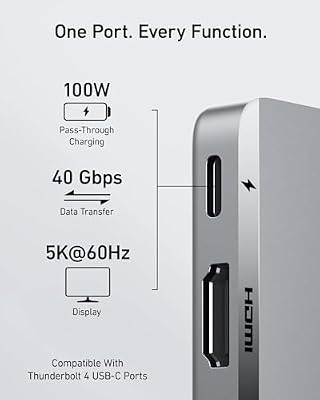
| Power Delivery | Up to 100W PD passthrough to the MacBook |
| Display output | Single 4K@60Hz via HDMI |
| Compatibility | MacBook Pro / MacBook Air (dual-USB-C, M-series and Intel) |
| Port count | 7 (HDMI, USB-C data, USB-C PD, 2x USB-A, SD, microSD) |
| Certification | Anker-branded, not Intel TB4 certified |
| Approx price | Around $90 |
Performance and Data Speeds
The 7-in-2 is a USB-C hub, not a Thunderbolt 4 dock — that is the most important framing for the product. It uses the MacBook’s USB-C ports in USB-C mode (not in TB4 mode), and presents the dock’s data USB-C and two USB-A ports at USB 3.2 Gen 2 speeds, which is 10Gbps. That is the right speed for SD card transfers, external SSDs and standard peripherals, and it covers the vast majority of MacBook use cases. What you do not get from this hub that you would from a true TB4 dock is the full 40Gbps bandwidth — there is no eGPU support, no dual-4K display capability, and no PCIe tunneling. For buyers who need those, a desktop TB4 dock is the right product; for buyers who want a tidy travel-friendly on-laptop hub, the 7-in-2 is purpose-built. For host context see our best RTX 5070 gaming laptops guide.
Power Delivery and Charging
The PD passthrough is rated at 100W, which means a 100W USB-C charger plugged into the hub’s USB-C PD port will deliver close to its full output to the MacBook (the hub itself draws a small amount, so real-world delivery is in the high 90s of watts). That covers a 14-inch MacBook Pro at full speed, and a 16-inch MacBook Pro at almost-full speed (the 16-inch can pull 140W under full load, charging at 100W is invisible in normal use). The one-charger-one-hub setup is genuinely tidy for a desk: plug the existing MacBook charger into the hub instead of the MacBook, and the hub takes over charging plus all the other ports.
Display Output and Multi-Monitor
The HDMI port delivers 4K@60Hz from MacBook hosts that support it (every M-series MacBook Pro, every Intel MacBook Pro with TB3+; the MacBook Air supports a single external display, while the MacBook Pro supports more). It is a single HDMI 2.0 port — not dual-monitor — which fits the M-series MacBook Air’s single-external-display limit but is also the cap for the M-series MacBook Pro through this hub. For dual-4K from a MacBook, you need a TB4 dock or DisplayLink hub; the 7-in-2 is single-display by design. The 4K@60Hz output is fine for productivity, video and most gaming via remote-stream or Apple Arcade. Buyers running OLED monitors should see our best OLED gaming laptops roundup.
Build and Connector Quality
The build is classic Anker — anodised aluminium chassis, flush dual-USB-C plug that aligns precisely with the MacBook’s port spacing, no dangling cable. The cable-less design is the headline feature. It means the hub sits as part of the laptop, moving with it when you reposition the MacBook on the desk, and the dock is genuinely portable (it slips into a laptop sleeve alongside the MacBook). The downside is the rigid mechanical loading on the MacBook’s USB-C ports — the hub’s weight is supported partly by the connectors themselves. In practice Apple’s USB-C ports are robust and Anker’s hub is light, so the loading is well within tolerance, but it is the trade-off you accept for a cable-less design. For a desktop dock instead, see our best USB hubs roundup.
Compatibility — Mac, PC and Steam Deck
The 7-in-2 is purpose-designed for MacBook Pro and MacBook Air with two adjacent USB-C ports on the same side — every Intel and M-series MacBook from 2016 onwards. It is not compatible with PC laptops, because PC laptops do not have the same dual-USB-C side layout that the rigid plug requires. It is also not designed for the Steam Deck, an iPad Pro or a phone — single-USB-C devices use a normal hub with a captive cable, not a rigid dual-plug dock. Within its MacBook target, the hub is one of the best-finished products on the market. For Mac users building broader desks, see our best gaming desks roundup.
Verdict
At around $90 the Anker 7-in-2 MacBook Pro Hub is the right hub for one specific user — a MacBook Pro or MacBook Air owner who wants a tidy, cable-free, on-laptop dock with HDMI 4K, SD cards, USB-A and PD passthrough. The build is premium Anker quality, the dual-USB-C design eliminates dangling cables, and the 100W PD passthrough means one charger covers the whole setup. It is not a Thunderbolt 4 dock — no dual-4K, no eGPU, no 40Gbps data — and buyers who need TB4 should choose a desktop dock instead. For MacBook users who want a clean travel-friendly dock, it is exceptionally well judged. See our Intel Core Ultra laptop guide guide for context on adjacent PC alternatives.
The single best reason to choose this hub over a captive-cable alternative is the visual outcome on the desk and in a bag. A traditional USB-C hub adds a captive cable that loops back to the laptop, which is the failure point for most desk-tidy attempts — the loop catches on the edge of the desk, gets in the way of the trackpad, and the hub itself slides around the desk surface. The 7-in-2’s rigid dual-USB-C plug eliminates that loop entirely; the hub becomes part of the laptop, moving with it and never sliding. For a buyer who values workspace tidiness as much as port count, that single design choice is the headline feature, and it is the reason the 7-in-2 has a more loyal MacBook user base than its spec sheet alone would predict.
Frequently Asked Questions
Is the Anker 7-in-2 MacBook Hub a Thunderbolt 4 dock?
No. It uses the MacBook’s USB-C ports in USB-C mode at 10Gbps, not as a full TB4 dock. There is no eGPU support, no dual-4K display capability, and no PCIe tunneling. For full TB4 features, choose a desktop TB4 dock.
Will the Anker 7-in-2 fit my MacBook Pro?
It is designed for MacBook Pro and MacBook Air models with two adjacent USB-C ports on the same side — every Intel MacBook Pro and Air from 2016 onwards and every M-series MacBook. It is not compatible with PC laptops.
Can the Anker 7-in-2 charge a 16-inch MacBook Pro?
Yes, at up to its 100W passthrough. A 16-inch MacBook Pro pulls 140W under full load but charges happily from 100W in normal use — the difference is invisible for most users.
Does the Anker 7-in-2 support dual monitors?
No. The single HDMI 2.0 port outputs 4K@60Hz to one display. For dual-4K from a MacBook, you need a Thunderbolt 4 dock or a DisplayLink-based hub.
More Thunderbolt 4 Reviews
- Anker 13-in-1 USB-C Docking Station Triple Display Review
- Anker 11-in-1 USB-C Docking Dual Monitor 10Gbps Review
- MOKiN USB-C Hub 10Gbps 4K@60Hz 100W PD Review
- UGREEN Revodok Pro USB-C Hub 6-in-1 10Gbps 4K Review
- Anker 8-in-1 USB-C Dock Dual Monitor 2 HDMI 4K Review
- Maxonar 2-Pack Thunderbolt 4 Cable 40Gbps 240W 8K Review
- Cable Matters Intel-Certified TB4 Cable 3.3ft 40Gbps Review
- Cable Matters Intel-Certified TB4 Cable 1ft 40Gbps Review
Affiliate Disclosure: As an Amazon Associate, we earn from qualifying purchases. If you click a link and make a purchase, we may earn a small commission at no extra cost to you. Prices and availability are accurate as of publication and may change.
Related Articles
Looking for more on this topic? Browse the hand-picked guides below — each one applies the same scoring rubric used in this review.










