

The Thrustmaster T-Flight Hotas X is the long-standing entry point to PC and PS3 flight simulation, and it is the joystick that has introduced more pilots to hands-on-throttle-and-stick than any other consumer model. It has been on the market for well over a decade, and it remains the default recommendation when a new pilot asks for a cheap, decent HOTAS to dip a toe into Elite Dangerous or Microsoft Flight Simulator. This Thrustmaster T-Flight Hotas X review covers the design, sensors, compatibility and value at around $70.
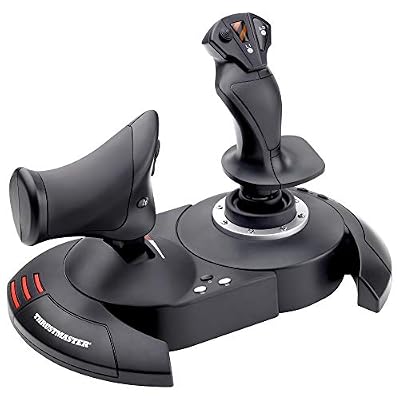
Thrustmaster T-Flight Hotas X USB Flight Sim Stick & Throttle - PC | Detachable design, adjustable resistance, 12 programmable buttons, 5 axes, dual rudder control, preset memory, ergonomic


As an Amazon Associate we earn from qualifying purchases. Product prices and availability are accurate as of the date/time indicated.
🛒 Best Price Today on Amazon
Prime members get fast, free shipping on everything above, plus member-only deals. New members get a 30-day free trial — cancel anytime.
As an Amazon Associate we earn from qualifying purchases.



Thrustmaster T-Flight Hotas X at a Glance
| Component | Specification |
|---|---|
| Type | HOTAS — joystick with integrated/detachable throttle |
| Compatibility | PC (Windows) and PlayStation 3 — USB |
| Buttons / axes | 12 action buttons; 5 axes (X, Y, Z rudder twist, throttle, hat) |
| Hall-effect sensors | No — uses standard potentiometer sensors |
| Hat switches | 1 multidirectional hat on stick |
| Throttle / pedals included | Throttle integrated; rudder pedals not included |
| Detachable parts | Yes — throttle detaches from stick for separate placement |
| Connection | Wired USB |
| Approx price | around $70 |
Build Quality & Realism
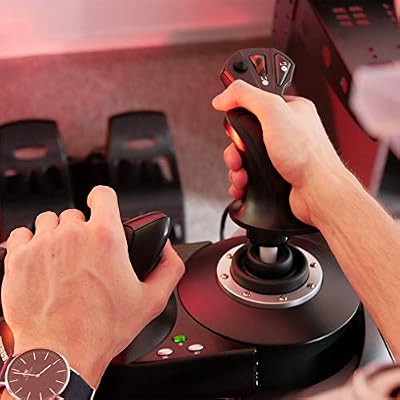
The T-Flight Hotas X is unapologetically a budget product, and viewed in that light the engineering is impressive. The whole assembly is plastic and the action is lighter than a higher-tier stick, but the contoured grip is comfortable, the throttle has a smooth and progressive feel, and the rudder-twist axis on the stick gives third-axis control without requiring separate pedals. The unit is light enough to need a non-slip surface or a clamp, but it is not flimsy.
Realism is not the Hotas X’s selling point — it does not have the metal-and-springs heft of a Warthog or the Hall-effect precision of the T16000M. What it does have is the basic HOTAS layout in working form: a stick in your right hand, a throttle in your left, both with buttons and hats falling under your fingers. For a player who has only ever used a gamepad, the transition to a proper two-handed flight control setup is a real and immediate upgrade in immersion and precision.
Compatibility & Platforms
The T-Flight Hotas X was originally engineered for PlayStation 3 and PC, and it works on both over USB. On PC it is recognised as a standard HID device, requires no special drivers in Windows, and its 12 buttons and 5 axes are mapped directly by most sim titles. The Mapping software allows the four-position preset switch to load different button arrangements for different games, which is a clever touch in a product this affordable.
The Hotas X is not officially supported on Xbox or modern PlayStation generations — for those platforms the Hotas One (Xbox-certified) is the right product. On PC the picture is unequivocally positive, and the Hotas X remains the standard entry-level recommendation for sim newcomers. For a wider view of input gear, our best controllers for PC guide compares the broader category.
Sim Programs / Game Support
The Hotas X has earned excellent community support across the PC flight catalogue precisely because so many pilots have used it as their first HOTAS. Microsoft Flight Simulator recognises it on connection and offers a sensible default mapping; Elite Dangerous has well-documented community profiles; and arcade flyers like War Thunder and Ace Combat 7 on PC respond well to its layout. For combat simulators like DCS World the button count is on the modest side, but every button is programmable, so single-aircraft setups remain comfortable.
On PlayStation 3 the Hotas X retains a niche life for retro pilots running older sims, but on modern consoles it is not the right choice. For pilots looking to expand the setup later, our best flight sim gear article covers the matching rudder pedals, throttles and yokes that pair with budget HOTAS gear.
What’s in the Box
The bundle is straightforward: the integrated joystick-and-throttle unit, a permanent USB cable, and a printed manual. There is no separate throttle box — the throttle is part of the same chassis as the stick — but the chassis can be split into two pieces for separate placement on the desk, then closed together for compact storage. There are no pedals and no software disc, but Thrustmaster provides drivers and the Mapping utility from its website.
It is worth noting that the cable is permanently attached and not particularly long. Most pilots find the supplied length sufficient, but if you intend to mount the stick on a custom flight chair or far from your PC, a USB extension cable is a useful addition.
Who It’s For
The Hotas X is for the newcomer to flight sims who wants to find out whether the genre is for them before spending real money on dedicated hardware. It is the obvious answer to the question ‘I just bought Microsoft Flight Simulator on a sale, what should my first HOTAS be?’ — cheap, complete, recognised everywhere on PC, and good enough to make the genre’s appeal immediately clear.
It is less suited to combat sim pilots who will quickly outgrow the button count, to enthusiasts who want Hall-effect precision, or to console players on current-generation hardware. For a beginner on a budget, however, it remains the standard recommendation a decade after release.
Pros and Cons
Pros: Lowest-cost legitimate HOTAS layout on the market; complete stick-and-throttle bundle with rudder twist; works on PC and PlayStation 3; separable throttle for flexible desk placement; four-position preset switch loads different button maps; plug-and-play HID device in Windows; layout has introduced more pilots to HOTAS flying than any other product; well-supported in MSFS, Elite Dangerous and War Thunder.
Cons: No Hall-effect sensors — uses conventional potentiometers that can develop drift over time; permanent USB cable that is not particularly long; only 12 buttons, which can run out in study-level combat sim aircraft; no Xbox or modern PlayStation certification; light chassis benefits from a non-slip surface; lacks the metal-and-springs realism of higher-tier sticks; modest hat-switch count for advanced setups.
Verdict
The Thrustmaster T-Flight Hotas X has the longevity it has earned. At around $70 it delivers a complete HOTAS layout, full PC compatibility, a separable throttle and a layout that lets a newcomer feel what hands-on-throttle-and-stick flying is really like. The lack of Hall-effect sensors and the modest button count put a ceiling on how long it will stay your main stick — but as a first step into flight simulation it is exceptional value and an easy recommendation.
Frequently Asked Questions
Does the Thrustmaster Hotas X work on PS4 or PS5?
No. The Hotas X is officially supported on PlayStation 3 and PC only. For Xbox use the Hotas One; on modern PlayStation, third-party HOTAS support is limited.
Does the Hotas X have Hall-effect sensors?
No. It uses standard potentiometer sensors. For a Hall-effect mid-range stick at a higher price, see the Thrustmaster T16000M.
Can the throttle on the Hotas X detach from the stick?
Yes. The whole unit splits into two pieces so the throttle can be placed on the left of the desk, then closed back together for storage.
How many buttons does the Hotas X have?
It has 12 action buttons, one multidirectional hat switch on the stick and a rudder-twist Z-axis. That covers most arcade and intermediate sim needs.
More Flight Stick & Sim Controller Reviews
- Thrustmaster T-Flight Hotas One Review: Xbox-Certified Flight Stick
- Thrustmaster TFRP Flight Rudder Pedals Review: Sliding-Rail Sim Pedals
- Thrustmaster HOTAS Warthog Review: Metal A-10C Replica Flight Stick
- Thrustmaster TCA Sidestick Airbus Edition Review: Civilian Airliner Sidestick
- Logitech G Extreme 3D Pro Review: Budget USB Flight Stick Joystick
- Logitech G X56 HOTAS Review: RGB HOTAS with Twin Throttles
- Logitech G PRO Flight Yoke System Review: Airliner Yoke for MSFS
- Logitech G PRO Flight Rudder Pedals Review: Civilian Sim Pedals
Affiliate Disclosure: As an Amazon Associate, we earn from qualifying purchases. If you click a link and make a purchase, we may earn a small commission at no extra cost to you. Prices and availability are accurate as of publication and may change.
Related Articles
Looking for more on this topic? Browse the hand-picked guides below — each one applies the same scoring rubric used in this review.










