

- Top Pick: Thrustmaster T-Flight Hotas One Flight Stick & Throttle – XBOX & PC
- Best Value: Thrustmaster T.FLIGHT HOTAS NEO ACE COMBAT 8 WINGS OF THEVE Edition – Officially Licensed Simulation Controller – Flight Joystick & Throttle with Vibration Feedback – Xbox Series X|S, Xbox One, PC
- Premium Choice: Thrustmaster Hotas One + Microsoft Flight Simulator 2024 Standard [Digital Code] – Play on Xbox Series X|S and Windows PC
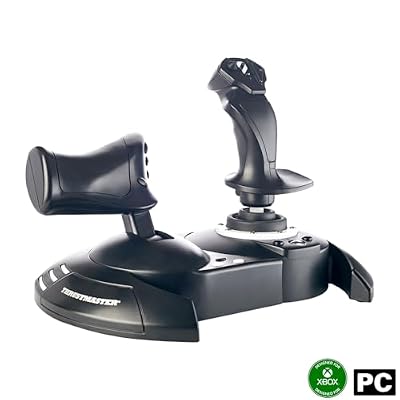
The Thrustmaster T-Flight Hotas One is the console pilot’s answer to the question of how to play Microsoft Flight Simulator, Elite Dangerous or Star Wars: Squadrons properly on an Xbox. It is the only widely available officially Xbox-certified HOTAS in the consumer price bracket, which on its own makes it the default choice for any console flight sim player. This Thrustmaster T-Flight Hotas One review covers the design, certification, compatibility and value at around $100.

Thrustmaster T-Flight Hotas One Flight Stick & Throttle - XBOX & PC


As an Amazon Associate we earn from qualifying purchases. Product prices and availability are accurate as of the date/time indicated.
🛒 Best Price Today on Amazon
Prime members get fast, free shipping on everything above, plus member-only deals. New members get a 30-day free trial — cancel anytime.
As an Amazon Associate we earn from qualifying purchases.


![Thrustmaster Hotas One + Microsoft Flight Simulator 2024 Standard [Digital Code] – Play on Xbox Series X|S and Windows PC](https://m.media-amazon.com/images/I/41lYMfu4D+L._SL160_.jpg)



Thrustmaster T-Flight Hotas One at a Glance
| Component | Specification |
|---|---|
| Type | HOTAS — joystick with detachable throttle |
| Compatibility | Xbox Series X|S, Xbox One and PC (Windows) — USB |
| Buttons / axes | 14 action buttons; 5 axes including rudder-twist Z-axis |
| Hall-effect sensors | No — uses standard potentiometer sensors |
| Hat switches | 1 multidirectional hat on stick |
| Throttle / pedals included | Throttle included and detachable; rudder pedals sold separately |
| Detachable parts | Yes — throttle detaches from stick for separate placement |
| Connection | Wired USB |
| Approx price | around $100 |
Build Quality & Realism
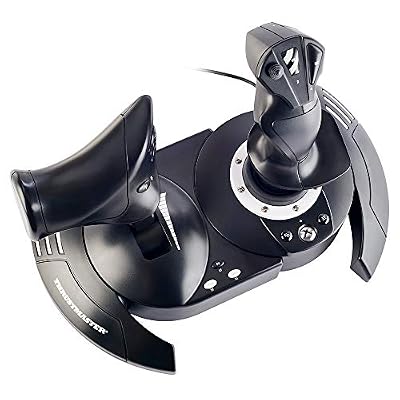
The Hotas One is recognisably from the same engineering family as the Hotas X — plastic chassis, contoured grip, smooth-feeling throttle — but the design has been refreshed for the modern Xbox generation. The stick is sized for adult hands, the buttons are clicky and positive, and the twist rudder on the Z-axis is firm enough to be usable rather than accidental. The throttle has a textured grip and a smooth progressive action with a centring detent for idle.
It is a step up in feel and refinement from the Hotas X without crossing into mid-range territory. There is no metal in the construction and no Hall-effect sensors on the stick, but for an Xbox-certified product in this price bracket it is the most realistic option a console pilot can buy. The dual-throttle option on the back of the unit lets sim pilots run with twin engines mapped to a split throttle, which is a small but pleasing touch.
Compatibility & Platforms
The headline feature of the Hotas One is its Xbox certification. Microsoft requires officially licensed hardware for many Xbox sim titles to recognise advanced input devices, and Thrustmaster’s certification means the Hotas One is detected natively on Xbox Series X, Xbox Series S and Xbox One. On PC it works as a standard HID device with full driver support and Thrustmaster’s mapping software. The same hardware therefore covers both console and PC use cases, which is rare and useful.
On PlayStation the Hotas One is not certified. For PC-only setups the T16000M FCS HOTAS offers more buttons, Hall-effect sensors and the TWCS throttle for around twice the price. For Xbox or for cross-platform Xbox/PC use, the Hotas One is simply the right product. The wider input picture is in our best controllers for PC guide.
Sim Programs / Game Support
Microsoft Flight Simulator on Xbox is the obvious headline use case, and the Hotas One is the unofficial standard answer to that game. Default mappings load automatically and cover the essential controls — throttle, ailerons, elevator, rudder via twist, flaps, gear, autopilot and view — without any setup. Elite Dangerous on Xbox is similarly well supported with community profiles, and Star Wars: Squadrons on Xbox One was effectively designed around HOTAS input.
On PC the Hotas One works equally well in DCS World, IL-2 Sturmovik, X-Plane and the rest of the catalogue, with deeper button assignment than any gamepad can offer. For pilots building out a full flight setup, our best flight sim gear and best flight sim cockpits guides cover yokes, pedals and the cockpit furniture that goes with a serious sim rig.
What’s in the Box
The Hotas One ships with the joystick, detachable throttle and a permanent USB cable. The two halves split for separate desk placement and clip back together for storage. There are no rudder pedals — if you want full pedals coverage on Xbox, the options are unfortunately limited, since Microsoft’s certification covers very few third-party pedal products.
A printed quick-start guide and warranty card complete the package. The Xbox-certified hardware identifies itself correctly to the console without any user intervention, which is exactly what a console buyer wants. PC users may install Thrustmaster’s drivers and mapping utility from the company’s website for additional customisation.
Who It’s For
The Hotas One is for the Xbox owner who wants to play flight or space sims properly. If you have Microsoft Flight Simulator on a Series X or Series S, the Hotas One is the natural and largely unrivalled hardware partner. It is also a sensible choice for the player who splits their gaming between an Xbox and a PC and wants one HOTAS that works on both.
It is less suited to PC-only pilots, who can step up to the T16000M FCS for better sensors and more buttons at a similar price; to PlayStation owners, since the Hotas One is not PS-certified; or to combat sim enthusiasts who need a much larger button count. For console sim pilots, however, it is the default choice.
Pros and Cons
Pros: Officially Xbox-certified for Xbox Series X|S and Xbox One — a rare and valuable feature; same hardware works on PC; recognised natively by MSFS on Xbox with sensible default mappings; comfortable refreshed grip sized for adult hands; detachable throttle for flexible desk placement; useful split-throttle option for twin-engine aircraft; broad sim software support on PC; sensible feature set for the price.
Cons: No Hall-effect sensors — uses standard potentiometers like the Hotas X; no PlayStation certification; rudder pedals are not included and console pedal options are very limited; the modest button count can fall short in study-level combat sims; plastic-throughout construction does not reach Warthog territory; permanent USB cable; light enough chassis to require a non-slip surface on a smooth desk.
Verdict
The Thrustmaster T-Flight Hotas One is the only easy recommendation for an Xbox owner who wants to fly with a real stick and throttle. At around $100 it brings genuine HOTAS layout, Xbox certification, dual-platform PC support and a sensible feature set in a chassis that is comfortable to use for hours. The sensors and button count put a ceiling on enthusiast use, but for the millions of Xbox players who want to fly MSFS with a real stick, it is the right answer at a fair price.
Frequently Asked Questions
Is the Thrustmaster Hotas One officially licensed by Microsoft?
Yes. The Hotas One is officially Xbox-certified, which means Xbox Series X, Series S and Xbox One recognise it natively for use with supported sim titles.
Does the Hotas One work with Microsoft Flight Simulator on Xbox?
Yes. It is the de facto standard HOTAS for MSFS on Xbox — the game loads default mappings on connection and works without further setup.
Does the Hotas One work on PlayStation?
No. It is certified for Xbox and PC only. For PS3 and PC the Hotas X is the alternative; for current PlayStations the third-party HOTAS market is limited.
Can the throttle on the Hotas One detach from the stick?
Yes. The throttle and stick separate so they can be placed on either side of the desk, then clipped back together for compact storage.
More Flight Stick & Sim Controller Reviews
- Thrustmaster TFRP Flight Rudder Pedals Review: Sliding-Rail Sim Pedals
- Thrustmaster HOTAS Warthog Review: Metal A-10C Replica Flight Stick
- Thrustmaster TCA Sidestick Airbus Edition Review: Civilian Airliner Sidestick
- Logitech G Extreme 3D Pro Review: Budget USB Flight Stick Joystick
- Logitech G X56 HOTAS Review: RGB HOTAS with Twin Throttles
- Logitech G PRO Flight Yoke System Review: Airliner Yoke for MSFS
- Logitech G PRO Flight Rudder Pedals Review: Civilian Sim Pedals
- MAYFLASH F300 Arcade Fight Stick Review: Multi-Platform Budget Stick
Affiliate Disclosure: As an Amazon Associate, we earn from qualifying purchases. If you click a link and make a purchase, we may earn a small commission at no extra cost to you. Prices and availability are accurate as of publication and may change.
Related Articles
Looking for more on this topic? Browse the hand-picked guides below — each one applies the same scoring rubric used in this review.


