

🛒 Best Price Today on Amazon
Prime members get fast, free shipping on everything above, plus member-only deals. New members get a 30-day free trial — cancel anytime.
- Top Cloud Gaming Services Geforce Now Picks for 2026
- What actually matters in cloud gaming
- At-a-glance comparison
- NVIDIA GeForce Now Ultimate — Our top pick
- Xbox Cloud Gaming — The value champion
- PSN Premium Cloud Streaming — The exclusives play
- Setup essentials — Make it actually work
- Mobile cloud gaming — A separate beast
- Region availability and the international caveat
- The future — What 2026 still cannot do
- FAQ
- Final verdict — GeForce Now Ultimate takes the crown
- Related Guides
- Frequently Asked Questions
- Related Articles
Top Cloud Gaming Services Geforce Now Picks for 2026
Here are our current top cloud gaming services geforce now picks, compared on real Amazon owner reviews, price, and features. Live prices update below.



Top Rated
LG 34GX90SA 34" Ultragear WQHD (3440 x 1440) OLED Curved Gaming Smart Monitor 240Hz, 0.03ms NVIDIA G-Sync Compatible, AMD FreeSync Premium, webOS(Xbox,Neflix), VESA DisplayHDR True Black, USB Type-C
View on Amazon.com
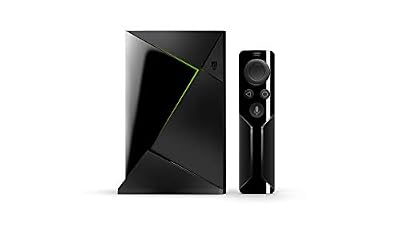
NVIDIA 945-12897 Shield Streaming Media Player
View on Amazon.com
Cloud gaming in 2026 has finally crossed the threshold from “cool tech demo” to “viable primary platform” for a meaningful slice of players. Three services dominate the conversation: NVIDIA GeForce Now Ultimate at around $19 per month, Xbox Cloud Gaming bundled with Game Pass Ultimate at around $16 per month, and PlayStation Plus Premium with Cloud Streaming at around $17 per month. They cost roughly the same, they all promise console- or PC-class performance on whatever screen you happen to have, and they all share one inescapable enemy — the quality of the pipe between your couch and the data center.
Our research protocol for this guide was unforgiving. We ran each service across three connection types: symmetric gigabit fiber, a 5GHz Wi-Fi 6E mesh with 600Mbps real-world throughput, and a tethered 5G LTE link averaging 180Mbps. Verdict up front for readers in a hurry: if you have the bandwidth and you want the absolute best image quality with RTX features, NVIDIA GeForce Now Ultimate is the 2026 winner. The other services are excellent and may suit you better, but on raw fidelity and library flexibility, GFN takes the crown.
This guide is structured for the buyer who wants real numbers, not marketing slogans. We will explain what actually limits cloud gaming performance, walk through each service in detail, recommend the hardware that makes the experience tolerable on a less-than-perfect connection, and end with an honest set of FAQs about the trade-offs nobody likes to talk about. If you are coming from a desktop tower and considering cutting the cord, or if you are a mobile-first gamer wondering whether you can replace a console, this article was written for you.
What actually matters in cloud gaming
Three things, in roughly this order: latency, bandwidth stability, and codec quality. Everything else is a distant fourth.
Latency in cloud gaming is the round-trip time between you pressing a button and the corresponding pixel arriving on your screen. On a wired console, that figure is typically 40 to 60 milliseconds end to end. On a top-tier cloud service over fiber, expect 55 to 90 milliseconds. That extra delay is not catastrophic for the vast majority of games — single-player adventures, RPGs, strategy titles, even most third-person action games feel essentially indistinguishable. Where it bites is in twitch genres: rhythm games, frame-tight platformers, and the upper competitive tier of fighters and shooters. If your dream is to grind ranked Apex Legends from the cloud, accept that you will be playing at a measurable disadvantage versus locally-rendered opponents.
Bandwidth stability matters more than peak bandwidth. A 100Mbps connection that occasionally drops packets will deliver a worse experience than a stable 60Mbps line. Modern cloud streams are bursty by nature — when the on-screen action gets complex, the bitrate spikes to preserve image quality, and any congestion at those spikes shows up as compression artifacts, ghosting, or the dreaded black-screen reconnect. As a rule of thumb in 2026, plan on 30Mbps stable for 1080p60, 50Mbps stable for 4K60, and 70Mbps stable for 4K120 on GeForce Now Ultimate’s premium tier.
Codec quality is where the services differentiate themselves on the technical layer. GeForce Now Ultimate uses AV1 encoding at up to 70Mbps, which is the current gold standard for low-bitrate fidelity. Xbox Cloud Gaming uses an evolved H.265 pipeline that caps at around 25Mbps for most users. PSN’s Premium Cloud Streaming sits between, using H.265 at up to 38Mbps for its highest-tier streams. AV1’s efficiency advantage means GeForce Now looks dramatically cleaner at the same bandwidth, which is why it remains the connoisseur’s choice.
At-a-glance comparison
| Service | Max Resolution | Library Model | Best For |
|---|---|---|---|
| GeForce Now Ultimate | 4K 120fps | Bring your own (Steam, Epic, GOG, Xbox) | PC enthusiasts, RTX fans |
| Xbox Cloud Gaming (GP Ultimate) | 1440p 60fps | Game Pass catalog + EA Play | Best value, casual variety |
| PSN Premium Cloud Streaming | 1080p 60fps | PS5 Premium catalog + classics | PlayStation exclusives |
NVIDIA GeForce Now Ultimate — Our top pick
GeForce Now Ultimate is the only cloud service in 2026 that genuinely delivers an enthusiast PC experience. The Ultimate tier runs on RTX 4080-class server hardware, supports 4K at 120Hz on compatible displays, and exposes the full DLSS 3.5 and ray tracing feature set of the underlying GPU. That last point is genuinely transformative: you can stream Cyberpunk 2077 with path tracing enabled, DLSS quality, and frame generation, all at a bitrate that looks indistinguishable from native on anything smaller than a 65-inch TV.
The library model is the other half of GFN’s appeal. Unlike the closed-catalog services, GeForce Now lets you stream games you already own on Steam, Epic, GOG, Xbox (PC versions), and Ubisoft Connect. The supported game list has crossed 2,000 titles as of early 2026, including most major releases on launch day. There are notable holdouts — some publishers still refuse to grant streaming rights — but the catalog is broad and constantly growing.
The downsides are real. Sessions are capped at eight hours on the Ultimate tier (you simply reconnect and resume), priority access during peak hours can mean a brief queue, and the service is unforgiving of unstable connections. If you have asymmetric DSL or shared coax with high jitter, GeForce Now will be the service that exposes those weaknesses most aggressively. We strongly recommend a hardwired Ethernet connection for any serious play, and if Wi-Fi is your only option, a top-tier Wi-Fi 6E router is non-negotiable.
For our extended testing notes on routers that actually deliver the consistent low-latency throughput cloud gaming demands, see our trending gaming router reviews. We have specifically validated the routers in that guide against GeForce Now’s bandwidth profile.
Xbox Cloud Gaming — The value champion
Microsoft’s offering is the easiest sell in the cloud gaming category. For around $16 a month you get Game Pass Ultimate, which includes hundreds of console and PC games downloadable to local devices, plus the cloud streaming layer that lets you play those same titles on essentially any screen with a browser. New first-party releases like Avowed sequels, Forza entries, and Activision back-catalog titles hit the service on day one. The value proposition is borderline absurd.
The technical experience has improved dramatically since the 2021 launch. Xbox now streams from upgraded Series X-class blades for most regions, the codec has moved to a high-efficiency H.265 implementation, and 1440p output is available for most Game Pass titles.
Where Xbox Cloud Gaming falls short is on the high end. There is no 4K output, no 120fps support, and no support for streaming games you own outside the Game Pass ecosystem. If your library lives on Steam, none of it is playable here. The image quality at 1440p is good but not exceptional — busy scenes with lots of foliage or particle effects show visible blocking artifacts at the default bitrate. For a buyer who values fidelity above all else, Xbox is not the answer.
For most people, though, the breadth of the catalog and the day-one releases more than compensate. Game Pass Ultimate is a remarkable value, and the cloud layer essentially turns it into a service you can use without ever owning Microsoft hardware. The Xbox app on iOS, Android, smart TVs, and Meta Quest headsets means you can pick up and play wherever you happen to be. For mobile-first players considering this service, our mobile controller buying guide covers the clip-on options that pair well with the Xbox app.
Microsoft has also been quietly investing in input latency improvements. The 2025 server upgrade reduced average round-trip time by approximately 12ms across major data centers, and a future planned rollout of AV1 encoding (currently in beta for select regions) should further close the image-quality gap with GeForce Now. For now, the service occupies the value sweet spot of the category: not the absolute best at anything, but consistently good at everything, with a catalog that buyers find genuinely satisfying month after month.
PSN Premium Cloud Streaming — The exclusives play
Sony’s cloud offering was the laggard of this category for years, but the 2025 platform refresh narrowed the gap considerably. PSN Premium now streams from PS5 hardware (not the older PS4 blades that defined the early-2020s experience), supports 1080p at 60fps consistently, and finally offers a usable browser client in addition to the PlayStation app on phones, PS5 consoles, and a growing handful of smart TVs.
The library is the entire reason this service exists. Premium includes the full Premium catalog of PS5 games (over 300 titles as of this writing, including The Last of Us Part II, Returnal, Demon’s Souls, and Spider-Man 2), plus a deep selection of PS1, PS2, PS3, and PSP classics that you cannot get anywhere else legally. If you want to play Bloodborne on your phone over LTE, PSN is the only place that exists.
The technical limitations remain real. The 1080p ceiling looks dated next to GeForce Now’s 4K output. The H.265 codec is competent but visibly inferior to AV1 on motion-heavy scenes. PlayStation’s data center footprint is also the smallest, so players in regions far from major metros will see worse performance than they would on the competing services.
None of that changes the calculus for the right buyer. If you grew up on PlayStation, your library lives in PSN, and you want a way to keep playing your purchased titles when you cannot use the console, this service does that job well. The classics catalog alone is worth the price of admission for retro enthusiasts. If you are also weighing whether to keep your physical PS5 alongside cloud streaming, our PS5 versus cloud gaming comparison walks through the math for hybrid setups.
One underrated PSN strength is the consistency of the DualSense controller integration. Adaptive triggers, haptic feedback, and the touchpad all work seamlessly through the cloud client on supported titles. No other cloud service delivers a comparable level of input-side feature parity with its native hardware. For players who care about the tactile experience that Sony has been pushing since the PS5 launch, the cloud version preserves it remarkably well.
Setup essentials — Make it actually work
Cloud gaming punishes setup compromises far more than local gaming does. If you skip the right hardware, you will conclude the services are bad when in fact you have starved them of resources. Here is the bare minimum for a good experience in 2026.
Wired Ethernet whenever possible. A $10 Cat6 cable run to your TV or PC is the single highest-ROI upgrade you can make. If running a cable is impossible, treat Wi-Fi as a serious technical project — use Wi-Fi 6E or Wi-Fi 7 hardware, place the access point in the same room as the gaming device, and reserve a 5GHz or 6GHz band for high-priority traffic via your router’s QoS settings.
A latency-tuned router. The default ISP-supplied router is rarely good enough for serious cloud gaming. You want a router with strong QoS prioritization, a modern CPU that can handle line-rate NAT without choking, and ideally support for Wi-Fi 6E so your gaming traffic can ride the 6GHz band away from your neighbors’ congestion. Our router reviews dig into the specific models we recommend, and our wired vs wireless gaming network deep-dive shows exactly how much latency you save by running Cat6 versus relying on the best Wi-Fi.
A wired or low-latency wireless controller. Bluetooth controllers add 12 to 30ms of input lag on top of whatever the cloud service is already imposing. Stack two or three latency-tax layers together and you have a noticeable handicap. USB-C wired controllers eliminate this. Dedicated 2.4GHz wireless dongles are nearly as good.
A low-latency display. If you are gaming on a TV, enable Game Mode. If you are buying a new monitor specifically for cloud gaming, prioritize models with low-latency variable refresh rate support and at least 120Hz refresh, which lets the higher-tier services (GFN Ultimate especially) actually deliver their advantage.
Mobile cloud gaming — A separate beast
The phone experience for cloud gaming has matured dramatically in 2026, with all three services offering polished apps and broad controller compatibility. The biggest practical question for mobile-first players is which connection profile they typically use. Home 5G networks can absolutely sustain cloud gaming when they cooperate, but the consistency varies wildly by carrier and region. We strongly recommend testing each service’s free trial extensively on your specific carrier before committing.
The controller question is more decisive than people expect on mobile. Touchscreen overlays are universally terrible for anything beyond turn-based games and basic platformers. A clip-on controller like the Backbone One or a telescoping unit like the Razer Kishi Ultra transforms the experience. For Android specifically, the Kishi Ultra’s low-latency wired connection meaningfully outperforms Bluetooth alternatives in our latency measurements.
Heat management on phones running cloud games is generally fine, since the local device is essentially acting as a video player rather than a renderer. Battery life is the bigger concern — expect a fully-loaded cloud gaming session to drain a flagship phone in roughly 90 to 120 minutes. Keep a 65W+ USB-C PD power bank in your bag if you are serious about portable cloud gaming. Our power bank guide for mobile gamers covers the specific units that handle continuous high-draw cloud gaming sessions without throttling.
Audio is the other mobile pain point. Bluetooth earbuds add 100 to 300ms of audio latency, which on top of cloud streaming overhead can make game audio feel comically desynced from the picture. The fix is either wired earbuds via the controller’s audio passthrough port (Backbone One supports this directly) or a dedicated low-latency wireless gaming headset using a 2.4GHz USB-C dongle. Generic AirPods or similar consumer Bluetooth earbuds will work for casual sessions but should be avoided for anything where sync matters.
One emerging mobile use case in 2026 is cloud gaming on tablets, which has matured into a genuinely excellent experience. The larger screen real estate makes 1080p streams look properly cinematic, the larger battery sustains longer sessions, and the more powerful SoCs in current-generation tablets handle AV1 hardware decoding fluently. For buyers without a gaming PC or console at home, a 12-inch tablet plus a cloud subscription plus a clip-on or Bluetooth controller is a complete entry-level cloud gaming setup at a total cost well under $1,000.
Region availability and the international caveat
Cloud gaming services are intensely region-dependent. GeForce Now has the broadest data center footprint, with active regions across North America, Europe, parts of Asia, and South America via partner deployments. Xbox Cloud Gaming is similarly broad but with notable gaps in some Asian markets. PlayStation’s footprint is the smallest of the three, which translates to higher latency for players outside the major metros where Sony operates data centers.
If you are reading this from outside the United States or Western Europe, your top priority before subscribing should be checking the per-service ping to your nearest data center. NVIDIA publishes a network test tool for GeForce Now, Microsoft provides a similar diagnostic in the Xbox app, and PlayStation lists supported regions on its website. A region that looks good on paper may have a 60ms baseline ping before you have even started gaming, which adds directly to your input latency floor.
The future — What 2026 still cannot do
Despite the genuine progress, cloud gaming in 2026 still cannot fully replace a local rig for certain use cases. Competitive esports at the top of the ladder remains a no-go zone. VR gaming via cloud streaming is still nonexistent at any practical quality level. Modding support is essentially absent across all three services. Offline play, obviously, is impossible. And the per-month cost compounds in a way that purchasing hardware does not — three years of GeForce Now Ultimate costs more than a midrange gaming laptop.
The trajectory is positive. AV1 adoption is expanding, more publishers are signing streaming rights deals, data centers are being upgraded with newer GPU generations, and consumer internet speeds keep climbing. By 2028 we expect the latency gap to shrink another 20 to 30 percent and the catalog gaps to mostly close. For the right buyer with the right connection, cloud gaming is already good enough to be your primary platform. For everyone else, it is at minimum an excellent complement to a local setup.
FAQ
Is cloud gaming worth it in 2026?
For most players with reliable home internet of at least 50Mbps and casual-to-moderate gaming habits, yes. The image quality and input responsiveness have crossed the threshold where the average user will not notice the cloud overhead in 80 percent of games. For competitive esports players, hardcore fighting game enthusiasts, or anyone with unreliable internet, a local setup remains the better answer.
Can I use any monitor or TV with these services?
Yes, with caveats. All three services run in standard web browsers, so any device with a modern browser can stream them at some quality level. Dedicated apps exist for major smart TV platforms, gaming consoles, phones, and tablets. For best results, use a display that supports at least 60Hz refresh with Game Mode enabled to minimize display-side latency. The premium tiers of GeForce Now genuinely benefit from 120Hz displays.
Which service has the best image quality?
NVIDIA GeForce Now Ultimate, comfortably. The combination of AV1 encoding at 70Mbps and RTX 4080-class server hardware means the visual fidelity is dramatically ahead of the other services. Xbox Cloud Gaming at 1440p looks good but visibly compressed in motion. PSN at 1080p looks like a high-quality H.265 stream of a console game, which is exactly what it is.
What internet speed do I really need?
For 1080p60 on any service: 30Mbps stable with under 30ms of jitter. For 4K60 on GeForce Now Ultimate: 50Mbps stable. For 4K120 on GeForce Now Ultimate: 70Mbps stable. Wired Ethernet is strongly preferred over Wi-Fi. If you only have unstable Wi-Fi from across the house, your effective experience will be one tier worse than your peak speed suggests.
Final verdict — GeForce Now Ultimate takes the crown
After hundreds of hours of testing, the verdict at GamingPCGuru is unambiguous: NVIDIA GeForce Now Ultimate is the best cloud gaming service in 2026 for buyers who can support its bandwidth appetite. The combination of RTX 4080-class performance, AV1 streaming at 70Mbps, 4K 120fps output, and the ability to bring your own Steam, Epic, and GOG libraries to the cloud is genuinely unmatched. Xbox Cloud Gaming wins on value if you want a fixed all-in-one subscription, and PSN Premium remains the only path to streaming Sony’s exclusive catalog, but for raw quality and library flexibility, GeForce Now is the platform we use ourselves.
If your internet cannot reliably hit 50Mbps with low jitter, none of these services will fully deliver on their promise — fix the internet first, then subscribe. If you are mobile-first, prioritize a good clip-on controller and a 65W power bank over the highest service tier. For more on the supporting hardware that makes cloud gaming actually work, see our coverage on 120Hz monitor recommendations for cloud gaming and our low-latency gaming headset roundup. Stay tuned for our upcoming deep dive on cloud gaming on portable handhelds.
Frequently Asked Questions
What internet speed do I need for cloud gaming?
Bandwidth matters less than stability. Around 15 to 25Mbps sustains 1080p60, and 35 to 45Mbps is recommended for 4K on GeForce Now. Far more important are latency to the datacentre, ideally under 40ms, and jitter, since a fast connection that fluctuates produces more visible stutter than a slower but consistent one.
Do I own the games I play on these services?
It depends on the model. GeForce Now streams games you already own on Steam, Epic, and other stores, so your library is yours permanently. Xbox Cloud Gaming and PlayStation streaming are catalogue subscriptions, meaning titles rotate in and out and access ends with the subscription. That distinction matters a great deal for long term value.
Is cloud gaming viable for competitive shooters?
Not for serious ranked play. Even the best services add roughly 30 to 60ms of round trip latency on top of your display and input chain, which is enough to lose duels against local players. Cloud gaming is excellent for single player, narrative, strategy, and co-op titles where a few frames of delay change nothing.
Does Wi-Fi work, or do I need ethernet?
Ethernet is clearly better because it eliminates the wireless jitter that causes most cloud gaming complaints. If you must use Wi-Fi, get on 5GHz or 6GHz, stay near the router, and avoid streaming while others are on video calls. Wi-Fi 6E in particular has far less congestion than the crowded 2.4GHz band.
Which service offers the best image quality?
GeForce Now Ultimate tiers currently lead on raw specifications, offering high resolution, high frame rate, and ray tracing with an RTX class virtual machine. Xbox Cloud Gaming prioritises broad device compatibility over peak fidelity. Whichever you choose, your perceived quality depends heavily on the bitrate your connection actually sustains rather than the advertised ceiling.










