

The AOC 27-inch QHD 240Hz Gaming Monitor targets a sweet spot many gamers want: a sharp QHD resolution and a fast 240Hz refresh rate on a 27-inch IPS panel, for around $160. It adds a quick 0.3ms response time, an overclock option to 260Hz, and dual adaptive-sync support that is both G-Sync Compatible and FreeSync. Combining QHD sharpness with a 240Hz refresh at this price is a genuine breakthrough. This AOC 27-inch QHD 240Hz review covers the panel, motion handling, gaming features and overall value.
- AOC 27-inch QHD 240Hz at a Glance
- Image Quality: Panel, Resolution and Colour
- Refresh Rate and Motion Performance
- Gaming Experience: Adaptive Sync and HDR
- Design, Connectivity and Ergonomics
- Who Is the AOC 27-inch QHD 240Hz For?
- Pros and Cons
- Is the AOC 27-inch QHD 240Hz Worth It?
- Frequently Asked Questions
- More Gaming Monitor Reviews
- Related Articles
- Related Articles
- Related Guides

AOC 27" Gaming Monitor QHD 260Hz Overclocked IPS NVIDIA G-SYNC Q27G41ZE | 2560×1440 Computer Monitor, 240Hz Native / 260Hz OC, NVIDA G-SYNC Compatible, 0.3ms, HDR, VESA, Audio Out, 3-Yr Warranty


As an Amazon Associate we earn from qualifying purchases. Product prices and availability are accurate as of the date/time indicated.
🛒 Best Price Today on Amazon
Prime members get fast, free shipping on everything above, plus member-only deals. New members get a 30-day free trial — cancel anytime.
As an Amazon Associate we earn from qualifying purchases.

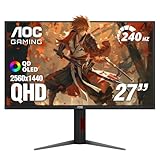


AOC 27-inch QHD 240Hz at a Glance
| Component | Specification |
|---|---|
| Screen size & type | 27″ flat IPS |
| Resolution | QHD 2560×1440 |
| Panel technology | IPS |
| Refresh rate | 240Hz (overclock 260Hz) |
| Response time | 0.3ms |
| Adaptive sync | G-Sync Compatible, FreeSync |
| HDR & brightness | 300 nits, 1000:1 contrast |
| Ports | DisplayPort 1.4, 2x HDMI 2.0 |
| Price | Around $160 |
Image Quality: Panel, Resolution and Colour
The AOC 27-inch uses an IPS panel, valued for accurate colour reproduction and wide viewing angles — the image stays consistent and natural even when viewed from the side. For a gaming monitor that may also be used for everyday tasks and media, IPS is a dependable, well-rounded choice that avoids the colour shifting seen on cheaper panel types.
The standout is the QHD 2560×1440 resolution. On a 27-inch screen, QHD is a noticeable step up in sharpness over Full HD — there are far more pixels filling the same area, so text is crisper and game detail is cleaner. QHD is widely considered the ideal resolution for a 27-inch monitor, balancing sharpness against the graphics demand it places on the system. Contrast is quoted at 1000:1, typical for IPS, with 300 nits of brightness that handles a normally lit room comfortably.
Refresh Rate and Motion Performance
The AOC runs at 240Hz, with an overclock option that lifts it to 260Hz. This is firmly high-end competitive territory: a 240Hz refresh rate produces four times the motion updates of a standard 60Hz panel, so fast movement stays exceptionally clear and on-screen action feels immediate. The overclock to 260Hz offers a small additional margin for players who want to push the panel as far as it will go.
Supporting that refresh rate is a very quick 0.3ms response time. Response time measures how rapidly a pixel can change colour, and a figure this low means pixel transitions easily keep pace with the 240Hz refresh, limiting the ghosting and blur trails that would otherwise undermine clarity. Delivering this level of motion performance at a QHD resolution, rather than the easier Full HD, is what makes the AOC genuinely impressive — competitive players get both sharpness and speed.
Gaming Experience: Adaptive Sync and HDR
The AOC supports both G-Sync Compatible and FreeSync adaptive-sync standards, which is a strong combination. Whichever brand of graphics card you own, the monitor can match its refresh rate to the card’s frame rate and eliminate screen tearing — the horizontal split that appears when frames and refreshes drift apart. That dual support gives buyers genuine flexibility now and for any future upgrade.
The monitor also includes AOC’s Shadow Control feature, which lets players brighten dark areas of the image to make enemies and detail easier to spot in gloomy scenes — a practical aid in competitive titles. There is no high-end HDR experience here, which is expected at the price. What competitive players will appreciate most is the core toolkit: QHD sharpness, a 240Hz refresh, a quick response time and tear-free output across both major graphics-card brands.
Design, Connectivity and Ergonomics
The AOC 27-inch has a clean, functional gaming design that suits a modern desk. Connectivity is well chosen: a DisplayPort 1.4 input, which is needed to reach the full 240Hz refresh at QHD resolution, plus two HDMI 2.0 ports that allow a PC and a console — or two consoles — to remain connected at the same time.
Ergonomically, the stand offers tilt adjustment, which is standard in this price bracket. Owners who want full height and rotation adjustment can use a VESA-compatible monitor arm. The design priority here is clearly on the panel itself — a QHD 240Hz IPS display at this price — rather than on an elaborate stand, which is a sensible allocation of the budget for a monitor aimed squarely at gamers.
Who Is the AOC 27-inch QHD 240Hz For?
The AOC 27-inch QHD 240Hz is for the gamer who refuses to choose between sharpness and speed. If you want the crisp detail of a QHD resolution on a well-sized 27-inch screen and the clear, fast motion of a 240Hz refresh rate, but you do not want to pay a premium price, this monitor is built precisely for you. Combining both features at around $160 is a genuine breakthrough in value.
It is well suited to competitive players who also enjoy detailed single-player games, since it serves both with one display. It is less suited to buyers who specifically want the deep contrast of a VA panel or a true high-impact HDR experience. But for the player who wants the widely admired QHD-and-240Hz combination without overspending, the AOC is an outstanding choice.
Pros and Cons
Pros: Sharp QHD resolution and a genuine 240Hz refresh together at a breakthrough price; quick 0.3ms response time; overclock to 260Hz; both G-Sync Compatible and FreeSync support; accurate IPS panel; Shadow Control for dark-scene visibility; dual HDMI plus DisplayPort.
Cons: Modest 1000:1 contrast typical of IPS; no high-impact HDR; tilt-only stand; QHD at 240Hz places real demand on the graphics card; design prioritises the panel over stand adjustability.
Is the AOC 27-inch QHD 240Hz Worth It?
At around $160 the AOC 27-inch QHD 240Hz is a genuine breakthrough in value. The combination of a sharp QHD resolution and a fast 240Hz refresh rate on an IPS panel has long carried a premium, and getting it at this price removes the usual compromise between detail and speed. Dual adaptive-sync support and a quick response time round out a strong package. The trade-offs — ordinary IPS contrast and no high-end HDR — are easy to accept. For a gamer who wants both sharpness and speed without overspending, it earns a confident recommendation.
Frequently Asked Questions
Is QHD better than Full HD on a 27-inch monitor?
Yes. QHD 2560×1440 has far more pixels than Full HD, so on a 27-inch screen text and game detail look noticeably sharper. QHD is widely considered the ideal resolution for this size.
Does the AOC 27-inch QHD 240Hz work with NVIDIA and AMD cards?
Yes. It supports both G-Sync Compatible and FreeSync, so it can eliminate screen tearing whether you use an NVIDIA or an AMD graphics card, giving you flexibility for any upgrade.
What does the overclock to 260Hz do?
The overclock option lifts the refresh rate from 240Hz to 260Hz, offering a small additional margin of motion clarity for players who want to push the panel as far as it will go.
Can the AOC 27-inch QHD 240Hz be used with a console?
Yes. It has two HDMI 2.0 ports alongside DisplayPort, so you can connect a PC and a console — or two consoles — and keep them connected at the same time.
More Gaming Monitor Reviews
- Acer Nitro 27-inch QHD 180Hz Gaming Monitor Review
- Samsung Odyssey G5 (G51F) Gaming Monitor Review: 27-inch QHD
- ASUS TUF Gaming VG27AQM5A Review: 27-inch 300Hz QHD
- LG UltraGear 32GS60QC Review: 32-inch Curved QHD Gaming Monitor
- Alienware 34 Curved Gaming Monitor Review (AW3425DWM)
- ASUS ROG Strix XG27AQDMG Review: 27-inch OLED Gaming Monitor
- Samsung Odyssey OLED G6 (G61SD) Review: 27-inch QD-OLED
- Alienware 34 QD-OLED Gaming Monitor Review (AW3425DW)
Affiliate Disclosure: As an Amazon Associate, we earn from qualifying purchases. If you click a link and make a purchase, we may earn a small commission at no extra cost to you. Prices and availability are accurate as of publication and may change.
Related Articles
Looking for more on this topic? Browse the hand-picked guides below — each one applies the same scoring rubric used in this review.










