

A home office monitor has a different job from a gaming monitor: it is the screen you stare at for eight hours a day, so comfort, eye care and clean ergonomics matter far more than headline refresh rates. The best work display is the one you barely notice — a panel that is easy on the eyes, sized right for documents and spreadsheets, and well connected so your laptop, dock and peripherals all hook up without fuss. This guide rounds up the best monitors for home office in 2026, chosen for everyday comfort and value rather than twitch-gaming speed.
- Best Monitors for Home Office at a Glance
- 1. HP Series 3 27 inch FHD Monitor, Full HD 1920 x 1080, IPS Panel
- 2. Sceptre Curved 24-inch Gaming Monitor 1080p R1500, 98% sRGB
- 3. Sceptre Curved 27-inch Prime Monitor up to 100Hz 1080p, 99% sRGB
- 4. SANSUI 32-inch Curved Gaming Monitor, High Refresh Rate FHD 1080P
- 5. SANSUI Curved Monitor 27 inch 120Hz USB Type-C with Speakers
- 6. SANSUI 34-Inch Curved Monitor UWQHD 3440 x 1440P, Up to 200Hz / 165Hz
- How to Choose a Monitor for Your Home Office
- Frequently Asked Questions
- Related Guides
- Related Articles
Our picks were chosen on what genuinely matters for a productive, comfortable workday: panel quality and viewing comfort, sensible size, connectivity (including USB-C for a one-cable laptop setup), eye-care features, and value for money. We have led with the most office-friendly displays and worked toward the larger crossover options, with prices from around $80 up to around $216. The list spans a clean IPS productivity panel, affordable curved screens that are gentle for long sessions, a USB-C model with speakers, and roomier displays for multitasking. Below is an at-a-glance comparison, then a closer look at each and a buyer’s guide built around comfort, connectivity and value — what really counts for working from home.
As an Amazon Associate we earn from qualifying purchases at no extra cost to you.



🛒 Best Price Today on Amazon
Prime members get fast, free shipping on everything above, plus member-only deals. New members get a 30-day free trial — cancel anytime.
Best Monitors for Home Office at a Glance
| Monitor | Best For | Standout Spec | Approx Price |
|---|---|---|---|
| HP Series 3 27-inch FHD IPS | Clean professional desktop | 27-inch IPS, 1300:1 contrast | around $178 |
| Sceptre Curved 24-inch 1080p | Compact comfortable value | Curved, 98% sRGB, built-in | around $80 |
| Sceptre Curved 27-inch up to 100Hz | Larger gentle workspace | 27-inch curved, 99% sRGB | around $98 |
| SANSUI 32-inch Curved FHD | Big multitasking canvas | 32-inch, generous real estate | around $180 |
| SANSUI 27-inch USB-C with Speakers | One-cable laptop desk | USB-C, built-in speakers | around $110 |
| SANSUI 34-inch Curved UWQHD | Ultrawide productivity | 3440×1440 ultrawide | around $216 |
1. HP Series 3 27 inch FHD Monitor, Full HD 1920 x 1080, IPS Panel
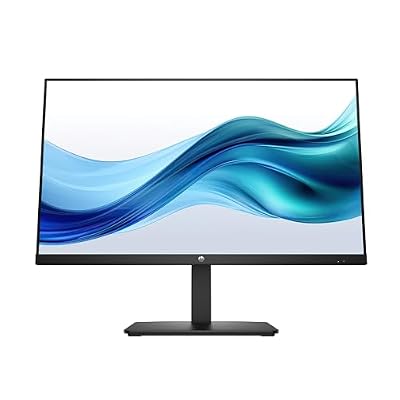
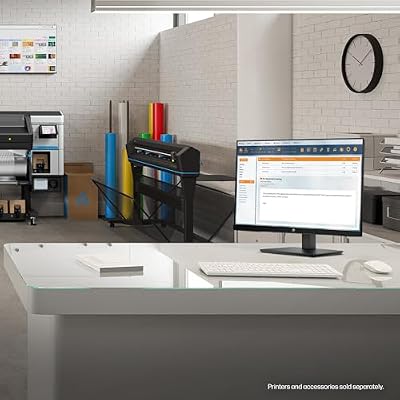
HP Series 3 27 inch FHD Monitor, Full HD Display (1920 x 1080), IPS Panel, 1300:1 Contrast Ratio, 250 Nits, Eye Ease with Eyesafe Certification, Black, 327se (2025)



As an Amazon Associate we earn from qualifying purchases. Product prices and availability are accurate as of the date/time indicated.
The HP Series 3 27-inch is the clean professional pick and a natural lead for a home office. It is a 27-inch Full HD monitor built on an IPS panel with a 1300:1 contrast ratio, delivering even color, wide viewing angles and the tidy, understated look that suits a work desk or a video call backdrop. At around $178 it is a dependable, name-brand display for everyday productivity.
For working from home this is exactly the right intent. The IPS panel keeps text and colors consistent whether you are looking straight on or glancing from the side, which reduces the eye strain that comes from washed-out, off-axis images on cheaper panels. The 27-inch size gives comfortable room for documents and a couple of windows side by side, and HP’s build and styling look professional in any office setting. If you want a clean, reliable everyday work monitor from a trusted brand, the HP Series 3 leads the list.
Pros: Even IPS image for comfortable viewing, professional 27-inch size, trusted HP build.
Cons: 60Hz-class refresh is fine for work but not for fast gaming; basic stand.
2. Sceptre Curved 24-inch Gaming Monitor 1080p R1500, 98% sRGB

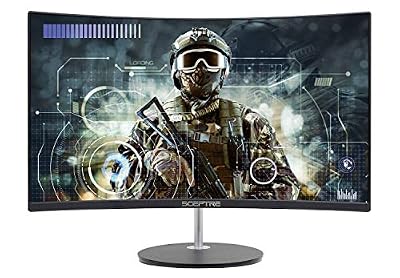
Sceptre Curved 24-inch Gaming Monitor 1080p R1500 98% sRGB HDMI x2 VGA Build-in Speakers, VESA Wall Mount Machine Black (C248W-1920RN Series)



As an Amazon Associate we earn from qualifying purchases. Product prices and availability are accurate as of the date/time indicated.
The Sceptre Curved 24-inch is the compact comfortable-value pick. It is a curved 1080p panel with a strong 98% sRGB color figure, dual HDMI plus VGA inputs and a built-in speaker, all for around $80 — the most affordable option on this list. For a tidy home-office desk where comfort and cost both matter, it covers the essentials at a hard-to-argue price.
For everyday work its gentle curve is the quiet advantage: a curved screen keeps the edges of the panel a more even distance from your eyes, which many people find more comfortable over a long day than a flat screen. The 24-inch size suits smaller desks and single-app focus, the 98% sRGB coverage keeps colors looking natural for documents and web work, and the built-in speaker saves desk space. As an affordable, comfortable display for a home office on a budget, the Sceptre 24-inch is a smart starting point.
Pros: Very affordable, gentle curve for comfort, strong 98% sRGB, built-in speaker.
Cons: 24 inches is tight for heavy multitasking; basic stand and 1080p detail.
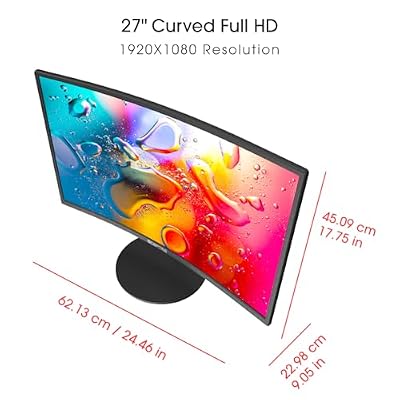
3. Sceptre Curved 27-inch Prime Monitor up to 100Hz 1080p, 99% sRGB
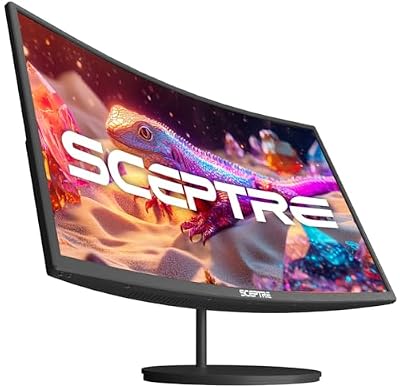
Sceptre Curved 27-inch Prime Monitor up to 100Hz 1080p, HDMI x2, VGA, 99% sRGB, Built-in Speakers, R1500, Machine Black 2025 (C275W-1920RN Series)



As an Amazon Associate we earn from qualifying purchases. Product prices and availability are accurate as of the date/time indicated.
The Sceptre Curved 27-inch is the larger gentle-workspace pick. It steps the size up to a 27-inch curved 1080p panel with an excellent 99% sRGB color figure, an up-to-100Hz refresh for smooth everyday motion, and dual HDMI plus VGA inputs. At around $98 it gives you a noticeably bigger, comfortable canvas while staying under a hundred dollars.
For working from home the extra size is the main draw, and it pairs nicely with the comfort of a curve. The 27-inch panel gives more room for spreadsheets, documents and side-by-side windows than a 24-inch screen, the gentle curve keeps the edges easy on the eyes through a long day, and the up-to-100Hz refresh makes scrolling and window movement feel smooth and fluid rather than choppy. The 99% sRGB coverage keeps colors accurate for any work. For a larger, comfortable, well-priced home-office display, it is a standout value.
Pros: Larger 27-inch comfortable canvas, smooth up-to-100Hz, excellent 99% sRGB, great value.
Cons: Still 1080p on 27 inches so text is less crisp; basic stand.
4. SANSUI 32-inch Curved Gaming Monitor, High Refresh Rate FHD 1080P




As an Amazon Associate we earn from qualifying purchases. Product prices and availability are accurate as of the date/time indicated.
The SANSUI 32-inch curved is the big multitasking-canvas pick for a home office. It is a large 32-inch curved Full HD panel that, while marketed for gaming with its high refresh rate, doubles as a generous work display thanks to its sheer size. At around $180 it gives you a wide, immersive canvas for spreading out windows, references and communication apps during the workday.
For working from home the appeal is room to breathe. A 32-inch screen lets you place two or three windows side by side without squinting, the curve keeps the wide panel’s edges within comfortable view so you are not turning your head, and the high refresh rate makes everyday scrolling and dragging feel smooth. Be honest about the trade-off: at 1080p across 32 inches, fine text is less crisp than on a higher-resolution panel, so it favors layout space over pixel-sharp detail. If a big, immersive multitasking canvas is your priority, it delivers that generously.
Pros: Large 32-inch multitasking canvas, comfortable curve, smooth high-refresh scrolling.
Cons: 1080p across 32 inches makes fine text softer; a gaming-first panel by design.
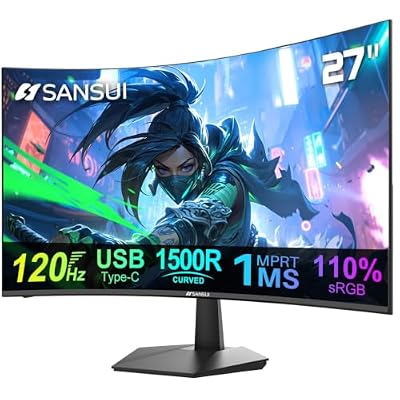
5. SANSUI Curved Monitor 27 inch 120Hz USB Type-C with Speakers


As an Amazon Associate we earn from qualifying purchases. Product prices and availability are accurate as of the date/time indicated.
The SANSUI 27-inch USB-C is the one-cable laptop pick, and for many home offices that is the killer feature. It is a 27-inch curved 120Hz panel with USB Type-C connectivity and built-in speakers, meaning a single USB-C cable can carry video — and on supported laptops, power — while the speakers handle calls and media. At around $110 it is a tidy, well-equipped work display.
For working from home, USB-C transforms the desk. One cable to your laptop drives the screen and can keep the laptop charged, eliminating the tangle of separate video and power leads and making it effortless to dock and undock at the start and end of the day. The built-in speakers cover video calls and background audio without extra hardware, the gentle curve adds comfort, and the 120Hz refresh keeps motion smooth. For a clutter-free, laptop-friendly home office, this SANSUI USB-C model is the standout.
Pros: Single-cable USB-C for laptops, built-in speakers, comfortable curve, smooth 120Hz.
Cons: USB-C power delivery depends on the model and your laptop; 1080p detail is modest.
6. SANSUI 34-Inch Curved Monitor UWQHD 3440 x 1440P, Up to 200Hz / 165Hz




As an Amazon Associate we earn from qualifying purchases. Product prices and availability are accurate as of the date/time indicated.
Rounding out the list is the SANSUI 34-inch curved ultrawide, the productivity powerhouse pick. It is a 34-inch UWQHD (3440 x 1440) 21:9 curved panel — the extra width and the sharper-than-1080p resolution make it superb for multitasking. At around $216 it is the premium option here, and the ultrawide format is the reason why it earns the spot.
For working from home, an ultrawide is arguably the most productive shape you can buy. The 21:9 width lets you place two full documents or a document beside a browser and chat window without the bezel gap of a dual-monitor setup, the 3440 x 1440 resolution keeps text crisp and readable across that wide canvas, and the gentle curve keeps the far edges comfortably in view. It is overkill if you only check email, but for spreadsheet-heavy work, research or anyone who lives in many windows at once, the SANSUI 34-inch ultrawide is a genuine productivity upgrade.
Pros: Wide 21:9 multitasking canvas, sharp UWQHD text, gentle curve for comfort.
Cons: Most expensive here; ultrawide is more than casual users need.
How to Choose a Monitor for Your Home Office
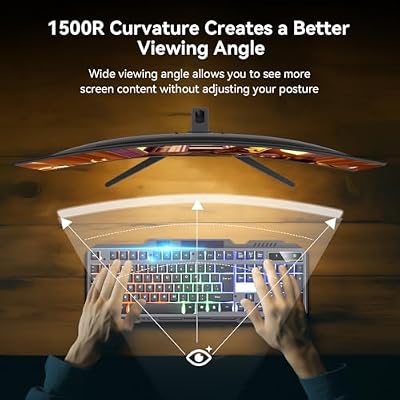
For a home office, comfort comes first, and that starts with the panel and how easy it is on your eyes over a long day. An IPS panel like the HP Series 3 keeps color and brightness consistent whether you look straight on or from an angle, which reduces strain compared with cheaper panels that wash out off-axis. A gentle curve, as on the Sceptre and SANSUI models, keeps the edges of the screen a more even distance from your eyes, which many people find more comfortable for hours of reading and writing.
Size and resolution shape how much you can fit on screen and how sharp it looks. A 27-inch panel is the home-office sweet spot for most people, giving room for documents and a couple of windows; larger 32-inch or ultrawide panels suit heavy multitaskers who keep many windows open. Remember that resolution matters for text: a higher-resolution panel like the 34-inch UWQHD keeps small fonts crisp, whereas 1080p stretched across a big screen looks softer, so balance the extra space against the sharpness your work demands.
Connectivity is the practical detail that makes daily life easier, especially if you work from a laptop. A monitor with USB-C, like the SANSUI 27-inch, can carry video and laptop power down a single cable, so you dock and undock with one connection and lose the cable clutter. Built-in speakers handle video calls without extra hardware. Check that the inputs match your laptop and dock, and favour USB-C if a clean, one-cable workflow appeals — it genuinely simplifies a home desk.
Finally, weigh eye comfort and value together, since this is a screen you will use every working day. Look for the comfort features that matter to you — a non-fatiguing panel, a gentle curve, a sensible size — rather than gaming specs you will not use. A high refresh rate is pleasant for smooth scrolling but is not essential for office work, so do not overpay for it. Set your budget, decide whether you want a compact single screen, a roomy multitasking canvas or a one-cable USB-C setup, and pick the monitor on this list that fits how you actually work from home.
Frequently Asked Questions
What size monitor is best for a home office?
For most people a 27-inch panel like the HP Series 3 or Sceptre 27-inch is the sweet spot: enough room for documents and a couple of windows without dominating the desk. If you multitask heavily across many windows, a 32-inch or an ultrawide such as the SANSUI 34-inch gives more space. A 24-inch screen like the Sceptre is fine for focused, single-app work or smaller desks.
Is a USB-C monitor worth it for working from home?
If you work from a laptop, very much so. A USB-C monitor like the SANSUI 27-inch can carry video and, on supported laptops, charging power down one cable, so you dock and undock with a single connection and avoid a tangle of leads. It keeps the desk tidy and makes the start and end of the workday effortless. Just confirm your laptop supports video and charging over USB-C.
Do home office monitors need a high refresh rate?
Not really. A high refresh rate makes scrolling and window movement look smoother, which is a pleasant bonus on panels like the Sceptre 27-inch or the SANSUI USB-C, but it is not essential for documents, email and spreadsheets. For office work, prioritise a comfortable, eye-friendly panel, the right size and good connectivity over chasing the highest refresh rate, which matters far more for gaming.
How do I reduce eye strain when working at a screen all day?
Choose a comfortable panel — an even IPS display like the HP Series 3, or a gently curved screen that keeps the edges an even distance from your eyes — and set the brightness to match your room rather than running it at maximum. Pick a sensible size and viewing distance so text is readable without leaning in, take regular short breaks, and position the monitor to avoid glare from windows and lights.
Related Guides
- Best Monitors
- Best USB-C Monitors
- Best Office Chairs for Working From Home
- Best Monitor Arms for Your Desk
- Best Mechanical Keyboards
- Best Webcams for Video Calls
Affiliate Disclosure: As an Amazon Associate, we earn from qualifying purchases. If you click a link and make a purchase, we may earn a small commission at no extra cost to you. Prices and availability are accurate as of publication and may change.
Ready to decide? Our #1 pick for 2026 is the HP Series 3 27-inch FHD IPS.
Live price & availability on Amazon.


