

- Top Pick: Alienware 34 Curved Gaming Monitor – AW3425DWM – 34-inch WQHD 180Hz 1ms Display, 1500R, AMD FreeSync Premium, VESA AdaptiveSync.
- Best Value: Alienware 34 240Hz QD-OLED Curved Gaming Monitor – AW3425DW – 34.2-inch WQHD (3440 x 1440) 0.03ms Display, 1800R Curve, AMD FreeSync Premium Pro, VESA AdaptiveSync, DisplayHDR TrueBlack 400
- Premium Choice: Alienware AW3423DWF Curved QD-OLED Gaming Monitor – 34-inch Quantum Dot, 0.1Ms 165Hz 21:9, 99.3% DCI-P3 Color Gamut, VESA DisplayHDR, 400, AMD FreeSync Premium Pro – Black
The Alienware 34 Curved Gaming Monitor (AW3425DWM) is the accessible entry point into Alienware ultrawide gaming. It pairs a 34-inch curved WQHD ultrawide panel with a 21:9 aspect ratio, a 180Hz refresh rate and a 1ms GtG response time, and adds AMD FreeSync, VESA DisplayHDR 400 and a dedicated console mode. Priced at around $350, it brings the Alienware name and the ultrawide experience within easier reach. This Alienware 34 AW3425DWM review covers the panel, motion handling, gaming features and overall value.
- Alienware 34 AW3425DWM at a Glance
- Image Quality: Panel, Resolution and Colour
- Refresh Rate and Motion Performance
- Gaming Experience: Adaptive Sync and HDR
- Design, Connectivity and Ergonomics
- Who Is the Alienware 34 AW3425DWM For?
- Pros and Cons
- Is the Alienware 34 AW3425DWM Worth It?
- Frequently Asked Questions
- More Gaming Monitor Reviews
- Related Articles
- Related Articles
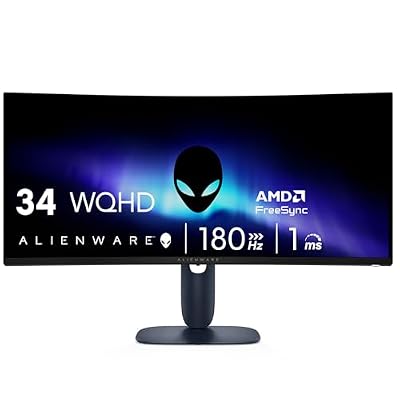
Alienware 34 Curved Gaming Monitor – AW3425DWM - 34-inch WQHD 180Hz 1ms Display, 1500R, AMD FreeSync Premium, VESA AdaptiveSync.


As an Amazon Associate we earn from qualifying purchases. Product prices and availability are accurate as of the date/time indicated.
🛒 Best Price Today on Amazon
Prime members get fast, free shipping on everything above, plus member-only deals. New members get a 30-day free trial — cancel anytime.
As an Amazon Associate we earn from qualifying purchases.





Alienware 34 AW3425DWM at a Glance
| Component | Specification |
|---|---|
| Screen size & type | 34″ curved (1500R) ultrawide |
| Resolution | WQHD ultrawide 3440×1440 (21:9) |
| Panel technology | Curved ultrawide panel |
| Refresh rate | 180Hz |
| Response time | 1ms GtG |
| Adaptive sync | AMD FreeSync |
| HDR & brightness | VESA DisplayHDR 400, 95% DCI-P3 |
| Ports | Dedicated console mode |
| Price | Around $350 |
Image Quality: Panel, Resolution and Colour
The Alienware 34 AW3425DWM is defined by its WQHD ultrawide resolution of 3440×1440 in a 21:9 aspect ratio. Compared with a standard 16:9 screen, an ultrawide is significantly wider, and that extra horizontal space transforms the experience: games feel more panoramic and cinematic, with a wider field of view that draws the player into the world. For immersive single-player titles in particular, the ultrawide format is a genuine step up over a conventional display.
Colour is well covered here, with a quoted 95% DCI-P3 coverage indicating a wide colour gamut that gives games a vivid, well-saturated look. DCI-P3 is a broader colour space than the basic sRGB standard, so modern, colourful content has the room it needs to look its best. The 1500R curve wraps the wide panel towards the viewer, which is important on an ultrawide — it keeps the far edges of the screen at a more comfortable viewing distance and within the natural field of view. The combination of the panoramic resolution, the gentle curve and a wide colour gamut makes for a genuinely absorbing image.
Refresh Rate and Motion Performance
The AW3425DWM runs at 180Hz, a refresh rate firmly in genuine high-refresh territory. Moving up from a 60Hz panel to 180Hz is a substantial improvement: motion looks markedly clearer, fast camera pans stay sharp, and the whole experience feels more fluid and responsive. Delivering that high refresh rate across a wide ultrawide canvas makes fast-paced games feel both smooth and immersive at the same time.
Supporting the 180Hz refresh is a quick 1ms GtG response time. The GtG, or grey-to-grey, figure measures how fast a pixel can shift between shades, and a low number means pixel transitions keep pace with the high refresh rate, limiting the ghosting trails that would otherwise blur fast motion. The 180Hz refresh is well judged for an ultrawide of this kind: it gives competitive players clear, smooth high-refresh motion, while the panoramic format and the curve ensure that single-player and adventure games feel genuinely cinematic and absorbing.
Gaming Experience: Adaptive Sync and HDR
The AW3425DWM supports AMD FreeSync, which matches the monitor’s refresh rate to the graphics card’s frame rate to eliminate screen tearing — the horizontal split that appears when frame delivery and refreshes drift apart. FreeSync also works with compatible NVIDIA cards, so the feature is useful regardless of graphics-card brand, keeping the wide picture clean and consistent.
The monitor carries VESA DisplayHDR 400 certification. DisplayHDR 400 is an entry-level HDR tier — it indicates genuine HDR signal support and a baseline brightness standard, though it does not deliver the dramatic impact of higher DisplayHDR tiers. The AW3425DWM also includes a dedicated console mode, which makes it straightforward to use with a games console. Together with the ultrawide format, that makes the monitor a flexible, immersive choice for both PC and console gaming.
Design, Connectivity and Ergonomics
The AW3425DWM carries Alienware’s distinctive design language — a clean, futuristic look that is well regarded among gaming monitors. Alienware monitors are generally well built, and the brand has a strong reputation for quality, which adds genuine reassurance at this price point. The 34-inch curved chassis is a substantial presence on a desk, as any ultrawide inevitably is, so it suits a setup with room to accommodate it.
Connectivity covers the standard inputs needed for a gaming PC and, with the dedicated console mode, a games console alongside it. Ergonomically, Alienware monitors are typically well equipped with stand adjustment that helps position a wide screen comfortably, and owners who want additional flexibility can rely on a VESA-compatible mount. The combination of the recognisable Alienware design, solid build quality and the immersive ultrawide format gives the AW3425DWM a genuinely premium feel for its price.
Who Is the Alienware 34 AW3425DWM For?
The Alienware 34 AW3425DWM is for the gamer who wants the immersive ultrawide experience and the Alienware name without paying a flagship price. If you value the panoramic, cinematic feel of a 21:9 ultrawide screen, want a genuine 180Hz refresh rate for smooth motion, and appreciate a recognised premium brand, this monitor is a well-judged entry point into ultrawide gaming.
It is less suited to the most demanding competitive players, who may want a faster 240Hz-plus panel, or to buyers who specifically want a flat 16:9 screen for esports titles, since not every competitive game supports the ultrawide aspect ratio fully. But for the gamer whose priority is immersive, panoramic single-player gaming at an accessible price, the AW3425DWM is an appealing and sensible choice.
Pros and Cons
Pros: Immersive 34-inch WQHD ultrawide format with a panoramic 21:9 field of view; 1500R curve for a comfortable wide viewing experience; genuine 180Hz refresh rate; quick 1ms GtG response time; AMD FreeSync; VESA DisplayHDR 400; dedicated console mode; recognised Alienware brand and build quality.
Cons: 180Hz trails the fastest 240Hz-plus competitive panels; DisplayHDR 400 is an entry-level HDR tier; not every competitive game fully supports the ultrawide aspect ratio; the 34-inch chassis takes substantial desk space.
Is the Alienware 34 AW3425DWM Worth It?
At around $350 the Alienware 34 AW3425DWM is a well-judged entry into ultrawide gaming. It delivers the immersive, panoramic 21:9 experience, a comfortable 1500R curve and a genuine 180Hz refresh rate, all under the recognised Alienware name, at a price far below flagship ultrawides. The trade-offs are sensible ones: a 180Hz refresh rather than 240Hz, and entry-level DisplayHDR 400 rather than a higher tier. Neither will trouble the buyer this monitor is aimed at, who wants immersion and a trusted brand more than the last word in speed or HDR impact. For the gamer who wants cinematic, immersive single-player gaming and a premium brand without a premium price, it earns a confident recommendation. Buyers set on the fastest refresh rates should look instead at a flat 240Hz panel.
Frequently Asked Questions
What is an ultrawide monitor?
An ultrawide monitor uses a wider 21:9 aspect ratio instead of the standard 16:9, giving extra horizontal screen space for a more panoramic, cinematic field of view in games and films.
Does every game support ultrawide?
Most modern single-player games support the 21:9 ultrawide ratio well, but some competitive titles do not fully, so it is worth checking support for the games you play most.
What is VESA DisplayHDR 400?
DisplayHDR 400 is an entry-level HDR certification tier. It confirms genuine HDR signal support and a baseline brightness standard, but does not match the impact of higher DisplayHDR tiers.
Does the Alienware 34 AW3425DWM work with consoles?
Yes. It includes a dedicated console mode that makes it straightforward to use with a games console alongside its standard support for a gaming PC.
More Gaming Monitor Reviews
- ASUS ROG Strix XG27AQDMG Review: 27-inch OLED Gaming Monitor
- Samsung Odyssey OLED G6 (G61SD) Review: 27-inch QD-OLED
- Alienware 34 QD-OLED Gaming Monitor Review (AW3425DW)
- Samsung 49-inch Odyssey G9 (G95C) Gaming Monitor Review
- ASUS ROG Swift PG32UCDM Review: 32-inch 4K OLED Gaming Monitor
- Sceptre Curved 24-inch Gaming Monitor Review: 1080p Budget Pick
- SANSUI 24-inch 180Hz Gaming Monitor Review (ES-G24F4)
- Acer Nitro KG241Y Gaming Monitor Review: 165Hz FHD VA
Affiliate Disclosure: As an Amazon Associate, we earn from qualifying purchases. If you click a link and make a purchase, we may earn a small commission at no extra cost to you. Prices and availability are accurate as of publication and may change.
Related Articles
Looking for more on this topic? Browse the hand-picked guides below — each one applies the same scoring rubric used in this review.
Ready to decide? Our #1 pick for 2026 is the Screen size & type.
Live price & availability on Amazon.


