

- Top Pick: EVGA XR1 Pro Capture Card, 1440p/4K HDR Capture/Pass Through, Certified for OBS, USB 3.1, ARGB, Audio Mixer, PC, PS5, PS4, Xbox Series X and S, Xbox One, Nintendo Switch, 144-U1-CB21-LR
- Best Value: Elgato 4K S Capture Card for PS5, Xbox Series X/S, Switch 2
- Premium Choice: Capture Card, 4K HDMI Video Capture Card, Game Capture Card, 1080P 60FPS Video Capture Device, HDMI to USB 3.0 Capture Card for Streaming, Work with Camera/Xbox/PS4/PS5/PC/OBS
The EVGA XR1 Pro is a serious alternative to the Elgato mid-range — an OBS-certified external capture card with 1440p capture support and 4K HDR pass-through, aimed squarely at the streamer who wants a card validated specifically for the OBS workflow. With more than 1,950 reviews on Amazon, the XR1 Pro is the most prominent non-Elgato choice in this tier. At around $182 it sits in mainstream-to-premium territory. This EVGA XR1 Pro review covers the capture resolution, pass-through, connection, software and value.
- EVGA XR1 Pro at a Glance
- Capture Resolution and Frame Rate
- HDR, Pass-Through and Display Compatibility
- Connection Type and Latency
- Software, OBS Integration and Streaming Features
- Who Is the EVGA XR1 Pro For?
- Pros and Cons
- Is the EVGA XR1 Pro Worth It?
- Frequently Asked Questions
- More Capture Card Reviews
- Related Articles
- Related Articles

EVGA XR1 Pro Capture Card, 1440p/4K HDR Capture/Pass Through, Certified for OBS, USB 3.1, ARGB, Audio Mixer, PC, PS5, PS4, Xbox Series X and S, Xbox One, Nintendo Switch, 144-U1-CB21-LR

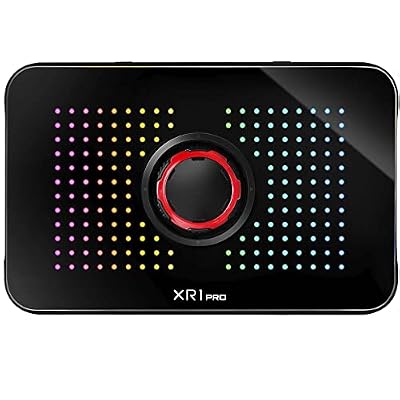


As an Amazon Associate we earn from qualifying purchases. Product prices and availability are accurate as of the date/time indicated.
🛒 Best Price Today on Amazon
Prime members get fast, free shipping on everything above, plus member-only deals. New members get a 30-day free trial — cancel anytime.
As an Amazon Associate we earn from qualifying purchases.







EVGA XR1 Pro at a Glance
| Component | Specification |
|---|---|
| Type | External capture card |
| Connection | USB 3.1 |
| Max capture resolution | 1440p |
| HDR support | Yes — 4K HDR pass-through |
| Pass-through resolution | 4K HDR pass-through |
| Compatibility | PS5, Xbox Series X/S, PC |
| Latency class | Low latency |
| Price | Around $182 |
Capture Resolution and Frame Rate
The XR1 Pro captures at up to 1440p, which is a slightly unusual spec choice — 1440p sits between the mainstream 1080p HDR capture of the HD60 X and the 4K30 capture of the 4K S. For PC streamers running 1440p gaming setups this is actually a sweet spot: 1440p is the native resolution many PC gamers play at, so capturing at 1440p preserves their actual gameplay fidelity for clip extraction without forcing a downscale. For console streamers the 1440p mode is less directly relevant — PS5 and Xbox typically output 1080p or 4K rather than 1440p — but the card handles those resolutions as well. Hosts at this tier are well covered in our best RTX 5070 gaming laptops guide.
The 1440p sweet spot is genuinely under-served by other capture cards. Most external cards either cap at 1080p (HD60 S, HD60 X for HDR mode, the UGREEN range) or jump straight to 4K (4K S, 4K X). For the very large population of PC gamers playing at 1440p on a high-refresh-rate monitor, 1440p capture is the spec that actually matches their gameplay, and the XR1 Pro is one of the few cards designed around it. That positioning matters more than any other single feature, and it is why the XR1 Pro continues to find buyers despite the dominance of the Elgato range.
HDR, Pass-Through and Display Compatibility
The XR1 Pro’s headline feature for the modern console streamer is 4K HDR pass-through. The player keeps a 4K HDR experience on their main monitor while the card captures at up to 1440p — which is the right separation between capture and pass-through for the current console generation. Display compatibility is the usual HDMI story: any modern monitor accepts the pass-through, and PS5, Xbox Series X/S and PC are all supported. The combination of 1440p capture and 4K HDR pass-through means the XR1 Pro is well suited to PC streamers in particular — for whom 1440p gameplay is the standard.
It is also worth noting that the XR1 Pro is the rare external card to combine 4K HDR pass-through with capture at a resolution below 4K — most cards either pair 1080p pass-through with 1080p capture, or 4K pass-through with 4K capture. The XR1 Pro’s mismatched-but-sensible spec lets the player keep their full-fidelity 4K HDR gaming experience while the card captures at a resolution sized for the streaming workflow.
Connection Type and Latency
The XR1 Pro is an external card connected over USB 3.1, which provides ample bandwidth for the card’s capture modes. Latency is low — EVGA position it as suitable for streaming use without perceptible delay on the gameplay display via the pass-through. The external form factor brings the usual benefits: portability, no case to open, and compatibility with both desktop and laptop hosts. For competitive PC streamers who care about end-to-end latency, the XR1 Pro’s OBS-certified pipeline is part of what justifies the price.
Software, OBS Integration and Streaming Features
The XR1 Pro is OBS-certified — and that is the headline software claim. OBS Studio is the universal streaming software, and a card certified specifically for the OBS workflow has been validated for the smooth integration, drivers and codec compatibility that the OBS pipeline demands. In practice that means the XR1 Pro appears in OBS as a stable capture source with predictable behaviour, which is exactly what serious streamers want. EVGA also provide their own software stack, but the OBS certification is what matters day to day. For streamers who run OBS as their primary tool and who do not want to be locked into a brand-specific software stack, the XR1 Pro is an appealing pick.
Who Is the EVGA XR1 Pro For?
The XR1 Pro is for the PC streamer who games at 1440p and wants 1440p capture, who values 4K HDR pass-through for the current console generation, and who specifically wants an OBS-certified card rather than one tied to a brand-specific software stack. If you are a 1440p PC gamer who streams, the XR1 Pro is a strong pick. It is less suited to two groups: the pure 1080p console streamer, who should pick the HD60 X and save money; and the 4K-capture creator, who should pick the 4K S or 4K X. For comparison context see our best 240Hz gaming laptops guide.
Pros and Cons
Pros: 1440p capture native — well matched to 1440p PC gaming; 4K HDR pass-through; OBS-certified for smooth streaming-software integration; USB 3.1 bandwidth; not tied to a brand-specific software stack.
Cons: 1440p capture is a niche spec for console streamers, who typically capture at 1080p or 4K; mid-to-premium price; smaller community and tutorial base than the Elgato range, where most online guides assume an Elgato card.
Is the EVGA XR1 Pro Worth It?
At around $182 the EVGA XR1 Pro is a strong pick for one specific buyer: the 1440p PC streamer who wants OBS-certified hardware and 4K HDR pass-through. For that buyer it is well placed and earns a recommendation. Mainstream 1080p console streamers will be better served by the Elgato HD60 X, and 4K creators by the Elgato 4K S or 4K X. PC hosts at this tier are well covered in our best RTX 5070 gaming laptops guide.
Frequently Asked Questions
What resolution does the EVGA XR1 Pro capture at?
Up to 1440p. The XR1 Pro also supports lower resolutions and provides 4K HDR pass-through, but the capture ceiling itself is 1440p — which is well matched to PC gamers who play natively at 1440p on a high-refresh monitor.
Does the EVGA XR1 Pro support 4K HDR?
On pass-through, yes — the XR1 Pro provides 4K HDR pass-through so the player keeps a 4K HDR experience on their main monitor. Capture itself is at up to 1440p, which is a deliberate spec separation rather than a limitation.
Is the EVGA XR1 Pro OBS-compatible?
Yes — it is OBS-certified, meaning the card has been specifically validated for the OBS Studio streaming workflow with stable drivers and codec compatibility.
Should I buy the EVGA XR1 Pro or the Elgato HD60 X?
Pick the XR1 Pro if you stream from a 1440p PC and want OBS-certified hardware. Pick the HD60 X if you stream from PS5 or Xbox Series X at 1080p HDR — it is cheaper and the Elgato ecosystem is the console-streaming default. The two cards genuinely serve different buyers rather than competing head-on, so the choice usually comes down to whether your primary gaming source is a PC running at 1440p or a console running at 1080p HDR.
More Capture Card Reviews
- AVerMedia GC573 Live Gamer 4K Internal Capture Card Review
- UGREEN 1080P HDMI Capture Card Review (Budget)
- UGREEN 4K@30Hz HDMI Capture Card Review
- Elgato HD60 S External Capture Card Review
- Elgato Cam Link 4K External Capture Card Review
- Elgato HD60 X External Capture Card Review (HDR10)
- Elgato 4K X Capture Card Review (4K144 Flagship)
- Elgato 4K S External Capture Card Review
Affiliate Disclosure: As an Amazon Associate, we earn from qualifying purchases. If you click a link and make a purchase, we may earn a small commission at no extra cost to you. Prices and availability are accurate as of publication and may change.
Related Articles
Looking for more on this topic? Browse the hand-picked guides below — each one applies the same scoring rubric used in this review.










