

- Top Pick: Elgato 4K S Capture Card for PS5, Xbox Series X/S, Switch 2
- Best Value: HDMI Capture Card for Streaming, 4K60 HDR & 1440P60 Passthrough Loop Out
- Premium Choice: Elgato HD60 S+, External Capture Card, Stream and Record in 1080p60 HDR10 or 4K60 HDR10 with ultra-low latency on PS5, PS4/Pro, Xbox Series X/S, Xbox One X/S, in OBS and more, works with PC and Mac
The Elgato HD60 X is the current mainstream capture card in Elgato’s range — the natural successor to the HD60 S, updated with HDR10 and 4K30 capture. It captures at 1080p60 with HDR10, or at 4K30 in SDR, and provides ultra-low latency pass-through so that the player can game on a second display without delay. With more than 5,100 reviews on Amazon and clear positioning for the PS5 and Xbox Series X generation, it has become the current default for new streamers. At around $120 it is well placed in the mainstream tier. This Elgato HD60 X review covers the capture resolution, HDR, pass-through, software and value.
- Elgato HD60 X at a Glance
- Capture Resolution and Frame Rate
- HDR, Pass-Through and Display Compatibility
- Connection Type and Latency
- Software, OBS Integration and Streaming Features
- Who Is the Elgato HD60 X For?
- Pros and Cons
- Is the Elgato HD60 X Worth It?
- Frequently Asked Questions
- More Capture Card Reviews
- Related Articles
- Related Articles

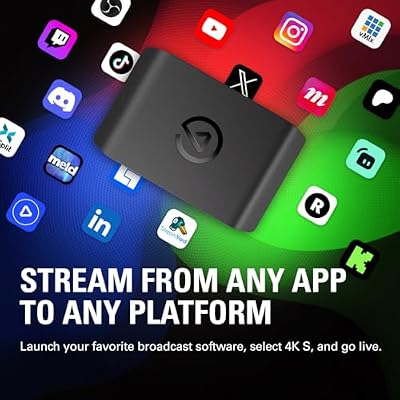
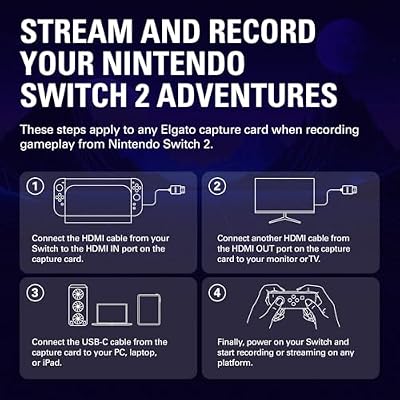
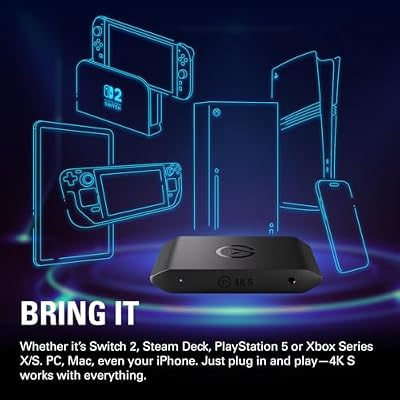
Elgato 4K S Capture Card for PS5, Xbox Series X/S, Switch 2 | 4K60 capture, 1440p120 or 1080p240 passthrough, HDR10 support, Near-zero latency, USB-C, Analog audio input






As an Amazon Associate we earn from qualifying purchases. Product prices and availability are accurate as of the date/time indicated.
🛒 Best Price Today on Amazon
Prime members get fast, free shipping on everything above, plus member-only deals. New members get a 30-day free trial — cancel anytime.
Elgato HD60 X at a Glance
| Component | Specification |
|---|---|
| Type | External capture card |
| Connection | USB |
| Max capture resolution | 1080p60 HDR10 or 4K30 SDR |
| HDR support | Yes — HDR10 capture at 1080p60 |
| Pass-through resolution | Ultra-low latency, up to 4K HDR |
| Compatibility | PS5, Xbox Series X/S, Switch, PC |
| Latency class | Ultra-low latency |
| Price | Around $120 |
Capture Resolution and Frame Rate
The HD60 X is built around the resolutions that the current console generation actually output. It captures at 1080p60 with HDR10 — which is what most PS5 and Xbox Series X streams will run at, since 1080p remains the streaming sweet spot — and it can alternatively capture at 4K30 in SDR for creators who want maxed-resolution clips for video editing rather than live streaming. That flexibility is the central upgrade over the older HD60 S: the same card can capture HDR colour at high frame rate for live streaming, or 4K at lower frame rate for clip extraction and YouTube uploads, depending on the workflow. For most streamers, 1080p60 HDR10 is the headline setting.
As an Amazon Associate we earn from qualifying purchases at no extra cost to you.






Having both modes available in one card is more useful than it first appears. A typical creator runs live streams at 1080p60 — for the encoder and viewer reasons that make 1080p the streaming default — but separately records 4K30 clips for edited YouTube uploads later. Two cards are not required; the HD60 X handles both jobs, with a mode toggle in Elgato’s software. That kind of dual-mode flexibility is why the HD60 X has replaced the HD60 S as the mainstream recommendation rather than sitting alongside it.
HDR, Pass-Through and Display Compatibility
HDR support is the headline feature. The HD60 X captures HDR10 at 1080p60, which means PS5 and Xbox Series X games that output HDR10 will be captured with their HDR metadata intact — important both for accurate clip editing and for HDR-capable streaming workflows. The pass-through is similarly upgraded: ultra-low latency pass-through up to 4K HDR means the player can keep playing on a 4K HDR monitor without any lag, while the card captures at 1080p60 HDR or 4K30. That separation between pass-through resolution and capture resolution is what makes the HD60 X feel modern — you no longer have to drop your gaming display to 1080p to capture. For 4K-class host PCs see our best RTX 5080 gaming laptops guide.
The HDR10 capture also matters for editorial work after the fact. Clips captured with HDR metadata intact can be tonemapped or graded later in editing software with much better results than clips captured as flat SDR from an HDR source — the colour information that HDR carries is what gives modern console games their distinctive look, and preserving that for the editor is a real upgrade over the older HD60 S.
Connection Type and Latency
The HD60 X is an external USB-connected card. As with the HD60 S, that brings portability — it moves easily between desktop and laptop — and simplicity, with no case to open. The ultra-low latency pass-through means the player never sees delay on their gaming display, which is the latency that actually matters for fast-paced gameplay. Software latency on the capture preview is naturally higher than on the gaming display, but in standard streaming workflows the streamer monitors the captured feed via the OBS preview on a side monitor while playing on the main monitor — so it is a non-issue in practice. The HD60 X is a card you can recommend without latency caveats for almost any streamer.
Software, OBS Integration and Streaming Features
Like the rest of the range, the HD60 X integrates with OBS Studio as a standard video capture source, with Streamlabs and other OBS forks, and with Elgato’s own 4K Capture Utility. The 4K Capture Utility is particularly relevant for the HD60 X because of its 4K30 mode — Elgato’s software is well tuned for managing 4K clips, scrubbing through long captures and exporting trimmed segments. For live streaming the OBS workflow is the same as for the HD60 S: add the card to the scene, set the canvas size, point your streaming destination, and go. The HD60 X slots in without disrupting any existing setup.
Who Is the Elgato HD60 X For?
The HD60 X is for the modern streamer with a current-generation console — a PS5 or an Xbox Series X — who wants HDR10 capture and the option of 4K30 clips, but whose live stream remains 1080p60. If that describes you, the HD60 X is squarely your card and an obvious choice over the older HD60 S. It is less suited to two groups: streamers who specifically need 4K60 or higher capture, who should jump to the 4K X or look at an internal card like the AVerMedia GC573; and the strict-budget buyer, who can capture 1080p over USB 2.0 for a fraction of the price with a UGREEN dongle. For the mainstream PS5/Xbox Series X streamer, the HD60 X is the right pick.
Pros and Cons
Pros: HDR10 capture at 1080p60; alternative 4K30 SDR capture mode; ultra-low latency pass-through up to 4K HDR; works on PS5, Xbox Series X/S, Switch and PC; mature Elgato software and OBS integration; the current mainstream default.
Cons: 4K capture limited to 30 fps; not the right card if you specifically need 4K60 or higher; pricier than the older HD60 S, though only modestly.
Is the Elgato HD60 X Worth It?
At around $120 the Elgato HD60 X is the mainstream recommendation for new streamers on the current console generation. It captures HDR10 — which matters for PS5 and Xbox Series X colour fidelity — and it can drop to 4K30 for high-resolution clip extraction, all while preserving 4K HDR pass-through to the player’s gaming display. For the mainstream streamer it is the right card and earns a confident recommendation. Streamers who specifically need 4K60 or higher should look at the 4K X; the very budget-conscious will be fine with a UGREEN dongle. Streaming-PC hosts at this tier are well covered by our best 240Hz gaming laptops guide.
Frequently Asked Questions
Does the Elgato HD60 X capture HDR?
Yes. The HD60 X captures HDR10 at 1080p60, which is what the current PS5 and Xbox Series X generation outputs. In 4K30 mode the capture is SDR.
Can the Elgato HD60 X capture 4K60?
No. The HD60 X captures up to 4K30 in SDR, or 1080p60 in HDR10. For 4K60 or higher capture you would need the Elgato 4K X.
Does the HD60 X allow 4K gameplay on a second display?
Yes. The HD60 X provides ultra-low latency pass-through up to 4K HDR, so the player can keep gaming in 4K HDR on the main display while the card captures.
Is the Elgato HD60 X compatible with PS5 and Xbox Series X?
Yes. It is positioned exactly for the current console generation and captures HDR10 from both PS5 and Xbox Series X.
More Capture Card Reviews
- Elgato 4K X Capture Card Review (4K144 Flagship)
- Elgato 4K S External Capture Card Review
- EVGA XR1 Pro Capture Card Review (1440p/4K HDR)
- AVerMedia GC573 Live Gamer 4K Internal Capture Card Review
- UGREEN 1080P HDMI Capture Card Review (Budget)
- UGREEN 4K@30Hz HDMI Capture Card Review
- Elgato HD60 S External Capture Card Review
- Elgato Cam Link 4K External Capture Card Review
Affiliate Disclosure: As an Amazon Associate, we earn from qualifying purchases. If you click a link and make a purchase, we may earn a small commission at no extra cost to you. Prices and availability are accurate as of publication and may change.
Related Articles
Looking for more on this topic? Browse the hand-picked guides below — each one applies the same scoring rubric used in this review.










