

- Top Pick: AVerMedia GC573 Live Gamer 4K, Internal Capture Card, Stream and Record 4K60 HDR10 with ultra-low latency on PS5, PS4 Pro, Xbox Series X/S, Xbox One X, in OBS, Twitch, YouTube
- Best Value: AVerMedia HDMI 2.1 Internal PCIe Capture Card for Streaming and Recording 4K60 with Ultra-Low Latency on PS5, PS4 Pro, Xbox Series X/S, Xbox One X, Switch Games – GC575 Live Gamer 4K 2.1
- Premium Choice: AVerMedia Live Gamer Ultra S 4K60 HDMI Capture Card with RGB24, GC553Pro
The AVerMedia GC573 Live Gamer 4K is the premium internal capture card option — a PCIe card rather than a USB dongle, built for the desktop streaming PC and aimed at the creator who wants 4K60 HDR10 capture. With more than 1,050 reviews on Amazon and a long-running reputation in the dedicated streaming-PC community, the GC573 is the card you choose when you have a dedicated streaming or gaming desktop with a free PCIe slot. At around $160 it is priced in line with mid-range external 4K cards. This AVerMedia GC573 review covers the capture resolution, HDR, pass-through, connection, software and value.
- AVerMedia GC573 Live Gamer 4K at a Glance
- Capture Resolution and Frame Rate
- HDR, Pass-Through and Display Compatibility
- Connection Type and Latency
- Software, OBS Integration and Streaming Features
- Who Is the AVerMedia GC573 For?
- Pros and Cons
- Is the AVerMedia GC573 Worth It?
- Frequently Asked Questions
- More Capture Card Reviews
- Related Articles
- Related Articles
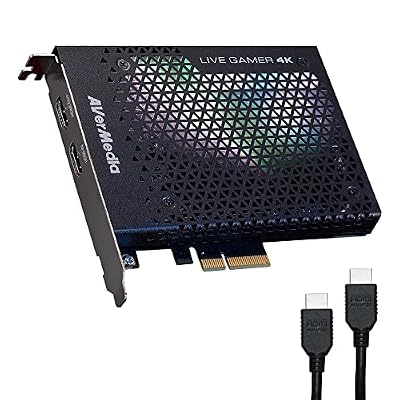
AVerMedia GC573 Live Gamer 4K, Internal Capture Card, Stream and Record 4K60 HDR10 with ultra-low latency on PS5, PS4 Pro, Xbox Series X/S, Xbox One X, in OBS, Twitch, YouTube


As an Amazon Associate we earn from qualifying purchases. Product prices and availability are accurate as of the date/time indicated.
🛒 Best Price Today on Amazon
Prime members get fast, free shipping on everything above, plus member-only deals. New members get a 30-day free trial — cancel anytime.
As an Amazon Associate we earn from qualifying purchases.







AVerMedia GC573 Live Gamer 4K at a Glance
| Component | Specification |
|---|---|
| Type | Internal PCIe capture card |
| Connection | PCIe (internal) |
| Max capture resolution | 4K60 HDR10 |
| HDR support | Yes — HDR10 capture |
| Pass-through resolution | Ultra-low latency 4K HDR pass-through |
| Compatibility | Desktop PC with PCIe slot; PS5, Xbox Series X source |
| Latency class | Ultra-low latency |
| Price | Around $160 |
Capture Resolution and Frame Rate
The GC573 captures at 4K60 with HDR10 — that is the headline figure and it is a significant spec. 4K60 HDR is the maximum output of PS5 and Xbox Series X in most games, so the GC573 captures everything the current console generation outputs at native quality, with HDR metadata intact. That makes it the right card for the creator producing high-fidelity edited content — YouTube uploads, archive recordings, highlight reels — where 4K60 makes a visible difference. For live streaming most GC573 users will downscale to 1080p60 for the actual broadcast, but the 4K60 capture provides resolution headroom for everything else. PC hosts at this tier are well covered in our best RTX 5080 gaming laptops guide.
An internal card capturing at 4K60 HDR puts real demands on the host system, but those demands are met cleanly because the PCIe interface provides far more bandwidth and lower jitter than USB. That matters specifically for long recording sessions: a USB-based 4K capture can hit occasional bandwidth hiccups during multi-hour sessions, while the GC573’s PCIe pipeline is steady throughout. For the creator who records full playthroughs rather than short clips, that steadiness is the real reason to pick internal.
HDR, Pass-Through and Display Compatibility
HDR10 is supported on capture, which is the format both PS5 and Xbox Series X games actually output. The pass-through is ultra-low latency and supports 4K HDR — so the player keeps a 4K HDR gaming experience on their main monitor while the card captures at 4K60 HDR10 simultaneously. That is exactly the workflow modern 4K HDR consoles require. Because the GC573 is a desktop-internal card with full PCIe bandwidth, it can handle 4K60 HDR capture and 4K HDR pass-through simultaneously without compromise — something USB cards manage but only with careful bandwidth budgeting.
For a creator producing graded YouTube uploads, the HDR10 capture pipeline is editorially valuable. Capturing the HDR metadata directly means the editor has the original colour information when working in HDR-capable editing software, which produces visibly better results than capturing flat SDR from an HDR source and trying to reconstruct the look afterwards. That editorial benefit is one of the reasons the GC573 remains a creator favourite.
Connection Type and Latency
The GC573 is internal: it slots into a PCIe x4 lane in a desktop PC. That is the key differentiator from every external USB card in this round-up. Internal PCIe brings two real advantages: lower latency than USB by virtue of the bus, and stable bandwidth that does not have to share with other USB devices on the host. The trade-offs are real too — the card is desktop-only, cannot be used on a laptop, requires you to open the chassis to install, and locks you in to the host PC’s PCIe layout. For a dedicated streaming-PC build with a free x4 slot, that is the right choice; for everyone else, an external card is more flexible. PC builders in this tier should see our best 240Hz gaming laptops guide.
Software, OBS Integration and Streaming Features
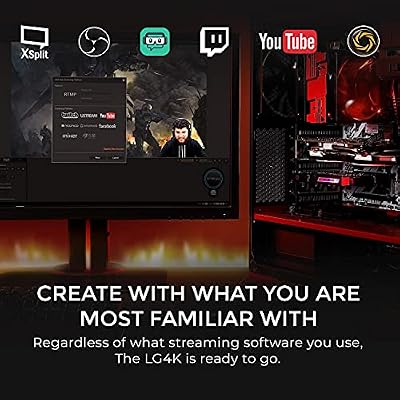
AVerMedia provide their own RECentral software for the GC573, and the card also integrates with OBS Studio as a standard capture source. RECentral is well-developed and includes features like flashback recording and 4K clip management that benefit GC573 users specifically, but most serious streamers run OBS as their main tool — and the GC573 integrates with OBS without difficulty. For the 4K-capture workflow, the choice of software matters less than the stability of the capture pipeline, and the GC573 is well regarded for stable long-recording sessions where USB cards sometimes struggle. AVerMedia’s long history in capture hardware shows in the maturity of the drivers and the consistency of capture output.
Who Is the AVerMedia GC573 For?
The GC573 is for the desktop streamer with a dedicated streaming PC and a free PCIe x4 slot who wants 4K60 HDR10 capture and the lowest practical latency. If you have a two-PC streaming setup, or a single high-end streaming-and-gaming desktop with a PCIe slot to spare, the GC573 is the right card — internal PCIe is the most stable and lowest-latency choice for that setup. It is not the right card for laptop users, for Mac users, or for anyone who does not want to open their PC chassis — those buyers should pick the Elgato HD60 X or 4K S instead.
Pros and Cons
Pros: 4K60 HDR10 capture — currently the highest console-relevant capture spec; ultra-low latency pass-through up to 4K HDR; internal PCIe stability with no USB bandwidth contention; mature AVerMedia drivers and RECentral software; integrates with OBS Studio.
Cons: Desktop-only — cannot be used with a laptop; requires opening the PC chassis; ties you to one host PC; older product than the latest Elgato range, though still well supported.
Is the AVerMedia GC573 Worth It?
At around $160 the AVerMedia GC573 is a strong pick for the desktop streamer who wants 4K60 HDR10 capture from an internal PCIe card. For that specific buyer it offers the best stability and the lowest practical latency available, and it earns a clear recommendation. Laptop users, Mac users and anyone wanting plug-and-play USB simplicity should choose the Elgato HD60 X or 4K S instead. Streaming-PC builds at this tier are well covered in our best RTX 5080 gaming laptops guide.
Frequently Asked Questions
Is the AVerMedia GC573 internal or external?
The GC573 is an internal PCIe card. It installs in a PCIe x4 slot in a desktop PC and cannot be used with a laptop.
Does the GC573 capture in 4K HDR?
Yes. The GC573 captures at 4K60 with HDR10, which is the maximum output of PS5 and Xbox Series X in most games.
Can I use the AVerMedia GC573 with a laptop?
No. The GC573 is a desktop-only internal PCIe card and cannot be used with any laptop. Laptop users who want a similar capture spec should choose an external card such as the Elgato HD60 X, 4K S or 4K X instead.
Does the AVerMedia GC573 work with OBS Studio?
Yes. The GC573 integrates with OBS Studio as a standard capture source, and also has AVerMedia’s own RECentral software available. RECentral is particularly useful for managing long 4K recording sessions, but most streamers will use OBS as their primary tool with the GC573 sitting inside that workflow as a standard capture source.
More Capture Card Reviews
- UGREEN 1080P HDMI Capture Card Review (Budget)
- UGREEN 4K@30Hz HDMI Capture Card Review
- Elgato HD60 S External Capture Card Review
- Elgato Cam Link 4K External Capture Card Review
- Elgato HD60 X External Capture Card Review (HDR10)
- Elgato 4K X Capture Card Review (4K144 Flagship)
- Elgato 4K S External Capture Card Review
- EVGA XR1 Pro Capture Card Review (1440p/4K HDR)
Affiliate Disclosure: As an Amazon Associate, we earn from qualifying purchases. If you click a link and make a purchase, we may earn a small commission at no extra cost to you. Prices and availability are accurate as of publication and may change.
Related Articles
Looking for more on this topic? Browse the hand-picked guides below — each one applies the same scoring rubric used in this review.










