

The UGREEN 4K@30Hz HDMI Capture Card is UGREEN’s step up from its base 1080P dongle — a USB 3.0 capture device that accepts a 4K@30Hz HDMI input, captures at 1080p60, and provides an HDMI loop-out. It is still very much a budget product but a meaningfully more capable one than the entry-level $20 dongle, with USB 3.0 bandwidth opening up 1080p60 capture. With more than 1,150 reviews on Amazon it has quickly become the budget pick for buyers who specifically want 60 fps capture without paying mainstream prices. At around $30 it is positioned just above the entry-level UGREEN. This UGREEN 4K@30Hz capture card review covers the capture resolution, pass-through, connection, software and value.
- UGREEN 4K@30Hz HDMI Capture Card at a Glance
- Capture Resolution and Frame Rate
- HDR, Pass-Through and Display Compatibility
- Connection Type and Latency
- Software, OBS Integration and Streaming Features
- Who Is the UGREEN 4K@30Hz Capture Card For?
- Pros and Cons
- Is the UGREEN 4K@30Hz Capture Card Worth It?
- Frequently Asked Questions
- More Capture Card Reviews
- Related Articles
- Related Articles
- Related Guides

UGREEN 4K@30Hz Loop Out HDMI Capture Card for 2K 30FPS 1080P 60FPS USB 3.0 | 2K@30Hz Record for Video Capture Card for Streaming Gaming with Low Latency Compatible with Switch 2 PS5 Xbox PC Mac



As an Amazon Associate we earn from qualifying purchases. Product prices and availability are accurate as of the date/time indicated.
🛒 Best Price Today on Amazon
Prime members get fast, free shipping on everything above, plus member-only deals. New members get a 30-day free trial — cancel anytime.
As an Amazon Associate we earn from qualifying purchases.





UGREEN 4K@30Hz HDMI Capture Card at a Glance
| Component | Specification |
|---|---|
| Type | External capture dongle |
| Connection | USB 3.0 |
| Max capture resolution | 1080p60 |
| HDR support | Not supported |
| Pass-through resolution | Loop-out HDMI pass-through |
| Compatibility | PC, Mac, mobile; HDMI source up to 4K@30Hz input |
| Latency class | Low for entry-level use |
| Price | Around $30 |
Capture Resolution and Frame Rate
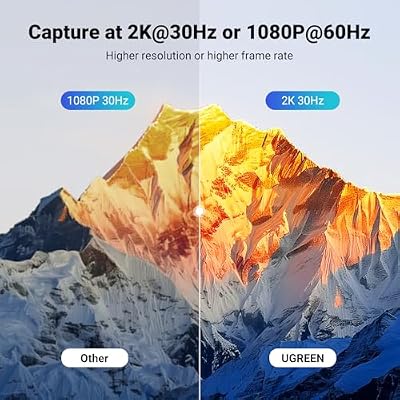
The UGREEN 4K@30Hz captures at 1080p60 — full HD at 60 frames per second, which is the streaming sweet spot. That is the headline upgrade over the entry-level UGREEN dongle, which is capped at 1080p30. For the budget streamer 1080p60 is the spec that actually matters — viewers can tell the difference between 30 fps and 60 fps gameplay immediately. The card also accepts a 4K@30Hz HDMI input, downscaling it to 1080p60 for capture, which means PS5 and Xbox Series X can plug in without needing to drop their output to 1080p. The captured file itself is 1080p60, which is what the streamer or YouTuber uploads.
The combination of accepting a 4K input and capturing at 1080p60 is the practical magic of this card. A new streamer plugging a PS5 into a $30 capture device does not have to dig through console settings to change the output resolution — they can leave the console set to its native 4K output, the dongle accepts the signal, and the streaming PC sees a 1080p60 source ready for OBS. That eliminates a category of setup confusion that has tripped up countless first-time streamers, and it is a quietly important reason the card sells as well as it does.
HDR, Pass-Through and Display Compatibility
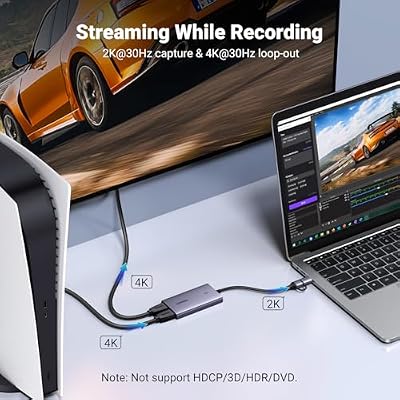
HDR capture is not supported — the budget UGREEN range does not include HDR. The card does provide an HDMI loop-out pass-through, which is the most important feature for any practical streaming setup: it lets the player game on a connected display while the dongle captures. Pass-through is at the input resolution; if you feed it a 4K@30Hz signal it loops out 4K@30Hz, and if you feed it 1080p60 it loops out 1080p60. There is no advertised ultra-low latency claim in the Elgato sense, so this is best paired with using the loop-out display as the gameplay monitor — which is the standard setup anyway.
The lack of HDR is a real limitation for a streamer using a PS5 or Xbox Series X, since both consoles output HDR by default in most modern titles. Streamers using this card with an HDR-capable console should disable HDR on the console output for the capture path while keeping HDR enabled on the pass-through monitor — a workable setup, but a configuration step that the mainstream Elgato cards make unnecessary by capturing HDR natively.
Connection Type and Latency
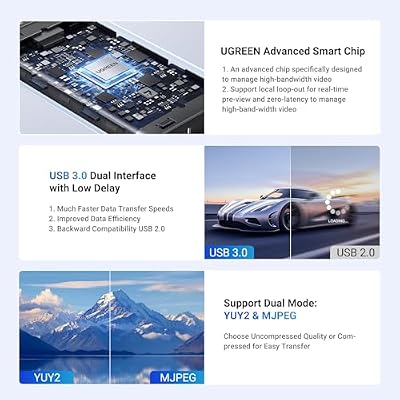
The card connects over USB 3.0, which is the upgrade that makes 1080p60 capture possible — USB 2.0 simply does not have the bandwidth for it. Latency is acceptable for streaming, and the loop-out display is what the player should monitor. The form factor remains a small dongle, which means it is portable and trivial to set up — plug HDMI in, USB out, and it works. For a budget streamer who wants 1080p60 without paying for an HD60 S, this is the spec to aim at.
Software, OBS Integration and Streaming Features
Like the entry-level UGREEN, this dongle appears as a standard UVC device — recognised by OBS Studio, Streamlabs, Zoom, Teams and every standard video app on Windows, Mac and mobile without any special drivers. That is the right design choice at this price: instead of investing in a brand-specific software stack, the dongle simply slots into existing OBS workflows. The streamer’s tutorial path is therefore the same as for any other UVC device — which is to say, every OBS tutorial on the internet applies. For more on the streaming-PC host see our best RTX 5070 gaming laptops guide.
Who Is the UGREEN 4K@30Hz Capture Card For?
The UGREEN 4K@30Hz is for the budget-conscious streamer who specifically wants 1080p60 capture and is willing to give up HDR and brand-specific software to save money. If your end output is a 1080p60 Twitch or YouTube stream, if you do not care about HDR colour for now, and if you do not need ultra-low-latency pass-through for highly competitive play, this dongle is the right pick. It is not for streamers who need HDR, for whom the Elgato HD60 X is the natural choice; and it is not for serious creators who want 4K capture, who should look at the Elgato 4K S or AVerMedia GC573.
Pros and Cons
Pros: 1080p60 capture at a budget price; USB 3.0 bandwidth; 4K@30Hz HDMI input accepted with downscaling; HDMI loop-out for pass-through; universal UVC compatibility with OBS, Mac, mobile and every video app; small portable dongle form factor.
Cons: No HDR capture; no ultra-low-latency pass-through claim; smaller community and software ecosystem than Elgato; the budget step-up cap is 1080p60 — for higher spec choose mainstream cards.
Is the UGREEN 4K@30Hz Capture Card Worth It?
At around $30 the UGREEN 4K@30Hz HDMI Capture Card is the right pick for the buyer who wants 1080p60 capture on the smallest possible budget. For that buyer it earns a recommendation — it is the meaningful step up from the entry-level dongle, and it delivers the resolution and frame rate that streaming platforms actually reward. Streamers who want HDR should jump to the Elgato HD60 X; serious 4K creators should look at the 4K S or GC573. Streaming-PC hosts at this tier are well covered in our best 240Hz gaming laptops guide.
Frequently Asked Questions
Does the UGREEN 4K@30Hz capture card capture in 4K?
No. The card accepts a 4K@30Hz HDMI input, but captures at 1080p60. For 4K capture you would need an Elgato 4K S, 4K X or AVerMedia GC573.
Does this UGREEN card support 60 fps capture?
Yes. The 4K@30Hz UGREEN captures at 1080p60 — this is the key upgrade over the entry-level 1080p UGREEN, which captures at 1080p30.
Does the UGREEN 4K@30Hz capture HDR?
No. HDR capture is not supported on this card. For HDR capture choose the Elgato HD60 X or AVerMedia GC573.
Should I buy the UGREEN 4K@30Hz or the Elgato HD60 S?
Pick the UGREEN 4K@30Hz if you are on the tightest budget and only need 1080p60 SDR. Pick the Elgato HD60 S if you want the mature software ecosystem and the broadest community tutorial base. The UGREEN saves a meaningful amount of money on the hardware, but the Elgato pays back in the form of better software polish, more reliable long-session capture, and a larger community of tutorials and troubleshooting guides that apply directly to your card.
More Capture Card Reviews
- Elgato HD60 S External Capture Card Review
- Elgato Cam Link 4K External Capture Card Review
- Elgato HD60 X External Capture Card Review (HDR10)
- Elgato 4K X Capture Card Review (4K144 Flagship)
- Elgato 4K S External Capture Card Review
- EVGA XR1 Pro Capture Card Review (1440p/4K HDR)
- AVerMedia GC573 Live Gamer 4K Internal Capture Card Review
- UGREEN 1080P HDMI Capture Card Review (Budget)
Affiliate Disclosure: As an Amazon Associate, we earn from qualifying purchases. If you click a link and make a purchase, we may earn a small commission at no extra cost to you. Prices and availability are accurate as of publication and may change.
Related Articles
Looking for more on this topic? Browse the hand-picked guides below — each one applies the same scoring rubric used in this review.










