

The UGREEN HDMI KVM Switch (4K@60Hz) is the more compact, lower-priced sibling of the USB 3.0 model reviewed above. It does the same fundamental job — share one HDMI monitor and four USB peripherals between two PCs at 4K@60Hz — but trades the USB 3.0 ports for USB 2.0, drops the wired remote, and lands at a significantly lower price. For users whose shared peripheral pool is keyboard, mouse and printer rather than fast SSDs and 4K webcams, this is the more sensible buy. This UGREEN HDMI KVM Switch (4K) review covers the switching performance, display compatibility, USB pass-through, build and value at around $60.
- UGREEN HDMI KVM (4K) at a Glance
- Switching Performance & Latency
- Display Compatibility — Single / Dual / Triple
- USB Pass-Through & Peripherals
- Build Quality & Switching Method
- Use Cases — Gaming + Streaming, Home Office
- Verdict
- Frequently Asked Questions
- More KVM Switch Reviews
- Related Articles
- Related Articles
- Related Guides

UGREEN HDMI KVM Switch 1 Monitor 2 Computers, 4K@60Hz, with 4 USB Ports




As an Amazon Associate we earn from qualifying purchases. Product prices and availability are accurate as of the date/time indicated.
🛒 Best Price Today on Amazon
Prime members get fast, free shipping on everything above, plus member-only deals. New members get a 30-day free trial — cancel anytime.
As an Amazon Associate we earn from qualifying purchases.


UGREEN HDMI KVM (4K) at a Glance
| Component | Specification |
|---|---|
| Type | HDMI KVM (Keyboard, Video, Mouse) |
| Computer count supported | 2 PCs |
| Monitor count | 1 (shared 4K HDMI monitor) |
| Display resolution support | 4K @ 60Hz (HDMI 2.0) |
| USB peripheral count | 4 USB-A 2.0 ports |
| USB version | USB 2.0 (480 Mbps) |
| Hot-key switching | Yes — Scroll Lock + Scroll Lock + 1/2 |
| Cables included | 2x HDMI 2.0 + 2x USB-A to USB-B uplink |
| Approx price | around $60 |
Switching Performance & Latency
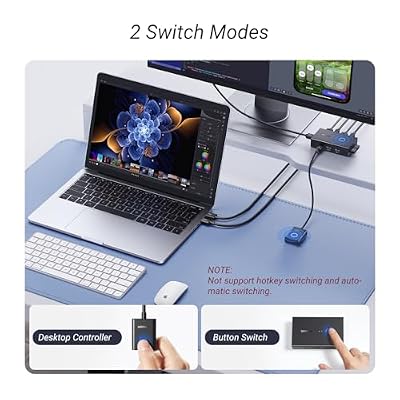
This HDMI KVM offers two switching methods: a front-panel button on the unit, and the standard Scroll Lock hot-key sequence on the shared keyboard. There is no wired remote in this model (that is reserved for the higher-tier USB 3.0 model reviewed above), which keeps the price down at the cost of having to reach for the switch directly. As a true KVM the changeover routes the keyboard, mouse, HDMI video and audio together — the active computer’s display follows the active peripherals in a single action. Expect the usual one to two seconds for the HDMI sync to lock and the USB peripherals to re-enumerate; the HDMI handshake is the dominant component of the latency.
Reliability is consistent with UGREEN’s HDMI KVM range. EDID emulation prevents the source PCs from losing their monitor profile during a switch (a common failure mode of cheaper HDMI KVMs that drops a Windows host into single-monitor 1024×768 mode), HDCP is passed transparently, and the unit handles modern HDMI 2.0 sources cleanly. The hot-key sequence is the standard double-tap of Scroll Lock followed by 1 or 2.
Display Compatibility — Single / Dual / Triple
One shared HDMI monitor at up to 4K and 60Hz, requiring HDMI 2.0-class hardware throughout. The bundled HDMI 2.0 cables meet that spec, which is the right call — pairing a 4K@60Hz KVM with HDMI 1.4 cables would silently downgrade the link. For 1080p the same link comfortably carries 1080p@144Hz or 1440p@120Hz, so high-refresh gaming on a 1080p/1440p monitor is well supported. There is one HDMI out on the unit, so this is single-monitor only — buyers who need to share two or three displays should look at the dual-monitor HDMI KVMs further down our list. For HDMI cabling beyond what is bundled, see our best HDMI cables guide.
USB Pass-Through & Peripherals
Four USB-A 2.0 downstream ports is the cost-saving compromise versus the USB 3.0 model. The 480 Mbps ceiling is fine for the classic KVM peripheral pool — keyboard, mouse, printer, occasional flash drive — and is the right spec for buyers whose shared peripherals are HID-class plus occasional storage. It is the wrong spec for buyers who want to share a high-bandwidth peripheral such as a 4K webcam or a fast external SSD between two hosts; for those use cases step up to the USB 3.0 model. The four-port allocation is generous for a KVM at this price and matches the standard small-office or home-streaming setup well.
Build Quality & Switching Method
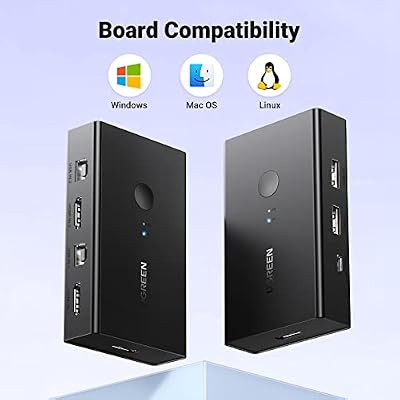
The chassis is a small metal-cased unit with HDMI inputs and USB-B uplinks on the rear, the four USB-A downstream ports on the front and the front-panel selector button alongside the active-host LEDs. The included cabling covers the two HDMI 2.0 monitor links and the two USB-A to USB-B uplinks, removing the most common purchase friction. The switching method, as covered, is the front-panel button plus the keyboard hot-key — there is no wired remote on this model. As with the USB 3.0 model, EDID emulation and HDCP pass-through are handled in firmware and require no configuration.
Use Cases — Gaming + Streaming, Home Office
This KVM is the right choice for two-PC HDMI desks where the shared peripheral pool is keyboard, mouse, printer and the like — a typical home office, a small-business reception desk, or a server-admin desk with a modern HDMI monitor in front of two host PCs. It also fits dual-PC streaming setups where the user prefers Scroll-Lock switching to a wired remote. For users whose shared peripheral pool includes a 4K webcam or external SSD, the USB 3.0 sibling is a better fit. For the gaming hardware that typically sits behind a KVM like this, our best RTX 5070 gaming laptops guide and best 240Hz gaming laptops guide cover the options.
Verdict
The UGREEN HDMI KVM Switch (4K) is the more affordable, USB 2.0 version of the company’s modern HDMI KVM range. It delivers the same 4K@60Hz video sharing, the same EDID and HDCP handling and the same hot-key switching as the USB 3.0 model, at a roughly $30 lower price and without the wired remote. For HDMI desks whose shared peripherals are keyboard, mouse and printer it is the right buy; for desks that also need to share fast external storage or 4K webcams, pay the premium for the USB 3.0 model. As a focused, well-built mid-price HDMI KVM it is one of the easier recommendations in the category.
Frequently Asked Questions
Does it support 4K@60Hz?
Yes — the KVM and the bundled HDMI 2.0 cables support 4K (3840×2160) at 60Hz. The source PCs must have HDMI 2.0 output capability.
Does it have hot-key switching?
Yes — Scroll Lock + Scroll Lock + 1 or 2 on the shared keyboard switches between hosts, alongside the front-panel button. There is no wired remote on this model.
What USB peripherals can it carry?
Four USB 2.0 ports for keyboard, mouse, printer or HID-class devices. For fast external SSDs or 4K webcams the USB 3.0 sibling is the better choice.
Are HDMI cables included?
Yes — two HDMI 2.0 cables and two USB-A to USB-B uplinks are included in the box.
More KVM Switch Reviews
- MLEEDA Dual Monitor HDMI KVM Review: 4K@60Hz, 2 PCs
- 4-Port HDMI KVM Switch Review: Dual Monitor, 4K, 4 PCs
- UGREEN HDMI KVM 2 Monitor 2 PC Review: 4K + USB 3.0
- UGREEN USB 2.0 Switch Review: 2 PC Share 4 USB Devices
- UGREEN USB 3.0 Switch Review: Selector for 2 PC, 4 USB
- Sabrent USB 2.0 Sharing Switch Review: Share Up to 4 PCs
- UGREEN USB 3.0 4-Port KVM Review: USB-C + USB-A Switch
- IOGEAR 2-Port USB VGA KVM Switch Review (GCS22U)
Affiliate Disclosure: As an Amazon Associate, we earn from qualifying purchases. If you click a link and make a purchase, we may earn a small commission at no extra cost to you. Prices and availability are accurate as of publication and may change.
Related Articles
Looking for more on this topic? Browse the hand-picked guides below — each one applies the same scoring rubric used in this review.


