

The 4-Port Dual Monitor HDMI KVM Switch is the most capable KVM in this list by host count: it shares two HDMI monitors and a USB peripheral pool between four computers, rather than the two-host arrangement of the KVMs above it. It is the right product for a power-user desk, a small server room, or a multi-PC creative studio where the user genuinely cycles among four hosts on one pair of monitors. This 4-Port Dual Monitor HDMI KVM review covers the switching, display compatibility, USB pass-through, build and value at around $200.
- 4-Port Dual Monitor HDMI KVM at a Glance
- Switching Performance & Latency
- Display Compatibility — Single / Dual / Triple
- USB Pass-Through & Peripherals
- Build Quality & Switching Method
- Use Cases — Gaming + Streaming, Home Office
- Verdict
- Frequently Asked Questions
- More KVM Switch Reviews
- Related Articles
- Related Articles
- Related Guides

4 Port HDMI KVM Switch 2 Monitors 4 Computers 4K@60Hz EDID Simulation Dual Monitor KVM Switch with 4 USB 3.0 Ports for USB Peripherals, Audio, RS232, with Wired Remote,12V Power and 4 USB Cables


As an Amazon Associate we earn from qualifying purchases. Product prices and availability are accurate as of the date/time indicated.
🛒 Best Price Today on Amazon
Prime members get fast, free shipping on everything above, plus member-only deals. New members get a 30-day free trial — cancel anytime.
As an Amazon Associate we earn from qualifying purchases.
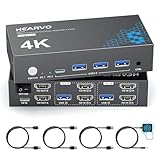



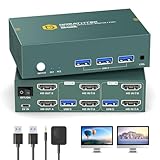
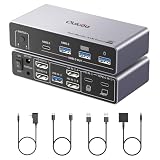


4-Port Dual Monitor HDMI KVM at a Glance
| Component | Specification |
|---|---|
| Type | Dual-monitor HDMI KVM (4 PCs) |
| Computer count supported | 4 PCs |
| Monitor count | 2 (shared 4K HDMI monitors) |
| Display resolution support | Dual 4K @ 60Hz (HDMI 2.0) |
| USB peripheral count | 4 USB-A ports (keyboard, mouse, peripherals) |
| USB version | USB 2.0 (HID + slow peripherals) |
| Hot-key switching | Yes — Scroll Lock hotkey + remote |
| Cables included | 8x HDMI + 4x USB host cables + wired remote |
| Approx price | around $200 |
Switching Performance & Latency
The 4-Port KVM offers three switching methods: a front-panel selector that cycles through hosts 1 to 4, a Scroll Lock hot-key sequence on the shared keyboard (Scroll Lock + Scroll Lock + 1 to 4), and a wired desktop remote. The wired remote is particularly welcome on a four-host KVM because reaching the front-panel selector with the wrong number of presses is more likely than on a two-host model; the remote has dedicated buttons per host. As a true dual-monitor KVM the changeover routes the keyboard, mouse, two HDMI outputs and the audio to the selected host in a single action. Expect the usual one to two seconds for both monitors to lock to the new HDMI sync.
Reliability across four hosts on a dual-monitor KVM is the design’s headline test. EDID emulation must hold for all four hosts simultaneously, which is meaningfully harder than the two-host case — failure shows up as a Windows desktop collapsing to a single monitor whenever you switch away. The 4-Port KVM handles this well in normal use across modern Windows, macOS and Linux source PCs. HDCP is passed transparently for protected content.
Display Compatibility — Single / Dual / Triple
Two HDMI outputs, two HDMI inputs per host across four hosts — a total of eight HDMI input ports on the unit. Both outputs carry 4K@60Hz independently via HDMI 2.0, so a dual-4K productivity setup is fully supported. For high-refresh 1440p or 1080p the same HDMI 2.0 link carries those resolutions at appropriate refresh rates per output. There is no triple-monitor support; if you need three or more displays alongside four hosts you would step up to a dedicated multi-monitor KVM at a significantly higher price. Eight HDMI 2.0 cables are bundled in the box (two per host), which is the major value point versus building the cabling separately. For longer cable runs see our best HDMI cables guide.
USB Pass-Through & Peripherals
Four USB-A ports carry the standard KVM peripheral pool — keyboard, mouse, printer, occasional storage — at USB 2.0 speeds. The peripherals follow the active host alongside the two HDMI outputs and the audio, which is the full KVM job. As with other USB 2.0 KVMs the spec is the right fit for HID-class peripherals and printers but not for fast external storage or high-bandwidth webcams. There is a 3.5mm audio passthrough on the rear for analogue speakers, routed alongside the video. The four-port USB allocation is enough for the typical multi-PC desk where the four hosts share a single keyboard-and-mouse plus a printer or two.
Build Quality & Switching Method
The chassis is a substantially larger metal-cased unit than the two-host KVMs above it — there are eight HDMI inputs to fit, four host USB-B uplinks, two HDMI outputs and the four USB-A downstream ports. The front panel carries a four-way selector and a row of active-host LEDs, plus the connector for the wired remote. The bundled accessory pack is the highlight: eight HDMI 2.0 cables, four USB host uplinks and the wired remote together would cost a substantial fraction of the KVM price if bought separately, so receiving them in the box meaningfully changes the value calculation. The switching method, as covered, is button, hot-key or remote — the most flexible of any KVM in this list.
Use Cases — Gaming + Streaming, Home Office
This KVM is for the genuine multi-host desk: a creative-studio workstation where four content-creation PCs share one pair of monitors, a small server-admin desk where four headless servers share one console pair, a competitive-streaming setup with a gaming PC, streaming PC, capture PC and review PC all driving the same monitor pair, or a multi-tenant office where four user accounts cycle on the same hardware. It is meaningfully overkill for a two-PC home office (one of the two-host HDMI KVMs above is more sensible at half the price), but where four hosts genuinely cycle on one pair of monitors it is the right product. For the typical creative-side hardware behind a multi-host KVM, our Intel Core Ultra laptop guide guide is a useful reference.
Verdict
The 4-Port Dual Monitor HDMI KVM is the rare multi-host KVM that ships fully cabled in the box — eight HDMI 2.0 cables, four USB host uplinks and a wired remote are all included, which is the major value-add versus building the cabling separately. The EDID handling holds up well across four hosts, the wired remote is the right switching method for a four-host workflow, and the dual-4K@60Hz support covers modern productivity displays. The main compromise is the USB 2.0 pass-through, which is fine for keyboards, mice and printers but not for fast external storage. For genuine four-host desks it is the easiest recommendation in its price tier.
Frequently Asked Questions
Can it really share two 4K monitors between four computers?
Yes — both HDMI outputs carry 4K@60Hz independently via HDMI 2.0, and the KVM has the eight HDMI input ports needed (two per host) for four hosts to feed both monitors.
How does EDID work across four hosts on dual monitors?
The KVM emulates both monitors to all four hosts so the Windows desktop arrangement on each PC survives a switch without collapsing to a single monitor. That is the key reliability test on a multi-host dual-monitor KVM.
Does it have a wired remote?
Yes — a small wired remote with one button per host is bundled in the box, alongside the front-panel selector and the Scroll Lock hot-key (Scroll Lock + Scroll Lock + 1 to 4).
Are all the cables included?
Yes — eight HDMI 2.0 cables (two per host), four USB host uplinks and the wired remote are all bundled. No separate cable purchase is needed.
More KVM Switch Reviews
- UGREEN HDMI KVM 2 Monitor 2 PC Review: 4K + USB 3.0
- UGREEN USB 2.0 Switch Review: 2 PC Share 4 USB Devices
- UGREEN USB 3.0 Switch Review: Selector for 2 PC, 4 USB
- Sabrent USB 2.0 Sharing Switch Review: Share Up to 4 PCs
- UGREEN USB 3.0 4-Port KVM Review: USB-C + USB-A Switch
- IOGEAR 2-Port USB VGA KVM Switch Review (GCS22U)
- BENFEI USB 3.0 Switch Review: 4 Ports, 2 PC Selector
- TRENDnet TK-209K 2-Port KVM Review with Audio Pass-Through
Affiliate Disclosure: As an Amazon Associate, we earn from qualifying purchases. If you click a link and make a purchase, we may earn a small commission at no extra cost to you. Prices and availability are accurate as of publication and may change.
Related Articles
Looking for more on this topic? Browse the hand-picked guides below — each one applies the same scoring rubric used in this review.










