

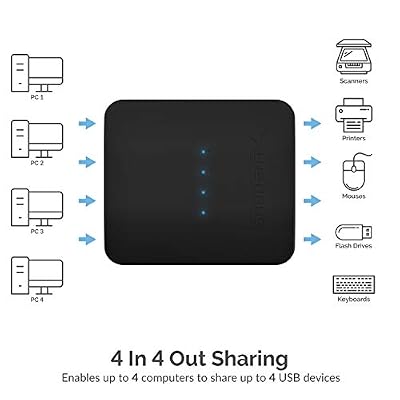
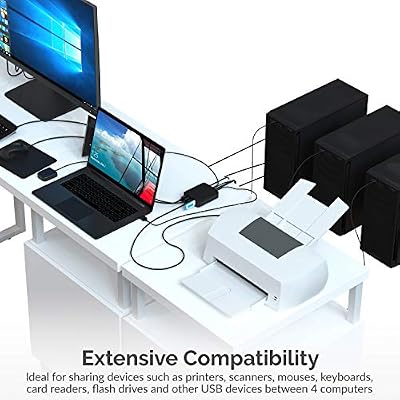
The Sabrent USB 2.0 Sharing Switch takes the opposite approach to the UGREEN USB switches above: instead of letting two computers share four USB peripherals, it lets up to four computers share a single USB device — a printer, an external drive, or a scanner that one machine at a time needs to use. As with every USB switch, this is a peripheral switch and not a KVM; it does not route video. This Sabrent USB 2.0 Sharing Switch review covers the switching performance, USB pass-through, build and value at around $15.
- Sabrent USB 2.0 Sharing Switch at a Glance
- Switching Performance & Latency
- Display Compatibility — Single / Dual / Triple
- USB Pass-Through & Peripherals
- Build Quality & Switching Method
- Use Cases — Gaming + Streaming, Home Office
- Verdict
- Frequently Asked Questions
- More KVM Switch Reviews
- Related Articles
- Related Articles
- Related Guides

SABRENT USB 2.0 Sharing Switch for 4 Computers, LED Indicators (USB-USS4) | Share USB peripherals across up to 4 computers; LED device indicators




As an Amazon Associate we earn from qualifying purchases. Product prices and availability are accurate as of the date/time indicated.
🛒 Best Price Today on Amazon
Prime members get fast, free shipping on everything above, plus member-only deals. New members get a 30-day free trial — cancel anytime.
As an Amazon Associate we earn from qualifying purchases.



Sabrent USB 2.0 Sharing Switch at a Glance
| Component | Specification |
|---|---|
| Type | USB switch (single-device sharing, no video) |
| Computer count supported | Up to 4 PCs |
| Monitor count | 0 (USB switch only — no video routing) |
| Display resolution support | N/A (peripheral switch, video handled separately) |
| USB peripheral count | 1 shared USB-A 2.0 port |
| USB version | USB 2.0 (480 Mbps) |
| Hot-key switching | No — manual rotary / button selector |
| Cables included | No host-side cables (use any USB-A to USB-B) |
| Approx price | around $15 |
Switching Performance & Latency
The Sabrent uses a manual selector on the top of the housing — depending on the revision shipped, this is either a small rotary dial or a button that cycles through positions one, two, three and four. Whichever computer the selector points to becomes the owner of the single shared USB peripheral, and the other hosts simply do not see the device. As with every USB switch, the changeover takes the USB device-discovery handshake — roughly half a second to a full second for a printer to appear on the newly active host, longer if Windows pauses to map a driver — but the action is reliable and unambiguous. There is no hot-key support, no software install and no automatic switching. The intended pattern is that you sit at one computer, dial up that computer’s port number, print or pull a file from the shared device, and dial back. For occasional sharing among up to four PCs that is a clean workflow.
Because the switch handles only a single downstream peripheral, the upstream negotiation is simpler than a multi-port hub and the changeover tends to be the most reliable of any USB switch design — there are no nine other ports to confuse the host. It is purpose-built for the shared-printer use case it advertises.
Display Compatibility — Single / Dual / Triple
The Sabrent does not see or affect the display side. Each of the up-to-four computers continues to drive its own monitor (or no monitor at all, in the case of a headless server that just needs occasional access to a shared printer). If you are picturing a four-PC desk where everyone watches the same monitor, this is not the product — a four-port HDMI KVM is. The Sabrent is for the case where each host has its own display already and only the peripheral access needs to be shared. For sharing video across multiple PCs, see the dedicated HDMI KVMs reviewed elsewhere on this site.
USB Pass-Through & Peripherals
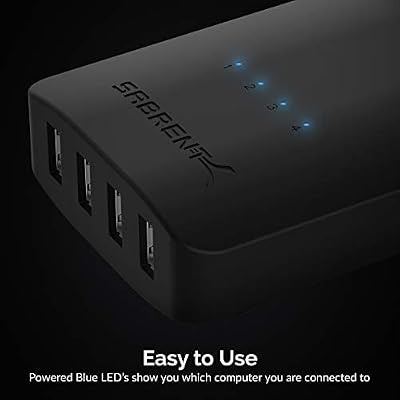
A single USB 2.0 port at 480 Mbps is the bandwidth ceiling. For the typical workloads of a sharing switch — printers, scanners, external mechanical drives or shared dongles such as a hardware security key — that bandwidth is more than enough. It is not the right product for sharing a high-speed SSD between four PCs; for that you would want a USB 3.0 sharing switch or a NAS. The single downstream USB-A 2.0 port is on the front edge for easy access, and the four host-side USB-B ports are on the back. Sabrent does not ship the host cables in the box, which is a small but real cost addition — you will need four USB-A to USB-B cables of the appropriate length.
Build Quality & Switching Method
The housing is a small, flat-topped plastic unit designed to sit on a desk or be mounted near a printer. The host port labels are clearly silk-screened and the active-host LED is large enough to read at arm’s length. The switching method is strictly manual: rotate or press the selector to choose the active host, and the change persists until you next touch the selector. That simplicity is a feature for the offices this product targets — there is nothing to configure and no driver to update. Sabrent has been making this exact product for years and the design is mature. The major caveat is the lack of bundled cables, which is worth budgeting around $10 for in addition to the switch itself. For peripheral cabling around the desk, see our best USB-C hubs guide.
Use Cases — Gaming + Streaming, Home Office
The Sabrent is squarely a home-and-small-office product. Its perfect customer is a household with three or four PCs that all occasionally need access to one printer, or a small business with a USB-only label printer that two or three desks share. For dual-PC streaming setups the four-host capacity is overkill — a two-host UGREEN model is cleaner — and for gaming desks where the keyboard and mouse must follow the video, an HDMI KVM is the right product. As a four-host, single-device sharing switch it is the cheapest serious option on Amazon, and it does its narrow job well. For the broader peripheral story around a multi-PC desk, our Intel Core Ultra laptop guide guide covers the host hardware.
Verdict
The Sabrent USB 2.0 Sharing Switch is one of the few four-host USB switches still in active production, and it remains an excellent buy for the specific job it does — sharing a single USB peripheral such as a printer or external drive between up to four computers. The manual switching is unambiguous, the build is sturdy, and the price is low. The two compromises are USB 2.0 only (fine for printers and scanners, slow for SSDs) and the lack of bundled host cables, which adds a small extra cost. Buyers who need a multi-PC printer share will find this the easy answer; buyers who want a multi-port two-PC switch should pick the UGREEN models reviewed above; buyers who need video to switch as well need an HDMI KVM.
Frequently Asked Questions
Is this a KVM switch?
No — it is a USB sharing switch, which routes a single USB peripheral between up to four computers. It does not switch video. For a true KVM, see the HDMI KVMs reviewed elsewhere on this site.
Does it come with cables in the box?
No host-side cables are included — you will need to supply four USB-A to USB-B cables of suitable length to connect the host computers. Budget around $10 for those.
Can I share a high-speed external SSD across four PCs with this?
Technically yes, but only at USB 2.0 speeds (around 35 MB/s). For fast SSD sharing a USB 3.0 sharing switch or a small NAS would be a better choice.
How do I switch between hosts?
There is a manual selector on the top of the unit — a rotary dial or button depending on revision — that cycles through positions one through four. Whichever position is selected is the active host.
More KVM Switch Reviews
- UGREEN USB 3.0 4-Port KVM Review: USB-C + USB-A Switch
- IOGEAR 2-Port USB VGA KVM Switch Review (GCS22U)
- BENFEI USB 3.0 Switch Review: 4 Ports, 2 PC Selector
- TRENDnet TK-209K 2-Port KVM Review with Audio Pass-Through
- UGREEN HDMI KVM Switch Review: 4K@60Hz + 4 USB 3.0
- UGREEN 4K@60Hz HDMI KVM Switch Review: 2 PC, 4 USB
- MLEEDA Dual Monitor HDMI KVM Review: 4K@60Hz, 2 PCs
- 4-Port HDMI KVM Switch Review: Dual Monitor, 4K, 4 PCs
Affiliate Disclosure: As an Amazon Associate, we earn from qualifying purchases. If you click a link and make a purchase, we may earn a small commission at no extra cost to you. Prices and availability are accurate as of publication and may change.
Related Articles
Looking for more on this topic? Browse the hand-picked guides below — each one applies the same scoring rubric used in this review.










