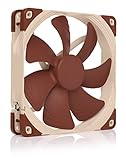
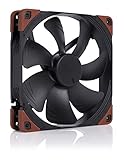
The Noctua NF-A14 PWM is widely considered the gold standard among 140mm case fans. It belongs to Noctua’s flagship A-series — a balanced airflow-and-pressure design engineered for the absolute lowest noise levels at any given cooling load — and it wears Noctua’s signature beige-and-brown livery, the iconic look that has come to define the brand. With a long-standing reputation among PC builders and reviewers, it is the reference fan against which other 140mm models are compared. At around $25 it sits above the redux line in price. This Noctua NF-A14 PWM review covers performance profile, acoustics, connection, longevity and value.

Noctua NF-A14 PWM, High-Performance Quiet Fan 140mm | High Airflow, Low Noise, 25mm Thick Fan, for Ventilation and Electronics Cooling, Rich Accessory Kit, 1500rpm 4-Pin PWM


As an Amazon Associate we earn from qualifying purchases. Product prices and availability are accurate as of the date/time indicated.
Updated October 2026 – specifications checked against Noctua’s published data sheet.
Noctua NF A14 Review: Short Verdict
This Noctua NF A14 review comes down to one line: the NF-A14 PWM is a balanced, very quiet 140mm fan (82.5 CFM, 2.08 mm H₂O, 24.6 dB(A) at full speed) with a 6-year warranty. It is not the cheapest 140mm fan, and its beige-and-brown look is divisive.
- Buy it if: you want a quiet, long-lived fan for cases, coolers or radiators and do not mind the color.
- Skip it if: you want RGB, an all-black look at the lowest price, or maximum static pressure for thick radiators.
🛒 Best Price Today on Amazon
Prime members get fast, free shipping on everything above, plus member-only deals. New members get a 30-day free trial — cancel anytime.
As an Amazon Associate we earn from qualifying purchases.



Noctua NF-A14 PWM at a Glance
| Component | Specification |
|---|---|
| Size | 140 x 140 x 25mm |
| Speed (RPM) | 0-1500 RPM (about 300 RPM at 20% PWM) |
| Airflow (CFM) | 82.5 CFM (140.2 m³/h) at full speed; 2.08 mm H₂O static pressure |
| Connection | PWM 4-pin |
| Bearing | SSO2 bearing; 6-year warranty |
| RGB | No (beige/brown signature livery) |
| Noise level | 24.6 dB(A) at full speed; 19.2 dB(A) with the included Low-Noise Adaptor |
| Best for | Premium quiet builds, case airflow, radiators |
| Price | Around $25 |
Size and Performance Profile (Airflow vs Pressure)
The NF-A14 PWM is a 140mm fan from Noctua’s A-series, which is the brand’s most balanced design — engineered to deliver strong airflow and respectable static pressure in the same fan rather than biasing entirely towards one or the other. That makes it genuinely versatile: it works as well in an open front-intake position as on a CPU air cooler or AIO radiator, which is one reason it has become Noctua’s default recommendation across so many use cases. The 140mm size is a key part of the appeal — it moves more air per revolution than a 120mm at the same RPM, and so the NF-A14 PWM rarely needs to spin fast enough to be heard. For buyers comparing it with pressure-focused fans, the P-series redux line in this guide is the more specialised pick, but the NF-A14 PWM is the safer all-rounder.
Acoustics and Noise
Acoustics are the NF-A14 PWM’s defining feature. Noctua engineers its A-series fans for the lowest possible noise at any given RPM, using technologies the brand has refined over many generations of the product, and the result is a fan that is genuinely quiet under load and effectively silent at idle. Combined with PWM control through the motherboard, the NF-A14 can be slowed to a near-stop when the system is cool and ramped up smoothly when needed. For builders who care about quiet operation, this is the reference benchmark; the wider best quiet PC case fans guide covers other quiet-focused options, but the NF-A14 is typically the fan others are compared against. If you have ever read a build log that says “so quiet I had to check it was running”, it was probably wearing Noctua A-series fans.
Connection: PWM, Daisy-Chain and Hub Support
The NF-A14 PWM connects via a 4-pin PWM header, giving precise duty-cycle speed control from the motherboard. PWM is materially better than 3-pin DC voltage control: it can slow the fan to a much lower minimum without losing stability, and it allows the smooth, gradual ramp that contributes to the fan’s quiet reputation. The standard NF-A14 PWM does not include PST daisy-chain, so each fan uses its own header or a hub. Most modern motherboards have enough headers for a typical NF-A14 deployment. Noctua’s own Y-cable and Low-Noise Adapter accessories are commonly included for users who want to wire two fans to one header or to permanently cap the maximum RPM.
Bearing Quality and Longevity
Like all Noctua fans the NF-A14 PWM uses the brand’s long-life bearing engineering and is backed by Noctua’s industry-leading 6-year warranty. For a flagship fan that may live in a PC for the lifetime of multiple CPUs and GPUs, that longevity is part of the value — Noctua bearings are widely reported to keep running cleanly long after cheaper fans have begun to whine or rattle. The brown chassis discolours less visibly than black components when dust accumulates, which is a small but practical advantage.
Noctua NF-A14 PWM Review: Performance Numbers Explained
The NF-A14 PWM spins from 0 to 1500 RPM and moves about 82.5 CFM at full speed with 2.08 mm H₂O of static pressure. That is a moderate airflow figure and a middling pressure figure, which is why it is called a balanced fan rather than a specialist.
| Fan | Best for | Profile | RGB |
|---|---|---|---|
| Noctua NF-A14 PWM | Quiet all-rounder: case, cooler, radiator | Balanced airflow and pressure | No |
| Noctua NF-P14s redux-1200 PWM | Budget quiet fan, restrictive spots | Pressure-biased, lower speed | No |
| be quiet! Silent Wings 4 140mm PWM | Low-noise builds with a black finish | Balanced, quiet | No |
| ARCTIC P14 PWM PST | Low-cost multi-fan builds | Pressure-biased | No |
Noctua also sells the newer NF-A14x25 G2 PWM, which is rated higher in airflow and pressure but costs noticeably more; the original NF-A14 PWM is the value pick if you do not need the extra headroom.
How to Run the NF-A14 PWM Quietly
To run the NF-A14 PWM quietly, set a fan curve that stays near 600-800 RPM at idle and ramps only when temperatures climb. At roughly 20% PWM the fan turns about 300 RPM and is close to inaudible in most cases.
- Use the Low-Noise Adaptor if you want to cap the fan at about 1200 RPM and about 19.2 dB(A) with a modest airflow reduction.
- Set a fan curve in BIOS or software rather than leaving the fan on a default aggressive profile.
- Use a hub or splitter if you run several fans, since this model has no PST daisy-chain.
- Mind the mount: rubber anti-vibration pads reduce case resonance, which is often the real source of noise.
NF-A14 PWM vs chromax.Black.swap
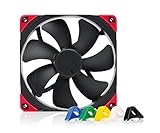
The chromax.Black.swap variant keeps the same fan design and is aimed at all-black builds, with swappable anti-vibration pads in several colors. If the beige-and-brown livery clashes with your build, pay the small premium for the black version rather than painting or covering the original.
Who Is the NF-A14 PWM For?
The NF-A14 PWM is for the builder who wants the quietest, most refined 140mm case fan available, and who is happy with — or actively fond of — Noctua’s beige-and-brown livery. It is a strong choice for premium quiet builds, top-of-the-line CPU air coolers, AIO radiators, and any case position where the goal is the lowest noise floor for a given cooling load. It is not the best pick for buyers who want a colour-neutral or RGB look — for that the chromax.Black variant in this guide is the right option — and it is more than is needed in a simple budget build, where the ARCTIC P14 or redux line would be a better-value match. For premium quiet 140mm cooling, it is the reference.
Pros and Cons
Pros: Industry-leading low noise; balanced A-series airflow/pressure profile suits almost any use; PWM 4-pin control; Noctua long-life bearing and 6-year warranty; long-standing reputation as the reference 140mm fan.
Cons: Beige/brown livery is divisive on aesthetic grounds; no RGB; price sits above budget and mid-range alternatives.
Is the NF-A14 PWM Worth It?
At around $25 the Noctua NF-A14 PWM is the gold-standard 140mm case fan. It delivers the lowest noise floor of any mainstream 140mm option, works equally well as a case fan, CPU cooler fan or radiator fan, and carries Noctua’s class-leading 6-year warranty. The beige-and-brown livery divides opinion on style but is a deliberate signature, and for builders who do not mind the look — or who actively appreciate it — the NF-A14 PWM is the safe, recommended pick. The chromax.Black variant in this guide offers identical performance in all-black for builders who want a different look. For premium quiet 140mm cooling, the NF-A14 PWM is the reference. Buyers building a fully quiet system should also see our best quiet PC case fans guide.
What to Look for in a Case Fan: Quick Buyer’s Guide
Size: 140mm fans move more air per revolution than 120mm at the same RPM, delivering equivalent cooling more quietly. Where a case supports 140mm mounts, larger is generally better.
PWM vs DC: A 4-pin PWM connection lets the motherboard control fan speed precisely via duty-cycle. A 3-pin DC fan uses voltage control only, which is less precise and tends to stall at low speeds.
Airflow vs static pressure: Open-path positions want airflow-biased fans; restrictive positions behind dust filters or radiators want pressure-biased fans. Many premium fans target a balanced profile.
Bearings: Fluid Dynamic Bearings, magnetic dome bearings and Noctua’s long-life designs all outlast cheaper sleeve bearings by years. Bearing wear is the source of most fan noise as fans age.
Frequently Asked Questions
Why does the Noctua NF-A14 PWM have a brown colour scheme?
The beige-and-brown livery is Noctua’s deliberate signature look, and it is part of the brand’s identity. For builders who prefer an all-black aesthetic, Noctua makes the NF-A14 chromax.Black.swap variant covered in this guide.
Is the Noctua NF-A14 PWM good for radiators?
Yes. As an A-series fan it has a balanced airflow-and-pressure profile, and it is widely used both on CPU air coolers and on AIO liquid-cooling radiators.
Does the NF-A14 PWM use PWM or DC control?
PWM, via a 4-pin connector. PWM gives the motherboard precise duty-cycle control over fan speed, which allows the fan to spin much more slowly and quietly at idle than a 3-pin DC fan.
How long does the Noctua NF-A14 PWM last?
It is backed by Noctua’s 6-year warranty, which is among the longest in the industry, and the bearing is widely reported to keep running quietly long after cheaper fans have begun to whine.
Is the Noctua NF-A14 PWM worth it?
Yes, if low noise and a long warranty matter more than price. It is not the cheapest 140mm fan, but few rivals pair quiet running with a 6-year warranty.
How loud is the Noctua NF-A14 PWM?
Noctua rates it at 24.6 dB(A) at full speed and about 19.2 dB(A) with the Low-Noise Adaptor. At typical fan-curve speeds below 800 RPM it is difficult to hear in a closed case.
Does the NF-A14 PWM come with a Low-Noise Adaptor?
Noctua’s accessory set for this model lists a Low-Noise Adaptor, a Y-cable and mounting hardware, but contents can vary by retailer package, so check the listing before you buy.
More Case Fan Reviews
- Noctua NF-A14 chromax.Black.swap PWM Fan Review
- Noctua NF-P14s redux-1200 PWM Quiet Fan Review (140mm)
- be quiet! Light Wings 140mm PWM ARGB Fan Review
- be quiet! Silent Wings Pro 4 140mm PWM Fan Review
- be quiet! Silent Wings 4 140mm PWM Fan Review
- ARCTIC P14 PWM PST Case Fan Review (140mm)
- ARCTIC P14 5-Pack Case Fan Review (140mm)
- Corsair RS120 ARGB 120mm PWM Fan Review
Affiliate Disclosure: As an Amazon Associate, we earn from qualifying purchases. If you click a link and make a purchase, we may earn a small commission at no extra cost to you. Prices and availability are accurate as of publication and may change.
Related Articles
Looking for more on this topic? Browse the hand-picked guides below — each one applies the same scoring rubric used in this review.