

The UGREEN 1080P HDMI Capture Card is the budget end of the capture-card market — a small USB 2.0 dongle that captures at 1080p30 and can pass-through up to 4K. It is not a streaming card in the Elgato sense; it is a low-cost utility device for occasional capture, video calls with HDMI cameras, and entry-level streaming experiments. With more than 1,550 reviews on Amazon, it has become the default cheap pick at this end of the market. At around $20 it costs roughly a tenth of the mainstream Elgato. This UGREEN 1080P capture card review covers the capture resolution, pass-through, connection, software and intended use.
- UGREEN 1080P HDMI Capture Card at a Glance
- Capture Resolution and Frame Rate
- HDR, Pass-Through and Display Compatibility
- Connection Type and Latency
- Software, OBS Integration and Streaming Features
- Who Is the UGREEN 1080P Capture Card For?
- Pros and Cons
- Is the UGREEN 1080P Capture Card Worth It?
- Frequently Asked Questions
- More Capture Card Reviews
- Related Articles
- Related Articles
- Related Guides

UGREEN Full HD 1080P 30fps Video Capture Card 4K HDMI to USB 2.0 | USB-A/USB-C Audio Recording for Gaming Capture, Streaming, Teaching Compatible with Switch 2 Xbox PS4 PS5 Camera


As an Amazon Associate we earn from qualifying purchases. Product prices and availability are accurate as of the date/time indicated.
🛒 Best Price Today on Amazon
Prime members get fast, free shipping on everything above, plus member-only deals. New members get a 30-day free trial — cancel anytime.
As an Amazon Associate we earn from qualifying purchases.






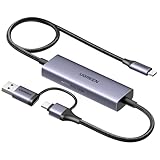
UGREEN 1080P HDMI Capture Card at a Glance
| Component | Specification |
|---|---|
| Type | External capture dongle |
| Connection | USB 2.0 |
| Max capture resolution | 1080p30 |
| HDR support | Not supported |
| Pass-through resolution | Pass-through up to 4K |
| Compatibility | PC, Mac, mobile; HDMI source |
| Latency class | Low for entry-level use |
| Price | Around $20 |
Capture Resolution and Frame Rate
The UGREEN captures at 1080p30 — full HD at 30 frames per second. That is a real step down from the 1080p60 of the HD60 S, and noticeably so for gameplay video, where 60 fps gives a smoother on-screen result. For occasional capture — a video call, an HDMI-only camera, a brief gameplay clip, an experiment with streaming software — 1080p30 is acceptable. For serious streaming it is not enough; viewers expect 60 fps and platforms reward it. The UGREEN is honest about what it is: a budget utility, not a streaming workstation. Buyers should choose it knowing they are choosing 1080p30.
There is also a reasonable case for using the UGREEN as a learning tool before committing to a mainstream card. Streaming software has a learning curve, OBS Studio configuration takes time to absorb, and there is no benefit to spending Elgato money on a card until that learning is in place. The UGREEN lets a new streamer get familiar with capture sources, scene composition and recording workflows at minimal cost, with a clear upgrade path to an HD60 S or HD60 X once the workflow is settled. For that learning-curve use case it is genuinely well placed.
HDR, Pass-Through and Display Compatibility
HDR capture is not supported. The pass-through, perhaps surprisingly given the price, can carry up to 4K — meaning the dongle accepts a 4K HDMI input, captures 1080p30 from it, and passes the original 4K signal through to a connected display. That means a PS5 or Xbox Series X plugged into the UGREEN can still output its full 4K image to a monitor while the dongle captures a downscaled 1080p30 copy. Pass-through latency is acceptable for the entry-level use case but the dongle does not market itself as ultra-low-latency in the way Elgato does, so competitive gameplay is best done with the action on the pass-through display.
The 4K-capable pass-through is the feature that elevates the UGREEN from pure novelty to a usable budget tool. Without it, a streamer plugging a PS5 into this dongle would have to give up the 4K experience on the gaming monitor — which is the kind of compromise that makes a budget capture card unusable in practice. With 4K pass-through included, the dongle is a real entry point rather than a compromise too far.
Connection Type and Latency
The UGREEN is an external USB 2.0 dongle, which is the design choice that makes the $20 price possible. USB 2.0 bandwidth is the real spec bottleneck — it is sufficient for 1080p30 capture but not for 1080p60 or 4K capture, which is why this dongle’s capture ceiling is what it is. Latency is acceptable for entry-level use and for video calls; the experience is roughly that of a USB webcam. For the budget end of the market the UGREEN’s compromises are well chosen — it is the cheapest path to getting an HDMI signal into a PC.
Software, OBS Integration and Streaming Features
The UGREEN appears as a standard UVC (USB Video Class) device, which means it works in every video app on Windows, Mac and mobile without any special drivers — OBS Studio, Zoom, Teams, Streamlabs, Discord, even mobile recording apps all recognise it. That broad compatibility is the dongle’s secret weapon: at $20 it gets HDMI into anything that has a USB-A port, and software treats it as a webcam. There is no Elgato-style branded software here — and at this price there does not need to be. For users who want a basic, no-fuss HDMI-to-USB bridge, that universal compatibility is the right design choice. Hosts in this tier are well covered in our best gaming laptops under $1,200 guide.
Who Is the UGREEN 1080P Capture Card For?
The UGREEN 1080P is for the buyer who wants the cheapest possible way to get an HDMI signal into a PC. Use cases are wide: experimenting with streaming software before committing to an Elgato; turning a basic HDMI camera into a webcam; capturing the occasional gameplay clip; presenting from a Switch or set-top box to a video call. If your needs are occasional and your budget is tight, this is the dongle that does the job. It is emphatically not for serious streaming — anyone whose end output is a regular Twitch or YouTube stream should choose the Elgato HD60 S at minimum.
Pros and Cons
Pros: The cheapest practical entry into HDMI capture; 4K-capable pass-through; universal UVC compatibility with Windows, Mac and mobile; appears in every video app with no special drivers; small and portable.
Cons: 1080p30 capture only — not 60 fps; USB 2.0 bandwidth-limited; no HDR capture; not positioned for serious live streaming; no premium software ecosystem.
Is the UGREEN 1080P Capture Card Worth It?
At around $20 the UGREEN 1080P HDMI Capture Card is the right pick for the occasional-use buyer — the experimenter, the video-call user with an HDMI camera, the casual clipper. For that buyer it is excellent value and earns a recommendation. Anyone whose end output is a regular live stream should not start here and should pick the Elgato HD60 S or HD60 X instead. Streaming-PC hosts at all tiers are covered in our best gaming laptops under $1,200 guide.
Frequently Asked Questions
Does the UGREEN 1080P capture card capture in 60 fps?
No. The UGREEN captures at 1080p30 — 30 frames per second. For 60 fps capture you would need an upgraded card such as the Elgato HD60 S or HD60 X.
Does the UGREEN capture card support HDR?
No. HDR capture is not supported. The pass-through carries the original signal up to 4K, but the capture itself is SDR at 1080p30.
Can I use the UGREEN with OBS Studio?
Yes. The UGREEN appears as a standard UVC capture device, so OBS Studio recognises it without any special drivers — and so do Zoom, Teams, Streamlabs and other video apps.
Should I buy the UGREEN or the Elgato HD60 S?
Pick the UGREEN if your needs are occasional, your budget is tight, and you only need 1080p30. Pick the HD60 S if you want to stream regularly at 1080p60 with mature software support. The UGREEN is the right entry point for the experimenter or video-call user with an HDMI camera, but anyone who plans to build a real streaming workflow over time will save themselves a future upgrade by starting with the HD60 S.
More Capture Card Reviews
- UGREEN 4K@30Hz HDMI Capture Card Review
- Elgato HD60 S External Capture Card Review
- Elgato Cam Link 4K External Capture Card Review
- Elgato HD60 X External Capture Card Review (HDR10)
- Elgato 4K X Capture Card Review (4K144 Flagship)
- Elgato 4K S External Capture Card Review
- EVGA XR1 Pro Capture Card Review (1440p/4K HDR)
- AVerMedia GC573 Live Gamer 4K Internal Capture Card Review
Affiliate Disclosure: As an Amazon Associate, we earn from qualifying purchases. If you click a link and make a purchase, we may earn a small commission at no extra cost to you. Prices and availability are accurate as of publication and may change.
Related Articles
Looking for more on this topic? Browse the hand-picked guides below — each one applies the same scoring rubric used in this review.










