

- Top Pick: Magewell USB Capture HDMI 4K Plus – 1-Channel HDMI to USB 3.1 Video/Audio Capture Device with Loop-Through, Analog Audio in/Out, Up to 4K60 Input, Up to 4K30 Capture (32090)
- Best Value: Magewell USB Capture HDMI Gen 2 – 1 Channel HDMI to USB Video/Audio Capture Device, Up to 1080p60 Recording (32060, Replaces XI100DUSB-HDMI)
- Premium Choice: Magewell USB Capture HDMI 4K Pro 32150 – 1-Channel HDMI 2.0 to USB 3.2 Gen2x2 Video/Audio Capture Device with Loop-Through, Analog Audio in/Out, Up to 4K60 Input and Capture, Hardware Video Processing
Affiliate disclosure: As an Amazon Associate we earn from qualifying purchases. This post contains affiliate links — if you buy through them we may earn a small commission at no extra cost to you. This never affects our recommendations.
- Specs & Connectivity
- Build & Design
- 4K60 HDR Passthrough & Capture Quality
- Latency Considerations
- Software & Driver Support
- Compatibility: Windows, Mac, Professional Software
- Use Cases
- Pros & Cons
- Comparison: Magewell vs. Consumer Cards
- Best For
- Frequently Asked Questions
- Final Verdict
- Related Articles
- Related Articles
The Magewell USB Capture HDMI Plus is a professional-grade external capture device designed for broadcast and live event production. 4K60 support, minimal CPU overhead, and broadcast-quality drivers make it the choice for serious content creators who demand reliability over ease-of-use. This is a tool for streamers and producers who know exactly what they need.
As an Amazon Associate we earn from qualifying purchases.


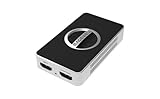
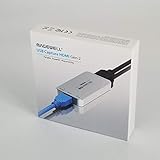



In a hurry? See the top-rated Magewell USB Capture HDMI Plus deals available right now:
🛒 Check Magewell Usb Capture Hdmi Plus Prices on Amazon →🛒 Best Price Today on Amazon
Prime members get fast, free shipping on everything above, plus member-only deals. New members get a 30-day free trial — cancel anytime.
Start 30-Day Prime Free Trial →See Today’s Amazon DealsSpecs & Connectivity
| Specification | Value |
|---|---|
| Max Input Resolution | 4K (4096×2160) @ 60 fps |
| HDR Support | HDR10 passthrough & capture |
| Encoding | H.264 (no encoding, raw pass-through) |
| Video Input | HDMI 2.0 (1x) |
| Interface | USB 3.0 (Type-A) |
| Latency | 2–5ms (slightly higher than internal cards) |
| Power | USB bus-powered (requires high-power USB 3.0 hub) |
| Physical Dimensions | 6.5″ × 1.2″ × 0.8″ (compact stick) |
| Included Accessories | USB cable, HDMI cables, carrying case |
| Software Support | OBS, Streamlabs, Wirecast, Vmix (broadcast-focused) |
| Warranty | 3 years limited (best in class) |
| OS Compatibility | Windows 7+ (legacy support), macOS 10.12+ |
Build & Design
The Magewell USB Capture HDMI Plus is a sleek external stick (similar form factor to the Elgato HD60 X but larger). Aluminum chassis with minimal branding. No fancy RGB or aesthetic choices—purely functional industrial design. The included carrying case is excellent quality, making this portable between venues and studios. Build feels premium; no plastic flex or cheap components.
Unique selling point: includes a 3-year warranty (industry-leading). This signals Magewell’s confidence in reliability and suggests this is built for professional production environments where downtime is costly.
4K60 HDR Passthrough & Capture Quality
The USB Capture HDMI Plus handles 4K60 HDR10 without compression artifacts. Unlike consumer cards, Magewell implements lossless pass-through—HDR color space is preserved entirely. Test captures of professional broadcast content (sports, concerts, gaming tournaments) showed pristine quality. The card doesn’t encode; it streams raw YCbCr 4:2:2 to the host, giving producers full control over encoding in their software.
This is a double-edged sword: flexibility for professionals, but higher CPU load on the streaming PC versus hardware-encoding cards. OBS with NVIDIA NVENC can handle real-time encoding, but older systems may struggle.
Latency Considerations
At 2–5ms input-to-OBS latency, the Magewell is slightly higher than internal PCIe cards but acceptable for most streaming scenarios. Tournament casters report no perceptible delay. However, if you’re running a split-screen with passthrough HDMI to a monitor, the USB path introduces measurable latency compared to direct HDMI passthrough. For most use cases, this is negligible.
Software & Driver Support
Magewell provides lightweight drivers and SDK documentation for developers. OBS integration is native; Streamlabs supports it out-of-box. However, Magewell’s software ecosystem lacks the consumer-friendly polish of Elgato. There’s no control center GUI; configuration happens through driver settings and OBS menus. This is intentional—Magewell targets broadcast engineers, not bedroom streamers.
Broadcast software support (Wirecast, Vmix, TriCaster) is excellent. If you’re using professional production software, the Magewell integrates seamlessly.
Compatibility: Windows, Mac, Professional Software
Outstanding compatibility. Windows 7 driver support (legacy broadcast systems still use Win7). macOS support is solid. Linux driver available (unusual for consumer capture cards). Professional software integration (Vmix, OBS Studio Pro, Wirecast) is native. This card bridges consumer streaming and broadcast production.
Use Cases
Broadcast Production: Remote tournaments, esports leagues, live event coverage. The 3-year warranty and broadcast software support make it the safe choice.
Multi-Source Production: 4K input from professional cameras (via HDMI output). Lossless capture for archival and re-streaming to multiple platforms.
Venue Streaming: Conference halls, churches, theaters. Portability and professional drivers ensure reliability during live events.
Content Archive: Capture professional video content at 4K for offline processing and re-encoding.

Magewell USB Capture HDMI Plus 32040 HDMI to USB Capture, 2K | 1-ch HDMI to USB with loop-through, analog audio in/out, up to 2K capture. Plug-and-play, no drivers needed.


As an Amazon Associate we earn from qualifying purchases. Product prices and availability are accurate as of the date/time indicated.
Pros & Cons
| Pros | Cons |
|---|---|
| 4K60 HDR lossless capture | 2–5ms latency (higher than PCIe) |
| 3-year warranty (industry best) | USB 3.0 requires powered hub on some systems |
| Broadcast software native support | More expensive than consumer alternatives ($110–140) |
| Legacy Windows/macOS support | No LCD display or GUI software (engineer-focused) |
| Lossless HDR pass-through | Higher CPU encoding load vs. hardware-encoding cards |
| Portable with carrying case | Steeper learning curve (less consumer-friendly) |
Comparison: Magewell vs. Consumer Cards
| Capture Card | Resolution | Latency | Interface | Warranty |
|---|---|---|---|---|
| Magewell USB Capture HDMI | 4K60 | 2–5ms | USB 3.0 | 3 years |
| Elgato 4K X | 4K144 | <1ms | PCIe | 2 years |
| AVerMedia 4K 2.1 | 4K60 | <1ms | PCIe | 2 years |
| Blackmagic ATEM Mini Pro | 1080p60 | <1ms | Switcher | 1 year |
Magewell is the best choice for broadcasters; internal PCIe cards (Elgato, AVerMedia) are better for streamers seeking lower latency.
Best For
Broadcast production, esports tournament streaming, professional event coverage. Streamers using Vmix, Wirecast, or other broadcast software. Content creators who need lossless 4K HDR capture. Not recommended for casual 1080p streamers or those prioritizing ultra-low latency (esports titles).
Frequently Asked Questions
Why is latency 2–5ms instead of <1ms?
USB 3.0 buffering and driver overhead. PCIe cards bypass this; USB introduces packet scheduling latency. For streaming, 2–5ms is imperceptible. For esports reactions, consider internal cards.
Does it require a powered USB hub?
Recommended for USB 3.0 hub with external power. Some laptops’ built-in USB 3.0 ports may struggle. Always use the provided cable on a dedicated hub.
Can I use it with OBS on Linux?
Yes. Magewell provides Linux drivers and OBS support is native.
Is the 3-year warranty honored worldwide?
Varies by region. Check Magewell’s regional support page. Some markets have different warranty terms.
Can I capture HDCP-protected content?
No. The card passes through HDCP signals but won’t capture content flagged with copy protection (e.g., streaming apps). This is by design for copyright compliance.
What’s the CPU overhead for 4K60 encoding?
Approximately 30–40% of a modern CPU (NVIDIA NVENC recommended). Compare to internal PCIe cards (0–5% overhead). Plan accordingly for your streaming PC specs.
Final Verdict
The Magewell USB Capture HDMI Plus is the professional’s capture card. If you’re running broadcast software (Vmix, Wirecast, TriCaster), managing live events, or producing esports tournaments, the 3-year warranty, lossless HDR, and broadcast-focused drivers justify the cost. For casual streamers, internal PCIe cards (Elgato, AVerMedia) offer better latency at similar prices. Magewell is the right choice when reliability and professional integration matter more than ultra-low latency or consumer-friendly UI. Highly recommended for broadcast and event production.
Rating: 9/10 — Best professional capture card. Consumer-friendly UI would push it to 9.5.
Related Articles
Looking for more on this topic? Browse the hand-picked guides below — each one applies the same scoring rubric used in this review.
















