

- Top Pick: GMKtec M2 Pro S Mini PC Intel Core i7-1185G7 (Turbo 4.8 GHz) Intel Iris Xe
- Best Value: GMKtec Mini PC Intel Core i7-1185G7 (Up to 8 GHz) 16GB DDR4 1TB SSD
- Premium Choice: GMKtec Mini PC Intel Core i7-1185G7 (up to 4.8 GHz) 16GB DDR4 512GB SSD Desktop Mini Computers WiFi 6, BT 5.2/ DP, HDMI/RJ45 2.5G/USB4.0
The GMKtec NucBox is a compact mini PC built around Intel’s Core i7-1185G7 Tiger Lake processor with Iris Xe integrated graphics. With 16GB of DDR4 memory and a 1TB SSD for around $460, it targets the buyer who wants a tidy, well-rounded small desktop for everyday computing and light creative work. This GMKtec NucBox review covers the specifications, real-world performance, connectivity and value, with attention to how the unusually generous 1TB SSD shapes the day-to-day experience.
- GMKtec NucBox at a Glance
- Performance and CPU Capability
- Graphics: Integrated vs External Output
- Memory, Storage and Upgradability
- Connectivity, Ports and Networking
- Who Is the GMKtec NucBox For?
- Pros and Cons
- Is the GMKtec NucBox Worth It?
- Frequently Asked Questions
- More Mini PC Reviews
- Related Articles
- Related Articles

GMKtec Mini PC Intel Core i7-1185G7 (Up to 8 GHz) 16GB DDR4 1TB SSD | Intel i226V RJ45 2.5G Iris Xe Graphics USB4.0 Desktop Mini Computers WiFi 6, BT 5.2/ DP, HDMI M2


As an Amazon Associate we earn from qualifying purchases. Product prices and availability are accurate as of the date/time indicated.
🛒 Best Price Today on Amazon
Prime members get fast, free shipping on everything above, plus member-only deals. New members get a 30-day free trial — cancel anytime.
As an Amazon Associate we earn from qualifying purchases.
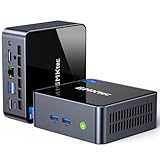


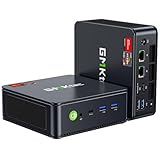
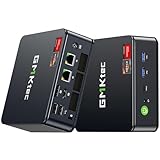
GMKtec NucBox at a Glance
| Component | Specification |
|---|---|
| Processor | Intel Core i7-1185G7 (4 cores, 8 threads, Tiger Lake) |
| Graphics | Intel Iris Xe integrated graphics |
| Memory | 16GB DDR4 |
| Storage | 1TB SSD |
| Ports | USB, HDMI and audio for desktop, display and peripherals |
| Networking | Wired and wireless networking |
| OS | Windows 11 |
| Form factor | Compact mini PC chassis |
| Price | Around $460 |
Performance and CPU Capability
The NucBox is built around the Intel Core i7-1185G7, a four-core, eight-thread Tiger Lake processor that has earned a reputation as a strong general-purpose chip in compact form factors. Four cores with eight threads is a sensible configuration for the role the NucBox targets — browser-led work, office suites, video calls, media playback and light photo editing all run comfortably, and the chip’s good per-core performance keeps the system responsive in single-threaded tasks. Tiger Lake also brings the QuickSync media engine, which speeds up video encoding and playback — a real bonus for media-heavy workflows. With 16GB of memory alongside, the NucBox has the headroom modern Windows 11 expects, and the 1TB SSD is unusually generous storage at this price. The i7-1185G7 is not the newest Intel design, but it remains a sensible choice in compact systems because its per-core performance is genuinely good and it pairs with the strongest Iris Xe configuration Intel offered in that generation — so for the kinds of everyday tasks most owners actually run, the NucBox keeps up with newer machines more closely than a generational gap alone would suggest, particularly when paired with fast PCIe storage. For broader context on Intel-based mini PCs, see our best Intel mini PCs roundup.
Graphics: Integrated vs External Output
Graphics on the NucBox come from Intel’s Iris Xe integrated GPU built into the Core i7-1185G7. Iris Xe is one of the stronger integrated solutions of its generation, and for everyday graphics work — driving a sharp Windows 11 desktop, smooth windowing, hardware-accelerated video, QuickSync encoding and decoding, lightweight games at modest settings — it is well judged. It is not a discrete GPU, so modern AAA gaming at high settings is outside its remit, and that is by design at this price. For office, home, light creative and esports use, Iris Xe is perfectly capable, and the HDMI output drives an external monitor cleanly. Buyers comparing options should also look at our best mini PCs for office and home use guide.
Memory, Storage and Upgradability
The NucBox ships with 16GB of DDR4 memory and a 1TB SSD. 16GB is the modern comfort point for Windows 11, and the 1TB SSD is a particular strength of this configuration — it is unusually generous at this price, and gives the NucBox real headroom for a large media library, multiple applications and a comfortable Windows install without immediate upgrades. The SSD is fast, modern storage rather than the slow eMMC or HDD some budget machines still ship with, so boot times and app launches are snappy. As with most mini PCs the NucBox is primarily a self-contained appliance, but the standard storage and memory modules give it a long, useful service life.
Connectivity, Ports and Networking
The NucBox covers the modern essentials for a compact desktop. USB ports handle peripherals and external storage, HDMI is provided for the display, and audio output is included for headphones or speakers. Networking covers wired and wireless, the right combination for a small machine that needs to behave like a normal desktop on a wired office network and a flexible home setup on wireless. The compact chassis is desk- and mount-friendly. For the role the NucBox targets, the connectivity is well judged.
Who Is the GMKtec NucBox For?
The NucBox is for the buyer who wants a tidy, well-rounded small desktop for everyday computing on a sensible mid-range budget. If you do office work, browse the web, run video calls, watch streaming media, do light photo editing and want a compact machine that feels like a normal Windows 11 PC, the Core i7-1185G7 with 16GB of memory and a 1TB SSD is well matched. It is a particularly good choice for a home-office or remote-work machine where the generous storage matters. It is also a sensible secondary or family PC, since the storage and connectivity comfortably support shared use across multiple Windows accounts. It is less suited to gamers or heavy creators — the integrated graphics and four-core CPU are for general use, not modern AAA gaming or sustained heavy rendering. For balanced everyday compact computing, the NucBox is well judged. Compare it in our best Intel mini PCs roundup.
Pros and Cons
Pros: Sensible four-core, eight-thread Core i7-1185G7; capable Iris Xe iGPU with QuickSync for media; comfortable 16GB of memory; unusually generous 1TB SSD; compact desk-friendly chassis; sensible mid-range value.
Cons: Four cores is mainstream rather than workstation-class; integrated graphics are not built for modern AAA gaming; DDR4 memory rather than the newer DDR5 standard.
Is the GMKtec NucBox Worth It?
At around $460 the GMKtec NucBox is a sensible mid-range mini PC buy for everyday computing. The Core i7-1185G7, 16GB of memory and 1TB SSD are a well-balanced configuration, and the storage is unusually generous at this price. The integrated graphics and four-core CPU are the honest limits, but for the role the NucBox targets they are well judged. The 1TB SSD in particular gives the NucBox a tangible advantage over rivals that ship 256GB or 512GB drives — for buyers who plan to keep the machine for several years as a household or home-office PC, the storage means fewer compromises early on and lower likelihood of needing an upgrade or external drive. That kind of practical generosity is what separates a well-judged budget mini PC from one that simply hits a price point. For balanced, capable everyday compact computing, it earns a recommendation. Buyers who want stronger CPU or integrated gaming performance should compare options in our best mini PCs for gaming guide.
Frequently Asked Questions
Is the GMKtec NucBox good for office work?
Yes. The 4-core, 8-thread Core i7-1185G7 with 16GB of RAM and a 1TB SSD comfortably handle browsing, office suites, video calls and light multitasking, with QuickSync helping media work.
Can the GMKtec NucBox play modern games?
Not at high settings. Iris Xe is built for general use and lighter games; for serious gaming a stronger integrated GPU or discrete GPU is the right answer.
How much storage does the GMKtec NucBox have?
It ships with a 1TB SSD — unusually generous at this price, with room for a large media library and many applications.
Is the Core i7-1185G7 still a sensible chip?
Yes, for general use. It is not Intel’s newest design, but it offers good per-core performance, eight threads and QuickSync media acceleration, which suit everyday computing well.
More Mini PC Reviews
- MSI Cubi NUC AI+ Barebone Mini PC Review
- GEEKOM A8 Max Mini PC Review (Ryzen 7 8745HS)
- GEEKOM IT15 AI Mini PC Review (Ultra 9 285H)
- GMKtec M6 Ultra Mini PC Review (Ryzen 7640HS)
- BOSGAME P4 Ultra Mini PC Review (Ryzen 7 7730U)
- KAMRUI Pinova P2 Mini PC Review (Ryzen 4300U)
- GMKtec M7 Ultra Mini PC Review (Ryzen 7 PRO 6850U)
- KAMRUI Hyper H2 Mini Gaming PC Review (i9-11900H)
Affiliate Disclosure: As an Amazon Associate, we earn from qualifying purchases. If you click a link and make a purchase, we may earn a small commission at no extra cost to you. Prices and availability are accurate as of publication and may change.
Related Articles
Looking for more on this topic? Browse the hand-picked guides below — each one applies the same scoring rubric used in this review.










