

- Top Pick: SteelSeries Apex 3 RGB Gaming Keyboard – 10-Zone RGB Illumination – IP32 Water Resistant – Premium Magnetic Wrist Rest (Whisper Quiet Gaming Switch)
- Best Value: SteelSeries Apex 3 TKL RGB Gaming Keyboard – Tenkeyless Compact Form Factor – 8-Zone RGB Illumination – IP32 Water & Dust Resistant – Whisper Quiet Gaming Switch – Gaming Grade Anti-Ghosting,Black
- Premium Choice: SteelSeries USB Apex 5 Hybrid Mechanical Gaming Keyboard – Per-Key RGB Illumination – Aircraft Grade Aluminum Alloy Frame – OLED Smart Display (Hybrid Blue Switch)
The SteelSeries Apex 3 RGB is a wired full-size membrane gaming keyboard that aims to offer a premium-feeling experience at a sensible budget price. It uses whisper-quiet gaming-grade membrane switches, adds 10-zone RGB lighting and IP32 water-and-dust resistance, and ships with a premium magnetic palm rest. With more than 7,900 reviews and a price of around $50, it is one of the most popular budget membrane gaming keyboards on the market. This SteelSeries Apex 3 RGB review covers the build, the typing feel, the gaming credentials and whether a quality membrane board still makes sense alongside mechanical rivals.
- SteelSeries Apex 3 RGB at a Glance
- Design and Build Quality
- Switches and Typing Feel
- Gaming Performance and Features
- Connectivity, Software and Everyday Use
- Who Is the SteelSeries Apex 3 RGB For?
- Pros and Cons
- Is the SteelSeries Apex 3 RGB Worth It?
- Frequently Asked Questions
- More Gaming Gear Reviews
- Related Articles
- Related Articles
- Related Guides

SteelSeries Apex 3 Gaming Keyboard - Black | 10-Zone RGB Illumination – IP32 Water Resistant – Premium Magnetic Wrist Rest (Whisper Quiet Gaming Switch)


As an Amazon Associate we earn from qualifying purchases. Product prices and availability are accurate as of the date/time indicated.
🛒 Best Price Today on Amazon
Prime members get fast, free shipping on everything above, plus member-only deals. New members get a 30-day free trial — cancel anytime.
As an Amazon Associate we earn from qualifying purchases.



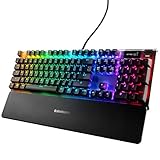


SteelSeries Apex 3 RGB at a Glance
| Component | Specification |
|---|---|
| Type | Wired full-size membrane gaming keyboard |
| Layout | Full-size |
| Switches | Whisper-quiet membrane gaming switches |
| Connection | Wired USB |
| Keycaps | Standard |
| Backlighting | 10-zone RGB |
| Notable features | IP32 water-and-dust resistance, magnetic palm rest, brand pedigree |
| Price | Around $50 |
Design and Build Quality
The SteelSeries Apex 3 RGB takes a conventional full-size shape with all the keys present, including the number pad, and presents itself as a polished, restrained gaming keyboard rather than an aggressive showpiece. The case is plastic, as expected at this price, but build feels tidy and considered, with no obvious corners cut, and the styling is in keeping with the mature aesthetic SteelSeries is known for across its range.
The most notable physical addition is the premium magnetic palm rest, which attaches and detaches cleanly and provides a comfortable support for the wrists during long sessions. IP32 water-and-dust resistance is a genuinely useful piece of practical engineering, providing a degree of protection against spills and dust that very few keyboards at this price offer. Together these details lift the Apex 3 above the typical sub-$50 board on substance as well as appearance.
Switches and Typing Feel
The Apex 3 uses whisper-quiet gaming-grade membrane switches. Membrane switches use a rubber dome underneath each key to register key presses, which gives a softer, quieter feel than the click of a mechanical switch. The whisper-quiet aspect of the Apex 3’s switches is significant for offices, dorm rooms and shared spaces where the click of a mechanical board would be disruptive, and they are tuned for gaming rather than office work.
The typing feel that results is soft, quiet and pleasant, with enough definition to make every keystroke feel deliberate even though the experience is clearly different from a true mechanical board. Long writing sessions are comfortable, and the keyboard does not become tiring. Buyers who specifically want a mechanical feel will need to look at a different keyboard, but for those who value quiet operation and a smooth, soft action, the Apex 3 is a fair choice.
Gaming Performance and Features
For gaming the Apex 3 covers the essentials and adds a few useful touches. The whisper-quiet switches are tuned for gaming and respond well to deliberate inputs, and the wired USB connection guarantees direct, consistent input with no wireless variables or batteries to manage mid-session. The full-size layout suits gamers who use number-pad shortcuts in MMOs or who simply prefer the familiar full layout for general use.
10-zone RGB lighting allows the keyboard’s appearance to be customised in coordinated regions across the layout. There are no advanced features such as Rapid Trigger or per-key Hall-effect actuation here, which is exactly right at this price. The Apex 3 is aimed squarely at the mainstream gamer who wants a polished, well-built keyboard rather than the competitive specialist, and for that audience it does what it sets out to do.
Connectivity, Software and Everyday Use
Connectivity is simple wired USB, which is the right choice for any gaming keyboard at this price — always ready, no batteries to manage and no wireless variables. Through SteelSeries software the 10-zone RGB lighting can be tuned to taste, but the keyboard works perfectly well as a plug-and-play product if software is not desired. The whisper-quiet operation also makes it pleasant to use in shared spaces and is a real practical benefit day to day.
The IP32 water-and-dust resistance is the standout for everyday use, providing a meaningful margin of safety against the inevitable knocked drink or dusty desk. The magnetic palm rest improves long-session comfort and detaches cleanly when not needed. Combined with the SteelSeries brand pedigree, the Apex 3 feels like a keyboard built to be lived with rather than a disposable budget product.
Who Is the SteelSeries Apex 3 RGB For?
The SteelSeries Apex 3 RGB is for the gamer who wants a polished, well-built full-size keyboard at a sensible price and who actively values quiet operation. If you share a room, work in an office or simply prefer a soft, quiet typing experience, and you want the practical bonuses of IP32 water resistance and a magnetic palm rest, the Apex 3 is squarely aimed at you. It also suits buyers who want a trusted brand rather than an unknown ultra-budget option.
It is less suited to buyers who specifically want a mechanical typing feel, who should look at a budget mechanical keyboard at a similar price, or to competitive players who want per-key RGB and advanced switch features. But for the mainstream gamer who values comfort, durability and a polished design over chasing the most aggressive features, the Apex 3 RGB is a strong choice.
Pros and Cons
Pros: Whisper-quiet gaming-grade membrane switches; IP32 water-and-dust resistance is rare at this price; premium magnetic palm rest; 10-zone RGB; full-size layout; SteelSeries brand pedigree; reliable wired USB.
Cons: Membrane rather than mechanical switches will not suit everyone; only 10-zone RGB rather than per-key lighting; lacks competitive features such as Rapid Trigger or Hall-effect switches; plastic case.
Is the SteelSeries Apex 3 RGB Worth It?
At around $50 the SteelSeries Apex 3 RGB is a sensible recommendation for the right buyer. It delivers a quiet, comfortable typing experience, a useful full-size layout, 10-zone RGB lighting and the genuinely valuable additions of IP32 water resistance and a magnetic palm rest. The membrane switches are tuned for gaming and the wired USB connection keeps things simple.
For the mainstream gamer who values polish, comfort and quiet operation over the click of a mechanical keyboard, the Apex 3 RGB earns a clear recommendation. Buyers who specifically want a mechanical feel should look elsewhere, and competitive players will need more advanced switches. But as a popular, polished and practical budget membrane keyboard, the SteelSeries Apex 3 RGB remains a strong pick.
Frequently Asked Questions
Is the SteelSeries Apex 3 RGB mechanical?
No. It uses whisper-quiet gaming-grade membrane switches, which use a rubber dome under each key and feel softer and quieter than the click of a true mechanical board.
What is IP32 water resistance on the Apex 3?
It is a rating that indicates a meaningful degree of protection against dust and against vertically dripping water, which gives a margin of safety against the inevitable knocked drink or dusty desk.
Does the SteelSeries Apex 3 RGB have per-key RGB?
No. It has 10-zone RGB lighting, which allows colours and effects to be customised in coordinated regions across the layout rather than per individual key.
Does the SteelSeries Apex 3 RGB come with a palm rest?
Yes. It ships with a premium magnetic palm rest, which attaches and detaches cleanly and provides comfortable support for the wrists during long sessions.
More Gaming Gear Reviews
- Logitech G PRO X2 SUPERSTRIKE Wireless Gaming Mouse Review
- Razer Viper V4 Pro Wireless Esports Gaming Mouse Review
- Razer Naga V2 HyperSpeed Wireless MMO Gaming Mouse Review
- Logitech G502 X Plus Wireless Gaming Mouse Review
- Razer Viper V3 HyperSpeed Wireless Gaming Mouse Review
- SteelSeries Rival 5 Gaming Mouse Review
- SteelSeries Arctis Nova 5 Wireless Gaming Headset Review
- Razer BlackShark V3 Wireless Gaming Headset Review
Affiliate Disclosure: As an Amazon Associate, we earn from qualifying purchases. If you click a link and make a purchase, we may earn a small commission at no extra cost to you. Prices and availability are accurate as of publication and may change.
Related Articles
Looking for more on this topic? Browse the hand-picked guides below — each one applies the same scoring rubric used in this review.










