

- Top Pick: Corsair K100 RGB Optical-Mechanical Wired Gaming Keyboard – QWERTY US Layout, OPX Switches – PBT Double-Shot Keycaps – Elgato Stream Deck and iCUE Compatible – Black
- Best Value: Corsair K100 RGB Mechanical Gaming Keyboard – Cherry MX Speed RGB Silver Keyswitches – PBT Double-Shot Keycaps – Elgato Stream Deck and iCUE Compatible – QWERTY NA Layout – Black
- Premium Choice: Corsair K70 PRO Mini Wireless 60% (CH-9189014-NA) Mechanical Cherry MX Speed Switch Keyboard with RGB Backlighting – Black (Renewed)
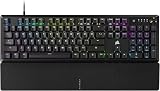
The Corsair K100 RGB is a flagship gaming keyboard, a full-size board that sets out to do everything and do it to a high standard. It is built around Corsair’s OPX optical-mechanical switches with a shallow 1.0mm actuation, and supported by AXON Hyper-Processing for a very high polling rate, PBT doubleshot keycaps, six dedicated macro keys, an iCUE control wheel and elaborate RGB lighting in an aluminium frame. With more than 4,600 reviews and a price of around $200, the K100 sits at the top of the range. This Corsair K100 RGB review covers the build, the switches, the features and the value.
- Corsair K100 RGB at a Glance
- Design and Build Quality
- Switches and Typing Feel
- Gaming Performance and Features
- Connectivity, Software and Everyday Use
- Who Is the Corsair K100 RGB For?
- Pros and Cons
- Is the Corsair K100 RGB Worth It?
- Frequently Asked Questions
- More Gaming Gear Reviews
- Related Articles
- Related Articles
- Related Guides

Corsair K100 RGB Optical-Mechanical Wired Gaming Keyboard - QWERTY US Layout, OPX Switches - PBT Double-Shot Keycaps - Elgato Stream Deck and iCUE Compatible - Black


As an Amazon Associate we earn from qualifying purchases. Product prices and availability are accurate as of the date/time indicated.
🛒 Best Price Today on Amazon
Prime members get fast, free shipping on everything above, plus member-only deals. New members get a 30-day free trial — cancel anytime.
As an Amazon Associate we earn from qualifying purchases.





Corsair K100 RGB at a Glance
| Component | Specification |
|---|---|
| Type | Wired flagship gaming keyboard |
| Layout | Full-size |
| Switches | Corsair OPX optical-mechanical, 1.0mm actuation |
| Connection | Wired USB |
| Keycaps | PBT doubleshot |
| Backlighting | Per-key RGB plus 44-zone LightEdge |
| Notable features | AXON Hyper-Processing for a very high polling rate, 6 dedicated macro keys, iCUE control wheel, aluminium frame |
| Price | Around $200 |
Design and Build Quality
The Corsair K100 RGB looks and feels like the flagship it is. An aluminium frame gives the full-size chassis a substantial, rigid presence on the desk, and the construction is finished to the high standard the price demands. The layout adds genuine functional extras to the standard full-size arrangement: a column of six dedicated macro keys runs down the left edge, and an iCUE control wheel sits in the top corner for quick, tactile adjustments.
The lighting design is among the most elaborate available. Beyond crisp per-key RGB, Corsair adds a 44-zone LightEdge, a strip of addressable lighting that wraps the edge of the keyboard for a striking visual effect. The keycaps are PBT doubleshot, a durable choice with legends that will not wear away. Everything about the K100’s design signals a keyboard intended to be the centrepiece of a high-end setup, with no obvious corners cut.
Switches and Typing Feel
The K100 RGB uses Corsair’s OPX optical-mechanical switches. These register a key press optically, by interrupting a light beam, which removes the metal contact of a traditional mechanical switch. The key detail is the actuation distance: the OPX switch actuates at a shallow 1.0mm, meaning a key registers very early in its travel. The practical effect is a keyboard that feels exceptionally fast and immediate, responding to the lightest, quickest press.
That shallow actuation suits fast-paced gaming particularly well, where the speed of input matters and players want their keystrokes recognised the instant they begin. For typing, the optical switches are smooth and consistent, and the early actuation gives the board a light, brisk character. Paired with the solid PBT doubleshot keycaps, the K100 offers a typing feel that is quick and refined, in keeping with its flagship billing.
Gaming Performance and Features
The K100 RGB is built for performance, and its gaming credentials are extensive. The OPX switches with their 1.0mm actuation deliver very fast input, and Corsair’s AXON Hyper-Processing technology drives a very high polling rate so the keyboard communicates with the PC extremely quickly. Together these ensure inputs are registered and transmitted with minimal delay, which is exactly what a flagship gaming keyboard should provide.
The six dedicated macro keys are a major practical feature, allowing complex commands or sequences to be bound and triggered instantly — valuable for MMOs, MOBAs and productivity alike. The iCUE control wheel offers a tactile way to adjust volume, lighting or other functions on the fly. With per-key RGB and the 44-zone LightEdge for personalisation, the K100 offers a complete, do-everything feature set with no obvious gaps.
Connectivity, Software and Everyday Use
The K100 RGB connects over a wired USB link, ensuring the direct, consistent input expected of a flagship keyboard, with the AXON technology making the most of that connection through a very high polling rate. The iCUE control wheel and dedicated macro keys mean many everyday functions are handled directly on the keyboard, which quickly becomes second nature.
Corsair’s iCUE software is central to the experience, tying together macro programming, the elaborate RGB and LightEdge lighting, and other settings into one control suite. It is a capable, deep ecosystem. For daily use the PBT doubleshot keycaps feel durable and pleasant, the aluminium frame keeps everything planted, and the macro keys and control wheel add real convenience well beyond gaming. As the centrepiece of a desk, the K100 is as practical as it is impressive.
Who Is the Corsair K100 RGB For?
The Corsair K100 RGB is for the enthusiast who wants a flagship, do-everything keyboard and treats budget as a secondary concern. If you want fast optical-mechanical switches, a very high polling rate, a bank of dedicated macro keys, a control wheel and the most elaborate RGB lighting available, all in a premium aluminium build, the K100 is aimed directly at you. It suits gamers who want their keyboard to be a true centrepiece.
It is less suited to the buyer who simply wants a good keyboard at a sensible price, since at around $200 the K100 is a significant outlay and many of its features — particularly the macro keys and LightEdge — will go unused by a mainstream gamer. Those buyers are better served lower in the range. But for the enthusiast who wants the flagship experience, the K100 delivers it comprehensively.
Pros and Cons
Pros: Fast OPX optical-mechanical switches with shallow 1.0mm actuation; very high polling rate via AXON Hyper-Processing; six dedicated macro keys; iCUE control wheel; durable PBT doubleshot keycaps; elaborate per-key RGB and 44-zone LightEdge; premium aluminium build.
Cons: High flagship price; many features go unused by mainstream gamers; depends on iCUE software for full functionality; substantial footprint with the macro key column.
Is the Corsair K100 RGB Worth It?
At around $200 the Corsair K100 RGB is a flagship keyboard, and its value is best understood as the price of having everything in one board. The OPX optical-mechanical switches are genuinely fast, the AXON-driven polling rate is very high, and the dedicated macro keys, control wheel and elaborate lighting make it one of the most fully featured keyboards available. The aluminium build and PBT keycaps confirm the premium positioning throughout.
For the enthusiast who wants a do-everything flagship and will use its breadth of features, the K100 earns a recommendation. The mainstream buyer who does not need macro keys or LightEdge should spend less and will not feel short-changed. As a top-of-the-range keyboard that delivers on its flagship ambitions, the K100 RGB stands among the best.
Frequently Asked Questions
How fast do the Corsair K100 RGB switches actuate?
The K100 uses Corsair OPX optical-mechanical switches with a shallow 1.0mm actuation, so a key registers very early in its travel. This gives the keyboard a fast, immediate feel suited to quick gaming inputs.
What does AXON Hyper-Processing do on the Corsair K100 RGB?
AXON Hyper-Processing drives a very high polling rate, meaning the keyboard communicates with the PC extremely quickly. Combined with the fast optical switches, it keeps input delay to a minimum.
How many macro keys does the Corsair K100 RGB have?
It has six dedicated macro keys arranged in a column on the left edge. They let complex commands or sequences be bound and triggered instantly, which is useful for MMOs, MOBAs and productivity.
What is the LightEdge on the Corsair K100 RGB?
The LightEdge is a 44-zone strip of addressable RGB lighting that wraps the edge of the keyboard. It adds a striking visual effect on top of the standard per-key RGB backlighting.
More Gaming Gear Reviews
- Razer DeathAdder Essential Gaming Mouse Review
- Logitech G502 HERO Gaming Mouse Review
- Logitech G305 LIGHTSPEED Wireless Mouse Review
- Razer Basilisk V3 Gaming Mouse Review
- Logitech G PRO X SUPERLIGHT 2 Wireless Mouse Review
- Razer DeathAdder V3 Pro Wireless Mouse Review
- Turtle Beach Recon 70 Gaming Headset Review
- Razer BlackShark V2 X Gaming Headset Review
Affiliate Disclosure: As an Amazon Associate, we earn from qualifying purchases. If you click a link and make a purchase, we may earn a small commission at no extra cost to you. Prices and availability are accurate as of publication and may change.
Related Articles
Looking for more on this topic? Browse the hand-picked guides below — each one applies the same scoring rubric used in this review.










