

The Razer DeathAdder Essential is a wired ergonomic gaming mouse that aims to deliver a proven shape and dependable performance at the lowest sensible price. It distils the long-running and hugely popular DeathAdder line into an affordable package, pairing a 6,400 DPI optical sensor with five programmable buttons and mechanical switches rated for around 10 million clicks. With well over 15,900 reviews and a price of around $20, it has become a default budget recommendation. This Razer DeathAdder Essential review examines the build, the sensor, the shape and whether a budget mouse can genuinely satisfy gamers.
- Razer DeathAdder Essential at a Glance
- Design and Build Quality
- Sensor and Tracking Performance
- Shape, Buttons and Grip
- Connectivity, Software and Everyday Use
- Who Is the Razer DeathAdder Essential For?
- Pros and Cons
- Is the Razer DeathAdder Essential Worth It?
- Frequently Asked Questions
- More Gaming Gear Reviews
- Related Articles
- Related Articles
- Related Guides

Razer DeathAdder Essential Ergonomic Wired Gaming Mouse, Black | 6400 DPI Optical Sensor, 5 Programmable Buttons, Rubber Side Grips, Mechanical Mouse Switches


As an Amazon Associate we earn from qualifying purchases. Product prices and availability are accurate as of the date/time indicated.
🛒 Best Price Today on Amazon
Prime members get fast, free shipping on everything above, plus member-only deals. New members get a 30-day free trial — cancel anytime.
Razer DeathAdder Essential at a Glance
| Component | Specification |
|---|---|
| Type | Wired ergonomic gaming mouse |
| Sensor | Optical |
| Max DPI | 6,400 |
| Switches | Mechanical, rated for ~10 million clicks |
| Buttons | 5 programmable |
| Connection | Wired USB |
| Weight | Not specified |
| Price | Around $20 |
Design and Build Quality
The Razer DeathAdder Essential inherits one of the most recognised and respected shapes in gaming. The DeathAdder ergonomic form has been refined over many years and many generations, and it is widely regarded as one of the most comfortable mouse shapes available, particularly for right-handed players who favour a palm grip. The Essential brings that shape to a budget product, which is a significant part of its appeal.
As an Amazon Associate we earn from qualifying purchases at no extra cost to you.



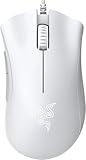


The build is straightforward and sensible for the price. The mouse is right-handed in design, with a contour that fills the palm and supports the hand naturally during long sessions. A rubberised scroll wheel provides reliable grip for precise scrolling. There is no elaborate styling or unnecessary embellishment here; the DeathAdder Essential focuses its budget on the things that matter most, and the result is a mouse that feels considered rather than cheap.
Sensor and Tracking Performance
At the centre of the DeathAdder Essential is an optical sensor with a maximum sensitivity of 6,400 DPI. For the overwhelming majority of gamers this is more than sufficient — most players use sensitivity settings well below the maximum, and 6,400 DPI comfortably covers the practical range needed for both fast-paced shooters and slower, more deliberate genres. The sensor delivers the accurate, consistent tracking that gaming demands.
What matters most in everyday play is reliability rather than a headline DPI figure, and the DeathAdder Essential’s optical sensor provides dependable cursor movement that follows the hand faithfully. The wired connection ensures there is no wireless latency to consider, so input feels direct and immediate. For a budget mouse, the tracking performance is genuinely solid, and it is one of the reasons the Essential has earned such a strong reputation among value-conscious gamers.
Shape, Buttons and Grip
The DeathAdder Essential’s shape is its defining strength. The ergonomic, right-handed form is sculpted to support a palm grip, with the body filling the hand and the contours giving a natural resting position for the fingers. For players who favour a palm or relaxed claw grip, it is one of the most comfortable shapes on the market, and that comfort holds up well across long gaming sessions.
Five programmable buttons cover the practical needs of most games: the two main clicks, a clickable scroll wheel and two thumb buttons that can be assigned to commands, abilities or browser navigation. The mechanical switches are rated for around 10 million clicks, which speaks to a build designed to last well beyond its modest price. The rubberised scroll wheel adds grip for precise control. It is a sensible, well-judged button arrangement.
Connectivity, Software and Everyday Use
The DeathAdder Essential connects over wired USB, which for a gaming mouse is a genuine advantage at this price. A wired connection means no battery to charge, no wireless dongle to manage and no signal interference to worry about — the mouse is always ready and input is consistently direct. For a budget product, this simplicity and reliability count for a great deal.
Razer’s software allows the five buttons and the DPI settings to be configured, so the mouse can be tailored to individual preferences and different games. As an everyday mouse the DeathAdder Essential is comfortable and dependable, the proven ergonomic shape serving just as well for browsing and office work as for gaming. With the trusted Razer name behind it and a build rated for millions of clicks, it is an easy mouse to live with day to day.
Who Is the Razer DeathAdder Essential For?
The Razer DeathAdder Essential is for the buyer who wants a comfortable, capable gaming mouse at the lowest sensible price. If you have a right-handed grip, appreciate the legendary DeathAdder ergonomic shape, and want a dependable optical sensor and programmable buttons for around $20, the Essential is aimed precisely at you. It is an excellent choice for first-time gaming mouse buyers, students and anyone building a setup on a budget.
It is less suited to the buyer who wants a wireless connection, an ultralight body for competitive play or a high-end sensor with the very highest DPI figures. Those gamers should look further up the range. It is also a right-handed mouse, so left-handed players will need an alternative. But for the value-focused gamer who wants a proven, comfortable shape, the DeathAdder Essential is a benchmark choice.
Pros and Cons
Pros: Outstanding value at around $20; legendary, highly comfortable ergonomic shape; dependable optical sensor; five programmable buttons; mechanical switches rated for ~10 million clicks; trusted Razer brand.
Cons: Wired only, with no wireless option; right-handed shape unsuitable for left-handed users; not an ultralight design for competitive play; modest maximum DPI compared with flagship mice.
Is the Razer DeathAdder Essential Worth It?
At around $20 the Razer DeathAdder Essential is one of the easiest recommendations in gaming peripherals. It brings the celebrated DeathAdder ergonomic shape, a long-proven comfort benchmark, to a budget price, and pairs it with a dependable optical sensor and a sensible set of programmable buttons. The switches rated for around 10 million clicks suggest a mouse built to last well beyond its cost.
For a first gaming mouse, a budget setup or a reliable spare, the DeathAdder Essential represents excellent value and earns a clear recommendation. It will not satisfy those who want wireless freedom or an ultralight competitive design, and left-handed users must look elsewhere. But as the budget benchmark for a comfortable, capable gaming mouse, the DeathAdder Essential is hard to beat.
Frequently Asked Questions
Is the Razer DeathAdder Essential good for gaming?
Yes. It uses the proven, comfortable DeathAdder ergonomic shape, a dependable optical sensor and five programmable buttons, all over a direct wired connection. It is a strong choice for casual and mainstream gaming.
What is the maximum DPI of the Razer DeathAdder Essential?
Its optical sensor reaches up to 6,400 DPI. That is comfortably enough for most players, since the majority of gamers use sensitivity settings well below the maximum.
Is the Razer DeathAdder Essential suitable for left-handed users?
No. It has an ergonomic right-handed shape sculpted for the right hand, so left-handed players should choose an ambidextrous or left-handed mouse instead.
Is the Razer DeathAdder Essential wireless?
No. It is a wired mouse connecting over USB. The wired connection means there is no battery to charge and no dongle to manage, which keeps it simple and reliable.
More Gaming Gear Reviews
- Logitech G502 HERO Gaming Mouse Review
- Logitech G305 LIGHTSPEED Wireless Mouse Review
- Razer Basilisk V3 Gaming Mouse Review
- Logitech G PRO X SUPERLIGHT 2 Wireless Mouse Review
- Razer DeathAdder V3 Pro Wireless Mouse Review
- Turtle Beach Recon 70 Gaming Headset Review
- Razer BlackShark V2 X Gaming Headset Review
- HyperX Cloud III Gaming Headset Review
Affiliate Disclosure: As an Amazon Associate, we earn from qualifying purchases. If you click a link and make a purchase, we may earn a small commission at no extra cost to you. Prices and availability are accurate as of publication and may change.
Related Articles
Looking for more on this topic? Browse the hand-picked guides below — each one applies the same scoring rubric used in this review.










