

The Razer Basilisk V3 is a feature-loaded ergonomic gaming mouse, and its standout trick is a clever scroll wheel. It is a wired mouse built around Razer’s Focus+ 26K optical sensor, with eleven programmable buttons, optical switches and the HyperScroll Tilt scroll wheel that can switch between modes and tilt sideways. A pronounced thumb rest shapes its comfortable ergonomic form, and 11-zone Chroma RGB handles lighting. With more than 10,000 reviews and a price of around $38, the Basilisk V3 packs a great deal in. This Razer Basilisk V3 review covers the build, the sensor, the shape and the value.
- Razer Basilisk V3 at a Glance
- Design and Build Quality
- Sensor and Tracking Performance
- Shape, Buttons and Grip
- Connectivity, Software and Everyday Use
- Who Is the Razer Basilisk V3 For?
- Pros and Cons
- Is the Razer Basilisk V3 Worth It?
- Frequently Asked Questions
- More Gaming Gear Reviews
- Related Articles
- Related Articles
- Related Guides

Razer Basilisk V3 Customizable RGB Wired Ergonomic Gaming Mouse, Black | Fastest Gaming Mouse Switch, Chroma RGB Lighting, 26K DPI Optical Sensor, 11 Programmable Buttons, HyperScroll Tilt Wheel



As an Amazon Associate we earn from qualifying purchases. Product prices and availability are accurate as of the date/time indicated.
🛒 Best Price Today on Amazon
Prime members get fast, free shipping on everything above, plus member-only deals. New members get a 30-day free trial — cancel anytime.
As an Amazon Associate we earn from qualifying purchases.






Razer Basilisk V3 at a Glance
| Component | Specification |
|---|---|
| Type | Wired ergonomic gaming mouse |
| Sensor | Razer Focus+ 26K optical |
| Max DPI | 26,000 |
| Switches | Optical Mouse Switches Gen-2 |
| Buttons | 11 programmable |
| Connection | Wired USB |
| Weight | Not specified |
| Price | Around $38 |
Design and Build Quality
The Razer Basilisk V3 has a substantial, sculpted ergonomic design built around a pronounced thumb rest. That thumb rest is a notable comfort feature, giving the thumb a defined, supported place to sit and helping the hand settle into a relaxed, stable position during long sessions. The mouse is a right-handed ergonomic shape, and the body is generously contoured to fill the palm.
The build is solid and well finished, and Razer adds 11-zone Chroma RGB lighting for personalisation, including a lit underglow that gives the mouse a distinctive look. The styling is recognisably that of a gaming mouse, but the shape is shaped by comfort rather than spectacle. For the price, the Basilisk V3 feels like a well-constructed, considered design, with the thumb rest a genuine ergonomic addition rather than a cosmetic flourish.
Sensor and Tracking Performance
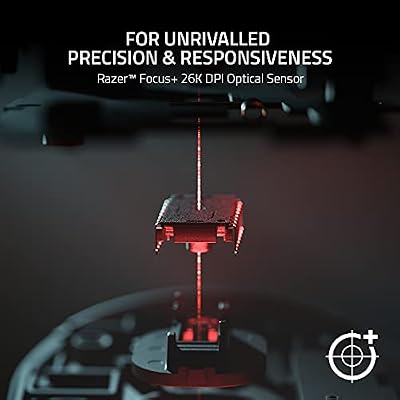
The Basilisk V3 is built around Razer’s Focus+ 26K optical sensor, capable of reaching up to 26,000 DPI. That is a very high figure, far beyond what any player needs in practice, and what it really indicates is a high-quality sensor with a great deal of headroom and precision. The Focus+ sensor delivers the accurate, consistent tracking that gaming demands across every genre.
In actual play the value of this sensor lies in its dependability. Cursor movement follows the hand faithfully, from the fast flicks of a shooter to the careful precision of a strategy game, and the wired connection ensures input is direct with no wireless latency to consider. For a mouse at around $38, having a sensor of this calibre is a significant part of the appeal, and it ensures tracking is never the limiting factor in the Basilisk V3’s performance.
Shape, Buttons and Grip
The Basilisk V3’s ergonomic shape, defined by its pronounced thumb rest, is comfortable and supportive. The right-handed form suits palm and claw grips well, and the thumb rest gives the hand a settled, relaxed position that holds up across long gaming sessions. For players who want a substantial, comfortable mouse to rest the hand on, the Basilisk V3’s shape is a real strength.
Eleven programmable buttons give plenty of control, and the standout among them is the HyperScroll Tilt scroll wheel. This wheel can switch between a ratcheted, tactile scrolling mode and a free-spinning mode for racing through long pages, and it tilts left and right for extra inputs. It is a genuinely clever, versatile feature. The optical switches, Razer’s second-generation design, register clicks by light rather than metal contact, for fast and consistent actuation.
Connectivity, Software and Everyday Use
The Basilisk V3 connects over wired USB, delivering direct, consistent input with no battery to charge and no wireless dongle to manage. For a gaming mouse this is a dependable arrangement that keeps input feeling immediate, and it helps the Basilisk V3 pack in its many features at an accessible price.
Razer’s software unlocks the mouse’s depth, allowing all eleven buttons, the DPI stages, the HyperScroll wheel behaviour and the 11-zone Chroma RGB lighting to be configured. As an everyday mouse the Basilisk V3 is excellent: the HyperScroll wheel’s free-spin mode is genuinely useful for long documents and web pages, and the abundance of buttons can be put to productivity use. The comfortable shape serves just as well for general work, making this a versatile mouse beyond gaming.
Who Is the Razer Basilisk V3 For?
The Razer Basilisk V3 is for the gamer who wants a comfortable, feature-rich ergonomic mouse without spending a great deal. If you have a right-handed grip, value a supportive thumb rest, want eleven programmable buttons and are drawn to the versatile HyperScroll Tilt wheel, the Basilisk V3 is built for you. It suits players who want a mouse that handles gaming and everyday productivity equally well.
It is less suited to the competitive player chasing the very lightest possible mouse, since the Basilisk V3 is a substantial ergonomic design, or to anyone who wants a wireless connection or a simple, minimalist mouse. Those buyers should look elsewhere in the range, and left-handed users will need an alternative. But for the gamer who wants comfort, features and that clever scroll wheel at a sensible price, the Basilisk V3 is a strong choice.
Pros and Cons
Pros: Excellent value at around $38; comfortable ergonomic shape with a supportive thumb rest; capable Focus+ 26K sensor; eleven programmable buttons; clever HyperScroll Tilt scroll wheel; 11-zone Chroma RGB lighting.
Cons: A substantial mouse, not suited to those wanting an ultralight design; wired only; ergonomic right-handed shape unsuitable for left-handed users; gets the best from Razer’s software.
Is the Razer Basilisk V3 Worth It?
At around $38 the Razer Basilisk V3 is excellent value, packing a great deal of capability into an accessible price. The comfortable ergonomic shape with its supportive thumb rest, the capable Focus+ 26K sensor and the eleven programmable buttons make it a versatile, well-rounded mouse, and the HyperScroll Tilt scroll wheel is a genuinely useful standout feature for gaming and everyday work alike.
For the gamer who wants comfort and features without a premium price, the Basilisk V3 earns a strong recommendation. The competitive player after an ultralight design and those who prefer simplicity should look elsewhere, and left-handed users must too. But as a feature-loaded ergonomic mouse with a clever scroll wheel at its heart, the Basilisk V3 is a fine choice.
Frequently Asked Questions
Is the Razer Basilisk V3 a good gaming mouse?
Yes — the Basilisk V3 is one of the best all-round ergonomic gaming mice, with a precise sensor, tactile scroll wheel with free-spin mode, and plenty of programmable buttons. The Pro/wireless versions add HyperSpeed wireless and charging-dock support.
What is the HyperScroll Tilt wheel on the Razer Basilisk V3?
It is a scroll wheel that can switch between a ratcheted, tactile mode and a free-spinning mode for racing through long pages, and it also tilts left and right for extra inputs. It is the mouse’s standout feature.
Is the Razer Basilisk V3 comfortable?
Yes. It has a substantial, sculpted ergonomic shape with a pronounced thumb rest that gives the thumb a supported position, helping the hand stay relaxed during long sessions.
What sensor does the Razer Basilisk V3 use?
It uses the Razer Focus+ 26K optical sensor, which reaches up to 26,000 DPI. The Focus+ sensor delivers accurate, consistent tracking across every genre.
Is the Razer Basilisk V3 suitable for left-handed users?
No. It has an ergonomic right-handed shape with a thumb rest sculpted for the right hand, so left-handed players should choose an ambidextrous mouse instead.
More Gaming Gear Reviews
- Logitech G PRO X SUPERLIGHT 2 Wireless Mouse Review
- Razer DeathAdder V3 Pro Wireless Mouse Review
- Turtle Beach Recon 70 Gaming Headset Review
- Razer BlackShark V2 X Gaming Headset Review
- HyperX Cloud III Gaming Headset Review
- Logitech G733 LIGHTSPEED Wireless Headset Review
- SteelSeries Arctis Nova Pro Wireless Headset Review
- Redragon K671 Mechanical Gaming Keyboard Review
Affiliate Disclosure: As an Amazon Associate, we earn from qualifying purchases. If you click a link and make a purchase, we may earn a small commission at no extra cost to you. Prices and availability are accurate as of publication and may change.
Related Articles
Looking for more on this topic? Browse the hand-picked guides below — each one applies the same scoring rubric used in this review.










