

- Top Pick: Redragon Mechanical Gaming Keyboard Wired, 11 Programmable Backlit Modes, Hot-Swappable Red Switch, Anti-Ghosting, Double-Shot PBT Keycaps, Light Up Keyboard for PC Mac
- Best Value: Redragon K556 Wired RGB Mechanical Gaming Keyboard, 104-Key Aluminum Board
- Premium Choice: Redragon K582 Wired RGB Mechanical Gaming Keyboard, 104-Key Standard Layout
The Redragon K671 is a wired full-size mechanical gaming keyboard that sets out to prove a budget board need not feel like a compromise. For a price of around $30 it offers a 104-key layout, hot-swappable linear Red mechanical switches and 11 RGB backlight modes, a feature set that would have seemed unlikely at this price only a few years ago. With more than 6,500 reviews behind it, the K671 has clearly found an audience among first-time mechanical buyers. This Redragon K671 review looks at the build, the typing feel, the gaming features and whether an ultra-budget keyboard can genuinely satisfy.
- Redragon K671 at a Glance
- Design and Build Quality
- Switches and Typing Feel
- Gaming Performance and Features
- Connectivity, Software and Everyday Use
- Who Is the Redragon K671 For?
- Pros and Cons
- Is the Redragon K671 Worth It?
- Frequently Asked Questions
- More Gaming Gear Reviews
- Related Articles
- Related Articles
- Related Guides
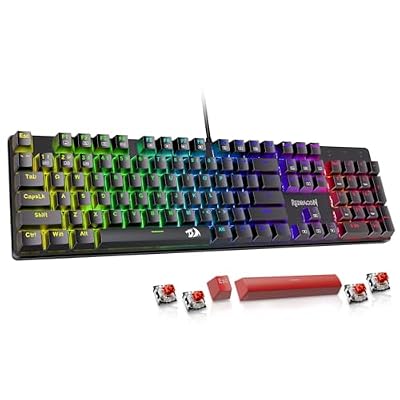
Redragon Mechanical Gaming Keyboard Wired, 11 Programmable Backlit Modes, Hot-Swappable Red Switch, Anti-Ghosting, Double-Shot PBT Keycaps, Light Up Keyboard for PC Mac


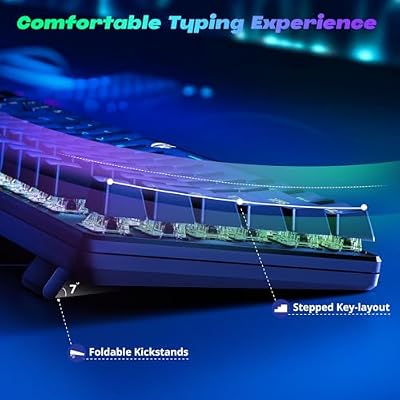


As an Amazon Associate we earn from qualifying purchases. Product prices and availability are accurate as of the date/time indicated.
🛒 Best Price Today on Amazon
Prime members get fast, free shipping on everything above, plus member-only deals. New members get a 30-day free trial — cancel anytime.
As an Amazon Associate we earn from qualifying purchases.




Redragon K671 at a Glance
| Component | Specification |
|---|---|
| Type | Wired mechanical gaming keyboard |
| Layout | Full-size, 104 keys |
| Switches | Hot-swappable linear Red mechanical |
| Connection | Wired USB |
| Keycaps | ABS |
| Backlighting | RGB, 11 modes |
| Notable features | Hot-swap sockets, macro support, full-key anti-ghosting |
| Price | Around $30 |
Design and Build Quality
The Redragon K671 keeps to a conventional full-size shape with all 104 keys present, including the number pad that many gamers and spreadsheet users still want. The case is ABS plastic, which is the expected choice at this price, and the board carries the slightly angular styling common to gaming peripherals. It is not a heavy keyboard, but the layout is sensible and nothing about the construction feels flimsy in normal use. For a board costing around $30, the K671 looks tidier and more restrained than many rivals at the same price.
The keycaps are ABS, the standard material on budget boards, and the RGB backlighting shines through cleanly with 11 selectable modes to choose from. The genuine surprise is the inclusion of hot-swappable switch sockets, a feature usually reserved for far pricier keyboards. That single detail lifts the K671 above its station and signals a board designed with a little more thought than its price tag implies.
Switches and Typing Feel
The K671 ships with linear Red mechanical switches, a sensible default for a gaming keyboard. Linear switches travel smoothly from top to bottom with no tactile bump and no click, which suits fast, repeated key presses and gives a consistent, predictable feel. For gaming this is the switch type most players gravitate towards, and for general typing it is quiet enough not to disturb a shared room while still offering the satisfying travel that draws people to mechanical keyboards in the first place.
Because the switches are hot-swappable, the typing feel is not fixed. If the linear Reds do not suit you, the sockets allow different mechanical switches to be fitted without any soldering, so a tactile or clicky switch can be installed later. That flexibility is unusual at this price and makes the K671 a forgiving first mechanical keyboard — you are not locked into one decision. Out of the box the linear Reds are a fair, agreeable starting point for most buyers.
Gaming Performance and Features
For gaming the K671 covers the essentials. Full-key anti-ghosting ensures that simultaneous key presses register correctly, which matters when movement, abilities and modifiers are held together during intense moments. The linear Red switches suit the rapid actuation that fast-paced titles demand, and the wired USB connection keeps input direct and lag-free, with no batteries to manage or wireless signal to worry about.
Macro support adds a layer of convenience, letting frequently used commands or key sequences be bound to a single press. Combined with the 11 RGB modes for personalising the look of the board, the K671 offers a feature set that comfortably matches the needs of casual and mainstream gamers. It is not aimed at the competitive specialist chasing the lowest possible latency, but for everyday gaming it does everything most players will ask of it.
Connectivity, Software and Everyday Use
Connectivity is straightforward: a single wired USB connection that works the moment it is plugged in, with no pairing, charging or driver hunt required. For a gaming keyboard this simplicity is a virtue — a wired board is always ready and never runs flat mid-session. The 104-key full-size layout also makes the K671 a capable everyday keyboard, comfortable for writing, browsing and number entry as well as gaming.
Lighting modes and macros can be configured directly, and the eleven RGB presets give enough variety to settle on a look without fuss. Redragon backs the keyboard with a 24-month warranty, which is reassuring on a budget product and suggests a degree of confidence in its durability. As a daily driver the K671 is an easy keyboard to live with, asking very little of its owner.
Who Is the Redragon K671 For?
The Redragon K671 is for the buyer taking a first step into mechanical keyboards, or anyone who wants a capable full-size gaming board without spending much. If you want linear switches, RGB lighting and a number pad for around $30, and you value the rare bonus of hot-swap sockets that let you change switches later, the K671 is squarely aimed at you. It is a particularly sensible choice for students and younger gamers building a setup on a budget.
It is less suited to the competitive player who wants the lowest latency and the most advanced tuning, or the enthusiast after premium PBT keycaps and a metal chassis. Those buyers should look further up the range. But for the mainstream gamer who simply wants a solid, flexible mechanical keyboard at the lowest sensible price, the K671 is hard to fault.
Pros and Cons
Pros: Outstanding value at around $30; hot-swappable switch sockets are rare at this price; smooth linear Red switches; full-size 104-key layout; 11 RGB modes; full-key anti-ghosting; long 24-month warranty.
Cons: ABS keycaps rather than more durable PBT; plastic case; not aimed at competitive players who want the lowest latency and advanced tuning.
Is the Redragon K671 Worth It?
At around $30 the Redragon K671 is one of the easiest budget recommendations to make. It delivers a genuine mechanical typing experience, a useful full-size layout and RGB lighting, and then adds hot-swappable sockets that almost no rival offers at this price. The ABS keycaps and plastic case are reasonable concessions for the money, and the 24-month warranty adds peace of mind.
For a first mechanical keyboard, a budget gaming setup or a no-fuss spare, the K671 represents excellent value and earns a clear recommendation. It will not satisfy the competitive specialist or the keyboard enthusiast, but it was never meant to. As an ultra-budget mechanical board that punches above its price, the Redragon K671 is a standout.
Frequently Asked Questions
Is the Redragon K671 good for gaming?
Yes. It uses smooth linear Red mechanical switches, has full-key anti-ghosting so simultaneous presses register correctly, and connects over wired USB for direct, lag-free input. It suits casual and mainstream gaming well.
Does the Redragon K671 have hot-swappable switches?
Yes, and that is its standout feature at the price. The hot-swap sockets let you change mechanical switches without any soldering, so you are not locked into the linear Red switches it ships with.
What keycaps does the Redragon K671 use?
It uses ABS keycaps, the standard material on budget keyboards. They are perfectly serviceable, though more expensive boards often use more durable PBT keycaps.
Is the Redragon K671 a full-size keyboard?
Yes. It has the full 104-key layout including a number pad, so it works well for number entry and general productivity as well as gaming.
More Gaming Gear Reviews
- Logitech G413 SE Mechanical Gaming Keyboard Review
- Logitech G PRO TKL Mechanical Keyboard Review
- Razer Huntsman V3 Pro Gaming Keyboard Review
- Corsair K100 RGB Optical-Mechanical Keyboard Review
- Razer DeathAdder Essential Gaming Mouse Review
- Logitech G502 HERO Gaming Mouse Review
- Logitech G305 LIGHTSPEED Wireless Mouse Review
- Razer Basilisk V3 Gaming Mouse Review
Affiliate Disclosure: As an Amazon Associate, we earn from qualifying purchases. If you click a link and make a purchase, we may earn a small commission at no extra cost to you. Prices and availability are accurate as of publication and may change.
Related Articles
Looking for more on this topic? Browse the hand-picked guides below — each one applies the same scoring rubric used in this review.










