

- Top Pick: VSDINSIDE K1 Pro Macro Keyboard, Wired Only Full-Key Programmable On-Board Keypad, Custom Gaming Streaming Mechanical Keyboards with Screen & Knob, Gasket, RGB Backlit, Hot Swappable Shortcut Pad
- Best Value: Redragon K521 Upgrade Rainbow LED Gaming Keyboard, 104 Keys Wired Mechanical Feeling Keyboard with Multimedia Keys, One-Touch Backlit, Anti-Ghosting, Compatible with PC, Mac, PS4/5, Xbox
- Premium Choice: VSDINSIDE Macro Keypad, Stream Controller Deck Gaming Streaming Shortcut Keyboard, 18 Programmable Keys Customizable Visual AI Pad USB Soundboard for OBS, YouTube, Desk Office Setup, Laptop, PC, Mac
Streaming is a live performance, and your keyboard is a control surface as much as an input device. The right board lets you flip scenes, mute your mic, trigger alerts, and adjust audio mid-broadcast without ever alt-tabbing out of frame — all while looking the part for viewers who can see your desk on camera. That puts the emphasis on programmable keys, dedicated media controls, bright customizable RGB, and a clean, photogenic design. This guide rounds up the best keyboards for streaming in 2026, chosen for how well they support a live, on-camera workflow rather than raw typing speed alone.
- Best Keyboards for Streaming at a Glance
- 1. Razer Ornata Chroma Gaming Keyboard with Hybrid Mechanical Switches
- 2. Redragon S101M-KS Gaming Keyboard and Mouse, Wireless Tri-Mode RGB
- 3. Redragon K552 Mechanical Gaming Keyboard, 87-Key Compact LED
- 4. Redragon K517 Pro Wireless Gaming Keyboard, RGB Tri-Mode BT/2.4G/USB
- 5. Redragon S101-3 PRO Gaming Keyboard and Mouse, RGB Programmable Combo
- 6. K1 RGB LED Backlit Gaming Keyboard and Mouse Combo, 104 Key
- How to Choose a Keyboard for Streaming
- Frequently Asked Questions
- Related Guides
- Related Articles
Our picks were selected on what genuinely helps a streamer: macro and hotkey support for scene-switching and quick commands, media keys for on-the-fly audio control, vivid RGB that reads well on stream, and an overall look that fits a broadcast setup. We have kept a wide price spread — from around $27 up to around $200 — because a great streaming keyboard exists at almost every budget. Some of these boards bundle a mouse, which is handy for a fresh setup. Below you will find an at-a-glance comparison, then a closer look at each keyboard and a buyer’s guide built around the features that actually matter when the camera is rolling.
As an Amazon Associate we earn from qualifying purchases at no extra cost to you.




🛒 Best Price Today on Amazon
Prime members get fast, free shipping on everything above, plus member-only deals. New members get a 30-day free trial — cancel anytime.
Best Keyboards for Streaming at a Glance
| Keyboard | Best For | Standout Spec | Approx Price |
|---|---|---|---|
| Razer Ornata Chroma | Premium on-camera look | Hybrid switches, per-key Chroma RGB | around $200 |
| Redragon S101M-KS Wireless Combo | Cable-free clean desk | Tri-mode wireless, RGB, mouse incl. | around $55 |
| Redragon K552 Compact | Tidy tenkeyless framing | 87-key compact, mechanical, LED | around $37 |
| Redragon K517 Pro Wireless | Budget wireless streamer | Tri-mode BT/2.4G/USB, RGB | around $32 |
| Redragon S101-3 PRO Combo | First full broadcast kit | Programmable RGB, mouse incl. | around $40 |
| K1 RGB Keyboard & Mouse Combo | Cheapest starter setup | 104-key RGB, mouse incl. | around $27 |
1. Razer Ornata Chroma Gaming Keyboard with Hybrid Mechanical Switches
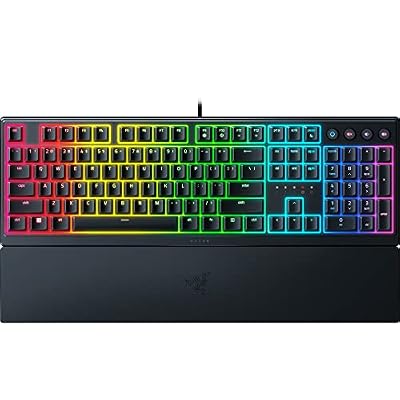
Razer Ornata V3 Gaming Keyboard, Low-Profile Keys, Black | Mecha-Membrane Switches, UV-Coated Keycaps, Backlit Media Keys, 10-Zone RGB Lighting, Snap Tap, Magnetic Wrist Wrest


As an Amazon Associate we earn from qualifying purchases. Product prices and availability are accurate as of the date/time indicated.
The Razer Ornata Chroma is the premium pick for streamers who want a board that looks and feels the part on camera. It pairs Razer’s hybrid mechanical membrane switches — a clicky, tactile feel with a softer cushioned bottom-out — with per-key Razer Chroma RGB, the most flexible lighting ecosystem here. A magnetic plush wrist rest and Razer’s clean industrial design round out a keyboard built to be seen. At around $200 it is the showpiece option.
For streaming specifically, the Ornata earns its place through Razer Synapse. You can bind macros and remap keys to switch scenes, fire alerts, or mute audio, and Chroma’s per-key lighting can be set to reactive or branded effects that pop on a webcam feed and even sync with supported games and apps. The comfortable hybrid feel keeps you accurate through long live sessions, and the premium look reinforces a polished channel aesthetic. If your stream’s production value matters and budget is not the constraint, the Ornata Chroma is the standout.
Pros: Per-key Chroma RGB looks superb on camera, comfortable hybrid switches, deep Synapse macros, plush wrist rest.
Cons: By far the priciest here; Synapse software needed for full control.
2. Redragon S101M-KS Gaming Keyboard and Mouse, Wireless Tri-Mode RGB

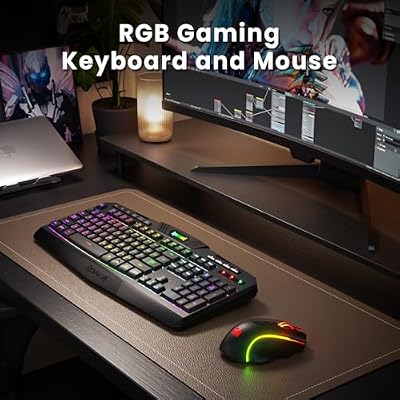
Redragon S101M-KS Gaming Keyboard and Mouse Wireless with Tri-Mode, RGB Keyboard and 4800 DPI Gaming Mouse, 10 Independent Multimedia Keys for Wins, PC, Computer, Wireless S101 Ideal for Gamer



As an Amazon Associate we earn from qualifying purchases. Product prices and availability are accurate as of the date/time indicated.
The Redragon S101M-KS is the wireless pick for a clean, cable-free streaming desk. It is a tri-mode keyboard — Bluetooth, 2.4GHz wireless, and wired USB — with full RGB backlighting, and it ships with a matching wireless mouse, so you can equip a tidy on-camera setup in one purchase. At around $55 it bundles wireless freedom and a complete peripheral set at a sensible price.
On stream, the appeal is a desk that looks uncluttered on camera: no cable run snaking across the frame, and a coordinated keyboard-and-mouse aesthetic with RGB you can tune to your channel colors. Tri-mode connectivity lets you pair it to your streaming PC over 2.4GHz for low-latency input or drop to wired when you want zero-worry reliability during a broadcast. The RGB reads well on a webcam, and the bundled mouse means a consistent look across both peripherals. For streamers who value a wireless, photogenic desk on a budget, it is a strong choice.
Pros: Tri-mode wireless keeps the desk cable-free on camera, RGB matches channel colors, mouse included, good value.
Cons: Membrane-style feel rather than full mechanical; wireless adds charging to manage.
3. Redragon K552 Mechanical Gaming Keyboard, 87-Key Compact LED
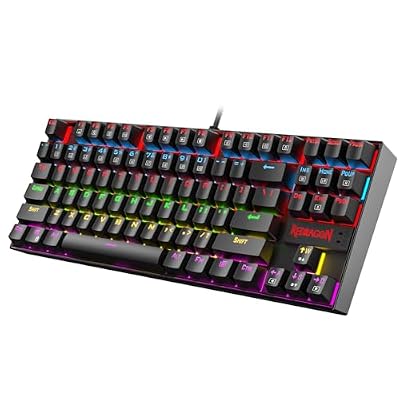
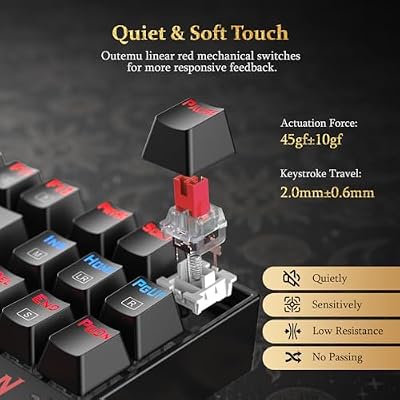
Redragon K552 Mechanical Keyboard, LED Gaming Keyboard with Red Switches | 87-Key TKL Compact, Anti-Ghosting, Metal Frame for PC Gaming & Typing, Beginner-Friendly, Redragon Classic Gaming Keyboard




As an Amazon Associate we earn from qualifying purchases. Product prices and availability are accurate as of the date/time indicated.
The Redragon K552 is the compact pick that keeps your on-camera framing tidy. It is an 87-key tenkeyless mechanical keyboard with real mechanical switches, a sturdy metal-plate build, and LED backlighting, all in a footprint that frees desk space and centers nicely in a webcam shot. At around $37 it is a long-standing budget mechanical favorite that punches above its price.
For streaming, the tenkeyless layout is the key benefit: dropping the numpad pulls the keyboard in tight, leaving a cleaner desk and more room for your mic arm or mouse sweeps, which looks more deliberate on camera. The genuine mechanical switches give a satisfying, audible feel that some streamers like for ASMR-style typing, and the solid metal build keeps it planted during animated moments. The LED backlighting adds glow for the shot. If you want a compact, durable mechanical board that frames well on stream without spending much, the K552 is an easy recommendation.
Pros: Compact tenkeyless framing for camera, genuine mechanical feel, sturdy metal build, excellent value.
Cons: Single-zone LED rather than per-key RGB; no dedicated media keys.
4. Redragon K517 Pro Wireless Gaming Keyboard, RGB Tri-Mode BT/2.4G/USB

Redragon K517 Pro Wireless Gaming Keyboard, RGB Backlit, Tri-Mode BT/2.4GHz/USB-C, Mechanical Feel 94 Keys Computer Keyboard with 4 Macro Keys, Number Pad, 4000mAh Battery for Win/MAC


As an Amazon Associate we earn from qualifying purchases. Product prices and availability are accurate as of the date/time indicated.
The Redragon K517 Pro is the budget wireless streamer’s keyboard. It offers tri-mode connectivity — Bluetooth, 2.4GHz, and USB-C wired — with RGB backlighting in a full-size layout, at around $32. For a streamer who wants the tidy look of a wireless board without stretching the budget, it covers the essentials at a hard-to-beat price.
On a streaming desk, the K517 Pro’s wireless modes let you keep the frame free of cable clutter and pair it however your setup demands — 2.4GHz to your capture PC for responsive input, or Bluetooth if you control a second machine. The RGB backlighting gives the on-camera glow viewers expect, and the full-size layout keeps a numpad handy for hotkeys or quick numeric input during a stream. Battery life lets it run through long broadcasts between charges. As an affordable, cable-free board that keeps your desk looking clean on camera, it is a smart value pick.
Pros: Tri-mode wireless on a tight budget, RGB for on-camera glow, USB-C charging, full-size layout.
Cons: RGB is zone-based, not per-key; lacks dedicated macro keys.
5. Redragon S101-3 PRO Gaming Keyboard and Mouse, RGB Programmable Combo

Redragon S101-3 PRO Gaming Keyboard and Mouse, RGB Backlit Programmable Keyboard Mouse with Software, Independent Macro Record Keys, Value Combo Set, New Update Version


As an Amazon Associate we earn from qualifying purchases. Product prices and availability are accurate as of the date/time indicated.
The Redragon S101-3 PRO is the pick for a streamer’s first complete broadcast kit. It is a full-size RGB-backlit keyboard bundled with a matching gaming mouse, with programmable functionality and a wrist rest, all for around $40. For someone setting up a stream from scratch, it delivers a coordinated keyboard-and-mouse pair and on-camera RGB in a single, affordable box.
For live streaming, the programmable keys let you assign shortcuts for common actions, while the RGB backlighting gives both peripherals a unified look that reads well on a webcam. Bundling the mouse means your desk has a consistent aesthetic from day one rather than a mismatched mix of gear, and the included wrist rest adds comfort for long sessions in front of the camera. It is a membrane-style board rather than full mechanical, but as an all-in-one starter setup that looks the part on stream, the S101-3 PRO is a sensible, budget-friendly foundation to build a channel around.
Pros: Complete keyboard-and-mouse kit, programmable keys, unified RGB look on camera, wrist rest, low price.
Cons: Membrane feel, not mechanical; programming is basic versus premium software.
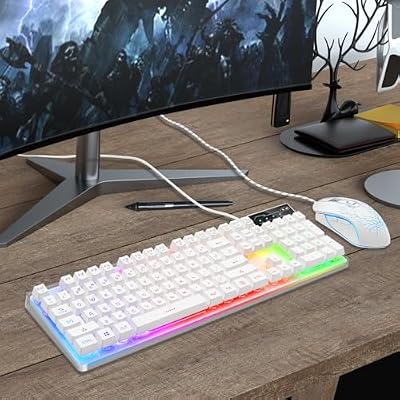
6. K1 RGB LED Backlit Gaming Keyboard and Mouse Combo, 104 Key

Gaming Keyboard and Mouse Combo, K1 RGB LED Backlit Keyboard with 104 Key for PC/Laptop(White)


As an Amazon Associate we earn from qualifying purchases. Product prices and availability are accurate as of the date/time indicated.
Rounding out the list is the K1 RGB keyboard-and-mouse combo, the cheapest starter setup here at around $27. It is a full 104-key RGB LED backlit keyboard paired with an RGB mouse, aimed squarely at the streamer building a first setup on the tightest budget. It will not match premium boards for feel, but it puts a complete, lit-up peripheral pair on the desk for almost nothing.
For a new streamer, the value here is getting both peripherals with on-camera RGB in one inexpensive purchase. The backlighting gives the colorful desk glow viewers associate with a gaming stream, the full-size layout keeps a numpad available for hotkeys, and the matching mouse means a coordinated look from the start. It is a basic membrane combo rather than a performance board, so think of it as a foundation you can upgrade later. But for the absolute lowest-cost way to get a streaming-ready keyboard and mouse with RGB, the K1 combo does the job.
Pros: Lowest price here, full RGB keyboard and mouse together, 104-key layout, on-camera glow.
Cons: Basic membrane build; no macro software or dedicated media keys.
How to Choose a Keyboard for Streaming
Start with programmability, because on a live stream your keyboard doubles as a control deck. The most valuable streaming feature is the ability to bind macros and hotkeys to actions you trigger constantly mid-broadcast — switching scenes, muting the mic, firing an alert, or launching a sound. A board with strong software like the Razer Ornata’s Synapse gives you the deepest control, while programmable combos like the Redragon S101-3 PRO offer simpler shortcut assignment. Decide how much live, in-frame control you want before anything else.
Media keys and audio control come next, since managing sound is half of streaming. Dedicated volume and playback controls — or function-layer equivalents — let you adjust music, mute yourself, or duck audio without alt-tabbing out of frame, which keeps your broadcast smooth and your overlay uninterrupted. If a board lacks dedicated media keys, check that its function row covers the controls you reach for most during a live session.
Then weigh the on-camera factors: RGB and form factor. Because viewers can see your desk, lighting that reads well on a webcam and can match your channel colors adds production value — per-key RGB like the Ornata’s is the most flexible, while zone RGB on the Redragon boards still glows nicely. Form factor matters too: a compact tenkeyless board like the K552 frames tightly and frees desk space for a mic arm, while a wireless board like the S101M-KS or K517 Pro keeps cables out of the shot for a cleaner look.
Finally, match the kit to your stage and budget. If you are building a setup from scratch, a bundled keyboard-and-mouse combo like the S101-3 PRO or K1 gives you a coordinated on-camera look in one purchase. If production polish is the priority and budget allows, the premium Ornata Chroma is the showpiece. Going wireless trades a little charging upkeep for a tidy frame, while wired boards never need a top-up mid-stream. Set your budget, prioritise programmability and audio control, and pick the streaming keyboard on this list that fits how your channel actually broadcasts.
Frequently Asked Questions
What keyboard features matter most for streaming?
Programmable macros and hotkeys top the list, because they let you switch scenes, mute your mic, and trigger alerts live without leaving the frame. Dedicated media keys for on-the-fly audio control come next, followed by RGB that looks good on camera and a form factor that frames cleanly. A board like the Razer Ornata Chroma with deep Synapse software covers all of these for serious streamers.
Do I need RGB on a streaming keyboard?
It is not essential, but because viewers can see your desk, RGB adds genuine production value and lets you match your keyboard’s glow to your channel colors. Per-key RGB like the Ornata’s is the most flexible for branded effects, while zone-based RGB on the Redragon boards still reads well on a webcam. If on-camera aesthetics matter to your channel, lighting is worth having.
Is a wireless keyboard good for streaming?
Yes — a wireless board like the Redragon S101M-KS or K517 Pro keeps cables out of your camera frame for a cleaner desk, and 2.4GHz modes deliver low-latency input suitable for a live broadcast. The only trade-off is keeping it charged, so top it up between sessions or fall back to its wired mode during long streams if you are worried about battery.
Should I get a keyboard-and-mouse combo for my stream?
If you are setting up a channel from scratch, a combo like the Redragon S101-3 PRO or the K1 kit is a smart, affordable way to get a coordinated, on-camera look from both peripherals in one purchase. If you already own a mouse you like, a standalone keyboard such as the Ornata Chroma or compact K552 lets you focus your budget on the board itself.
Related Guides
- Best Mechanical Keyboards
- Best Wireless Gaming Mouse
- Best Gaming Headsets for Streaming
- Best Gaming Monitors
- Best Gaming PCs for Streaming
- Best Budget Gaming Setup
Affiliate Disclosure: As an Amazon Associate, we earn from qualifying purchases. If you click a link and make a purchase, we may earn a small commission at no extra cost to you. Prices and availability are accurate as of publication and may change.










