

- Top Pick: ASUS ROG Azoth Wireless Mechanical Gaming Keyboard – 75% TKL, Tri-Mode Connectivity, Hot Swappable Pre-lubed ROG NX Snow Linear Switches, PBT Keycaps, RGB, OLED Display, PC/Mac Support – Black
- Best Value: ASUS ROG Azoth Extreme Wireless Mechanical Gaming Keyboard – 75% TKL, ROG NX Snow Linear Switches, PBT Keycaps, Aluminum Chassis, Carbon Fiber, Gasket Mount, Color OLED Screen, PC/Mac Support – Black
- Premium Choice: ASUS ROG Azoth Wireless Mechanical Gaming Keyboard – 75% TKL, Tri-Mode Connectivity, Hot Swappable Pre-lubed ROG NX Storm Clicky Switches, PBT Keycaps, RGB, OLED Display, PC/Mac Support – Black
The ASUS ROG Azoth is a wireless 75% mechanical gaming keyboard that takes inspiration from the custom-keyboard community and brings it into the gaming mainstream. It supports tri-mode connectivity over USB-C, 2.4GHz wireless and Bluetooth, uses gasket-mounted ROG NX mechanical switches with silicone dampening for a refined sound, and pairs PBT doubleshot keycaps with an aluminium top plate. It adds an OLED display and a multi-function knob for direct control, all for a price of around $190. This ASUS ROG Azoth review covers the build, the typing feel, the gaming credentials and whether a custom-style premium keyboard is the right choice at this level.
- ASUS ROG Azoth at a Glance
- Design and Build Quality
- Switches and Typing Feel
- Gaming Performance and Features
- Connectivity, Software and Everyday Use
- Who Is the ASUS ROG Azoth For?
- Pros and Cons
- Is the ASUS ROG Azoth Worth It?
- Frequently Asked Questions
- More Gaming Gear Reviews
- Related Articles
- Related Articles
- Related Guides
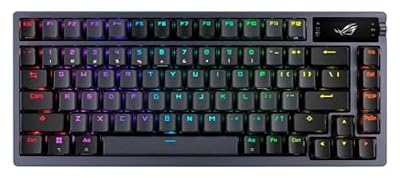
ASUS ROG Azoth Wireless Mechanical Gaming Keyboard – 75% TKL, Tri-Mode Connectivity, Hot Swappable Pre-lubed ROG NX Snow Linear Switches, PBT Keycaps, RGB, OLED Display, PC/Mac Support - Black



As an Amazon Associate we earn from qualifying purchases. Product prices and availability are accurate as of the date/time indicated.
🛒 Best Price Today on Amazon
Prime members get fast, free shipping on everything above, plus member-only deals. New members get a 30-day free trial — cancel anytime.
As an Amazon Associate we earn from qualifying purchases.




ASUS ROG Azoth at a Glance
| Component | Specification |
|---|---|
| Type | Wireless premium mechanical gaming keyboard |
| Layout | 75% TKL |
| Switches | ROG NX mechanical, gasket-mounted with silicone dampening |
| Connection | Tri-mode: USB-C, 2.4GHz wireless, Bluetooth |
| Keycaps | PBT doubleshot |
| Backlighting | Per-key RGB |
| Notable features | OLED display, multi-function knob, aluminium top plate, custom-style build |
| Price | Around $190 |
Design and Build Quality
The ASUS ROG Azoth borrows heavily and deliberately from the world of custom mechanical keyboards. The 75% layout is a popular compromise that keeps the function row and a column of navigation keys while trimming the number pad to keep the footprint compact. The aluminium top plate gives the chassis the rigidity and quietly premium feel that a flagship board demands, and the result is a keyboard that looks far closer to an enthusiast custom build than a typical gaming product.
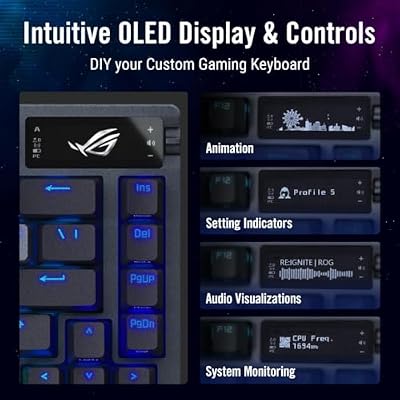
PBT doubleshot keycaps complete the look, providing a durable typing surface with legends that will not wear off. The OLED display set into the top edge of the board, paired with a multi-function knob, gives the Azoth a distinctive face and a practical means of direct control. Build, materials and styling all reinforce the premium price; the Azoth feels considered and substantial in a way that few mainstream gaming keyboards manage.
Switches and Typing Feel
The defining feature of the Azoth as a typing experience is its gasket-mounted construction. The switch plate is suspended on silicone gaskets rather than rigidly screwed down, which softens the impact of each keystroke and gives the board a slightly more flexible, cushioned feel. Combined with internal silicone dampening, the result is a noticeably more refined sound profile than a conventional mechanical keyboard, with less hollow ping and a deeper, more satisfying note.
The ROG NX mechanical switches themselves are designed to suit this premium build, and the PBT doubleshot keycaps add a textured, solid feel under the fingertips. The combination is a clear step beyond what most gaming keyboards offer for typing pleasure: precise, dampened and well voiced. Anyone coming from a standard mechanical board will notice the difference immediately, and for long writing sessions as well as gaming the Azoth is genuinely enjoyable to use.
Gaming Performance and Features
For gaming the Azoth combines solid fundamentals with thoughtful additions. The 75% layout keeps the function row and navigation keys accessible while clearing some desk space for mouse movement, a sensible middle ground between a full-size board and a strict TKL. The ROG NX mechanical switches provide the fast, consistent input that gaming demands, and the wired USB-C connection guarantees the lowest possible latency when it matters most.
The OLED display can show real-time information at a glance, and the multi-function knob gives direct, immediate control over volume or other functions without leaving the game. Per-key RGB lighting adds the customisation expected at this level. The Azoth is not chasing the narrow Hall-effect esports niche, but as a premium mainstream gaming keyboard with genuine character, it is well equipped.
Connectivity, Software and Everyday Use
The Azoth’s tri-mode connectivity is a major part of its appeal. The wired USB-C connection is the right choice for competitive play and for charging, the 2.4GHz wireless mode delivers low-latency wireless gaming, and Bluetooth allows the keyboard to be paired with phones, tablets or a second computer. Switching between modes is straightforward and makes the Azoth genuinely versatile across different setups and rooms.
Through Armoury Crate software the per-key RGB, the OLED display content and the knob function can all be tuned. The OLED display is useful in everyday life too, showing status information without needing to bring up software. The keyboard works as well for writing and general computing as it does for gaming, helped by the comfortable 75% layout and the PBT keycaps. The Azoth is a versatile, satisfying daily driver.
Who Is the ASUS ROG Azoth For?
The ASUS ROG Azoth is for the enthusiast or premium gamer who wants a custom-keyboard typing experience without buying and building parts themselves. If you want gasket-mounting, silicone dampening, PBT keycaps and an aluminium top plate, but you also want tri-mode wireless connectivity and a finished, polished product ready out of the box, the Azoth is squarely aimed at you. It also suits buyers who simply want a distinctive premium keyboard with character.
It is less suited to the buyer focused purely on competitive esports, who would be better served by a Hall-effect board with adjustable actuation and Rapid Trigger, or to the bargain hunter, since at around $190 the Azoth is a premium investment. But for the gamer who values typing feel and design as much as raw performance, the Azoth delivers something unusual and rewarding.
Pros and Cons
Pros: Gasket-mounted construction with silicone dampening for refined typing feel; PBT doubleshot keycaps; aluminium top plate; tri-mode connectivity (USB-C, 2.4GHz, Bluetooth); 75% layout; OLED display; multi-function knob; per-key RGB.
Cons: Premium price around $190; not aimed at the competitive esports niche where Hall-effect switches dominate; the OLED and knob are features many buyers will rarely customise.
Is the ASUS ROG Azoth Worth It?
At around $190 the ASUS ROG Azoth is a serious purchase, but it delivers an experience few mainstream gaming keyboards can match. The gasket-mounted build with silicone dampening, the PBT doubleshot keycaps and the aluminium top plate together produce a typing feel and sound profile that is genuinely closer to a custom enthusiast keyboard than to a typical gaming product, and the tri-mode connectivity adds modern flexibility.
For the enthusiast who wants premium build and a custom-style typing experience in a polished, ready-to-use package, the Azoth earns a clear recommendation. The competitive esports player or the bargain buyer should look elsewhere. But as a premium wireless mechanical keyboard with real character, the ASUS ROG Azoth is one of the most distinctive options on the market.
Frequently Asked Questions
What is gasket mounting on the ASUS ROG Azoth?
It is a construction style where the switch plate is suspended on silicone gaskets rather than rigidly screwed down. This softens each keystroke and gives the keyboard a more cushioned typing feel and a refined sound profile.
How does the ASUS ROG Azoth connect?
It supports tri-mode connectivity: wired USB-C, 2.4GHz wireless for low-latency gaming and Bluetooth for pairing with phones, tablets or a second computer.
What does the OLED display on the ROG Azoth do?
The OLED display sits at the top of the board and can show real-time information at a glance. Paired with the multi-function knob, it gives direct control over functions without leaving the game.
Is the ROG Azoth a full-size keyboard?
No. It uses a compact 75% layout, which keeps the function row and a column of navigation keys but trims the number pad to keep the footprint small.
More Gaming Gear Reviews
- Logitech G515 Wireless TKL Low Profile Gaming Keyboard Review
- MageGee MK-Box 60% Mechanical Gaming Keyboard Review
- SteelSeries Apex 3 RGB Gaming Keyboard Review
- Logitech G PRO X2 SUPERSTRIKE Wireless Gaming Mouse Review
- Razer Viper V4 Pro Wireless Esports Gaming Mouse Review
- Razer Naga V2 HyperSpeed Wireless MMO Gaming Mouse Review
- Logitech G502 X Plus Wireless Gaming Mouse Review
- Razer Viper V3 HyperSpeed Wireless Gaming Mouse Review
Affiliate Disclosure: As an Amazon Associate, we earn from qualifying purchases. If you click a link and make a purchase, we may earn a small commission at no extra cost to you. Prices and availability are accurate as of publication and may change.
Related Articles
Looking for more on this topic? Browse the hand-picked guides below — each one applies the same scoring rubric used in this review.










