

- Top Pick: Logitech G502 X Plus Wireless RGB Gaming Mouse – Black
- Best Value: Logitech G502 Lightspeed Wireless Gaming Mouse – Black
- Premium Choice: Logitech G502 X Plus Lightspeed Wireless Gaming Mouse, Black | Hero Sensor, 25,600 DPI, 13 Programmable Buttons, LIGHTFORCE Switches, RGB Lighting, PC/Mac | with Signature Series Charging Dock
The Logitech G502 X Plus is the wireless flagship of one of the most popular gaming mouse families ever made. It pairs the well-known G502 right-handed ergonomic shape with Logitech’s HERO 25K sensor at up to 25,600 DPI, LIGHTFORCE hybrid optical-mechanical switches and a generous 13 programmable controls. It connects over LIGHTSPEED wireless, weighs around 106g and adds LIGHTSYNC RGB lighting. For a price of around $160, this Logitech G502 X Plus review covers the build, the sensor, the button layout and whether the wireless top of the G502 family deserves a recommendation.
- Logitech G502 X Plus at a Glance
- Design and Build Quality
- Sensor and Tracking Performance
- Shape, Buttons and Grip
- Connectivity, Software and Everyday Use
- Who Is the Logitech G502 X Plus For?
- Pros and Cons
- Is the Logitech G502 X Plus Worth It?
- Frequently Asked Questions
- More Gaming Gear Reviews
- Related Articles
- Related Articles
- Related Guides
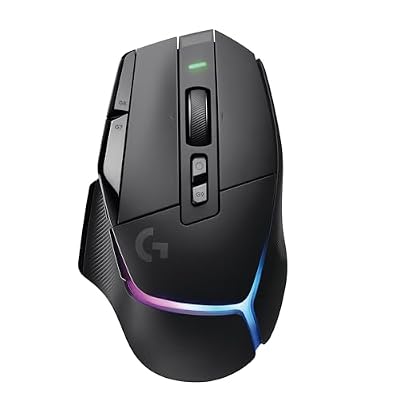
Logitech G502 X Plus Wireless RGB Gaming Mouse - Black | Optical Switches, RGB, 13 Buttons , Infinite Scroll Toggle, <130 hr Battery, USB-C, Wireless Charging Capable, for PC/MacOS


As an Amazon Associate we earn from qualifying purchases. Product prices and availability are accurate as of the date/time indicated.
🛒 Best Price Today on Amazon
Prime members get fast, free shipping on everything above, plus member-only deals. New members get a 30-day free trial — cancel anytime.
As an Amazon Associate we earn from qualifying purchases.





Logitech G502 X Plus at a Glance
| Component | Specification |
|---|---|
| Type | Wireless ergonomic gaming mouse |
| Sensor | HERO 25K |
| Max DPI | 25,600 DPI |
| Switches | LIGHTFORCE optical-mechanical hybrid |
| Buttons | 13 programmable controls |
| Connection | Wireless LIGHTSPEED |
| Weight | Around 106g |
| Price | Around $160 |
Design and Build Quality
The Logitech G502 X Plus inherits the unmistakable G502 family shape, which has been refined over multiple generations and remains one of the most popular ergonomic mouse designs in PC gaming. The shape is right-handed and contoured to support the hand with a thumb rest and angled sides, which suits palm and claw grip styles particularly well. The result is a comfortable, planted feel that many G502 owners have come to prefer over years of use.
At around 106g it is heavier than a dedicated esports mouse, but the weight is appropriate to the mouse’s broader role and the supportive shape carries it well. The LIGHTSYNC RGB lighting adds personalisation without dominating the look. Build quality is what Logitech G-line buyers expect, which is to say solid and well finished throughout, and the G502 X Plus continues the family’s reputation for sturdy, reliable construction.
Sensor and Tracking Performance
The G502 X Plus uses Logitech’s HERO 25K sensor, with a maximum DPI of 25,600. HERO has been one of the most respected gaming sensors on the market for years, and the 25K iteration delivers clean, predictable tracking across the full range of sensitivities a player would realistically use. Tracking is consistent and accurate, with no acceleration or skipping at any reasonable polling rate.
Combined with LIGHTSPEED wireless, the sensor delivers tracking that is indistinguishable from wired in normal use, which is what a modern wireless flagship must achieve. For mainstream and advanced gaming the HERO 25K is more than capable, and while it is one generation behind the newest HERO 2 in Logitech’s range, the practical difference for most players is negligible. The G502 X Plus performs flawlessly across the games and use cases its broad audience demands.
Shape, Buttons and Grip
The G502 X Plus offers 13 programmable controls, a much larger button cluster than a typical esports mouse. The set includes primary and secondary clicks, scroll wheel with horizontal tilt, DPI controls, sniper button and additional side buttons. For games that benefit from extra mappable inputs — MMOs, MOBAs, simulators or productivity-heavy applications — that flexibility is genuinely useful, and it is a meaningful differentiator from minimalist esports mice.
The shape is right-handed and contoured to support the hand comfortably for palm and claw grips, with a thumb rest that helps anchor the hand for sweeping movements. The primary clicks use LIGHTFORCE optical-mechanical hybrid switches, which combine the responsiveness of optical switches with the tactile feel of mechanical switches, while avoiding the double-click issues that traditional purely mechanical switches sometimes develop over time. The button feel is fast, consistent and satisfying.
Connectivity, Software and Everyday Use
Connectivity is wireless LIGHTSPEED, Logitech’s well-proven low-latency wireless technology that is engineered to be indistinguishable from wired in actual play. For an ergonomic flagship like the G502 X Plus, wireless freedom is a major practical benefit — no cable to drag on sweeping movements, a clean desk and the ability to reposition the mouse without snagging.
Through Logitech G HUB software the 13 buttons can be programmed individually for different games and applications, and the LIGHTSYNC RGB lighting can be tuned. For everyday use the supportive ergonomic shape and the consistent click feel of the LIGHTFORCE switches make the mouse comfortable for long sessions, and the extra buttons are useful for productivity shortcuts. The G502 X Plus is a versatile, well-rounded daily driver that handles gaming and work equally well.
Who Is the Logitech G502 X Plus For?
The Logitech G502 X Plus is for the gamer who wants the wireless flagship of the popular G502 family. If you like the ergonomic G502 shape, want LIGHTSPEED wireless freedom and value the flexibility of 13 programmable controls for everything from games to productivity, the G502 X Plus is squarely aimed at you. It also suits players who want a versatile mouse for a broad range of genres rather than a specialist esports tool.
It is less suited to left-handed players, since the shape is contoured for the right hand, or to competitive shooter players who want the lightest, most minimalist possible esports mouse — at around 106g and with 13 buttons, the G502 X Plus is the opposite philosophy. Those buyers should look elsewhere. But for the gamer who wants the polished wireless top of the G502 line, this is the mouse.
Pros and Cons
Pros: Wireless flagship of the popular G502 family; HERO 25K sensor with clean tracking; LIGHTFORCE optical-mechanical switches; LIGHTSYNC RGB; 13 programmable controls; LIGHTSPEED wireless with no perceptible latency; supportive ergonomic shape.
Cons: Premium price around $160; right-handed shape only; around 106g is heavy for competitive esports use; uses the HERO 25K sensor rather than the newer HERO 2; broad-feature philosophy will not appeal to minimalist esports fans.
Is the Logitech G502 X Plus Worth It?
At around $160 the Logitech G502 X Plus is a premium investment, but it earns the price for the right buyer. The wireless freedom of LIGHTSPEED, the well-proven HERO 25K sensor, the LIGHTFORCE optical-mechanical switches and the generous set of 13 programmable controls together make a thoroughly capable, versatile mouse that handles gaming and productivity equally well in the familiar G502 ergonomic shape.
For the right-handed gamer who values the G502 shape, wants wireless freedom and will use the extra buttons for games or work, the G502 X Plus earns a clear recommendation. Left-handed players, minimalist esports fans and bargain hunters should look elsewhere. But as the wireless flagship of one of the most popular gaming mouse families ever made, the Logitech G502 X Plus is a polished and versatile choice.
Frequently Asked Questions
What sensor does the Logitech G502 X Plus use?
It uses Logitech’s HERO 25K sensor, with a maximum DPI of 25,600. HERO is a well-proven gaming sensor that delivers clean, predictable tracking across the full range of sensitivities a player would realistically use.
How many buttons does the Logitech G502 X Plus have?
It has 13 programmable controls, including primary and secondary clicks, scroll wheel with horizontal tilt, DPI controls, sniper button and additional side buttons. They can be programmed individually per game in Logitech G HUB.
Is the Logitech G502 X Plus wireless?
Yes. It connects over Logitech’s LIGHTSPEED wireless technology, which is engineered to deliver wired-equivalent performance and is widely used across Logitech’s gaming peripherals.
What are LIGHTFORCE switches on the Logitech G502 X Plus?
LIGHTFORCE switches are optical-mechanical hybrids used in the primary mouse buttons. They combine the responsiveness of optical switches with the tactile feel of mechanical switches while avoiding double-click issues that can affect purely mechanical switches.
More Gaming Gear Reviews
- Razer Viper V3 HyperSpeed Wireless Gaming Mouse Review
- SteelSeries Rival 5 Gaming Mouse Review
- SteelSeries Arctis Nova 5 Wireless Gaming Headset Review
- Razer BlackShark V3 Wireless Gaming Headset Review
- Logitech G Astro A50 X Wireless Gaming Headset Review
- Corsair HS80 RGB USB Gaming Headset Review
- HyperX Cloud Stinger 2 Core Gaming Headset Review
- SteelSeries Apex Pro TKL Gen 3 Gaming Keyboard Review
Affiliate Disclosure: As an Amazon Associate, we earn from qualifying purchases. If you click a link and make a purchase, we may earn a small commission at no extra cost to you. Prices and availability are accurate as of publication and may change.
Related Articles
Looking for more on this topic? Browse the hand-picked guides below — each one applies the same scoring rubric used in this review.










