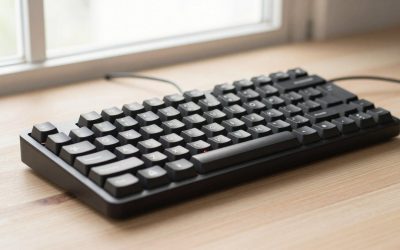
- Top Pick: ASUS ROG Azoth Wireless Mechanical Gaming Keyboard – 75% TKL, Tri-Mode Connectivity, Hot Swappable Pre-lubed ROG NX Snow Linear Switches, PBT Keycaps, RGB, OLED Display, PC/Mac Support – Black
- Best Value: ASUS ROG Azoth X Wireless Mechanical Gaming Keyboard – 75% TKL, PBT Keycaps
- Premium Choice: ASUS ROG Azoth Extreme Wireless Mechanical Gaming Keyboard – 75% TKL, ROG NX Snow Linear Switches, PBT Keycaps, Aluminum Chassis, Carbon Fiber, Gasket Mount, Color OLED Screen, PC/Mac Support – Black
Affiliate disclosure: As an Amazon Associate we earn from qualifying purchases. This post contains affiliate links — if you buy through them we may earn a small commission at no extra cost to you. This never affects our recommendations.
The wireless mechanical keyboard is one of the most feature-packed wireless gaming keyboards available: 75% layout, ROG NX mechanical switches (hot-swappable), a built-in three-mode switch lubing station, OLED status display, and tri-mode connectivity (2.4GHz, Bluetooth, USB-C wired). At ~$220, it’s expensive — here’s whether it’s worth it.

In a hurry? See the top-rated wireless mechanical keyboard deals available right now:
🛒 Check Wireless Mechanical Keyboard Prices on Amazon →🛒 Best Price Today on Amazon
Prime members get fast, free shipping on everything above, plus member-only deals. New members get a 30-day free trial — cancel anytime.
Start 30-Day Prime Free Trial →See Today’s Amazon DealsKey Specs
| Spec | Detail |
|---|---|
| Layout | 75% (84-key — has F-row + arrow cluster) |
| Switches | ROG NX Red/Brown/Blue (hot-swappable) |
| Connectivity | 2.4GHz / Bluetooth 5.0 / USB-C wired |
| Polling rate | 1000Hz (wired/2.4GHz) |
| OLED display | Yes — status, media, system info |
| Battery | ~2000mAh — up to 100hrs (backlight off) |
| Hot-swap | Yes — 3/5-pin compatible |
| Gasket mount | Yes |
| Price | ~$220 |
Build Quality & Typing Feel
The ROG Azoth is built like a premium product. The aluminum top frame, polycarbonate bottom, and gasket-mounted PCB give it a bounce and sound profile closer to a custom keyboard than most gaming boards. Flex is noticeable without being excessive — typing feels cushioned rather than clunky.
ROG NX Red switches (linear, 45g actuation) are smooth out of the box — noticeably better than standard Cherry MX Reds. The built-in lube station in the side of the keyboard (slide your switch across three foam pads pre-loaded with lube) lets you improve switch feel without tools. It’s a gimmick on paper that actually works in practice.
Wireless Performance
ROG Speedlink 2.4GHz wireless is one of the best gaming wireless implementations available — latency is sub-1ms, identical to wired in competitive gaming scenarios. Bluetooth is available for productivity use but has higher latency; don’t use it for competitive gaming.
Battery life: With RGB on at moderate brightness, real-world battery runs 30–40 hours. With RGB off: 80–100 hours as claimed. For a gaming keyboard this size with wireless, that’s excellent.
The OLED Display
Like the SteelSeries Apex Pro TKL, the Azoth has a small OLED on the top right. It shows battery level, connectivity mode, media info via Armory Crate software, and custom images. The implementation here is slightly more useful than the Apex Pro’s — the battery display with percentage visible at a glance is genuinely handy for a wireless keyboard.
ROG Azoth vs SteelSeries Apex Pro TKL
| ROG Azoth | Apex Pro TKL | |
|---|---|---|
| Layout | 75% (has arrows, no numpad row gap) | TKL (full F-row + arrow section) |
| Wireless | ✓ 2.4GHz + Bluetooth | ✗ Wired only |
| Switches | ROG NX (mechanical, hot-swap) | OmniPoint 2.0 (Hall Effect) |
| Rapid Trigger | ✗ | ✓ |
| Gasket mount | ✓ | ✗ |
| Price | ~$220 | ~$200 |
Choose Azoth if: Wireless matters, you prefer 75% layout (more compact than TKL), or you value typing feel and gasket mount. Choose Apex Pro TKL if: Rapid Trigger for competitive FPS is a priority — the Hall Effect switches give a genuine gaming edge the Azoth’s mechanical switches can’t match.
Verdict
The wireless mechanical keyboard is the best premium wireless 75% gaming keyboard in 2026. Gasket mount, excellent wireless, hot-swap switches, and a battery that lasts days — all in a compact layout. It’s expensive at $220, but every dollar is accounted for in build quality. If you don’t need Hall Effect/Rapid Trigger, this is a better all-around keyboard than the Apex Pro TKL. Score: 9/10.
Top-Rated Picks
As an Amazon Associate we earn from qualifying purchases at no extra cost to you.


Frequently Asked Questions
Is the ROG Azoth worth the price?
Yes, for the right buyer. If you want a wireless mechanical keyboard with premium build quality, the Azoth justifies its $220 price with gasket mount, hot-swap switches, long battery life, and tri-mode connectivity. For pure competitive FPS play, a Wooting or Apex Pro TKL with Hall Effect switches may be a better investment.
Does the ROG Azoth have Rapid Trigger?
No. The ROG Azoth uses traditional mechanical switches (ROG NX), not Hall Effect. Rapid Trigger requires Hall Effect magnetic switches — available on the SteelSeries Apex Pro TKL, Wooting keyboards, and a few others.
What switches come with the ROG Azoth?
The Azoth comes with your choice of ROG NX Red (linear, 45g), NX Brown (tactile, 45g), or NX Blue (clicky, 50g). All are hot-swappable — you can replace them with any 3 or 5-pin MX-compatible switch without soldering.
Related Guides
n| Product | Buy |
|---|---|
| wireless mechanical keyboard (Black) | Check on Amazon |
| wireless mechanical keyboard Extreme | Check on Amazon |
| ASUS ROG Falchion Ace | Check on Amazon |
| Keychron Q1 HE | Check on Amazon |
Related Articles
Looking for more on this topic? Browse the hand-picked guides below — each one applies the same scoring rubric used in this review.