

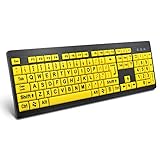
- Top Pick: BOOGIIO Large Print Computer Keyboard, Wired USB High Contrast Keyboard with Oversized Print Letters for Visually Impaired Low Vision Individuals (Yellow+Black)
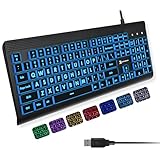
- Best Value: X9 Large Print Backlit Computer Keyboard – Easy to See Big Letters – Lighted USB Wired Keyboard with 7-Colors Backlight LED, Full Size Oversized Light Up Keyboard for Windows, PC, Laptop, Desktop
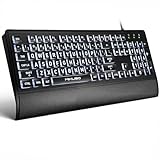
- Premium Choice: KOPJIPPOM Large Print Backlit Keyboard, USB Wired Computer Keyboard, Full Size Keyboard with White Illuminated LED Compatible for Windows Desktop, Laptop, PC, Gaming, Black
The best keyboard for an older adult is rarely the quickest or the showiest. It is the one whose letters can be read without leaning toward the screen, whose cable plugs in without pairing menus, and whose layout matches the keys a person already knows. For many families shopping in 2026, that points toward large print designs with high contrast legends, since oversized lettering solves the most common complaint: not seeing which key is which.
This guide is for relatives choosing a keyboard for a parent or grandparent, for low vision users who still type every day, and for anyone who wants a simple, plug-and-play board without gaming extras. Each pick is described strictly from its listing: legend size, backlighting, wrist support, connection, and layout. Read the Quick Picks table to compare, then use the details to decide between wired and wireless.
Quick Picks
As an Amazon Associate we earn from qualifying purchases at no extra cost to you.




| Product | Best for | Key spec from the title |
|---|---|---|
| BOOGIIO Large Print | Maximum legend contrast | Yellow and black high contrast, oversized letters |
| X9 Large Print Backlit | Dim rooms with color choice | 7-color LED backlight, full size |
| KOPJIPPOM White LED | Calm, single-color lighting | White illuminated LED, full size |
| Elderly Keyboard 104 Keys | Standard layout, no lighting | 104 keys QWERTY, high contrast keys |
| MIKUSO Large Print | Comfort add-ons included | 4X larger letters, wrist rest, dustproof cover |
| KOPJIPPOM 7-Color | Adjustable typing angle | Foldable stands, 7 backlight colors |
| Large Print Backlit with Wrist Rest | Wrist support with lighting | 7-color backlight, wrist rest |
| EDJO Large Print | Simple full-size backlit option | 7 colors, oversize letters |
| HXMJ Wireless Combo | Cable-free desks | Keyboard and mouse set, scissor switch |
How to Choose
Legend Size and Contrast
Large print keyboards enlarge the letters printed on each keycap, and some listings state a multiplier, such as four times larger than a regular key. Contrast matters as much as size: yellow on black, white on black, or another strong pairing helps most low vision users. Backlighting helps in dim rooms, but a bright, even legend on the keycap matters more during daytime use. Glossy plastic can reflect a window, so a matte finish and a position away from direct glare are worth considering.
Wired or Wireless
A wired USB board needs no batteries and no pairing, which is why most large print models are wired. A wireless set with a USB receiver removes the cable but adds batteries to remember. Check the cable length against the distance from the computer to where the keyboard will actually sit, especially for a laptop on a side table. If a tower sits under the desk, a short cord can end up stretched tight and unplug itself.
Layout and Key Action
A full-size, 104-key QWERTY layout matches what most people learned on, including a number pad for banking and tax forms. Scissor switches, found in laptop-style boards, give a shallower and quieter press than the deep travel of a standard membrane board. Avoid compact layouts for seniors who rely on the number pad. Also look at how the Enter, Backspace, and arrow keys are placed, since unfamiliar positions cause more frustration than small print ever does.
Comfort Extras and What to Skip
Wrist rests and foldable stands change the angle and support for long sessions. Multi-color backlighting is mostly a personal choice, and one steady color is easier on the eyes than a rotating effect. Ignore gaming keywords on the listing unless a specific feature, such as full-size layout, is what you actually need. Lighting that cycles through colors can be tiring for sensitive eyes, so choose a model that lets you hold one steady shade.
The 9 Best Options
BOOGIIO Large Print Computer Keyboard
BOOGIIO is built around contrast: yellow and black keys with oversized print letters, aimed at visually impaired and low vision typists. It is a wired USB board, so setup means plugging in a cable and typing.
- The yellow-on-black scheme is the strongest contrast pairing among these picks.
- Wired USB means no batteries or pairing.
- Trade-off: the title mentions no backlight, so a dark room may need a desk lamp.
Skip it if you want lighted keys or a wrist rest in the box. Evening typists who share a dim living room with a partner will probably be happier with one of the backlit listings.
X9 Large Print Backlit Keyboard
The X9 combines big letters with a lighted design that offers a 7-color LED backlight. It is full size and wired, compatible with Windows desktops and laptops.
- Oversized legends and a backlight cover both daytime and evening use.
- Seven color options let you pick the shade that reads best.
- Trade-off: the color range is more than many older users need.
Skip it if you prefer a single steady light color or no lighting at all. A relative who is easily confused by function-key shortcuts for changing light effects may find a plainer board less distracting.
KOPJIPPOM Large Print Backlit Keyboard (White LED)
This KOPJIPPOM listing emphasizes a white illuminated LED, a full-size layout, and USB wired connection. It is a calm choice for someone who finds changing colors distracting.
- White light gives a neutral, steady glow behind the legends.
- Full-size layout keeps the number pad.
- Trade-off: the title does not mention a wrist rest or adjustable stands.
Skip it if you want multiple lighting colors or built-in wrist support. In that case, look at the MIKUSO or the seven-color listings, which cover those features.
Elderly Keyboard 104-Key Large Print
This unbranded board focuses on a plain 104-key QWERTY layout, high contrast keys, and big print letters on a wired USB connection. It is for buyers who want the familiar standard layout with larger legends and nothing extra.
- A standard full-size layout means no relearning.
- High contrast keys are the central feature.
- Trade-off: no backlight or wrist rest is listed.
Skip it if you often type in low light. Without a listed backlight, the keys depend entirely on the room lamp or daylight to be read clearly.
MIKUSO Large Print Backlit Keyboard
MIKUSO packs the most comfort features in this group: letters described as four times larger, a white LED backlight, an ergonomic wrist rest, and a dustproof cover. It is wired USB and aimed at seniors and low vision users, and the combination of cover and rest suggests a board meant to stay on a desk for the long term.
- The dustproof cover protects the keys when the board is not in use.
- The wrist rest supports longer sessions.
- Trade-off: the wrist rest and cover add bulk to a small desk.
Skip it if you have limited desk depth. A small table or a laptop stand may not have room for a full-size board plus a padded rest in front of it.
KOPJIPPOM Large Print Keyboard (7 Colors, Foldable Stands)
This second KOPJIPPOM variant offers seven interchangeable backlight colors, USB plug-and-play, and foldable stands for adjusting the tilt. It is a corded full-size board for Windows and laptops.
- Foldable stands let you change typing angle.
- Interchangeable colors suit different room lighting.
- Trade-off: the title lists no wrist rest.
Skip it if you want support for the wrists or the simplest possible lighting. Someone who types for long stretches would be better served by the MIKUSO or the wrist rest model.
Large Print Backlit Keyboard with Wrist Rest
This generic listing combines a 7-color backlight, a wrist rest, USB plug-and-play, and oversize letters that are easy to see and type. It even mentions laptop, PC, and gaming use, so compatibility is broad.
- Wrist rest and backlight arrive together.
- Plug-and-play USB keeps setup short.
- Trade-off: no brand name appears in the title, so check the seller details before ordering.
Skip it if brand support matters to you. A named maker is easier to contact when a key or cable needs attention, which family helpers often value.
EDJO Large Print Backlit Wired Keyboard
EDJO is a straightforward full-size, wired board with seven backlight colors and oversize letters on light-up keys. It targets Windows laptops and PCs.
- Oversize legends light up for readability.
- Full size keeps the number pad.
- Trade-off: the title mentions no wrist rest, stands, or cover.
Skip it if you want comfort extras in the box. It is the plain option of the seven-color group, so the extras come from your own desk setup.
HXMJ Wireless Large Print Keyboard and Mouse Set
HXMJ is the only wireless pick, bundling a keyboard and mouse with a USB receiver. The title mentions a quiet scissor switch and a yellow finish aimed at seniors and low vision users.
- One receiver covers both keyboard and mouse.
- The quiet scissor switch suits shared rooms.
- Trade-off: wireless means batteries to keep on hand.
Skip it if you want a backlight or never want to change batteries. A set that sits on a shelf between uses can also surprise a user with a dead battery at the worst moment.
Which One Fits Your Situation
For a Parent With Low Vision
Begin with BOOGIIO for its high-contrast yellow and black design. If lighting matters in the evening, MIKUSO adds a white backlight and describes letters four times larger.
For Long Typing Sessions
MIKUSO or the Large Print Backlit with Wrist Rest are the two listings that mention wrist support, which helps when emailing or writing for an hour or more. The KOPJIPPOM 7-Color model adds foldable stands instead, so it fits people who care more about the tilt of the board than a padded rest.
For a Cable-Free Desk
HXMJ is the choice when a cord crossing the desk is a hazard or a nuisance. One USB receiver handles both the keyboard and the mouse, which also frees a port on a small laptop. Keep a spare set of batteries near the computer so a sudden stop never turns into a support call.
For a Plain, Familiar Layout
The Elderly Keyboard 104-Key or the KOPJIPPOM White LED keep the standard full-size layout without extra decoration. Both suit a person who simply wants familiar keys, a bigger font on them, and nothing to configure.
Common Mistakes
- Buying a compact keyboard for someone who relies on the number pad.
- Choosing multi-color lighting when a single steady color would be easier to read.
- Forgetting to check the cable length against the actual distance to the computer.
- Picking wireless without planning for spare batteries.
- Assuming every large print listing includes a wrist rest or a backlight.
Related guides
- Battery Operated Smoke And Carbon Monoxide Detectors
- Combination Smoke And Carbon Monoxide Detectors
- Aio Liquid Coolers For High Performance Gaming
Frequently Asked Questions
What is a large print keyboard?
It is a keyboard with enlarged letters on each key, usually in a high contrast color pairing. The keys themselves are generally standard in size and layout, so typing skills carry over directly from any older keyboard.
Do seniors need a backlit keyboard?
Not always, but lighted legends help in dim rooms. If the computer sits near a window, a high contrast board without lighting may be enough. Think about evenings too, because many people use a computer more after dinner than during the day.
Is wired better than wireless for older users?
Wired boards avoid batteries and pairing, so there is less to troubleshoot. Wireless suits people who dislike cables on the desk.
Will these work with a Mac?
Most titles list Windows, PC, or laptop compatibility, not Mac. Confirm compatibility on the listing page if you use Apple hardware.















