Table of Contents
- Quick Answer
- 1. ASUS ROG Azoth Wireless
- 2. SteelSeries Apex Pro Mini Gen 2 Wired
- 3. Logitech G515 Lightspeed TKL
- 4. Keychron K8 Max
- 5. Corsair K70 CORE RGB
- How to Choose
- Who Should Skip
- FAQ
- Final Verdict
- Product and ASIN Reference
Resident Evil Village mixes long, quiet stretches with sudden violence: one minute Ethan Winters is picking through a ruined house in the snow, the next a Lycan is crashing through a window. Movement, blocking, aiming, reloading, and healing all run through the keyboard, so the board under your fingers shapes how the game feels.
A good keyboard for Village needs reliable keys that register every press, switches that stay comfortable through slow exploration and frantic combat, and a layout that keeps WASD, sprint, block, reload, and item shortcuts within easy reach. The five boards below cover different styles, from adjustable Hall Effect switches to tactile mechanical options, so there is a match for speed, quiet, or wireless freedom.
As an Amazon Associate, we earn from qualifying purchases.
Quick Answer
For most players, the ASUS ROG Azoth Wireless is the best keyboard for Resident Evil Village, pairing tactile ROG NX Brown switches with a compact 75% layout, tri-mode connectivity, and an OLED display. If you want the fastest inputs, the SteelSeries Apex Pro Mini Gen 2 Wired offers adjustable Hall Effect actuation in a tiny 60% layout, while the Logitech G515 Lightspeed TKL is the best low-profile wireless option.
1. ASUS ROG Azoth Wireless Gaming Keyboard

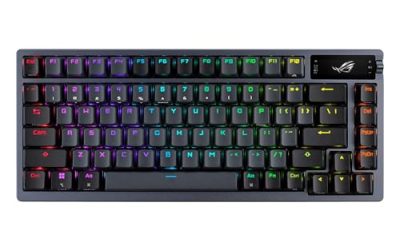
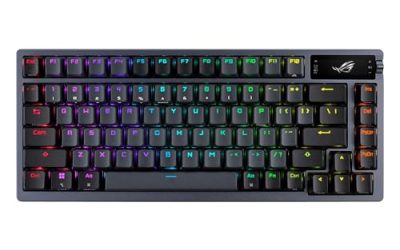
The ASUS ROG Azoth Wireless is the strongest all-round pick for Resident Evil Village. Its 75% layout keeps the function row and navigation keys while dropping the number pad, freeing up desk space for the mouse. The gasket-mount design and three layers of dampening foam give it a cushioned, muted feel for the game’s quiet sections.
The pre-lubed ROG NX Brown switches are tactile without being clicky, giving clear feedback for blocking, reloading, and weapon swaps. The switches are hot-swappable, and the board ships with a DIY lube kit and spare switches. Tri-mode connectivity covers 2.4 GHz SpeedNova wireless, Bluetooth for up to three devices, and wired USB, while the OLED display and three-way control knob show keyboard status and handle media without leaving the game.
Specs
- Layout: 75% layout with function row and navigation keys
- Switches: Pre-lubed ROG NX Brown tactile switches, hot-swappable
- Connectivity: 2.4 GHz SpeedNova wireless, Bluetooth, wired USB
- Keycaps: PBT doubleshot keycaps
- Extras: OLED display, three-way control knob, gasket mount, three-layer dampening foam, DIY switch lube kit
- Compatibility: Windows 11 and macOS 10.11 or later
2. SteelSeries Apex Pro Mini Gen 2 Wired Gaming Keyboard

The SteelSeries Apex Pro Mini Gen 2 Wired is the pick for players who want the fastest, most adjustable inputs in the smallest footprint. Its 60% layout strips the board down to the essentials, giving the mouse maximum room for the wide, fast swipes that aiming at a lunging Lycan demands. Every key uses OmniPoint 2.0 adjustable HyperMagnetic switches, so actuation can be tuned per key, and Rapid Trigger resets keys the instant they move back up, making repeated presses for blocking and dodging feel immediate.
This wired-only board connects through a detachable USB-C cable, so there is no battery to manage and no wireless latency to think about. Its compact frame uses a premium aluminum top plate and double shot PBT keycaps, and side-printed secondary legends keep the full function of a larger board available through layers.
Specs
- Layout: 60% layout, 61 keys
- Switches: OmniPoint 2.0 adjustable HyperMagnetic switches with Rapid Trigger
- Connectivity: Wired USB-C, detachable cable
- Keycaps: Double shot PBT keycaps with side-printed secondary legends
- Extras: Premium aluminum top plate, adjustable actuation, 2-in-1 action keys
- Compatibility: Windows, Xbox, PlayStation, and Mac OS X
3. Logitech G515 Lightspeed TKL Gaming Keyboard

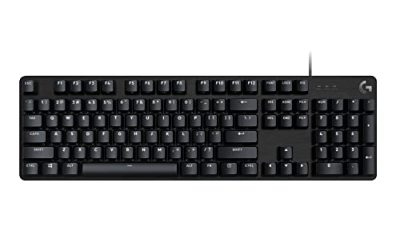
The Logitech G515 Lightspeed TKL is the best low-profile option here, and its slim, flat design is easy on the wrists during the long, slow-burn chapters of Village. At just 22 mm high, the board keeps hands in a flatter, more relaxed position than a tall mechanical board, which matters across long sessions. The tenkeyless layout drops the number pad for extra mouse room while keeping the function row and arrows.
Its GL Brown tactile switches actuate at 1.3 mm, giving quick, light presses with a gentle tactile bump that suits both careful exploration and sudden combat. Tri-mode connectivity runs through Lightspeed 2.4 GHz wireless, Bluetooth, or a wired data mode, and the board is rated for up to 36 hours of battery life. LIGHTSYNC RGB offers per-key lighting, and G HUB software handles remaps and macros for healing items and weapon shortcuts.
Specs
- Layout: Tenkeyless (TKL) layout
- Switches: GL Brown low-profile tactile switches, 1.3 mm actuation
- Connectivity: Lightspeed 2.4 GHz wireless, Bluetooth, wired data mode
- Keycaps: Double-shot PBT low-profile keycaps
- Extras: LIGHTSYNC RGB, 22 mm slim profile, up to 36 hours of battery life, G HUB support
- Compatibility: PC and Mac
4. Keychron K8 Max Gaming Keyboard

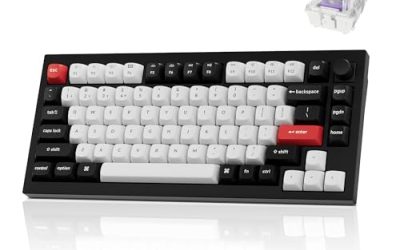
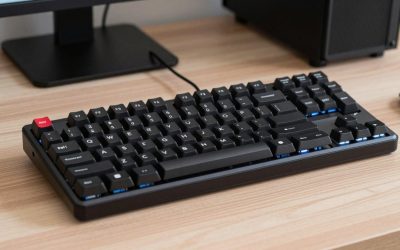
The Keychron K8 Max is a strong choice for players who split their time between Village and everything else on their PC. Its 80% tenkeyless layout keeps a full function row and navigation cluster in a compact frame, and the QMK firmware allows deep remapping of movement, guard, interact, and inventory keys. The Keychron Super Brown switches are tactile with a satisfying thocky sound profile, giving clear feedback for every reload and block without the harsh click of a clicky switch.
Connectivity covers 2.4 GHz wireless, Bluetooth 5.1, and wired USB-C, with a 1000 Hz polling rate in 2.4 GHz and wired modes. The 4000 mAh rechargeable battery supports long wireless sessions, and the board offers more than 22 types of RGB backlight settings plus a static white option.
Specs
- Layout: 80% tenkeyless layout, 87 keys
- Switches: Keychron Super Brown tactile switches, hot-swappable
- Connectivity: 2.4 GHz wireless, Bluetooth 5.1, wired USB-C
- Keycaps: Double-shot PBT keycaps
- Extras: QMK firmware, 4000 mAh rechargeable battery, 1000 Hz polling rate in 2.4 GHz and wired modes, RGB backlighting
- Compatibility: macOS, Windows, and Linux
5. Corsair K70 CORE RGB Gaming Keyboard

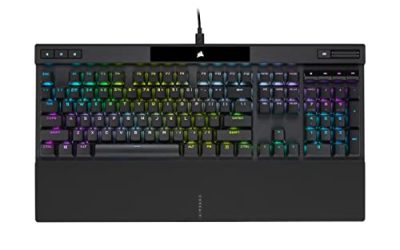
The Corsair K70 CORE RGB is the full-size pick for players who want a number pad and a palm rest in the box. Its pre-lubed MLX Red linear switches are smooth and quiet, with two layers of sound dampening foam underneath, so late-night sessions in the village stay discreet and the board never feels harsh under the fingers. The linear feel suits players who prefer a straight, uninterrupted keystroke for movement and aiming, with no tactile bump to push through.
A multi-function rotary dial and programmable media button sit above the number pad, and per-key RGB lighting is configurable through iCUE software, with up to five onboard profiles for layouts and macros. The aluminum top plate keeps the board rigid during intense fights, and the included palm rest supports the wrists across long chapters.
Specs
- Layout: Full-size layout, 104 keys, with number pad
- Switches: Pre-lubed MLX Red linear switches
- Connectivity: Wired USB
- Keycaps: ABS double-shot keycaps
- Extras: Included palm rest, multi-function rotary dial, programmable media button, two layers of sound dampening foam, up to five onboard profiles, iCUE support
- Compatibility: Windows 10 and Windows 11
How to Choose
Start with layout. Village uses WASD movement plus sprint, block, reload, interact, and inventory shortcuts, so any layout from 60% up works, but compact boards give the mouse more room for aiming. A 60% board maximizes mouse space, a 75% board keeps the function row, and a tenkeyless board adds navigation keys.
Next, pick a switch feel. Tactile switches such as ROG NX Brown, GL Brown, and Super Brown give a small bump that confirms each press, which helps with deliberate actions like blocking and reloading. Linear switches such as MLX Red feel smooth and uninterrupted, which suits players who hold keys down for movement. Adjustable Hall Effect switches such as OmniPoint 2.0 go further, letting each key actuate sooner or later to match your playstyle, with Rapid Trigger for fast repeated presses.
Then consider connection and noise. Wireless boards keep the desk clean and suit couch or living-room play, while wired boards remove battery and latency from the equation entirely. Village rewards atmosphere, so quieter switches and foam-dampened boards preserve the tension better than loud clicky switches. Finally, check software: QMK, iCUE, and G HUB all allow remapping.
Who Should Skip
Players who already own a reliable mechanical keyboard with switches they like can skip this roundup entirely, since Village does not demand a specific board and the default controls work well on any standard layout. If you play almost exclusively with a controller, a new keyboard will not change how Village feels.
Compact layouts are also worth skipping if you rely heavily on the number pad or dedicated media keys, since 60% and 75% boards move those functions to layers. Players who dislike low-profile keys should avoid the G515 Lightspeed TKL.
FAQ
Do I need a special keyboard to play Resident Evil Village on PC?
No. Village plays well on any standard keyboard, and the default controls cover movement, aiming, blocking, reloading, and inventory without special hardware. A good gaming keyboard improves comfort and response, but it does not unlock anything the game itself requires.
Is a 60% keyboard good for Resident Evil Village?
Yes, as long as you are comfortable using layers for the function keys. The 60% layout gives the mouse maximum room for aiming, which helps in fast combat. Players who use the function row often may prefer a 75% or tenkeyless board instead.
Are Hall Effect switches worth it for a survival horror game?
Hall Effect switches are useful if you want to fine-tune actuation per key, such as a hair-trigger for blocking and a deeper press for movement keys. Rapid Trigger also helps with fast repeated presses, though tactile mechanical switches are more than fast enough for Village.
Should I choose a wired or wireless keyboard for Resident Evil Village?
Either works well. Wireless boards offer a cleaner desk and freedom of placement, while wired boards remove battery management and any concern about wireless latency. For a single-player horror game, the practical difference is small, so choose based on your desk setup.
Final Verdict
The ASUS ROG Azoth Wireless is the best keyboard for Resident Evil Village, combining tactile ROG NX Brown switches, a space-saving 75% layout, tri-mode connectivity, and a useful OLED display in one well-dampened board. Players who want the fastest inputs should choose the SteelSeries Apex Pro Mini Gen 2 Wired for its adjustable OmniPoint 2.0 switches and Rapid Trigger, while the Logitech G515 Lightspeed TKL is the best low-profile wireless option. The Keychron K8 Max suits players who want QMK customization, and the Corsair K70 CORE RGB is the right pick for a quiet, full-size board with a palm rest included.
Product and ASIN Reference
| Product | ASIN |
|---|---|
| ASUS ROG Azoth Wireless Gaming Keyboard | B0BSL7WW51 |
| SteelSeries Apex Pro Mini Gen 2 Wired Gaming Keyboard | B0B16HXVVQ |
| Logitech G515 Lightspeed TKL Gaming Keyboard | B0D1DSW8TF |
| Keychron K8 Max Gaming Keyboard | B0DYHCM1GM |
| Corsair K70 CORE RGB Gaming Keyboard | B0CH3MRGK7 |