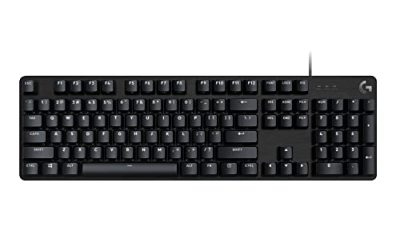
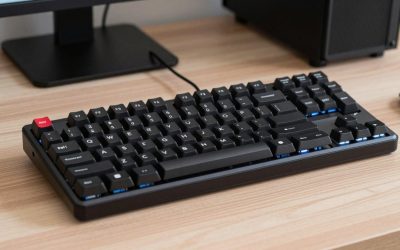
Halls of Torment is a dark fantasy horde-survival roguelite where you spend most of every run steering your hero through dense crowds of enemies with the WASD keys while abilities fire on their own timers. A run can last half an hour or more, and a single mistimed step can end it, so the keyboard under your left hand matters more than it does in most games. The right board keeps movement crisp, fingers comfortable, and never drops an input at the worst moment.
The best keyboard for Halls of Torment is a mechanical board with responsive switches, full anti-ghosting for diagonal movement plus ability keys, and a layout that fits your desk and hands. Wireless freedom is a bonus rather than a requirement, and macro keys or programmable layers help if you like binding abilities and menus to a single press. The five keyboards below cover full-size, tenkeyless, and compact layouts at budget, mid-range, and premium tiers.
As an Amazon Associate, we earn from qualifying purchases.
Quick Answer
The Corsair K70 RGB PRO is the best keyboard for Halls of Torment overall, thanks to its fast CHERRY MX Speed switches, 8,000Hz polling, and full-size layout with media controls. If you want a smaller desk footprint, the Keychron Q1 HE brings Hall Effect switches and rapid trigger to a 75% layout, while the Corsair K70 CORE RGB delivers most of the full-size experience at a budget tier.
1. Corsair K70 RGB PRO — Best Overall

The K70 RGB PRO earns the top spot by doing everything a horde-survival game asks of a board. Its CHERRY MX Speed switches actuate at just 1.2 mm, so the small directional taps you use to weave between enemy packs register almost the instant your finger moves, and 8,000Hz hyper-polling with CORSAIR AXON hyper-processing moves inputs to the game far faster than a standard keyboard. The anodized aluminum frame feels rigid under hard play, PBT double-shot PRO keycaps resist shine and wear, and the soft-touch palm rest keeps wrists comfortable through long runs. Per-key RGB lighting is programmable through iCUE, media keys and an aluminum volume roller handle audio without tabbing out, and a tournament switch locks the board to static lighting while disabling accidental macros.
Specs
- Switches: CHERRY MX RGB Speed, linear, 1.2 mm actuation
- Layout: Full-size, 104 keys
- Connectivity: Wired USB Type-C, 8,000Hz polling
- Keycaps: PBT double-shot PRO
- Backlighting: Per-key RGB
- Extras: Aluminum frame, media keys and volume roller, soft-touch palm rest, tournament switch, 50 onboard profiles
- Price tier: Premium
2. Keychron Q1 HE — Best Hall Effect Keyboard

The Keychron Q1 HE is the most interesting keyboard here because its Hall Effect switches change how movement feels. Gateron double-rail magnetic switches sense key position instead of using a fixed metal contact, which enables rapid trigger: a key resets the moment you start lifting your finger, so repeated taps and quick direction changes feel noticeably sharper. Actuation adjusts down to a 0.1 mm sensitivity, so you can set the WASD cluster to respond to the lightest touch while keeping other keys deeper. The 75% layout keeps the function row and arrows while freeing mouse space, and a full aluminum body gives the board a dense, planted feel. Hot-swappable sockets let you change switches without soldering, QMK support opens up remapping and macros, and tri-mode connectivity covers 2.4 GHz wireless, Bluetooth, and wired Type-C.
Specs
- Switches: Gateron double-rail magnetic Hall Effect, hot-swappable, rapid trigger
- Layout: 75% layout, 82 keys
- Connectivity: 2.4 GHz wireless, Bluetooth 5.2, wired USB Type-C, 1,000Hz polling
- Keycaps: OSA profile double-shot PBT
- Backlighting: South-facing RGB
- Extras: Full aluminum body, QMK support, 4,000 mAh battery
- Price tier: Premium
3. Logitech G PRO X 60 — Best Compact Keyboard

The Logitech G PRO X 60 is built for players who want maximum mouse room and a keyboard that travels well. Its 60% form factor drops the number pad, function row, and navigation cluster, freeing a wide sweep of desk space for low-sensitivity mouse movement. That suits Halls of Torment well, since the game needs only movement keys, a handful of ability bindings, and menu shortcuts, all of which fit on a 60% layout once you learn its layers. GX optical switches deliver fast, debounce-free actuation in tactile or linear options, and dual-shot PBT keycaps stand up to heavy use. LIGHTSPEED wireless gives a fast, stable connection, with Bluetooth and wired USB-C as backups, and battery life runs up to 65 hours. KEYCONTROL in G HUB assigns up to five customizable layers per key, so ability keys, potions, and shortcuts live where your fingers expect them.
Specs
- Switches: GX optical, tactile or linear
- Layout: 60% form factor
- Connectivity: LIGHTSPEED wireless, Bluetooth, wired USB-C
- Keycaps: Dual-shot PBT
- Backlighting: LIGHTSYNC RGB
- Extras: KEYCONTROL with 5 customizable layers, up to 65 hours of battery life, included carrying case
- Price tier: Mid-range
4. Corsair K70 CORE RGB — Best Budget Keyboard

The Corsair K70 CORE RGB is the value pick, and the board to choose if you want the full-size K70 experience without stepping into the premium tier. Pre-lubed MLX Red linear switches feel smooth straight out of the box, and two layers of sound-dampening foam give the board a deeper, quieter sound than most boards at its tier, which matters during long sessions when thousands of keypresses can make a loud board tiresome. The full-size layout keeps the number pad for inventory and menu shortcuts, a multi-function rotary dial and programmable media button handle volume and playback, and per-key RGB lighting is configurable through iCUE with up to five onboard profiles. ABS double-shot keycaps are durable and shine-through, the included palm rest adds comfort for extended runs, and SOCD support helps with clean directional inputs when switching rapidly between movement keys. The switches are not hot-swappable, but for the tier it is hard to beat.
Specs
- Switches: Pre-lubed CORSAIR MLX Red, linear
- Layout: Full-size
- Connectivity: Wired USB, 1,000Hz polling
- Keycaps: ABS double-shot
- Backlighting: Per-key RGB
- Extras: Two layers of sound-dampening foam, media control dial, palm rest, SOCD support, 5 onboard profiles
- Price tier: Budget
5. Logitech G915 X Lightspeed TKL — Best Low-Profile Keyboard

The Logitech G915 X Lightspeed TKL suits players who want a slim, low-profile feel without giving up wireless performance. Its GL tactile switches actuate at 1.3 mm with a short, crisp travel that fits the constant small adjustments of horde-survival movement, and the low-profile design keeps wrists at a flatter, more relaxed angle during long runs. Double-shot PBT keycaps and a brushed aluminum top plate give it a durable, premium feel despite its thin 23 mm height. Tri-mode connectivity covers 2.4 GHz LIGHTSPEED wireless, Bluetooth, and wired USB-C, and battery life runs up to 42 hours with USB-C recharging. KEYCONTROL assigns up to 15 functions per key, generous headroom for ability bindings and macros, while soft-touch media keys and a cast iron volume roller handle audio without leaving the game.
Specs
- Switches: GL tactile, low-profile, 1.3 mm actuation
- Layout: Tenkeyless
- Connectivity: LIGHTSPEED wireless, Bluetooth, wired USB-C
- Keycaps: Double-shot PBT
- Backlighting: LIGHTSYNC RGB
- Extras: Brushed aluminum top plate, KEYCONTROL with up to 15 functions per key, media keys and volume roller, up to 42 hours of battery life
- Price tier: Premium
How to Choose
Start with switches. Linear switches suit the game because smooth, consistent travel makes long WASD sessions less tiring, while tactile switches add a bump you can feel without looking down. Hall Effect switches add rapid trigger and adjustable actuation for the fastest direction changes, at a premium tier.
Next, pick a layout. Full-size boards keep the number pad for menus and shortcuts, tenkeyless boards drop it for extra mouse room, and 60% and 75% layouts go further by trimming the function row or navigation keys. Any of them works for this game, so choose by desk space and whether you use the number pad elsewhere. A fast 2.4 GHz wireless board performs on par with wired, so pick wireless for a clean desk and wired if you never want to charge. Finally, check software and extras: programmable layers matter if you bind abilities to one press, and a palm rest, sound dampening, and durable PBT keycaps pay off over runs lasting an hour or more.
Who Should Skip
Skip the premium boards if you already own a mechanical keyboard you like, since Halls of Torment does not demand high-end hardware. Pass on the Hall Effect and low-profile picks if you prefer a standard key feel; their benefits show in direction changes and wrist angle, not damage numbers. Compact 60% layouts deserve a second thought if you rely on the number pad or function keys, because relearning layers takes time. Finally, if you play with a controller instead of a keyboard, none of these boards will change your experience, and your money is better spent elsewhere.
Frequently Asked Questions
Do you need a mechanical keyboard for Halls of Torment?
No, the game runs fine on any keyboard, including a basic membrane board. A mechanical keyboard helps because its switches register faster, feel more consistent over long sessions, and handle simultaneous keypresses more reliably, which matters for diagonal movement plus an ability key at the same time.
Is a compact keyboard better for Halls of Torment?
A compact keyboard is better if desk space is tight or you use low mouse sensitivity, since a 60% or 75% layout leaves more room for wide mouse sweeps. It is not better in gameplay terms, since the game needs only a small set of keys, so it comes down to desk space, travel, and whether you miss the number pad.
Are Hall Effect keyboards worth it for Halls of Torment?
Hall Effect keyboards are worth considering if you want the most responsive movement possible, since rapid trigger resets a key the moment you start lifting it and adjustable actuation lets you tune the WASD cluster to your touch. They are not required; a good linear or tactile board plays the game just as well for most players.
Do macros help in Halls of Torment?
Macros help if you like binding a sequence, such as opening a menu or triggering an ability, to one keypress, and programmable layers make that easy. The game itself is not macro-dependent, so treat macros as a convenience feature rather than a competitive advantage.
Final Verdict
The Corsair K70 RGB PRO is the best keyboard for Halls of Torment for most players, pairing fast CHERRY MX Speed switches and 8,000Hz polling with a comfortable full-size layout, palm rest, and media controls. For the sharpest movement, look at the Keychron Q1 HE; the Logitech G PRO X 60 suits small desks and travel, the Corsair K70 CORE RGB covers the budget tier, and the Logitech G915 X Lightspeed TKL is the low-profile wireless pick. Any of the five will serve you well through long runs, so choose the layout and switch feel that fits your setup.
Product and ASIN Reference
| Product | ASIN |
|---|---|
| Corsair K70 RGB PRO | B09NCLR4M6 |
| Keychron Q1 HE | B0D4YKXSPD |
| Logitech G PRO X 60 | B0BRSSGBCN |
| Corsair K70 CORE RGB | B0CH3MRGK7 |
| Logitech G915 X Lightspeed TKL | B0DB1X3LLT |