

Affiliate disclosure: As an Amazon Associate we earn from qualifying purchases. This post contains affiliate links — if you buy through them we may earn a small commission at no extra cost to you. This never affects our recommendations.
Wireless gaming keyboards have crossed the latency threshold where the performance difference from wired connections is imperceptible. Modern 2.4 GHz RF wireless keyboards poll at 1000 Hz — the same as wired boards — delivering 1 ms response times that no human reaction time can distinguish from a direct USB connection. The practical advantages of wireless are real: clean desk aesthetics with no cable management, freedom to game from the couch or in various positions, and no cable drag affecting peripheral feel. In 2025, wireless gaming keyboards start at $40 and deliver genuine gaming-grade performance without the latency penalty that plagued earlier wireless technology. These five picks cover every budget tier and form factor in the wireless gaming keyboard market.
In a hurry? See the top-rated Wireless Gaming Keyboards deals available right now:
🛒 Check Wireless Gaming Keyboards Prices on Amazon →🛒 Best Price Today on Amazon
Prime members get fast, free shipping on everything above, plus member-only deals. New members get a 30-day free trial — cancel anytime.
Start 30-Day Prime Free Trial →See Today’s Amazon DealsTop Picks at a Glance
| Product | Best For |
|---|---|
| Redragon S101M-KS Tri-Mode Wireless | Best wireless TKL value |
| RedThunder K10 Wireless | Budget wireless TKL + mouse bundle |
| Wireless RGB Keyboard+Mouse | Premium wireless combo |
| RedThunder 60% Wireless | Wireless compact layout |
| RisoPhy Wireless Combo | Budget wireless combo under $40 |

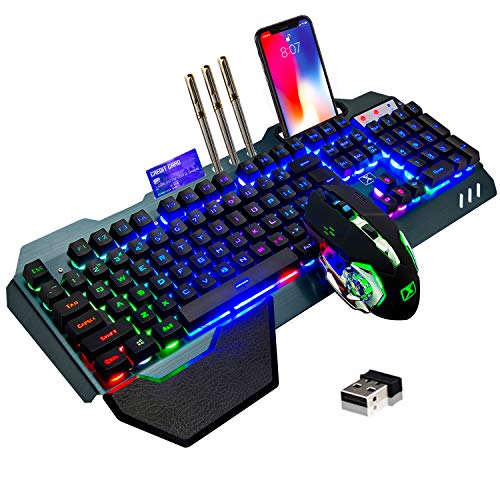


Redragon S101M-KS Tri-Mode Wireless
The Redragon S101M-KS is the wireless TKL benchmark at the sub-$60 price point. Tri-mode connectivity covers all scenarios: 2.4 GHz RF for gaming (1000 Hz polling, gaming-grade latency), Bluetooth 5.0 for multi-device pairing (laptop, tablet, phone), and wired USB for when battery runs low mid-session. The TKL layout retains all keys except the numpad. Battery life with RGB enabled is approximately 2 weeks — strong for a backlit wireless board. The aluminum top plate adds rigidity that budget plastic-only boards lack. This is the most complete wireless gaming keyboard value under $60.
- Pros: Tri-mode wireless, 1000 Hz on 2.4 GHz, aluminum top plate, TKL layout, long battery
- Cons: No hot-swap, plastic base, switch selection limited at purchase
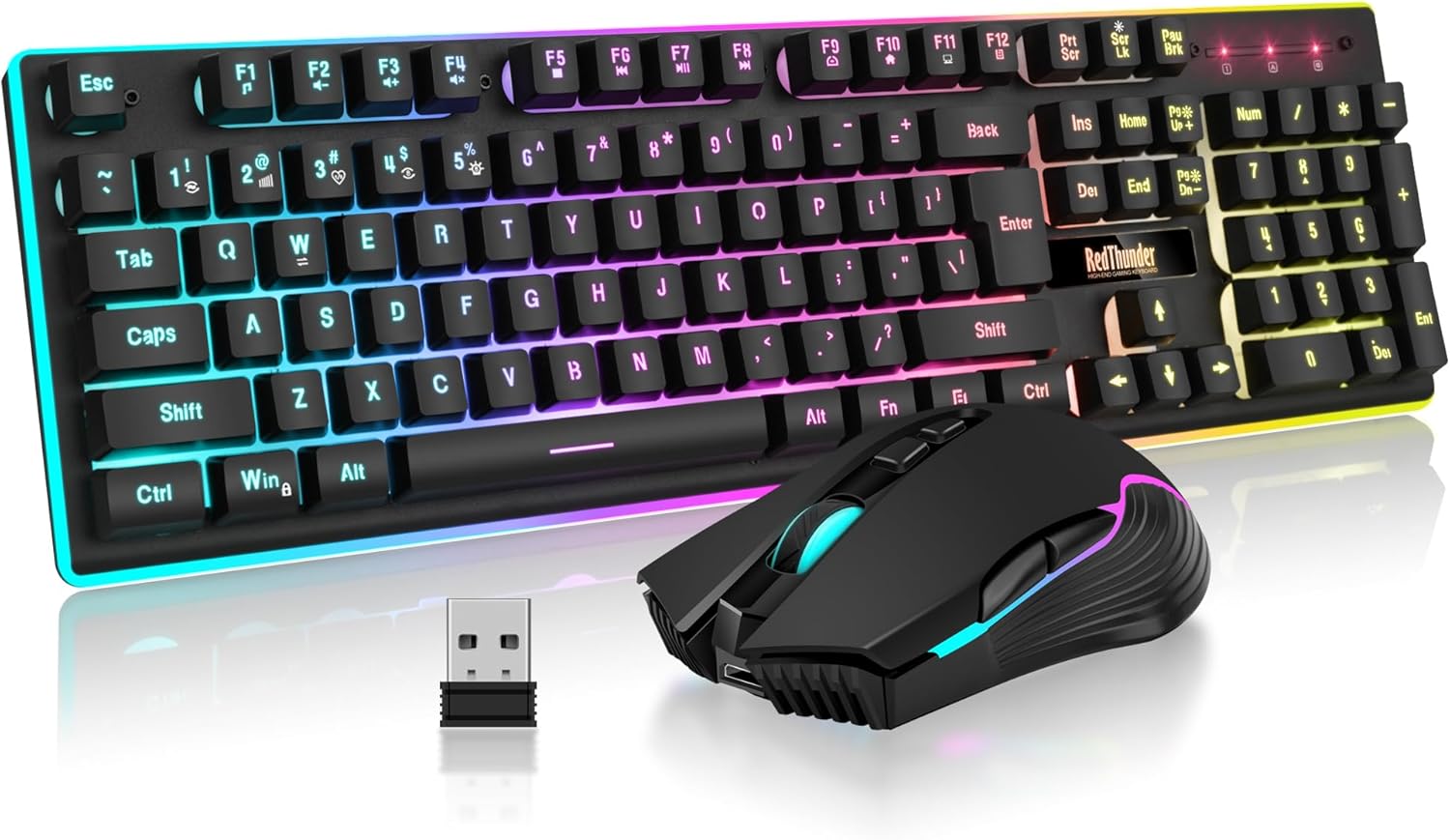
RedThunder K10 Wireless
The RedThunder K10 bundles a wireless TKL keyboard with a wireless mouse for under $50 — a complete peripheral package at a budget price. The keyboard’s 2.4 GHz connection is reliable for gaming use, and battery life is solid at approximately 2 weeks. The mouse included is competent for casual gaming. For users setting up a clean wireless gaming station without spending separately on keyboard and mouse, the K10 bundle eliminates two purchasing decisions in one $47.99 transaction.
- Pros: Complete keyboard and mouse bundle, wireless, TKL, strong battery, excellent value
- Cons: Switches not premium mechanical, mouse is entry-level, no hot-swap
Wireless RGB Keyboard+Mouse
The step-up wireless combo at $62.99 improves on the K10 bundle in both keyboard build quality and mouse performance. The TKL keyboard uses a more rigid case and improved switch feel compared to pure budget offerings. The included wireless mouse features better sensor performance for gaming use. RGB lighting is more customizable than the K10 bundle. For users who want a wireless desk upgrade and recognize that the peripheral quality in the $62.99 combo represents better long-term value than the $47.99 alternative, this bundle justifies its premium.
- Pros: Better build quality than K10 bundle, improved mouse, TKL layout, wireless, RGB
- Cons: Not premium mechanical switches, ABS keycaps, no hot-swap
RedThunder 60% Wireless
The RedThunder 60% Wireless delivers compact wireless gaming at $40.84 — a rare combination at this price point. The 60% layout maximizes desk space while the wireless connection eliminates cable clutter for a genuinely clean, minimalist setup. Battery life is solid, and the 2.4 GHz connection is reliable for gaming. This board is the right choice for FPS gamers who want wireless freedom without the bulk of a TKL layout. The compact footprint is also ideal for gaming in varied positions — on a couch, in bed, or at a standing desk.
- Pros: Wireless compact 60%, $40.84, clean desk setup, good battery, 2.4 GHz reliable
- Cons: Not mechanical switches, no hot-swap, 60% requires adjustment, basic mouse if bundled
RisoPhy Wireless Combo
The RisoPhy combo delivers a wireless keyboard and mouse package at $39.99 — the lowest price point for a complete wireless gaming peripheral set in this roundup. The keyboard uses standard wireless connectivity reliable for casual and moderate gaming. The mouse is entry-level but functional for everyday use and casual gaming. For users on the tightest budget who want to eliminate desk cables or who primarily use the keyboard for mixed gaming and productivity at low-to-mid intensity, the RisoPhy combo covers the essentials without overspending.

- Pros: Lowest-price complete wireless combo at $39.99, cable-free desk, basic functionality covered
- Cons: Not mechanical switches, basic mouse, less suitable for competitive gaming, entry-level build
Buying Guide
2.4 GHz vs Bluetooth for Gaming
2.4 GHz RF wireless is the standard for gaming keyboards because it maintains low, consistent latency at 1000 Hz polling. The dedicated USB dongle creates a direct, interference-resistant wireless channel between keyboard and PC. Bluetooth, while convenient for multi-device pairing, typically polls at 125 Hz or 250 Hz — lower than the 1000 Hz standard for gaming — and introduces slightly more latency variability. For serious gaming, always use 2.4 GHz mode when available. Use Bluetooth exclusively for productivity tasks, multi-device switching, or console/smart TV connectivity where Bluetooth is the only option.
Battery Life and RGB
RGB lighting is the primary battery drain on wireless gaming keyboards. Boards with RGB enabled typically offer 1–3 weeks of battery life depending on brightness settings. With RGB disabled, battery life extends to 1–6 months on most boards. If battery longevity is critical for your use case (infrequent charging opportunities, travel use), reduce RGB brightness or disable it entirely. USB-C charging is increasingly common on 2025 wireless boards versus older Micro-USB, allowing use of the same cable as most modern devices.
Wireless Interference Considerations
2.4 GHz wireless keyboards can theoretically experience interference from other 2.4 GHz devices (wireless mice, routers, microwaves). In practice, modern keyboards use frequency hopping spread spectrum (FHSS) technology that automatically shifts frequencies to avoid interference. Connection dropouts are rare in typical home gaming environments. For competitive gaming in crowded RF environments (LAN events), wired mode is the safest choice — which is why tri-mode boards like the S101M-KS offer wired fallback.
Wireless for Console Gaming
All keyboards in this roundup connect via USB dongle (pluggable into PS4, PS5, or Xbox via USB-A port) or Bluetooth (compatible with PS5, Xbox, and Nintendo Switch in Bluetooth mode). For console gaming, check Bluetooth compatibility with your specific console model before purchasing. PS5 natively supports Bluetooth keyboards. Xbox Series consoles support Bluetooth keyboards for text input. Nintendo Switch supports Bluetooth keyboards in TV mode.
FAQ
Is wireless good enough for competitive gaming?
Yes. 2.4 GHz wireless at 1000 Hz polling is indistinguishable from wired for keyboard input in competitive gaming. Unlike mice — where 2.4 GHz wireless also performs excellently but at higher cost — keyboards don’t track continuous motion, meaning the discrete keypress nature of keyboard input makes latency differences even less impactful than for wireless mice. Professional esports players use wireless keyboards at top-level competition.
How long do wireless gaming keyboards last on a charge?
With RGB lighting enabled: 1–3 weeks typically. With RGB disabled: 1–6 months. The boards in this roundup average approximately 2 weeks of regular gaming use with RGB at moderate brightness. USB-C charging means you can game wired while charging if battery runs low, maintaining uninterrupted wireless play after recharging.
Will a wireless keyboard work with my gaming PC?
Yes. All 2.4 GHz wireless keyboards in this list use standard USB-A dongles that plug into any PC USB port. Windows, macOS, and Linux all support them as standard USB HID devices — no drivers required. Bluetooth keyboards similarly pair with any Bluetooth-enabled PC without additional software.
What’s the best wireless gaming keyboard for couch gaming?
The Redragon S101M-KS with Bluetooth mode is ideal for couch gaming — pair it with your PC or console via Bluetooth, place it on your lap, and game from the couch without range limitations. The TKL layout fits lap gaming better than full-size boards. The 60% wireless options are even more lap-friendly due to their reduced size.

Verdict
Wireless gaming keyboards in 2025 deliver genuine gaming-grade performance without the cable. The Redragon S101M-KS at $54.99 is the best standalone wireless TKL for gaming with its tri-mode connectivity and aluminum plate. For complete peripheral setups, the RedThunder K10 ($47.99) and Wireless RGB Combo ($62.99) bundle keyboard and mouse in one purchase. Compact wireless players should look at the RedThunder 60% Wireless at $40.84. All picks deliver the core wireless promise: a cable-free gaming desk without latency compromise.
Related Articles
Looking for more on this topic? Browse the hand-picked guides below — each one applies the same scoring rubric used in this review.
Frequently Asked Questions
Is wireless keyboard latency noticeable in games?
Not with a 2.4GHz dongle. Modern implementations poll at 1000Hz or higher and add latency in the low single-digit milliseconds, which no player can perceive. Bluetooth is a different matter, adding enough delay to be felt in fast games, so keep Bluetooth for productivity and use the dongle for play.
How long does the battery last?
It depends almost entirely on RGB lighting. With backlighting off, many wireless boards run for months on a charge. With full brightness per-key RGB enabled, expect 20-40 hours before recharging. Most models let you set a lighting timeout, which extends runtime dramatically without giving up the effect entirely.
Can I connect to multiple devices at once?
Many wireless keyboards support three or more Bluetooth profiles plus the 2.4GHz dongle, with a physical switch or key combination to change between them. This lets you keep a gaming PC on the dongle and a laptop and tablet on Bluetooth, switching instantly without re-pairing.
Do wireless keyboards support full n-key rollover?
Over the 2.4GHz dongle, yes, virtually all gaming models do. Bluetooth implementations sometimes reduce rollover to six keys due to protocol limitations, though this rarely matters since few games require more than six simultaneous presses. If you use complex macros or play rhythm games, verify the specification for your connection mode.
Is it worth paying more than a wired equivalent?
Wireless typically costs 30-50 percent more for identical switches and build. You are paying for a clean desk, easy repositioning and portability. If your keyboard never moves and cable clutter does not bother you, that money buys better switches, a heavier case or a gasket mount on a wired board instead.
Ready to decide? Our #1 pick for 2026 is the Redragon S101M-KS Tri-Mode Wireless.
Live price & availability on Amazon.


