

- Top Pick: Womier Shine Through PBT Keycaps, Pudding White Keyboard Keycaps
- Best Value: DGG 60% Wired Gaming Keyboard, Pudding Keycaps with Translucent Layer, RGB Backlit Ultra-Compact Small Keyboard, Waterproof Mini Compact 61 Keys Keyboard for PC/Mac Gamer, Typist, Travel, White
- Premium Choice: HyperX Pudding Keycaps – Double Shot PBT Keycap Set with Translucent Layer, for Mechanical Keyboards, Full 104 Key Set, OEM Profile, English (US) Layout – Black
Affiliate disclosure: As an Amazon Associate we earn from qualifying purchases. This post contains affiliate links — if you buy through them we may earn a small commission at no extra cost to you. This never affects our recommendations.
As an Amazon Associate we earn from qualifying purchases at no extra cost to you.

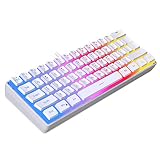


Pudding keycaps transformed the RGB gaming keyboard from a peripheral that glows to one that genuinely displays light. The concept is straightforward: instead of a standard opaque keycap that only allows light through the legend cutout on top, a pudding keycap uses a translucent lower section on all four sides of the keycap body. The result is a diffused glow that escapes from the sides and bottom of each key, illuminating the keyboard deck between keys and creating a dramatic RGB effect that standard keycaps simply cannot replicate. When you light a keyboard with pudding keycaps in a dark room, the effect is genuinely striking — a backlit keyboard becomes something closer to a light installation.
Beyond aesthetics, pudding keycaps in 2026 have become a marker of a certain type of keyboard buyer: someone who cares about customization, who wants their setup to look as deliberate as it performs, and who recognizes that the keyboard sitting on their desk for eight to twelve hours a day deserves at least some attention to visual design. The good news is that pudding keycaps are no longer exclusively an aftermarket upgrade — several keyboards now ship with pudding keycaps pre-installed, and the options span from budget-friendly to genuinely premium.
This guide covers the five best gaming keyboards with pudding keycaps you can buy in 2026 — whether pre-installed or as the natural pairing for a hot-swap board — with specific switch options, RGB quality assessments, build quality notes, and honest trade-offs at every price tier.
In a hurry? See the top-rated Gaming Keyboard with Pudding Keycaps deals available right now:
🛒 Check Gaming Keyboard With Pudding Keycaps Prices on Amazon →🛒 Best Price Today on Amazon
Prime members get fast, free shipping on everything above, plus member-only deals. New members get a 30-day free trial — cancel anytime.
Start 30-Day Prime Free Trial →See Today’s Amazon DealsQuick Comparison: Best Gaming Keyboard with Pudding Keycaps 2026
| Keyboard | Size | Switch Type | Hot-Swap | RGB |
|---|---|---|---|---|
| HyperX Alloy Origins Core + Pudding | TKL | HyperX Linear / Tactile | No | Per-key RGB |
| Glorious GMMK 2 | 65% / Full | Hotswap-ready | Yes (5-pin) | Per-key RGB |
| Redragon K556 RGB + Pudding | Full-size | Outemu Red/Blue/Brown | No | Per-key RGB |
| Tecware Phantom Elite | TKL / Full | Outemu switches | Yes (3-pin) | Per-key RGB |
| Durgod Taurus K320 TKL | TKL | Cherry MX / Gateron | No | Per-key RGB |
Top 5 Best Gaming Keyboard with Pudding Keycaps in 2026
1. HyperX Alloy Origins Core (with Pudding Keycaps) — Best Overall Pudding Keycap Gaming Keyboard
The HyperX Alloy Origins Core is one of the best-built tenkeyless keyboards at its price point, and when paired with HyperX’s own pudding keycaps (sold separately or as a bundle), it becomes arguably the best complete pudding keyboard package in the sub-$100 range. The keyboard itself is built on an aircraft-grade aluminum top frame that feels substantially more premium than keyboards twice its price — there is no flex, no resonance when typing, and the weight distribution gives the board a planted, stable feel on any desk surface.
The HyperX mechanical switches (available in Red linear, Aqua tactile, and Speed Silver fast-linear variants) are developed in partnership with Kailh and feel excellent. The Red linear is smooth with a 45g actuation force and no tactile bump — suited for gaming where rapid repeated presses benefit from linear travel. The Aqua tactile is the pick for typists who want a bump without the clickety-clack of a clicky switch. Switch wobble is minimal, which matters for RGB — if the switch moves laterally in its housing, the LED alignment shifts and the pudding effect becomes uneven.
The per-key RGB implementation on the Alloy Origins Core is excellent, with individually addressable LEDs and HyperX Ngenuity software providing full control over effects, per-key color assignments, and synchronization with HyperX mice and headsets. When the HyperX pudding keycaps are installed, the side-glow effect is exceptional — the translucent lower half distributes light evenly across the keyboard surface, creating the illuminated deck effect that makes pudding setups so visually distinctive.
Pros: Aircraft aluminum top frame; excellent HyperX switches; superb per-key RGB with pudding keycaps; solid software; TKL saves desk space
Cons: Not hot-swap (switch replacement requires soldering); pudding keycaps sold separately for most configurations; no volume knob or media keys
Verdict: For players who want a premium-feeling TKL keyboard with excellent RGB and no soldering required for the initial build, the Alloy Origins Core with HyperX pudding keycaps is the best complete package under $100.
Buy the HyperX Alloy Origins Core on Amazon
2. Glorious GMMK 2 — Best Hot-Swap Pudding Keycap Gaming Keyboard
The Glorious GMMK 2 is the choice for players who want a pudding keycap keyboard that can evolve over time. Hot-swap sockets — 5-pin compatible, accepting virtually any MX-footprint switch on the market — mean you can pull and replace switches without soldering equipment. Want to start with Gateron Yellow linears and upgrade to Boba U4T tactiles six months later? Done in ten minutes with a switch puller. This upgradability is particularly valuable for buyers who are new to mechanical keyboards and are still discovering their switch preference.
The GMMK 2 ships bare or pre-built with GMMK Fox switches (a Glorious-branded linear with 45g actuation), and it accepts the widely available Glorious Aura pudding keycaps as a natural companion — these are among the best pudding keycaps available, with a thick PBT lower half that diffuses light evenly without showing surface scratches as quickly as thinner ABS options. The 65% layout (also available as full-size) is increasingly popular for gaming: it drops the numpad and function row from a full keyboard while retaining arrow keys, which many TKL users miss.
The gasket-style mounting system on the GMMK 2 provides a degree of flex that reduces typing fatigue and generates a slightly deeper, less plasticky sound profile than tray-mounted boards at the same price. The per-key RGB is vibrant and even — the combination of the gasket mount, GMMK 2’s efficient LED positioning, and Aura pudding keycaps produces one of the best RGB diffusion results in this price class.

Pros: 5-pin hot-swap socketing; gasket-style mounting for sound and feel; excellent pudding keycap pairing; 65% layout available; strong RGB output
Cons: Fox switches in pre-built version are good but not premium; 65% lacks function row (not for everyone); software could be more polished
Verdict: The best hot-swap pudding keycap keyboard for players who want to upgrade switches over time. The GMMK 2 is a platform, not just a keyboard — it grows with your preferences.
Buy the Glorious GMMK 2 on Amazon
3. Redragon K556 RGB with Pudding Keycaps — Best Budget Pudding Keycap Gaming Keyboard
The Redragon K556 makes a strong argument that excellent pudding RGB does not require a premium budget. Available in configurations that include pudding keycaps pre-installed, the K556 delivers per-key RGB, a full-size layout, and a solid aluminum base plate at a price that consistently undercuts the competition by $20–30. The Outemu switches (available in Red, Blue, and Brown variants) are not the smoothest available — Outemu Reds in particular have more stem wobble than Gateron or Cherry equivalents — but they are more than adequate for gaming use cases and casual typing.
The pudding keycap implementation on the K556 uses ABS lower sections rather than the PBT found on premium alternatives. ABS diffuses light well and produces excellent visual results initially, but will develop shine (a smooth, worn look) on the top surface faster than PBT under daily use. For players who care primarily about RGB visual impact and are comfortable accepting some surface wear over 12–18 months of heavy use, ABS pudding is entirely acceptable. For players who want keycaps that maintain their texture for years, an upgrade to aftermarket PBT pudding keycaps is the logical next step.
The K556’s aluminum base plate adds rigidity and a premium feel that is unusual at this price. The RGB software (Redragon’s app) is functional, if not polished. The magnetic wrist rest included in some bundles is a thoughtful addition for full-size keyboard users who want ergonomic support during long sessions.
Pros: Best value pudding keyboard on this list; full-size layout; aluminum base plate; magnetic wrist rest in some bundles; pre-installed pudding keycaps
Cons: Outemu switches have more wobble than premium options; ABS pudding keycap top surface wears faster; software is basic
Verdict: For budget-conscious buyers who want the pudding RGB effect without premium spending, the K556 is the right starting point. Upgrade the keycaps to PBT pudding later if surface wear becomes noticeable.
Buy the Redragon K556 RGB on Amazon
4. Tecware Phantom Elite — Best Value Pudding Keycap Full-Size Keyboard
The Tecware Phantom Elite occupies the interesting middle ground between budget and premium — it ships with pudding keycaps pre-installed, offers hot-swap sockets (3-pin), and delivers per-key RGB at a price that sits comfortably below the HyperX and Glorious options while offering features the Redragon K556 does not. The 3-pin hot-swap sockets accept the vast majority of MX-footprint switches — only 5-pin switches require the extra two pins clipped before installation, a minor inconvenience.
Tecware’s pudding keycaps ship with the board are ABS, similar to Redragon’s approach. The illumination is even and vibrant — Tecware has positioned the LEDs carefully to maximize side-glow effect, and the result stands up well against keyboards with thicker, pricier keycaps. The switch options at purchase include Outemu Red, Brown, Blue, and Silent Red — the Silent Red is particularly notable for shared living setups where sound dampening is a priority.
The board has a plastic top case rather than aluminum, which introduces slightly more resonance when typing on hard surfaces. A desk mat (which most serious keyboard setups use anyway) addresses this. The RGB software is proprietary and basic — no macro programming depth comparable to HyperX or Glorious — but all major lighting effects are present and the per-key customization covers the essential use cases.

Pros: Pre-installed pudding keycaps; 3-pin hot-swap; multiple switch options including Silent; competitive price; vibrant RGB output
Cons: Plastic top case resonates more than aluminum; 3-pin hot-swap excludes some 5-pin switches without modification; ABS keycap wear
Verdict: The best value pick for players who want hot-swap flexibility and pudding RGB without the premium price. The plastic case is the primary compromise at this tier.
Buy the Tecware Phantom Elite on Amazon
5. Durgod Taurus K320 TKL — Best Premium Pudding Keycap Gaming Keyboard
The Durgod Taurus K320 is a premium TKL keyboard that does not ship with pudding keycaps — but it is so well-suited to aftermarket pudding keycap installation that it earns its place as the premium recommendation for players willing to invest in the complete package. Available with Cherry MX or Gateron switches (both in multiple variants), the K320 uses a double-shot PBT top case, Cherry MX-compatible mounting, and a build quality that is exceptional at its price point — the tolerances are tight, the key feel is consistent, and the board sits flat without flex even on hard surfaces.
When paired with quality PBT pudding keycaps (HyperX Pudding, Glorious Aura, or any MX-compatible PBT pudding set), the K320’s per-key RGB produces a deeply even, refined glow. Unlike budget keyboards where LED brightness variation between keys is visible, the K320’s LED positioning and power delivery are consistent enough that pudding keycaps reveal the quality of the lighting implementation rather than exposing its limitations.
Cherry MX switches on the K320 are the most widely available and well-characterized switches in the industry — Red linear at 45g, Brown tactile at 55g, Speed Silver at 45g with shorter travel, Blue clicky at 60g. If you already know which Cherry variant you prefer, the K320 delivers it in an excellent housing. The board is not hot-swap, so initial switch choice matters. USB-C detachable cable is included, a premium feature that aids cable management and replacement.
Pros: Premium build quality; Cherry MX or Gateron switch options; USB-C detachable; excellent pudding keycap pairing platform; consistent LED implementation
Cons: Not hot-swap; pudding keycaps are an additional cost; higher price point; no dedicated media keys
Verdict: The best platform for a premium pudding keycap build. Pair the K320 with Cherry MX Reds and a quality PBT pudding set for a keyboard that looks, feels, and sounds excellent for years.
Buy the Durgod Taurus K320 TKL on Amazon
How to Choose the Best Gaming Keyboard with Pudding Keycaps
ABS vs. PBT Pudding Keycaps: Which Material Matters More
Pudding keycaps are available in two primary materials: ABS (Acrylonitrile Butadiene Styrene) and PBT (Polybutylene Terephthalate). ABS is less expensive to manufacture, produces excellent light diffusion because of its smoother surface, but develops a shiny, worn appearance on the top surface within 6–18 months of daily use. The shine (called “keycap shine” or “ABS shine”) does not affect function but is noticeable aesthetically and can make an otherwise clean setup look used.
PBT is harder, more rigid, and maintains its textured surface finish much longer — quality PBT pudding keycaps show minimal shine even after years of daily use. PBT also produces a slightly different sound profile: less hollow and more subdued than ABS, which complements the dampened sound character that many gasket-mount keyboard users are chasing. If longevity and tactile surface quality matter to you, spend the extra $20–30 for PBT pudding keycaps. The RGB diffusion difference is minor; the durability difference is significant.
Hot-Swap vs. Fixed Switch Keyboards
Hot-swap keyboards use socketed switch mounts that allow switches to be pulled and replaced without a soldering iron. This is the most important feature for players who are still exploring switch preferences or who anticipate wanting to upgrade in the future. The GMMK 2 (5-pin hot-swap) and Tecware Phantom Elite (3-pin hot-swap) are the hot-swap options on this list. Fixed keyboards (HyperX Alloy Origins Core, Redragon K556, Durgod K320) require soldering to change switches — a skill barrier that stops most users from ever modifying their build.

If you know exactly what switch you want and are confident in that choice, a fixed keyboard is fine — and often provides better value at a given price point because the hot-swap socket adds manufacturing cost. If you are unsure or expect your preferences to evolve, pay the premium for hot-swap capability.
Switch Types and RGB Interaction
Switch choice affects RGB output in a subtle but real way. Linear switches (Red, Yellow, Silver variants) allow the LED to shine upward through the switch housing without interruption — the light path is clean and unobstructed through the actuation cycle. Tactile switches with pronounced bump geometry can create very slight light variation at the bump point during actuation, though this is invisible during normal typing. Clicky switches (Blue variants) have a more complex internal mechanism that can cause minor inconsistencies in LED alignment if switch tolerances are loose — a consideration for budget switches specifically.
For the cleanest pudding RGB effect, linear switches on a keyboard with tight switch tolerances (Cherry MX, Gateron Yellows, Boba LT, HyperX Red) are the optimal pairing. The light path is consistent, the pudding diffusion is even, and the overall illumination quality is highest.
Keyboard Size and RGB Surface Area
Full-size keyboards (100%) have the most total keys and therefore the most RGB surface area — the pudding effect across 104 keys in a dark room is dramatic. TKL (80%) removes the numpad, reducing the display footprint but keeping the primary typing area intact. 65% and smaller layouts concentrate the pudding effect in a smaller physical space, which can actually increase visual intensity per unit area at the cost of some key count.
For pure RGB impact, full-size maximizes the visual display. For practical daily use in gaming setups where desk space is at a premium, TKL or 65% provides a better balance.
Budget Breakdown: What $55–$90 Gets You
$50–$60 (Redragon K556): Pre-installed ABS pudding keycaps, full-size layout, aluminum base plate. The value baseline — everything works, ABS wear is the long-term trade-off.
$60–$70 (Tecware Phantom Elite): Adds hot-swap capability over the Redragon at a modest price premium. The logical next step for players who want switch flexibility.
$70–$85 (HyperX Alloy Origins Core, Glorious GMMK 2): Premium build quality or premium platform flexibility. The HyperX wins on feel and construction; the GMMK 2 wins on upgradability.
$85–$100 (Durgod K320 TKL): Best premium non-hot-swap TKL. Outstanding platform for a quality pudding keycap build with Cherry MX or Gateron switches.
Final Verdict
The best gaming keyboard with pudding keycaps in 2026 for most players is the HyperX Alloy Origins Core paired with HyperX Pudding keycaps. The aluminum construction, excellent HyperX switches, and vibrant per-key RGB create a package that outperforms its price class in every category that matters. The pudding keycap effect on the Alloy Origins Core in a dark room is genuinely impressive — the side-glow diffusion across the aluminum deck is exactly what makes this combination so popular.
For players who prioritize switch upgradability and platform longevity, the Glorious GMMK 2 is the better investment — its 5-pin hot-swap sockets accept every quality switch on the market, and the gasket mounting adds a sound and feel premium that fixed keyboards at this price cannot match. Budget-focused buyers should start with the Redragon K556, understanding that the ABS pudding keycaps will show wear over time and budgeting for a PBT upgrade set eventually. And for players willing to invest in a premium, long-term platform, the Durgod Taurus K320 TKL with Cherry MX Reds and aftermarket PBT pudding keycaps is the highest-quality build on this list — a keyboard that will still look and feel excellent five years from now.
Related Articles
Looking for more on this topic? Browse the hand-picked guides below — each one applies the same scoring rubric used in this review.
Frequently Asked Questions
What is the best gaming keyboard pudding keycaps in 2026?
The best gaming keyboard pudding keycaps depends on your budget and how you plan to use it. The options compared above are our top-rated picks based on real customer ratings, build quality, and overall value — start with the highest-rated model that fits your budget.
How much should I expect to spend on a gaming keyboard pudding keycaps?
Prices vary by brand and features. Budget options cover the essentials, while mid-range and premium models add durability, performance, and extra features. Compare the prices in the list above to find the best value for your needs.
What should I look for when buying a gaming keyboard pudding keycaps?
Focus on what matters most for your use case — build quality, compatibility, performance, warranty, and verified customer reviews. Every pick above is selected to balance these factors.
Are budget gaming keyboard pudding keycaps options worth it?
Yes. For most people a well-reviewed budget or mid-range gaming keyboard pudding keycaps delivers excellent value. You only need to spend more if you specifically require premium materials or top-tier performance.
How did we choose these gaming keyboard pudding keycaps picks?
We compare current Amazon ratings, review counts, key features, and price to surface the options with the best real-world value. The list is refreshed as ratings and availability change.









