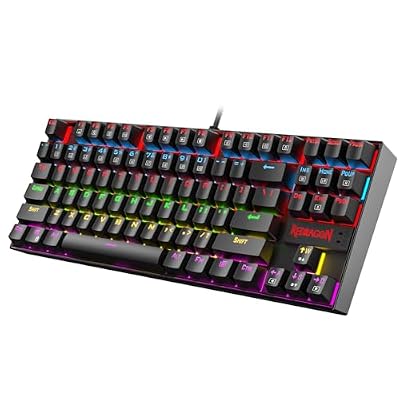
- Top Pick: Redragon K521 Upgrade Rainbow LED Gaming Keyboard, 104 Keys Wired Mechanical Feeling Keyboard with Multimedia Keys, One-Touch Backlit, Anti-Ghosting, Compatible with PC, Mac, PS4/5, Xbox
- Best Value: Corsair Skiff 100 Quiet RGB Wired Gaming Keyboard – US QWERTY – Black
- Premium Choice: Corsair K55 RGB PRO Membrane Wired Gaming Keyboard – Black
Affiliate disclosure: As an Amazon Associate we earn from qualifying purchases. This post contains affiliate links — if you buy through them we may earn a small commission at no extra cost to you. This never affects our recommendations.
- Watch: Best Gaming Keyboard Under $100 in 2026: Top 5 Picks for Every Playstyle — Video Review
- Quick Comparison: All 5 Keyboards at a Glance
- 1. Logitech G Pro X TKL — Best Overall Gaming Keyboard Under $100
- 2. SteelSeries Apex 3 TKL — Best for Competitive FPS
- 3. Corsair K70 RGB TKL — Best Build Quality
- 4. Razer BlackWidow V3 TKL — Best Switches
- 5. HyperX Alloy Origins Core — Best Value
- Mechanical vs Membrane: Which Is Better for Gaming?
- Frequently Asked Questions
- Full Comparison Table
- Related Articles
- Related Articles



If you’re serious about gaming, your keyboard is not an afterthought. The right board can shave milliseconds off your reaction time, reduce fatigue during marathon sessions, and give you a tactile edge over opponents still clacking away on a membrane slab from 2018.
As an Amazon Associate we earn from qualifying purchases at no extra cost to you.


The best gaming keyboard under $100 hits the sweet spot where performance meets value. In this guide, we cover five keyboards that genuinely earn a spot on your desk — no padding, no filler picks. Each board was evaluated on switch feel, actuation force, anti-ghosting capability, N-key rollover, and build quality. Whether you main FPS, grind ranked MMO, or play everything, there’s a pick here for you.
In a hurry? See the top-rated Gaming Keyboard Under $100 deals available right now:
🛒 Check Gaming Keyboard Under $100 Prices on Amazon →
⚡ Save on Your Next PC — Amazon Prime
Prime members get fast free shipping on the systems above, plus early access to Prime Day & Black Friday PC deals. New members get a 30-day free trial.
Watch: Best Gaming Keyboard Under $100 in 2026: Top 5 Picks for Every Playstyle — Video Review
Quick Comparison: All 5 Keyboards at a Glance
| Keyboard | Size | Switch | Actuation Force | RGB | Wireless |
|---|---|---|---|---|---|
| Logitech G Pro X TKL | TKL | GX Red / Blue / Brown (swappable) | 45g (Red) | Yes | No |
| SteelSeries Apex 3 TKL | TKL | QX2 membrane-hybrid | 45g | Yes | No |
| Corsair K70 RGB TKL | TKL | Cherry MX Red / Speed / Blue | 45g (Red) | Yes | No |
| Razer BlackWidow V3 TKL | TKL | Razer Green / Yellow | 45g (Yellow) | Yes | No |
| HyperX Alloy Origins Core | TKL | HyperX Red / Aqua / Blue | 45g (Red) | Yes | No |
1. Logitech G Pro X TKL — Best Overall Gaming Keyboard Under $100
The G Pro X TKL is what happens when Logitech engineers a keyboard specifically for esports professionals and then prices it for the rest of us. Used by pro players across CS2, Valorant, and League circuits, this is the closest thing to a no-compromise competitive board at this price.
The headline feature is hot-swappable switches. The G Pro X TKL ships with your choice of GX Red (linear), GX Blue (clicky), or GX Brown (tactile) — and you can swap them out without soldering. It’s a rare feature at this price tier and one that future-proofs your investment as your preferences evolve.
Build quality is aircraft-grade aluminum alloy top frame over a plastic base. The detachable USB-C cable with a braided sleeve is a thoughtful touch.
Pros:
- Hot-swappable GX switches — unique at this price
- Used and endorsed by top esports professionals
- Full N-key rollover, zero ghosting at all keypress combinations
- Compact TKL layout saves desk real estate for wider mouse movement
- LIGHTSYNC RGB with per-key lighting via G HUB software
Cons:
- No wireless option
- G HUB software is resource-heavy on lower-end systems
- Plastic bottom plate reduces premium feel
Specs:
| Spec | Detail |
|---|---|
| Form Factor | TKL (87-key) |
| Switches | GX Red / Blue / Brown (hot-swappable) |
| Actuation Force | 45g (Red), 50g (Blue/Brown) |
| Actuation Point | 1.9mm |
| Anti-Ghosting | Full N-key rollover |
| Cable | Detachable USB-C, braided |
| RGB | Per-key LIGHTSYNC |
| Weight | 980g |
Buy on Amazon — Logitech G Pro X TKL
2. SteelSeries Apex 3 TKL — Best for Competitive FPS
The Apex 3 TKL is the outlier on this list — it uses SteelSeries’ QX2 membrane-hybrid switches instead of mechanical ones. This is a deliberate design choice for players who want a near-silent, fast-actuating board that won’t disturb teammates on a LAN or a shared apartment wall.
The QX2 switches are whisper-quiet, actuate at 45g, and have a 4mm travel depth. The board also boasts an IP32 water-resistance rating — spill some energy drink, wipe it down, keep playing.
At ~$44, this is the most affordable pick on this list. If you’re building a budget competitive setup or want a secondary board for office/travel, it punches well above its price class.
Pros:
- IP32 water resistance — real-world durability advantage
- Whisper-quiet switches ideal for streaming or shared spaces
- Solid aluminum frame at a budget price
- 10-zone RGB with Prism Sync support
- Lightweight at 450g
Cons:
- Membrane-hybrid, not true mechanical — different feel and longevity curve
- Limited customization via SteelSeries GG software
- RGB zones (not per-key) limit lighting granularity
Specs:
| Spec | Detail |
|---|---|
| Form Factor | TKL (87-key) |
| Switches | QX2 Membrane-Hybrid |
| Actuation Force | 45g |
| Travel Distance | 4.0mm |
| Anti-Ghosting | 10-key rollover |
| Water Resistance | IP32 |
| Cable | Fixed USB-A |
| RGB | 10-zone (not per-key) |
| Weight | 450g |
Buy on Amazon — SteelSeries Apex 3 TKL
3. Corsair K70 RGB TKL — Best Build Quality
The K70 RGB TKL is Corsair’s flagship TKL entry, and it shows. The full aircraft-grade aluminum frame is the most substantial chassis on this list — this board does not flex, does not creak, and does not move unless you move it. If build quality is a deciding factor, nothing else at this price comes close.
It ships with Cherry MX switches — the industry benchmark. Choose Red for linear gaming, Speed (Silver) for the fastest actuation at 1.2mm, or Blue for audible feedback. Cherry’s manufacturing consistency is legendary; these switches will outlast the keyboard market trend cycle.
The K70 RGB TKL adds a dedicated media key row along the top — play/pause, volume, and a mute button — which sets it apart in daily-driver usability.
Pros:

- Best-in-class full aluminum build — genuinely premium feel
- Cherry MX switch options (Red, Speed, Blue) — proven, consistent
- Dedicated media controls — rare on TKL layouts
- 100% anti-ghosting with full N-key rollover
- Detachable USB-C cable
Cons:
- Heaviest keyboard on this list at 1.05kg
- iCUE software is large and occasionally unstable
- No wrist rest included at near-$100 price
Specs:
| Spec | Detail |
|---|---|
| Form Factor | TKL (87-key) |
| Switches | Cherry MX Red / Speed / Blue |
| Actuation Force | 45g (Red), 45g (Speed) |
| Actuation Point | 2.0mm (Red), 1.2mm (Speed) |
| Anti-Ghosting | Full N-key rollover |
| Frame | Aircraft-grade aluminum |
| Cable | Detachable USB-C, braided |
| RGB | Per-key dynamic |
| Weight | 1050g |
Buy on Amazon — Corsair K70 RGB TKL
4. Razer BlackWidow V3 TKL — Best Switches
The BlackWidow V3 TKL is Razer’s refinement of one of the most popular gaming keyboard lines ever made, now in a compact TKL package. The differentiator here is Razer’s proprietary Razer Yellow switches — optomechanical actuators that use light beams instead of physical contact to register keystrokes.
Optical actuation is theoretically faster and more consistent than traditional mechanical contact. The Yellow variant actuates at 1.2mm with 45g force — linear and fast, near-silent. If raw keystroke speed is your priority and you prefer linear switches, the V3 TKL is your board.
Pros:
- Razer Yellow optical switches — fastest actuation on this list
- Transparent switch housing for vivid per-key RGB
- Detachable USB-C cable
- Ergonomic incline adjustments (2 positions)
- Solid mid-range build with metal top plate
Cons:
- ABS keycaps prone to shine over time (PBT upgrade recommended)
- Razer Synapse 3 required for advanced features
- No media keys or dial
Specs:
| Spec | Detail |
|---|---|
| Form Factor | TKL (84-key) |
| Switches | Razer Yellow (Optical Linear) |
| Actuation Force | 45g |
| Actuation Point | 1.2mm |
| Total Travel | 4.0mm |
| Anti-Ghosting | Full N-key rollover |
| Cable | Detachable USB-C, braided |
| RGB | Razer Chroma per-key |
| Weight | 800g |
Buy on Amazon — Razer BlackWidow V3 TKL
5. HyperX Alloy Origins Core — Best Value
The HyperX Alloy Origins Core is the pick for buyers who want a genuinely premium mechanical keyboard without approaching the $100 ceiling. At ~$54, it delivers an aircraft-grade aluminum frame, HyperX’s own mechanical switches, and per-key RGB — features that cost significantly more on competing brands.
HyperX Red switches are smooth linears with a 45g actuation force and 1.8mm actuation point — tuned specifically for gaming. They’re manufactured in-house, giving HyperX full control over consistency and spec. The Aqua (tactile) and Blue (clicky) variants are also available at the same price.
Pros:
- Best price-to-build-quality ratio on this list
- HyperX linear switches — smooth, consistent, gaming-tuned
- Full aluminum frame at ~$54 — remarkable at this tier
- Per-key RGB with dynamic lighting zones
- 100% anti-ghosting, full N-key rollover
Cons:
- Fixed (non-detachable) USB-A cable
- NGENUITY software is limited in macro/customization depth
- No media keys or USB passthrough
Specs:
| Spec | Detail |
|---|---|
| Form Factor | TKL (87-key) |
| Switches | HyperX Red (Linear) |
| Actuation Force | 45g |
| Actuation Point | 1.8mm |
| Total Travel | 4.0mm |
| Anti-Ghosting | Full N-key rollover |
| Cable | Fixed braided USB-A |
| RGB | Per-key dynamic |
| Weight | 790g |
Buy on Amazon — HyperX Alloy Origins Core
Mechanical vs Membrane: Which Is Better for Gaming?
This debate comes up in every keyboard buyer’s guide, so here’s the direct answer: mechanical switches win for competitive gaming, with one exception.
Mechanical keyboards use individual physical switches under each key. Each switch has a defined actuation point, consistent travel, and tactile or auditory feedback if you choose it. Benefits for gaming:
- Precise actuation point: you know exactly when the keystroke registers
- Durability: 50–100 million keypress ratings vs. 5–10 million for membrane
- Repairability: individual switches can be replaced (especially on hot-swap boards)
- Faster response: lower actuation points (1.2–2.0mm) vs. membrane (~4mm bottom-out)
Membrane keyboards use a pressure-sensitive rubber dome sheet. They’re quieter, cheaper, and spill-resistant — but mushy, inconsistent, and faster to wear out.
The exception: membrane-hybrid switches like the SteelSeries QX2 narrow the gap significantly. They actuate at defined force with better consistency than standard membrane, while retaining the silence advantage. For casual players or those in noise-sensitive environments, they’re a legitimate choice.
Bottom line: If you’re playing competitively, mechanical is the right call. If you value silence above all else and aren’t grinding ranked, the Apex 3 TKL’s hybrid switches are worth considering.
Frequently Asked Questions
What switches are best for gaming?
For competitive gaming, linear switches are the most popular choice — no tactile bump means no resistance between keypress and registration. Razer Yellow, Cherry MX Red, HyperX Red, and Logitech GX Red are all strong options. Actuation points below 2.0mm give you the fastest possible response. Tactile (Brown) switches are fine for mixed gaming/typing use. Clicky (Blue) switches are generally avoided for gaming due to noise on streams and in team comms.
Do you need N-key rollover for gaming?
Yes, for competitive play. N-key rollover (NKRO) means every simultaneous keypress is registered independently, no matter how many keys you hold at once. Without it, certain key combinations cause “ghosting” — where keypresses go unregistered. In MOBA and RTS scenarios where you’re pressing 4–6 keys simultaneously, ghosting costs you actions. Every keyboard on this list supports full NKRO.
Is TKL better than full size for gaming?
For most gaming setups, yes. A TKL (tenkeyless) layout removes the numpad, shortening the board by roughly 20%. This moves your mouse closer to center, reducing arm extension and allowing lower-sensitivity players more room to move. The numpad is rarely used in gaming. The trade-off is losing the numpad for number entry — if you need it, consider a separate USB numpad accessory.
What’s the difference between linear and tactile switches?
Linear switches (Red variants) actuate smoothly from top to bottom — consistent force, no bump, no click. Fast, quiet, preferred by FPS and action game players.
Tactile switches (Brown variants) have a physical bump at the actuation point that you feel (but don’t hear). This gives confirmation that a keypress registered without bottoming out the key. Popular for mixed gaming/typing use.
Clicky switches (Blue variants) add an audible click at actuation on top of the tactile bump. High sensory feedback, but louder — not ideal for shared spaces or streaming.
The right choice depends on feel preference. Most competitive FPS players use linears; many typing-heavy MMO and strategy players prefer tactile.
Full Comparison Table
| Keyboard | Best For | Switch Type | Actuation | Build | NKRO |
|---|---|---|---|---|---|
| Logitech G Pro X TKL | Overall competitive | Mechanical (hot-swap) | 1.9mm / 45g | Aluminum + plastic | Yes |
| SteelSeries Apex 3 TKL | Silence / budget FPS | Membrane-hybrid | 4.0mm / 45g | Aluminum | 10-key |
| Corsair K70 RGB TKL | Build quality / daily driver | Cherry MX mechanical | 2.0mm / 45g | Full aluminum | Yes |
| Razer BlackWidow V3 TKL | Raw switch speed | Optical linear | 1.2mm / 45g | Aluminum top | Yes |
| HyperX Alloy Origins Core | Value pick | Mechanical linear | 1.8mm / 45g | Full aluminum | Yes |
The Logitech G Pro X TKL is the most versatile keyboard on this list — hot-swappable switches, proven pro-level build, and genuine esports pedigree at a fair price. If budget is the primary constraint, the HyperX Alloy Origins Core delivers full aluminum build quality and solid switches at $54, making it the best dollar-for-dollar option in this roundup.
Related Articles
Looking for more on this topic? Browse the hand-picked guides below — each one applies the same scoring rubric used in this review.